
Pilih bahasa

Fillable Schedule E – Tax Form for Investment Property

  1. Negara Amerika Serikat
  2. Bahasa Bahasa inggris
  3. Aktivitas Pajak
  4. Departemen IRS
Fillable Schedule E – Tax Form for Investment Property

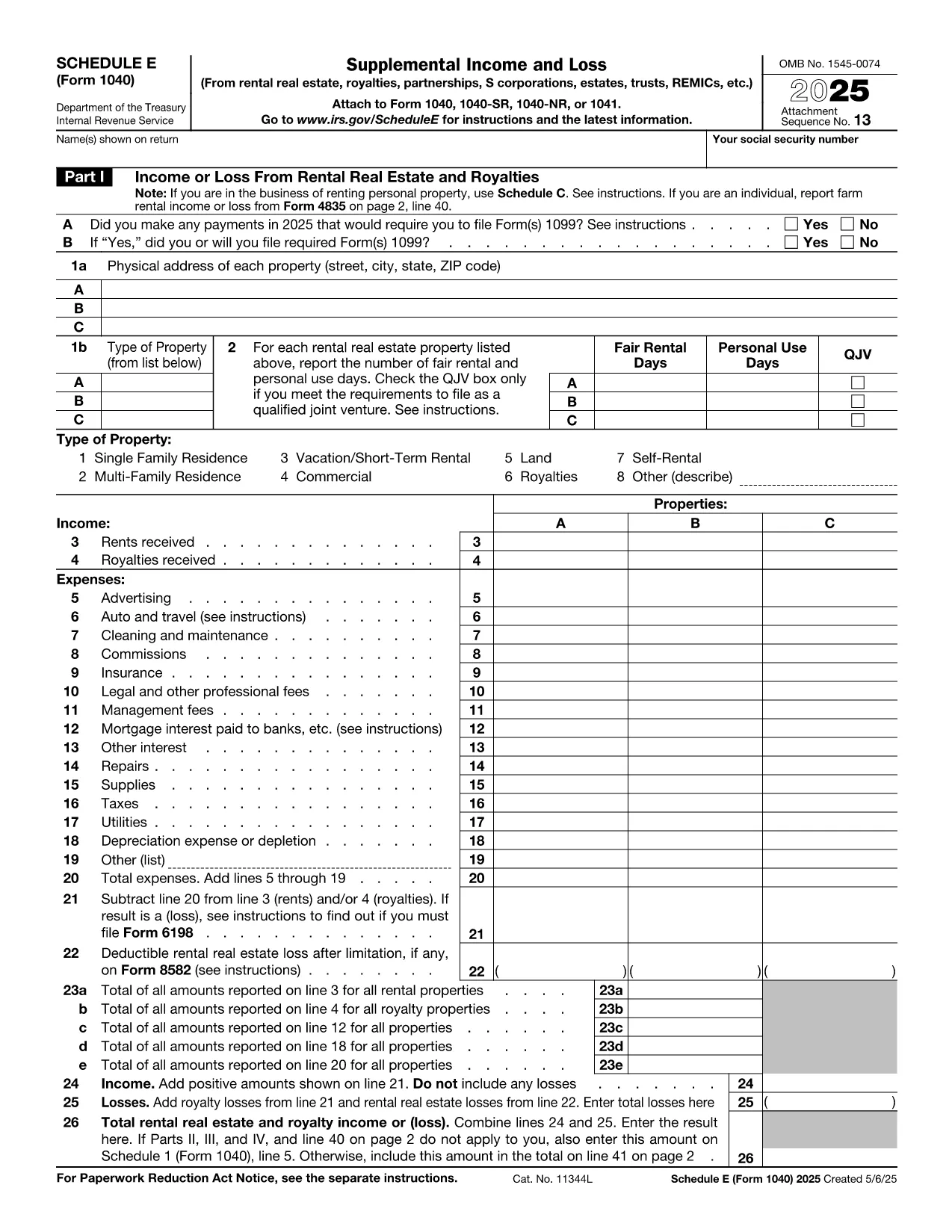
Investing in rental real estate? The IRS Schedule E (Form 1040) is the official tax form used to report income, expenses, and depreciation for investment properties. Our fillable PDF version lets you complete the form directly in your browser—no extra software required.

Whether you own a single rental house or a portfolio of apartments, Schedule E captures every deductible expense, from mortgage interest to repairs, helping you lower your taxable income.

What Is Schedule E and Who Needs It?

Schedule E is part of the individual income tax return (Form 1040). It is required for anyone who earns rental income, royalties, or income from a partnership, S‑corp, or trust that is reported on a K‑1. If you own an investment property that generates rent, you must file Schedule E.

Key Sections of the Investment Property Tax Form

  • Part I – Income: Rental income, royalty payments, and other supplemental earnings.
  • Part II – Expenses: Advertising, cleaning, commissions, insurance, legal fees, maintenance, mortgage interest, property taxes, utilities, and depreciation.
  • Part III – Net Profit or Loss: Calculates the total taxable amount that flows to Form 1040 line 8.

How to Complete the Fillable PDF with Formize

Instead of downloading the PDF and opening a separate editor, simply click the "Fill out this form" button below. The Formize PDF Filler app will load in seconds, allowing you to type, select, and calculate directly on the page.

Common Mistakes & Tips for Accurate Filing

  • Double‑check that all expense categories are correctly allocated to each property.
  • Don’t forget to attach Form 4562 for depreciation if you’re claiming it for the first time.
  • Ensure the totals in Part III match the sum of income minus expenses; mismatched totals trigger IRS notices.

Where to Submit Your Completed Form

After filling out Schedule E, attach it to your Form 1040 when you e‑file or mail a paper return to the IRS. Keep a copy for your records in case of an audit.

FAQ
  • Do I need Schedule E if I have only one rental property?

    Yes. Any rental income—whether from one property or many—must be reported on Schedule E.

  • Can I claim home office expenses on Schedule E?

    Home office expenses are reported on Schedule C, not Schedule E. Schedule E is only for rental‑related income and expenses.

  • What if my rental expenses exceed my rental income?

    You can report a net loss on Schedule E, which may offset other income subject to passive activity loss rules.

  • How do I calculate depreciation for my investment property?

    Use Form 4562 to calculate depreciation. The amount is then entered on Schedule E, Part II, line 18.

  • Is the fillable PDF accepted by the IRS?

    Yes. As long as the final PDF is signed and saved, the IRS accepts electronically completed Schedule E.

  • Can I edit the form after I’ve saved it?

    Yes. Open the saved PDF again in the Formize PDF Filler to make changes before final submission.

  • Do I need a digital signature on Schedule E?

    When e‑filing, the electronic signature on your Form 1040 covers Schedule E. For paper filing, sign the Form 1040 signature line.

  • Where can I find instructions for Schedule E?

    The IRS provides detailed instructions at https://www.irs.gov/forms-pubs/about-schedule-e-form-1040.

BAGAIMANA CARANYA

Cara mengisi tax form investment property gratis secara online dalam 5 langkah mudah:

  1. 1
    Open the Fillable Form
    Click the "Fill out this form" button on this page. The Formize PDF Filler will launch in a new window.
  2. 2
    Enter Your Information
    Type directly into each field—income, expenses, and property details. Use the tab key to move between sections.
  3. 3
    Review Calculations
    The filler automatically totals income, expenses, and net profit. Verify the numbers before proceeding.
  4. 4
    Save or Export
    When finished, click "Save PDF" to download a completed copy, or choose "Export to Email" to send it directly to your accountant.
  5. 5
    Submit with Your Tax Return
    Attach the saved Schedule E to your Form 1040 when you e‑file or mail your paper return to the IRS.
Bentuk aplikasi Pengisi PDF
TENTANG

Formulir pajak

tax form investment property adalah salah satu formulir Pajak yang merupakan dokumen yang digunakan untuk melaporkan informasi tentang pendapatan, pemotongan, dan kewajiban pajak seseorang atau bisnis kepada otoritas pajak terkait. Formulir ini diperlukan untuk mematuhi peraturan perpajakan dan memenuhi kewajiban perpajakan. Formulir pajak bervariasi tergantung negara dan persyaratan pajak spesifik yang berlaku. Berikut adalah beberapa jenis formulir pajak yang umum:

Formulir Pajak Perorangan: Formulir ini digunakan oleh wajib pajak orang pribadi untuk melaporkan penghasilan pribadinya dan pengurangan klaim, kredit, dan pengecualian. Contohnya mencakup formulir 1040 di Amerika Serikat atau formulir Pengembalian Pajak Self-Assessment di Inggris.

Formulir Pajak Bisnis: Formulir pajak bisnis digunakan oleh perusahaan, kemitraan, atau wiraswasta untuk melaporkan pendapatan bisnis, pengeluaran, dan informasi terkait pajak lainnya. Contohnya termasuk formulir Jadwal C (Laba atau Rugi dari Bisnis) di Amerika Serikat atau formulir CT600 (Pengembalian Pajak Perusahaan) di Inggris.

Formulir Pajak Penggajian: Formulir ini digunakan oleh pemberi kerja untuk melaporkan upah, gaji, dan pajak yang dipotong dari gaji karyawannya. Contohnya mencakup formulir W-2 di Amerika Serikat atau formulir P60 di Inggris.

Formulir Pajak Penjualan: Formulir pajak penjualan digunakan oleh bisnis untuk melaporkan dan menyetorkan pajak penjualan yang dipungut atas barang atau jasa kena pajak. Formulir pajak penjualan spesifik berbeda-beda di setiap yurisdiksi.

Formulir Pajak Pertambahan Nilai (PPN): Formulir PPN digunakan di negara-negara yang mengenakan pajak pertambahan nilai untuk melaporkan dan menyetorkan PPN yang dipungut atas penjualan dan mengklaim kredit PPN untuk pembelian. Contohnya termasuk formulir pengembalian PPN yang digunakan di banyak negara.

Formulir Perkiraan Pajak: Formulir perkiraan pajak digunakan untuk melaporkan dan membayar perkiraan pajak atas penghasilan yang tidak dikenakan pemotongan, seperti pendapatan wirausaha atau pendapatan investasi.

Ini hanyalah beberapa contoh dari berbagai formulir pajak yang mungkin ada. Formulir spesifik yang diperlukan bergantung pada undang-undang dan peraturan perpajakan di negara atau yurisdiksi Anda. Penting untuk berkonsultasi dengan pedoman otoritas pajak atau mencari nasihat profesional untuk menentukan formulir mana yang dapat diterapkan pada situasi Anda.

FITUR

Pengisi PDF

Cara termudah untuk mengisi formulir PDF secara online

  • Isi tax form investment property dengan cepat
    Mencari cara mengisi tax form investment property dengan cepat secara online? Dengan pengisi formulir PDF online gratis kami, Anda akan tahu cara mengedit dan mengisi dokumen pdf ini dalam waktu kurang dari satu menit.
  • Editor PDF online yang mudah digunakan
    Muak dengan mencetak file PDF sehingga Anda dapat mengeditnya, sebelum memindai ulang dan mengirimnya kembali? Edit dokumen PDF secara online gratis. Gunakan editor pdf online kami untuk menghemat waktu dan kertas.
  • Alat hebat, semua platform
    Ingin tahu cara mengisi tax form investment property di Mac, atau mungkin cara menggunakan pengisi PDF gratis? Alat PDF online kami berfungsi di semua platform.
  • Penyimpanan file yang aman
    File "tax form investment property" yang telah selesai disimpan dalam database aman yang dikelola oleh hosting Amazon Cloud. Anda dapat menghapus file Anda dari sistem kami kapan saja. Bagaimanapun, file-file ini secara otomatis dihapus setelah 24 jam.
  • Ngobrol dengan tax form investment property
    Ngobrol dengan "tax form investment property" di Chatize yang merupakan asisten pembaca PDF gratis. Ajukan pertanyaan dan dapatkan jawaban dari "tax form investment property". Cukup klik tombol Chat Dengan Dokumen di atas.

Hapus sesi pengisian

Hapus sesi pengisian yang dipilih? Dalam hal ini, kemajuan Anda dalam menyelesaikan formulir akan hilang.

Hapus sesi pengeditan

Hapus sesi pengeditan yang dipilih? Dalam hal ini, kemajuan Anda dalam membuat dan mengedit formulir akan hilang.