
Pilih bahasa

TurboTax Refund Request Form – Fillable PDF

  1. Negara Amerika Serikat
  2. Bahasa Bahasa inggris
  3. Aktivitas Pajak
  4. Departemen IRS
TurboTax Refund Request Form – Fillable PDF

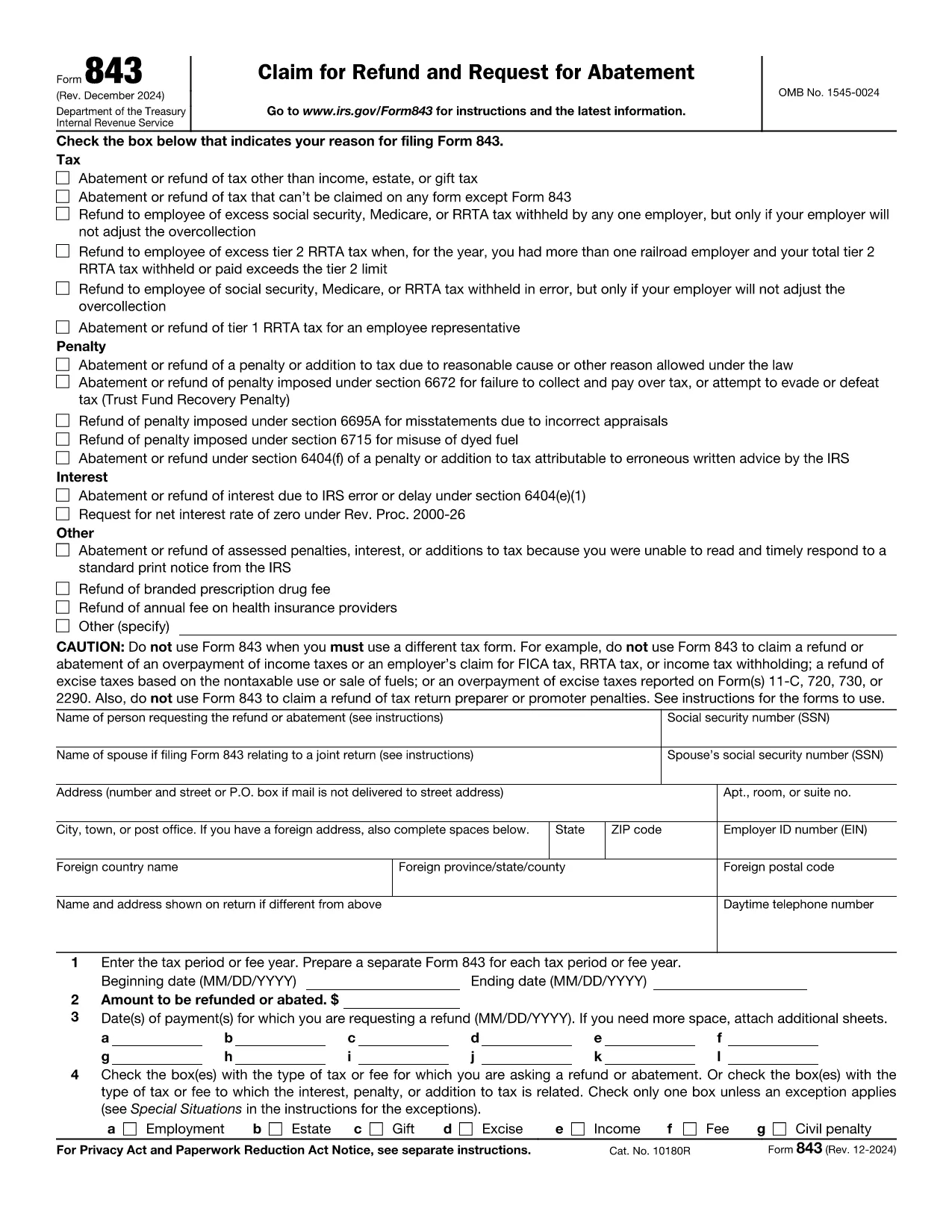
If you filed your taxes with TurboTax and believe you are owed a refund, you’ll need the official IRS Form 843 – Claim for Refund and Request for Abatement. This form is the correct document to request a refund for over‑paid taxes, penalties, or interest.

What Is the TurboTax Refund Request Form?

TurboTax does not issue its own refund form; instead, it guides you to the IRS Form 843. The form is a fillable PDF that can be completed online, printed, and mailed to the IRS. Using Formize’s PDF Filler, you can complete the form directly in your browser without installing any software.

How to Fill Out the Form in Seconds

Follow the simple steps below and let the Formize PDF Filler do the heavy lifting:

  • Click the "Fill out this form" button on this page.
  • Wait a few seconds while the Formize PDF Filler app loads the fillable version of Form 843.
  • Enter your personal information, tax year, and the amount you are claiming.
  • Review the auto‑saved data, then click Submit to download a completed PDF.
  • Print and mail the PDF to the address listed in the instructions, or keep a digital copy for your records.

Common Mistakes to Avoid

  • Wrong tax year: Double‑check the year you are claiming a refund for.
  • Missing signatures: The form must be signed and dated; Formize lets you add a digital signature.
  • Incorrect amounts: Verify the amount you owe the IRS before entering it.
  • Incomplete explanations: Provide a clear reason for the refund request in Part I, line 1.

Where to Submit Your Completed Form

After you download the completed Form 843, mail it to the IRS processing center for your state (see the IRS mailing addresses). Keep a copy for your records and track the mailing if possible.

Need More Help?

TurboTax’s support articles explain when to use Form 843 and how to calculate the amount you’re claiming. For IRS‑specific questions, visit the IRS Help Center. Remember, the Formize PDF Filler works on any device—desktop, tablet, or smartphone.

FAQ
  • Do I need a TurboTax account to use this form?

    No. The refund request uses IRS Form 843, which is independent of TurboTax. You only need your tax return details.

  • Can I submit Form 843 electronically?

    The IRS currently accepts Form 843 only by mail. After filling it online, print and send the completed PDF.

  • How long does the IRS take to process a refund claim?

    Processing times vary, but most refunds are issued within 6‑8 weeks after the IRS receives a complete Form 843.

  • What if I make a mistake on the form?

    You can edit the PDF in Formize before downloading. If you discover an error after mailing, submit a corrected Form 843 with "Amended" noted at the top.

  • Is there a fee to use Formize PDF Filler?

    Formize offers a free basic filler for simple forms like Form 843. No credit card is required.

  • Do I need to include my original tax return?

    Attach a copy of the relevant portion of your tax return (e.g., Schedule A) that shows the amount you’re claiming.

  • Can I request a refund for penalties?

    Yes. Form 843 allows you to claim refunds for penalties and interest, provided you meet the eligibility criteria.

  • What if I filed state taxes with TurboTax?

    State refunds are handled by the respective state tax agency. This form is for federal refunds only.

  • How do I know which IRS address to mail to?

    The IRS mailing address depends on your state. Refer to the "Where to File" page on the IRS website for the correct address.

  • Is a digital signature accepted by the IRS?

    The IRS requires a handwritten signature on paper forms. Use Formize to add a digital signature for review, then print and sign manually before mailing.

BAGAIMANA CARANYA

Cara mengisi TurboTax refund request form gratis secara online dalam 5 langkah mudah:

  1. 1
    Click the Fill Button
    Press the "Fill out this form" button on this page to launch the Formize PDF Filler.
  2. 2
    Wait for the App to Load
    The fillable PDF loads in a few seconds—no download or extra software required.
  3. 3
    Enter Your Information
    Complete the required fields: personal details, tax year, refund amount, and reason for the claim.
  4. 4
    Add Your Signature
    Use the digital signature tool in Formize to sign the form securely.
  5. 5
    Download and Submit
    Click "Submit" to download the finished PDF, then print and mail it to the IRS address for your state.
Bentuk aplikasi Pengisi PDF
TENTANG

Formulir pajak

TurboTax refund request form adalah salah satu formulir Pajak yang merupakan dokumen yang digunakan untuk melaporkan informasi terkait pajak kepada otoritas pajak terkait. Ada berbagai jenis formulir pajak, termasuk formulir pajak federal, negara bagian, dan lokal, yang dapat bervariasi tergantung pada keadaan dan lokasi pembayar pajak.

FITUR

Pengisi PDF

Cara termudah untuk mengisi formulir PDF secara online

  • Isi TurboTax refund request form dengan cepat
    Mencari cara mengisi TurboTax refund request form dengan cepat secara online? Dengan pengisi formulir PDF online gratis kami, Anda akan tahu cara mengedit dan mengisi dokumen pdf ini dalam waktu kurang dari satu menit.
  • Editor PDF online yang mudah digunakan
    Muak dengan mencetak file PDF sehingga Anda dapat mengeditnya, sebelum memindai ulang dan mengirimnya kembali? Edit dokumen PDF secara online gratis. Gunakan editor pdf online kami untuk menghemat waktu dan kertas.
  • Alat hebat, semua platform
    Ingin tahu cara mengisi TurboTax refund request form di Mac, atau mungkin cara menggunakan pengisi PDF gratis? Alat PDF online kami berfungsi di semua platform.
  • Penyimpanan file yang aman
    File "TurboTax refund request form" yang telah selesai disimpan dalam database aman yang dikelola oleh hosting Amazon Cloud. Anda dapat menghapus file Anda dari sistem kami kapan saja. Bagaimanapun, file-file ini secara otomatis dihapus setelah 24 jam.
  • Ngobrol dengan TurboTax refund request form
    Ngobrol dengan "TurboTax refund request form" di Chatize yang merupakan asisten pembaca PDF gratis. Ajukan pertanyaan dan dapatkan jawaban dari "TurboTax refund request form". Cukup klik tombol Chat Dengan Dokumen di atas.

Hapus sesi pengisian

Hapus sesi pengisian yang dipilih? Dalam hal ini, kemajuan Anda dalam menyelesaikan formulir akan hilang.

Hapus sesi pengeditan

Hapus sesi pengeditan yang dipilih? Dalam hal ini, kemajuan Anda dalam membuat dan mengedit formulir akan hilang.