
Seleziona la lingua

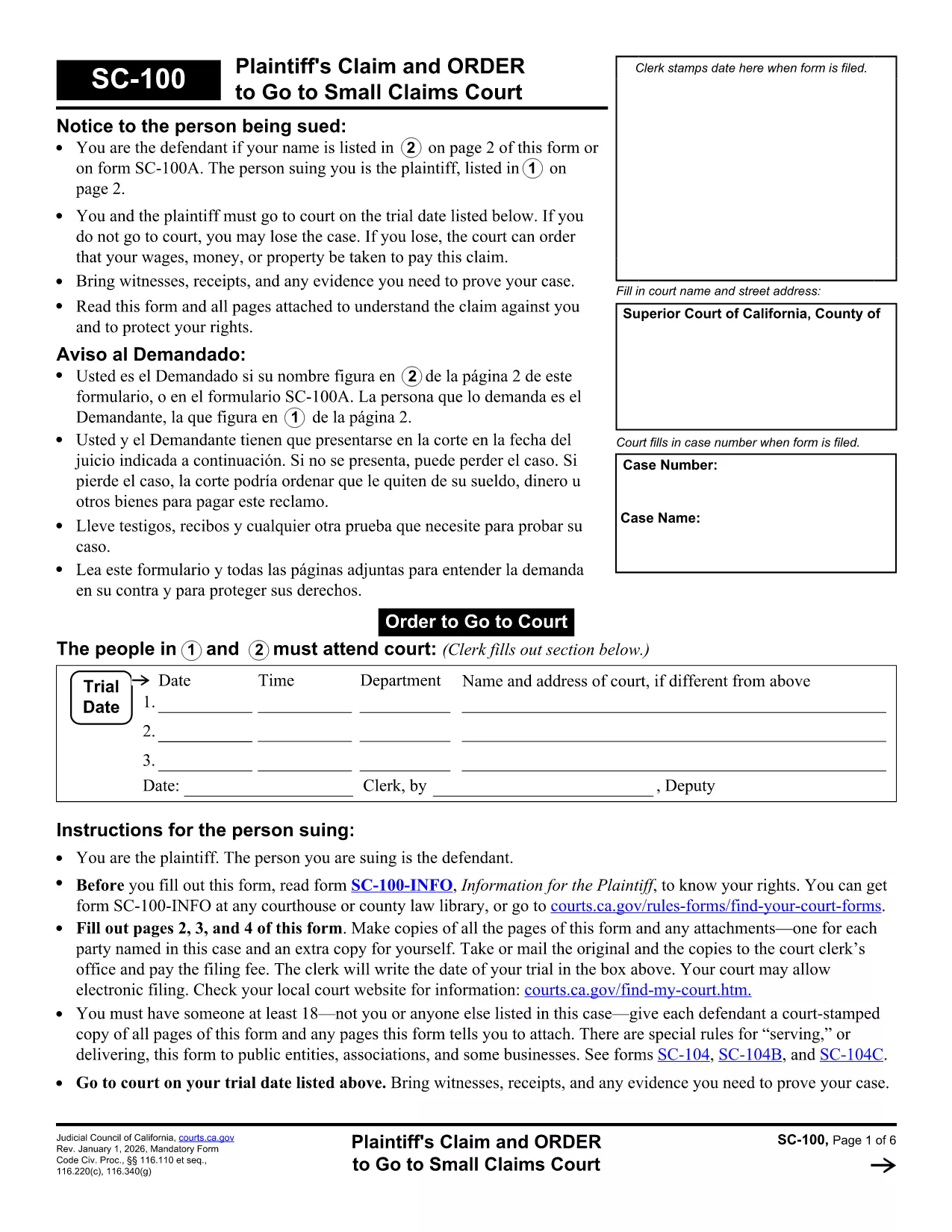
California Small Claims Court Form SC‑100 – Fillable PDF

  1. Lingua Inglese
  2. Paese Stati Uniti d'America
  3. Attività Legal Forms
  4. Dipartimento California Courts
  5. Stato California
Compila questo modulo
California Small Claims Court Form SC‑100 – Fillable PDF

Looking for a reliable, fillable California legal form to start a small‑claims case? The SC‑100 Plaintiff’s Claim and Order to Go to Small Claims Court is the official document you need. With Formize’s online PDF filler you can complete the form in minutes—no extra software required.

What Is the SC‑100 Form?

The SC‑100 is the standard claim form used by the California Courts for small‑claims cases (up to $10,000). It captures the plaintiff’s details, the defendant’s information, a description of the dispute, and the amount you’re seeking.

How to Fill Out the SC‑100 Online

Follow the simple steps below to complete the form directly in your browser. All fields are interactive, and the form saves your progress automatically.

Common Mistakes to Avoid

  • Leaving any required field blank – the filler will highlight missing information.
  • Incorrectly spelling the defendant’s name or address – double‑check official records.
  • Exceeding the $10,000 limit – claims above this amount must be filed in a different court.

Where to Submit the Completed Form

Once you’ve saved and printed the completed SC‑100, deliver it to the clerk’s office of the appropriate California Superior Court. Some counties also accept electronic filings through their e‑filing portals.

Legal Help & Resources

If you need assistance, visit the California Courts Self‑Help Center or consult a qualified attorney. The form itself is free, and Formize provides the online filler at no cost.

FAQ
  • What is the purpose of the SC‑100 form?

    The SC‑100 is the official claim form for filing a small‑claims case in California Superior Courts. It starts the legal process and tells the court what you’re suing for.

  • Who can use the SC‑100 form?

    Any individual, business, or organization seeking monetary relief of $10,000 or less in a California small‑claims court can use the SC‑100.

  • Is there a filing fee for the SC‑100?

    Yes. Filing fees vary by county, typically ranging from $30 to $75. Check with your local clerk’s office for the exact amount.

  • Can I submit the SC‑100 electronically?

    Many California counties now accept electronic filings through their e‑filing portals. After completing the form, export it as a PDF and upload it according to your county’s guidelines.

  • Do I need a lawyer to fill out the SC‑100?

    No. The SC‑100 is designed for self‑represented litigants. However, if your case is complex, consulting an attorney can help ensure accuracy.

  • What happens if I make a mistake on the form?

    Mistakes can delay your case. Common errors include misspelling names, incorrect amounts, or leaving required fields blank. Review the form carefully before submitting.

  • How long does it take to complete the SC‑100 online?

    Most users finish in 5–10 minutes using the Formize fillable PDF, especially with the real‑time validation that prevents missing information.

  • Is the SC‑100 form free to download?

    Yes. The official PDF is provided by the California Courts at no cost, and Formize’s online filler is also free to use.

COME

Come compilare California legal forms gratuitamente, online in 5 semplici passaggi:

  1. 1
    Click the Fill Out Button
    On this page, click the bright “Fill out this form” button. The Formize PDF Filler app will open in a new tab.
  2. 2
    Wait for the Filler to Load
    The fillable PDF loads automatically. All fields become editable; you’ll see a progress bar while the document prepares.
  3. 3
    Enter Your Information
    Type directly into each field—name, address, claim amount, and case details. The filler validates required entries in real time.
  4. 4
    Save and Download
    When you’re finished, click “Save PDF”. The completed SC‑100 downloads to your computer ready for printing or electronic filing.
  5. 5
    Print or E‑File
    Print the saved PDF and bring it to the clerk’s office, or upload it through your county’s e‑filing portal if available.
App Formize PDF Filler
DI

modello California legal forms

Con il tradizionale set di funzionalità per la visualizzazione e la compilazione di un documento PDF, combinato con i vantaggi di un'applicazione Web e un layout reattivo, puoi completare California legal forms in pochi minuti.

CARATTERISTICHE

Compilatore PDF

Il modo più semplice per compilare moduli PDF online

  • Compila rapidamente California legal forms
    Cerchi un modo per compilare rapidamente California legal forms online? Con il nostro compilatore di moduli PDF gratuito online, saprai come modificare e compilare questo documento PDF in meno di un minuto.
  • Editor PDF online facile da usare
    Stufo di stampare file PDF in modo da poterli modificare, prima di riscansionarli e rispedirli? Modifica documenti PDF gratuitamente online. Utilizza il nostro editor PDF online per risparmiare tempo e carta.
  • Grandi strumenti, tutte le piattaforme
    Ti stai chiedendo come inserire California legal forms su un Mac o forse come utilizzare un riempitivo PDF gratuito? I nostri strumenti PDF online funzionano su tutte le piattaforme.
  • Archiviazione sicura dei file
    I file "California legal forms" completati vengono archiviati in un database protetto gestito dall'hosting Amazon Cloud. Puoi eliminare i tuoi file dal nostro sistema in qualsiasi momento. In ogni caso, questi file vengono automaticamente cancellati dopo 24 ore.
  • Chatta con {parola chiave}
    Chatta con "California legal forms" su Chatize che è un assistente di lettura PDF gratuito. Fai domande e ottieni risposte da "California legal forms". Basta fare clic sul pulsante Chatta con il documento in alto.

Elimina sessione di riempimento

Eliminare la sessione di riempimento selezionata? In questo caso, i progressi nella compilazione del modulo andranno persi.

Elimina la sessione di modifica

Eliminare la sessione di editing selezionata? In questo caso, i tuoi progressi nella creazione e modifica del modulo andranno persi.