Seleziona la lingua

Fillable IRS Form 8949 – Capital Gains Tax PDF

  1. Paese Stati Uniti d'America
  2. Lingua Inglese
  3. Attività Le tasse
  4. Dipartimento IRS
Compila questo modulo
Fillable IRS Form 8949 – Capital Gains Tax PDF

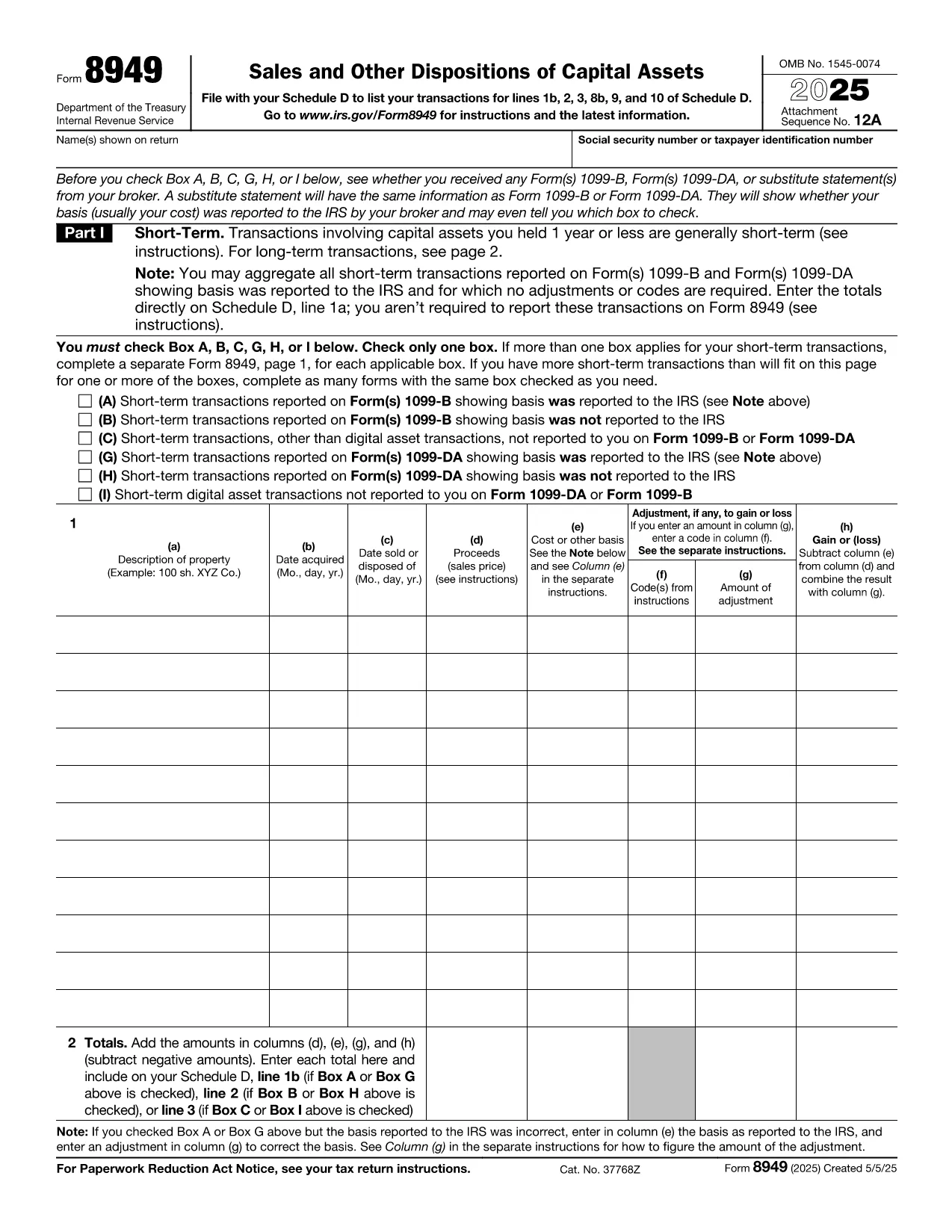
When you sell stocks, bonds, real estate, or other capital assets, the IRS requires you to report those transactions on Form 8949. This fillable PDF lets you capture every sale, purchase, and adjustment in a format the IRS accepts.

What Is Form 8949?

Form 8949, Sales and Other Dispositions of Capital Assets, is the primary document for reporting capital gains and losses. The information you provide on this form feeds into Schedule D, which determines your overall capital gain or loss for the tax year.

How to Fill Out the Form Using Formize

Instead of downloading the PDF and opening a separate editor, simply click the "Fill out this form" button on this page. The Formize PDF Filler app will load in your browser, and you can start entering data instantly.

  • Enter the description of each asset, dates of acquisition and sale, and the amounts.
  • Select the correct type of gain or loss (short‑term, long‑term, or mixed).
  • Use the built‑in calculator to apply any adjustments, such as wash‑sale rules.
  • When finished, download the completed PDF or export it directly to your tax software.

Common Mistakes to Avoid

  • Incorrect dates: Double‑check the acquisition and sale dates; a single‑day error can change the short‑term/long‑term classification.
  • Missing basis adjustments: Forgetting commissions, fees, or previous wash‑sale adjustments can inflate your taxable gain.
  • Wrong totals: Use the Formize calculator to ensure totals on each page match the summary on Schedule D.
  • Incomplete identification: Provide the correct CUSIP or identification number for each security.

Where to Submit Your Completed Form

After saving the filled PDF, attach it to your Form 1040 filing. If you e‑file, the PDF can be uploaded directly through most tax‑preparation software. For paper filing, include the printed form with your tax return.

FAQs About Capital Gains Reporting

Below are quick answers to the most common questions taxpayers have about reporting capital gains.

FAQ
  • Do I need to file Form 8949 if I have no capital gains?

    If you have no capital gains or losses to report, you can skip Form 8949 and enter "0" on Schedule D. However, the IRS may still request a completed form if you filed a return that references capital transactions.

  • Can I use Form 8949 for cryptocurrency transactions?

    Yes. Cryptocurrency sales are treated as capital assets. List each transaction on Form 8949, providing the date acquired, date sold, and fair market value at sale.

  • What is the difference between short‑term and long‑term gains?

    Short‑term gains arise from assets held one year or less and are taxed at ordinary income rates. Long‑term gains are from assets held more than one year and benefit from lower capital‑gain tax rates.

  • How do I report a wash‑sale loss?

    If a wash sale occurs, you must adjust the cost basis of the replacement security. Form 8949 includes a column for wash‑sale adjustments; the Formize filler automatically calculates the corrected basis.

  • Do I need to attach Form 8949 to my e‑file?

    Most modern tax‑software programs automatically import the data from Form 8949 into Schedule D. If you e‑file manually, you can upload the PDF when prompted.

  • Where can I find instructions for Form 8949?

    The IRS provides detailed instructions on the same page as the PDF (https://www.irs.gov/forms-pubs/about-form-8949). The Formize page also includes a quick‑start guide.

COME

Come compilare capital gains tax form gratuitamente, online in 4 semplici passaggi:

  1. 1
    Open the Fillable Form
    Click the "Fill out this form" button on this page. The Formize PDF Filler app loads directly in your browser.
  2. 2
    Enter Your Transaction Details
    Fill in the asset description, acquisition and sale dates, purchase price, sale price, and any adjustments.
  3. 3
    Review Totals and Calculations
    Use the built‑in calculator to verify gains, losses, and the final totals that will flow to Schedule D.
  4. 4
    Save or Export the Completed PDF
    When all fields are complete, download the filled PDF or export it to your tax‑preparation software.
App Formize PDF Filler
DI

Moduli fiscali

capital gains tax form è uno dei moduli fiscali che sono documenti utilizzati per segnalare informazioni relative alle imposte all'autorità fiscale competente. Esistono vari tipi di moduli fiscali, inclusi moduli fiscali federali, statali e locali, che possono variare a seconda delle circostanze e dell'ubicazione del contribuente.

CARATTERISTICHE

Compilatore PDF

Il modo più semplice per compilare moduli PDF online

  • Compila rapidamente capital gains tax form
    Cerchi un modo per compilare rapidamente capital gains tax form online? Con il nostro compilatore di moduli PDF gratuito online, saprai come modificare e compilare questo documento PDF in meno di un minuto.
  • Editor PDF online facile da usare
    Stufo di stampare file PDF in modo da poterli modificare, prima di riscansionarli e rispedirli? Modifica documenti PDF gratuitamente online. Utilizza il nostro editor PDF online per risparmiare tempo e carta.
  • Grandi strumenti, tutte le piattaforme
    Ti stai chiedendo come inserire capital gains tax form su un Mac o forse come utilizzare un riempitivo PDF gratuito? I nostri strumenti PDF online funzionano su tutte le piattaforme.
  • Archiviazione sicura dei file
    I file "capital gains tax form" completati vengono archiviati in un database protetto gestito dall'hosting Amazon Cloud. Puoi eliminare i tuoi file dal nostro sistema in qualsiasi momento. In ogni caso, questi file vengono automaticamente cancellati dopo 24 ore.
  • Chatta con {parola chiave}
    Chatta con "capital gains tax form" su Chatize che è un assistente di lettura PDF gratuito. Fai domande e ottieni risposte da "capital gains tax form". Basta fare clic sul pulsante Chatta con il documento in alto.

Elimina sessione di riempimento

Eliminare la sessione di riempimento selezionata? In questo caso, i progressi nella compilazione del modulo andranno persi.

Elimina la sessione di modifica

Eliminare la sessione di editing selezionata? In questo caso, i tuoi progressi nella creazione e modifica del modulo andranno persi.