
Seleziona la lingua

IRS Schedule B (Form 1040SB) – Fillable PDF

  1. Paese Stati Uniti d'America
  2. Lingua Inglese
  3. Attività Le tasse
  4. Dipartimento IRS
Compila questo modulo
IRS Schedule B (Form 1040SB) – Fillable PDF

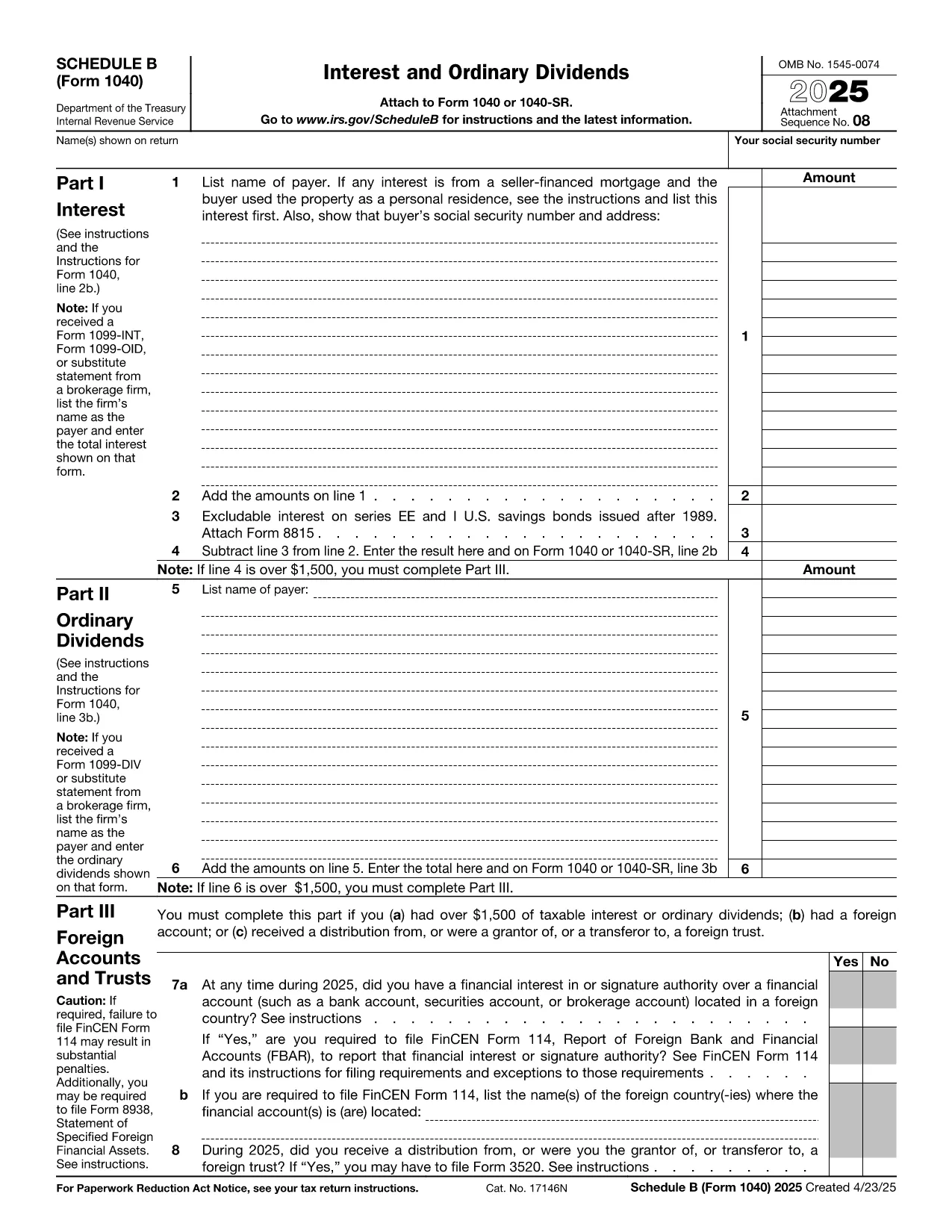
Schedule B, officially known as Form 1040SB – Interest and Ordinary Dividends, is an essential attachment to the U.S. Individual Income Tax Return (Form 1040). Whether you receive interest from a bank account, a brokerage, or dividends from stocks, you’ll need to report those amounts on Schedule B.

What Is Schedule B?

Schedule B helps the Internal Revenue Service (IRS) track taxable interest and ordinary dividend income. The form includes sections for:

  • Interest income details
  • Ordinary dividend details
  • Foreign accounts and trusts disclosure

Accurately completing Schedule B can prevent processing delays and ensure you receive any refunds you’re entitled to.

How to Fill Schedule B Online

Instead of downloading the PDF, opening a PDF editor, and wrestling with form fields, simply click the "Fill out this form" button on this page. The Formize PDF Filler app will load in seconds, presenting a clean, fillable interface:

  1. Click Fill out this form below.
  2. Wait a moment while the Formize PDF Filler loads the Schedule B PDF.
  3. Enter your interest and dividend information in the highlighted fields.
  4. Save your progress, download the completed PDF, or export it directly to your tax software.

The entire process is browser‑based, secure, and requires no additional software.

Common Mistakes to Avoid

  • Leaving the foreign account question blank – Even a “No” answer must be entered.
  • Mismatching totals – Ensure the sum of lines 1‑4 matches the total shown on line 5.
  • Using the wrong tax year PDF – This page always provides the latest version (2023).
  • Hand‑writing on the PDF – The Formize filler forces typed entries, keeping the file IRS‑ready.

Where to Submit Your Completed Form

Once you’ve saved the filled‑out Schedule B, attach it to your Form 1040 when filing electronically or include it with your paper return. If you e‑file through a commercial tax preparer, simply upload the PDF when prompted.

Need Help? Quick Resources

For detailed IRS instructions, see the IRS Schedule B Instructions. If you have questions about specific line items, the IRS FAQ is a great place to start.

Fill out this form

FAQ
  • Do I need Schedule B if I earned less than $1,500 in interest?

    No. The IRS requires Schedule B only if your total interest and ordinary dividends exceed $1,500, or if you have foreign accounts.

  • Can I edit the PDF after I download it?

    Yes. The PDF downloaded from Formize remains fully fillable, so you can reopen it in any PDF reader and make changes before final submission.

  • Is the Formize filler secure?

    Absolutely. All data is processed locally in your browser; Formize does not store any personal information on its servers.

  • What if I make a mistake after I’ve submitted?

    If you e‑file, you can amend your return using Form 1040X. For paper filings, attach a corrected Schedule B and clearly label it as an amendment.

  • Do I need to report foreign bank accounts on Schedule B?

    Yes. If you have a financial interest in or signature authority over a foreign account, you must answer “Yes” on Schedule B, line 7, and may need to file FinCEN Form 114 (FBAR).

  • Is there a fee to use the Formize PDF Filler?

    No. Formize offers a free, no‑registration filler for standard IRS forms like Schedule B.

COME

Come compilare IRS Schedule B gratuitamente, online in 4 semplici passaggi:

  1. 1
    Open the Formize PDF Filler
    Click the "Fill out this form" button on this page. The Formize PDF Filler app will load the Schedule B PDF directly in your browser.
  2. 2
    Enter Your Information
    Type your interest and dividend amounts into the highlighted fields. The filler validates numeric entries and shows totals automatically.
  3. 3
    Save or Export
    When you’re done, click "Save" to download the completed PDF, or export it straight to your tax software for e‑filing.
  4. 4
    Submit with Your Tax Return
    Attach the saved Schedule B to your Form 1040 when filing electronically or include it with your paper return.
App Formize PDF Filler
DI

Moduli fiscali

IRS Schedule B è uno dei moduli fiscali che sono documenti utilizzati per segnalare informazioni sul reddito, sulle detrazioni e sugli obblighi fiscali di un individuo o di un'azienda all'autorità fiscale competente. Questi moduli sono necessari per rispettare le leggi fiscali e adempiere agli obblighi fiscali. I moduli fiscali variano a seconda del Paese e dei requisiti fiscali specifici in vigore. Ecco alcuni tipi comuni di moduli fiscali:

Moduli fiscali individuali: questi moduli vengono utilizzati dai singoli contribuenti per dichiarare il proprio reddito personale e richiedere detrazioni, crediti ed esenzioni. Gli esempi includono il modulo 1040 negli Stati Uniti o il modulo di dichiarazione dei redditi di autovalutazione nel Regno Unito.

Moduli fiscali aziendali: i moduli fiscali aziendali vengono utilizzati da società, società di persone o lavoratori autonomi per segnalare redditi, spese e altre informazioni di natura fiscale. Gli esempi includono il modulo Schedule C (profitti o perdite aziendali) negli Stati Uniti o il modulo CT600 (dichiarazione dei redditi della società) nel Regno Unito.

Moduli relativi alle imposte sui salari: questi moduli vengono utilizzati dai datori di lavoro per segnalare salari, stipendi e imposte trattenute sulle buste paga dei propri dipendenti. Gli esempi includono il modulo W-2 negli Stati Uniti o il modulo P60 nel Regno Unito.

Moduli IVA: i moduli IVA vengono utilizzati dalle aziende per dichiarare e versare l'imposta sulle vendite riscossa su beni o servizi imponibili. I moduli specifici per l'imposta sulle vendite variano in base alla giurisdizione.

Moduli IVA (IVA): i moduli IVA vengono utilizzati nei paesi che impongono un'imposta sul valore aggiunto per dichiarare e versare l'IVA riscossa sulle vendite e richiedere crediti IVA per gli acquisti. Gli esempi includono i moduli di dichiarazione IVA utilizzati in molti paesi.

Moduli stima imposte: i moduli stima imposte vengono utilizzati per segnalare e pagare le imposte stimate sul reddito non soggetto a ritenuta, ad esempio reddito da lavoro autonomo o reddito da investimenti.

Questi sono solo alcuni esempi delle numerose forme fiscali che possono esistere. I moduli specifici richiesti dipendono dalle leggi e dai regolamenti fiscali del tuo Paese o giurisdizione. È importante consultare le linee guida dell'autorità fiscale o chiedere una consulenza professionale per determinare quali moduli sono applicabili alla tua situazione.

CARATTERISTICHE

Compilatore PDF

Il modo più semplice per compilare moduli PDF online

  • Compila rapidamente IRS Schedule B
    Cerchi un modo per compilare rapidamente IRS Schedule B online? Con il nostro compilatore di moduli PDF gratuito online, saprai come modificare e compilare questo documento PDF in meno di un minuto.
  • Editor PDF online facile da usare
    Stufo di stampare file PDF in modo da poterli modificare, prima di riscansionarli e rispedirli? Modifica documenti PDF gratuitamente online. Utilizza il nostro editor PDF online per risparmiare tempo e carta.
  • Grandi strumenti, tutte le piattaforme
    Ti stai chiedendo come inserire IRS Schedule B su un Mac o forse come utilizzare un riempitivo PDF gratuito? I nostri strumenti PDF online funzionano su tutte le piattaforme.
  • Archiviazione sicura dei file
    I file "IRS Schedule B" completati vengono archiviati in un database protetto gestito dall'hosting Amazon Cloud. Puoi eliminare i tuoi file dal nostro sistema in qualsiasi momento. In ogni caso, questi file vengono automaticamente cancellati dopo 24 ore.
  • Chatta con {parola chiave}
    Chatta con "IRS Schedule B" su Chatize che è un assistente di lettura PDF gratuito. Fai domande e ottieni risposte da "IRS Schedule B". Basta fare clic sul pulsante Chatta con il documento in alto.

Elimina sessione di riempimento

Eliminare la sessione di riempimento selezionata? In questo caso, i progressi nella compilazione del modulo andranno persi.

Elimina la sessione di modifica

Eliminare la sessione di editing selezionata? In questo caso, i tuoi progressi nella creazione e modifica del modulo andranno persi.