
Seleziona la lingua

Turn Your PDF into a Fillable Form in Seconds

  1. Paese Stati Uniti d'America
  2. Lingua Inglese
  3. Attività Le tasse
  4. Dipartimento IRS
Compila questo modulo
Turn Your PDF into a Fillable Form in Seconds

Whether you need a contract, an application, or a simple questionnaire, turning a static PDF into an interactive, fillable form saves time and eliminates printing hassles. With Formize’s PDF Filler you can convert and complete any PDF directly in your browser – no Adobe Acrobat license required.

Why Use an Online Fillable PDF?

  • Accessible from any device – desktop, tablet, or smartphone.
  • Data is saved automatically, reducing the risk of lost information.
  • Easy to share via email or a secure link.
  • Compliant with PDF/A standards for long‑term archiving.

Step‑by‑Step: Convert and Fill Your PDF

Follow the quick guide below to turn your PDF into a fillable form and start entering data right away.

Common Mistakes & How to Avoid Them

  • Skipping field naming: Give each field a clear label so users know what information to enter.
  • Using low‑resolution PDFs: High‑quality source files ensure crisp, readable fields.
  • Forgetting to test: Preview the form in the Filler app before sharing.

Download the Sample PDF Form

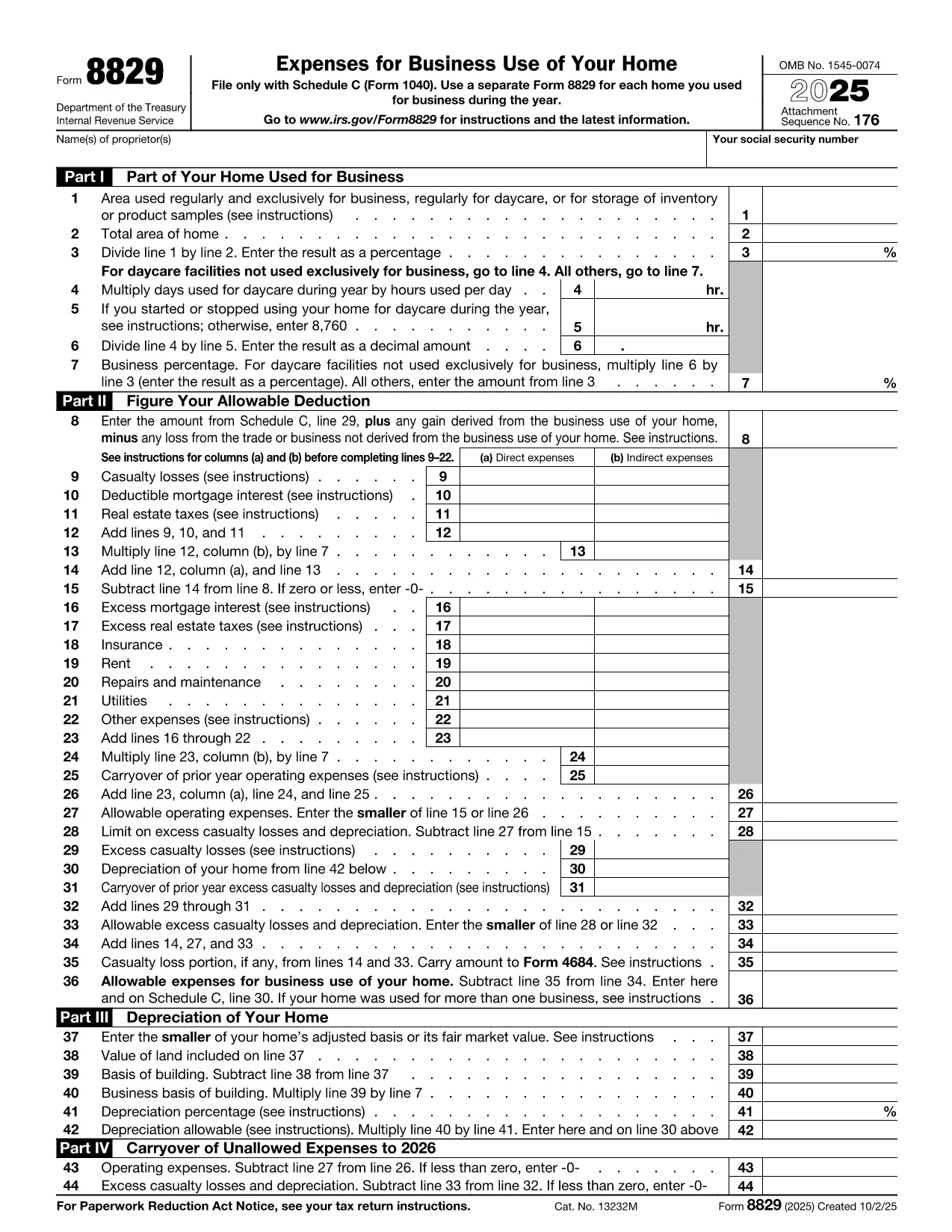
Use our sample IRS Form 8829 (Home Office Deduction) as a real‑world example. Click the button below to open it in the Formize PDF Filler and see how easy it is to turn a regular PDF into a fillable one.

Where to Get Help

If you run into any issues, the Formize help center offers step‑by‑step tutorials and troubleshooting tips.

FAQ
  • Do I need any software to turn a PDF into a fillable form?

    No. Formize PDF Filler runs entirely in your web browser, so you don’t need Adobe Acrobat or any other desktop software.

  • Can I convert a scanned PDF into a fillable form?

    Yes. Upload the scanned PDF, use Formize’s OCR tool to recognize text, then add fillable fields on top of the recognized content.

  • Is my data secure while I’m filling out the form?

    Formize uses SSL encryption for all data transmission and stores files on secure servers that comply with industry standards.

  • Can I share the fillable PDF with others?

    Absolutely. After saving, you can generate a shareable link or send the completed PDF via email directly from the app.

  • What if I make a mistake while filling the form?

    All changes are saved automatically, and you can use the “Undo” button or simply edit any field again before finalizing.

  • Do I need a Formize account to use the filler?

    You can fill out the form without an account, but creating an account lets you save progress, access history, and reuse templates.

  • Is there a limit to the size of PDF I can convert?

    Formize supports PDFs up to 50 MB. Larger files may need to be split or compressed before uploading.

COME

Come compilare turn PDF into form gratuitamente, online in 4 semplici passaggi:

  1. 1
    Click the “Fill out this form” button
    Locate the button on this page and press it. The Formize PDF Filler app will open in a new tab.
  2. 2
    Wait for the Formize PDF Filler to load
    The app loads the PDF automatically. You’ll see editable fields appear where you can type, check boxes, or select dates.
  3. 3
    Enter your information
    Click into each field and fill out the required data. All changes are saved in real time.
  4. 4
    Save or download the completed form
    When you’re finished, click “Save” to store the form in your Formize account or “Download” to get a copy on your device.
App Formize PDF Filler
DI

Moduli fiscali federali

turn PDF into form è uno dei moduli fiscali federali che sono documenti utilizzati per segnalare e presentare le imposte federali sul reddito presso l'Internal Revenue Service (IRS) negli Stati Uniti. Questi moduli vengono utilizzati da individui, aziende e organizzazioni per segnalare i propri redditi, detrazioni e altre informazioni rilevanti necessarie per il calcolo della propria responsabilità fiscale federale.

Il modulo fiscale federale più comunemente utilizzato è il Modulo 1040, utilizzato dai singoli contribuenti per dichiarare la propria imposta sul reddito personale. Altri moduli comunemente utilizzati includono il Modulo 1065 per le partnership, Modulo 1120 per le aziende e Modulo 990 per le organizzazioni esentasse.

I moduli fiscali federali in genere richiedono ai contribuenti di segnalare varie fonti di reddito, come salari, stipendi e mance, nonché redditi da investimenti, proprietà in affitto e altre fonti. I moduli consentono inoltre ai contribuenti di richiedere detrazioni e crediti per varie spese, come contributi di beneficenza, interessi ipotecari e spese sanitarie.

È importante compilare i moduli fiscali federali in modo accurato e puntuale, poiché in caso contrario si potrebbero incorrere in sanzioni e addebiti di interessi da parte dell'IRS.

CARATTERISTICHE

Compilatore PDF

Il modo più semplice per compilare moduli PDF online

  • Compila rapidamente turn PDF into form
    Cerchi un modo per compilare rapidamente turn PDF into form online? Con il nostro compilatore di moduli PDF gratuito online, saprai come modificare e compilare questo documento PDF in meno di un minuto.
  • Editor PDF online facile da usare
    Stufo di stampare file PDF in modo da poterli modificare, prima di riscansionarli e rispedirli? Modifica documenti PDF gratuitamente online. Utilizza il nostro editor PDF online per risparmiare tempo e carta.
  • Grandi strumenti, tutte le piattaforme
    Ti stai chiedendo come inserire turn PDF into form su un Mac o forse come utilizzare un riempitivo PDF gratuito? I nostri strumenti PDF online funzionano su tutte le piattaforme.
  • Archiviazione sicura dei file
    I file "turn PDF into form" completati vengono archiviati in un database protetto gestito dall'hosting Amazon Cloud. Puoi eliminare i tuoi file dal nostro sistema in qualsiasi momento. In ogni caso, questi file vengono automaticamente cancellati dopo 24 ore.
  • Chatta con {parola chiave}
    Chatta con "turn PDF into form" su Chatize che è un assistente di lettura PDF gratuito. Fai domande e ottieni risposte da "turn PDF into form". Basta fare clic sul pulsante Chatta con il documento in alto.

Elimina sessione di riempimento

Eliminare la sessione di riempimento selezionata? In questo caso, i progressi nella compilazione del modulo andranno persi.

Elimina la sessione di modifica

Eliminare la sessione di editing selezionata? In questo caso, i tuoi progressi nella creazione e modifica del modulo andranno persi.