
言語を選択する

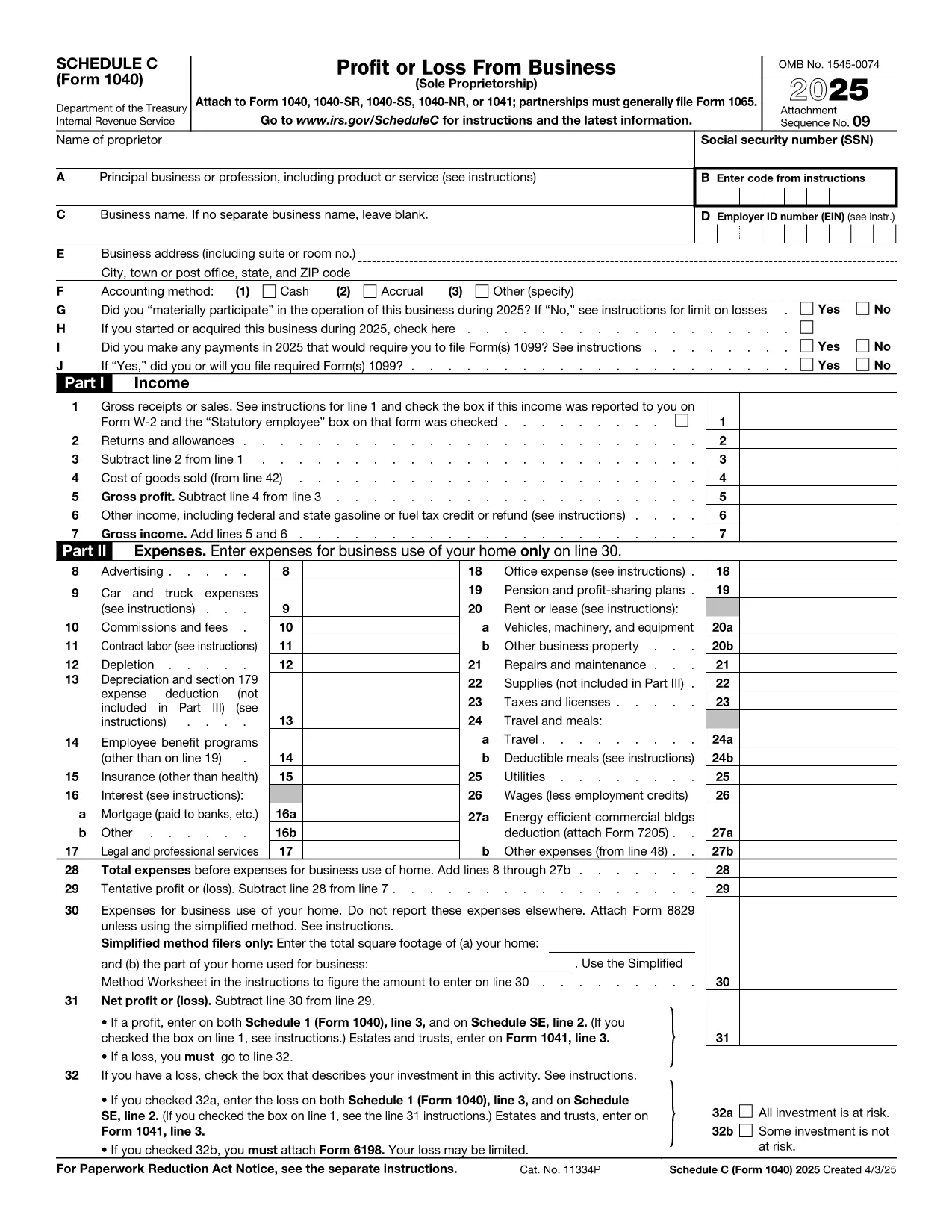
Schedule C – Profit or Loss from Business (Fillable PDF)

  1. アメリカ合衆国
  2. 言語 英語
  3. アクティビティ 税金
  4. デパートメント 内国歳入サービス
Schedule C – Profit or Loss from Business (Fillable PDF)

Schedule C (Form 1040) is the IRS form used by sole proprietors, single‑member LLCs, and independent contractors to report profit or loss from a business. Our fillable PDF lets you complete the form directly in your browser—no Adobe Acrobat or printer required.

What Is Schedule C and Who Needs It?

The Schedule C form captures income, expenses, cost of goods sold, and vehicle mileage for a trade or business. If you earned self‑employment income in the last tax year, you’ll likely need to file Schedule C with your Form 1040.

Key Sections of the Schedule C Form

  • Part I – Income: Gross receipts, returns, and other income.
  • Part II – Expenses: Advertising, car expenses, depreciation, supplies, and more.
  • Part III – Cost of Goods Sold: Beginning inventory, purchases, and ending inventory.
  • Part IV – Information About Your Vehicle: Mileage and expenses if you use a car for business.
  • Part V – Other Expenses: Any additional costs not listed in Part II.

How to Fill Out Schedule C Online

Instead of downloading the PDF and opening it in a desktop editor, simply click the “Fill out this form” button below. The Formize PDF Filler app will load in seconds, and you can start entering your numbers right away.

Common Mistakes & Tips

  • Double‑check that all income is reported—missed cash sales can trigger an audit.
  • Keep receipts for every expense; the IRS may request documentation.
  • Use the correct expense categories; mis‑classifying can reduce your deduction.
  • Don’t forget to fill out the vehicle information section if you claim mileage.
  • Review the totals in Part I and Part II to ensure they balance before attaching to Form 1040.

When you’re finished, you can download a completed PDF, print it, or submit it electronically with your tax return.

説明書

よくある質問
  • Who must file Schedule C?

    Anyone who earned self‑employment income, operated a sole proprietorship, or had a single‑member LLC taxed as a disregarded entity must file Schedule C with their Form 1040.

  • Can I use Schedule C for multiple businesses?

    Yes. If you run more than one trade or profession, you file a separate Schedule C for each business and attach all of them to your return.

  • What expenses are deductible on Schedule C?

    Ordinary and necessary business expenses such as advertising, rent, utilities, supplies, vehicle costs, depreciation, home‑office expenses, and cost of goods sold are deductible.

  • Do I need a separate EIN for Schedule C?

    An EIN is not required; you can use your Social Security Number. However, an EIN is recommended if you have employees or want to keep personal and business IDs separate.

  • How do I report home‑office expenses?

    Complete Form 8829 to calculate the home‑office deduction, then transfer the amount to Schedule C, line 30.

  • What if I discover an error after filing?

    File Form 1040‑X, Amended U.S. Individual Income Tax Return, and attach a corrected Schedule C showing the updated numbers.

方法

オンラインで 5 回の簡単なステップで Schedule C PDF を無料で入力する方法:

  1. 1
    Click the Fill Out Button
    Press the “Fill out this form” button on this page. The Formize PDF Filler will open in a new tab.
  2. 2
    Wait for the Filler to Load
    The app loads the fillable Schedule C PDF in seconds—no download required.
  3. 3
    Enter Your Information
    Complete each field, following the on‑screen prompts for income, expenses, and vehicle data.
  4. 4
    Review and Validate
    Use the built‑in calculator to verify totals and correct any errors before saving.
  5. 5
    Save, Print or E‑File
    Download the finished PDF, print a hard copy, or attach it to your electronic tax filing.
Formize PDF Filler アプリ
だいたい

納税フォーム

Schedule C PDF は税務フォームの 1 つで、収入、控除、納税義務を関連税務当局に報告するために使用される文書です。これらのフォームは納税申告プロセスの重要な部分であり、個人や企業が税法を遵守し、納税義務を正確に計算していることを確認するために使用されます。

必要な特定の納税フォームは、個人の申告状況、収入源、国の税法などの要因によって異なります。ただし、一般的な納税フォームのいくつかを次に示します。

個人所得税フォーム: 米国の1040 シリーズなどのフォームが使用されます。個人が自分の収入を報告し、控除や控除を申請し、納税額を計算するために使用します。

事業税フォーム: 個人事業主、パートナーシップ、法人、自営業者などの企業は、収入、支出、未払いの税金を報告するためにさまざまなフォームを提出する必要がある場合があります。例としては、スケジュール C (事業による損益) やフォーム 1120 (米国法人所得税申告書) などがあります。

雇用税フォーム: 雇用主は従業員の賃金を報告し、給与税を源泉徴収して納付する必要があります。この目的には、W-2 (賃金および納税申告書) や 941 (雇用主の四半期連邦税申告書) などのフォームが使用されます。

投資および退職口座フォーム: これらのフォームは、投資収益、キャピタルゲイン、損失、退職口座からの拠出金および分配金を報告するために使用されます。例には、フォーム 1099-DIV (配当金および分配) および フォーム 5498 (IRA 貢献情報)。

相続税および贈与税のフォーム: 人が亡くなった場合、または重要な贈与を行った場合は、フォーム 706 などの特定のフォームが必要です。 a> (米国遺産 (および世代間移転) 納税申告書) およびフォーム 709 (米国贈与 (および世代間譲渡)) Skipping Transfer) Tax Return) は、適用される相続税や贈与税の報告と計算に使用されます。

税法と形式は時間の経過とともに変更される可能性があることに注意することが重要です。そのため、個人および企業は、現在の要件を確実に遵守するために、関連する税務当局に相談するか、税務の専門家にアドバイスを求める必要があります。

特徴

PDFフィラー

オンラインで PDF フォームに記入する最も簡単な方法

  • Schedule C PDF をすばやく入力してください
    Schedule C PDF をオンラインですばやく入力する方法をお探しですか?オンラインの無料 PDF フォーム フィラーを使用すると、この PDF ドキュメントを 1 分以内に編集して入力する方法がわかります。
  • 使いやすいオンライン PDF エディター
    再スキャンして返送する前に、編集できるように PDF ファイルを印刷することにうんざりしていませんか? PDFドキュメントをオンラインで無料で編集.当社のオンライン PDF エディターを使用して、時間と紙を節約してください。
  • 優れたツール、すべてのプラットフォーム
    Mac で Schedule C PDF を入力する方法や、PDF フィラーを無料で使用する方法を知りたいですか?当社のオンライン PDF ツールは、すべてのプラットフォームで動作します。
  • 安全なファイル ストレージ
    完成した「Schedule C PDF」ファイルは、Amazon クラウド ホスティングが管理する安全なデータベースに保存されます。いつでもシステムからファイルを削除できます。いずれにせよ、これらのファイルは 24 時間後に自動的に削除されます。
  • {キーワード} とチャットする
    無料の PDF リーダー アシスタントである Chatize で「Schedule C PDF」とチャットします。質問すると、「Schedule C PDF」から回答が得られます。上の [ドキュメントとチャット] ボタンをクリックするだけです。

フィルセッションを削除

選択したフィルセッションを削除しますか?この場合、フォームへの記入の進捗状況は失われます。

編集セッションを削除する

選択した編集セッションを削除しますか?この場合、フォームの作成および編集の進行状況は失われます。