言語を選択する

IRS Form 1099‑SA – Fillable HSA Distribution Tax Form

  1. アメリカ合衆国
  2. 言語 英語
  3. アクティビティ 税金
  4. デパートメント 内国歳入サービス
IRS Form 1099‑SA – Fillable HSA Distribution Tax Form

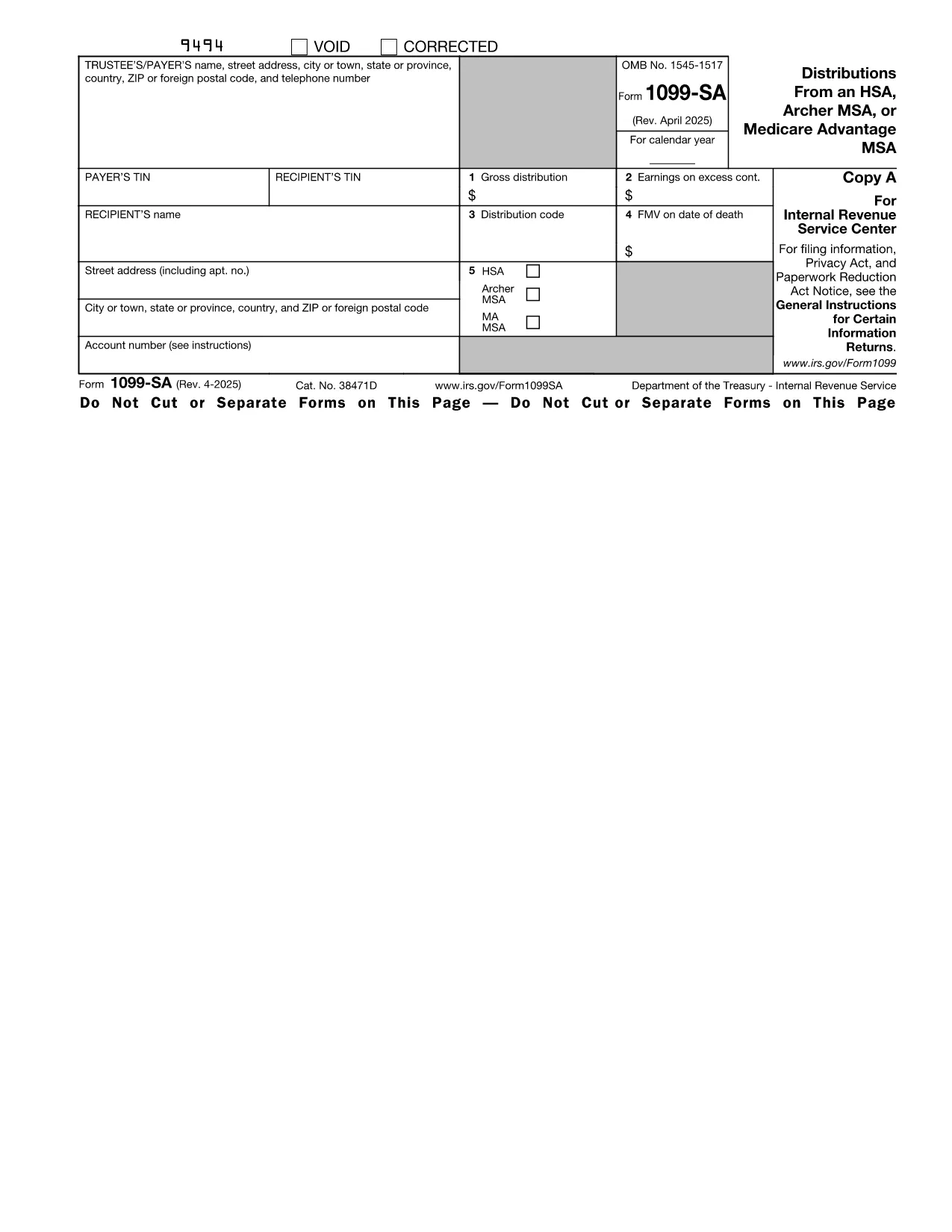
The IRS Form 1099‑SA reports distributions from a Health Savings Account (HSA), Archer MSA, or Medicare Advantage MSA. Financial institutions issue this form to you and the IRS whenever you receive a distribution. Accurate reporting is essential to avoid penalties and to correctly calculate any taxable amount on your tax return.

What Is Form 1099‑SA?

Form 1099‑SA is a one‑page informational return that shows the total amount distributed from your HSA during the calendar year, the type of distribution (e.g., normal, excess, or rollover), and any federal income tax withheld. You use the information on this form when completing Form 8889 (Health Savings Accounts) on your individual tax return.

How to Fill Out the HSA Distribution Form Online

Instead of downloading the PDF and opening it in a separate editor, simply click the "Fill out this form" button on this page. The Formize PDF Filler app will load directly in your browser, letting you complete every field instantly.

Common Mistakes to Avoid

  • Entering the wrong distribution code – double‑check the box that matches the reason for the distribution.
  • Omitting the amount of federal tax withheld – even a $0 entry must be entered.
  • Failing to sign the form if you are printing it for paper filing.
  • Using the wrong tax year version – make sure you are on the 2023 (or current year) PDF.

Where to Submit Your Completed Form

Form 1099‑SA is sent to the IRS by the payer (your bank or HSA custodian). You, the recipient, keep a copy for your records and use the figures when preparing your personal tax return. If you file electronically, the data from the fillable PDF can be imported directly into most tax‑software programs.

Need a printable copy? After you finish filling the form in Formize, click **Download PDF** and print it for your records.

説明書

  • フォーム1099-SAおよび5498-SAのための指示 - フォーム1099-SAと5498-SAの指示、HSA、アーチャーMSA、またはメディケアのメリットMSA、およびHSA、アーチャーMSA、またはメディケアの利点MSAからの配布 インフォメーション
よくある質問
  • Do I need to file Form 1099‑SA with the IRS?

    No. The payer (your HSA custodian) files Form 1099‑SA with the IRS. You keep the copy for your records and use the information on your personal return.

  • What is the distribution code on Form 1099‑SA?

    The code indicates why the money was taken out (e.g., normal distribution, excess contribution, rollover). Choose the code that matches your situation to avoid errors on Form 8889.

  • Can I edit a downloaded PDF after I fill it in Formize?

    Yes. After you complete the form, you can download the PDF and reopen it in any standard PDF editor if further changes are needed.

  • Is there a fee to use the Formize PDF Filler?

    Formize offers a free basic filler for most IRS forms, including Form 1099‑SA. No credit‑card information is required.

  • What if my HSA custodian issued a corrected Form 1099‑SA?

    Download the corrected PDF, fill it out again using Formize, and keep both versions for your records. Use the corrected amounts when completing Form 8889.

  • How long should I keep Form 1099‑SA?

    Retain the form for at least three years from the date you filed your tax return, as required by IRS record‑keeping rules.

  • Can I fill out Form 1099‑SA on a mobile device?

    Yes. The Formize PDF Filler is responsive and works on smartphones and tablets as long as you have a modern browser.

方法

オンラインで 5 回の簡単なステップで Form 1099-SA を無料で入力する方法:

  1. 1
    Click the Fill‑out Button
    On this page, click the blue "Fill out this form" button. The Formize PDF Filler will open in a new tab.
  2. 2
    Wait for the Filler to Load
    The app loads within seconds. You’ll see a fully interactive version of Form 1099‑SA ready for input.
  3. 3
    Enter Your Information
    Type directly into each field—payer name, distribution amount, tax withheld, and distribution code. All calculations are automatic.
  4. 4
    Review and Save
    Double‑check every entry, then click "Save" to store the completed PDF in your browser or download it to your device.
  5. 5
    Print or Submit
    Print a hard copy for your records or upload the saved PDF to your tax‑software program.
Formize PDF Filler アプリ
だいたい

連邦税フォーム

Form 1099-SA は連邦税フォームの 1 つで、米国の内国歳入庁 (IRS) に連邦所得税を報告および提出するために使用される文書です。これらのフォームは、個人、企業、組織が連邦税負担の計算に必要な所得、控除、その他の関連情報を報告するために使用されます。

最も一般的に使用される連邦税フォームはフォーム 1040 で、個人の納税者が個人所得税を報告するために使用します。その他の一般的に使用されるフォームには、パートナーシップ用の フォーム 1065フォーム 1120、非課税組織の場合はフォーム 990

連邦税フォームでは通常、納税者に対し、賃金、給与、チップなどのさまざまな収入源のほか、投資、賃貸不動産、その他の収入源からの収入を報告するよう求めています。このフォームを使用すると、納税者は慈善寄付金、住宅ローン利子、医療費などのさまざまな費用の控除やクレジットを請求することもできます。

連邦税フォームを正確かつ期限内に提出することが重要です。これを怠ると、IRS から罰金や利息が課される可能性があります。

特徴

PDFフィラー

オンラインで PDF フォームに記入する最も簡単な方法

  • Form 1099-SA をすばやく入力してください
    Form 1099-SA をオンラインですばやく入力する方法をお探しですか?オンラインの無料 PDF フォーム フィラーを使用すると、この PDF ドキュメントを 1 分以内に編集して入力する方法がわかります。
  • 使いやすいオンライン PDF エディター
    再スキャンして返送する前に、編集できるように PDF ファイルを印刷することにうんざりしていませんか? PDFドキュメントをオンラインで無料で編集.当社のオンライン PDF エディターを使用して、時間と紙を節約してください。
  • 優れたツール、すべてのプラットフォーム
    Mac で Form 1099-SA を入力する方法や、PDF フィラーを無料で使用する方法を知りたいですか?当社のオンライン PDF ツールは、すべてのプラットフォームで動作します。
  • 安全なファイル ストレージ
    完成した「Form 1099-SA」ファイルは、Amazon クラウド ホスティングが管理する安全なデータベースに保存されます。いつでもシステムからファイルを削除できます。いずれにせよ、これらのファイルは 24 時間後に自動的に削除されます。
  • {キーワード} とチャットする
    無料の PDF リーダー アシスタントである Chatize で「Form 1099-SA」とチャットします。質問すると、「Form 1099-SA」から回答が得られます。上の [ドキュメントとチャット] ボタンをクリックするだけです。

フィルセッションを削除

選択したフィルセッションを削除しますか?この場合、フォームへの記入の進捗状況は失われます。

編集セッションを削除する

選択した編集セッションを削除しますか?この場合、フォームの作成および編集の進行状況は失われます。