
言語を選択する

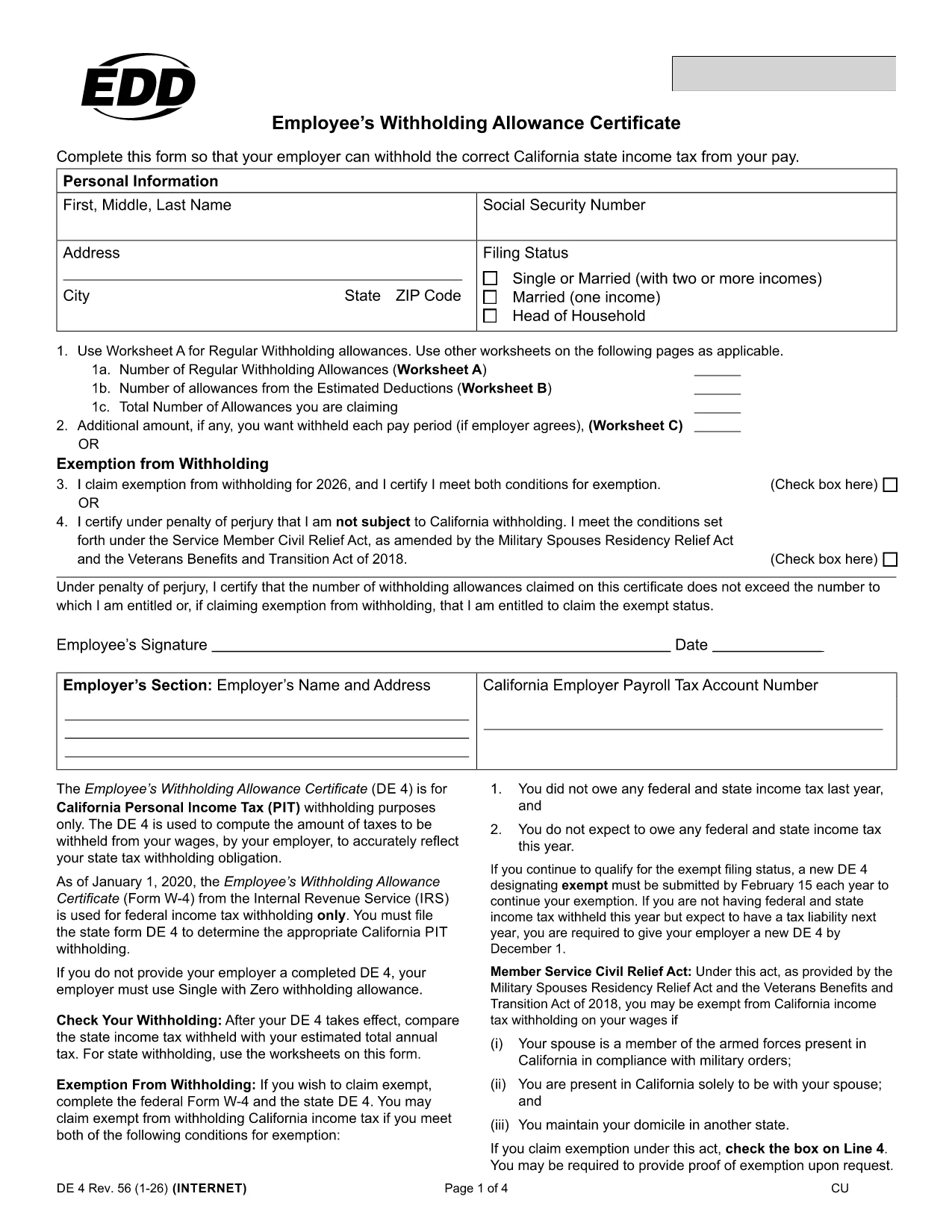
California DE 4 Employee Withholding Allowance Certificate (Fillable PDF)

  1. アメリカ合衆国
  2. 言語 英語
  3. アクティビティ 税金
  4. デパートメント EDD
California DE 4 Employee Withholding Allowance Certificate (Fillable PDF)

The California DE 4 (Employee’s Withholding Allowance Certificate) is the state‑level counterpart to the federal W‑4. Employers use it to calculate the correct amount of state income tax to withhold from each employee’s wages.

This fillable PDF is hosted on Formize.com, so you can complete it directly in your browser—no extra software, no printing, and no hassle.

What Is the DE 4 Form and Who Needs It?

The DE 4 is required for every employee working in California who is subject to state income tax. It captures personal allowances, additional withholding amounts, and exemption status.

How to Complete the DE 4 Form Online with Formize

Follow the simple steps below to fill the form in seconds. The Formize PDF Filler loads automatically when you click the button.

  • Click “Fill out this form” on this page.
  • Wait a few seconds while the Formize PDF Filler app loads.
  • Enter your personal information, allowances, and any extra withholding amounts.
  • Review the completed form for accuracy.
  • Save, download, or print the PDF, then give it to your employer.

Common Mistakes to Avoid on Your DE 4

  • Leaving the “Exempt” box unchecked when you actually qualify for exemption.
  • Entering the wrong number of allowances – double‑check the worksheet on page 2.
  • Forgetting to sign and date the form; an unsigned DE 4 is invalid.
  • Using outdated personal data (address, marital status) after a life change.

Where to Submit the Completed Form

Once you’ve saved the filled PDF, provide it to your payroll or HR department. They will attach it to your employee record and use it to calculate state tax withholdings.

If you need a hard copy for your records, you can download and print the PDF directly from the Formize interface.

よくある質問
  • Do I need to fill out a DE 4 if I am a full‑time student?

    Yes, if you earn wages in California you must complete a DE 4, unless you qualify for exemption based on your income level.

  • Can I change my DE 4 after it’s submitted?

    Absolutely. Submit a new DE 4 anytime your personal or financial situation changes (marriage, dependents, etc.).

  • Is the DE 4 the same as the federal W‑4?

    No. The DE 4 is a state‑specific form for California income tax withholding; you still need a federal W‑4 for IRS taxes.

  • What happens if I claim too many allowances?

    Claiming too many allowances may result in under‑withholding, leading to a larger tax bill (and possible penalties) when you file your California return.

  • Do I need to sign the DE 4 electronically?

    Yes. The Formize filler includes an electronic signature field that satisfies California’s requirements.

  • Is there a deadline for submitting a DE 4?

    Submit the completed form to your employer as soon as possible—ideally before your first paycheck of the year.

  • Can I use the same DE 4 for multiple employers?

    You should provide a separate DE 4 to each employer, as each maintains its own payroll records.

  • Where can I find the official DE 4 PDF?

    The official, up‑to‑date DE 4 PDF is available from the California Employment Development Department at the link below.

方法

オンラインで 4 回の簡単なステップで California DE 4 を無料で入力する方法:

  1. 1
    Click the Fill‑out Button
    Press the “Fill out this form” button on this page to launch the Formize PDF Filler.
  2. 2
    Wait for the App to Load
    A short loading screen appears; the Formize editor will open automatically.
  3. 3
    Enter Your Information
    Type directly into each field – personal details, allowances, extra withholding, and exemption status.
  4. 4
    Review and Save
    Check all entries for accuracy, then click “Save” to download a copy or “Print” to give a hard copy to your employer.
Formize PDF Filler アプリ
だいたい

納税フォーム

California DE 4 は税務フォームの 1 つで、収入、控除、納税義務を関連税務当局に報告するために使用される文書です。これらのフォームは納税申告プロセスの重要な部分であり、個人や企業が税法を遵守し、納税義務を正確に計算していることを確認するために使用されます。

必要な特定の納税フォームは、個人の申告状況、収入源、国の税法などの要因によって異なります。ただし、一般的な納税フォームのいくつかを次に示します。

個人所得税フォーム: 米国の1040 シリーズなどのフォームが使用されます。個人が自分の収入を報告し、控除や控除を申請し、納税額を計算するために使用します。

事業税フォーム: 個人事業主、パートナーシップ、法人、自営業者などの企業は、収入、支出、未払いの税金を報告するためにさまざまなフォームを提出する必要がある場合があります。例としては、スケジュール C (事業による損益) やフォーム 1120 (米国法人所得税申告書) などがあります。

雇用税フォーム: 雇用主は従業員の賃金を報告し、給与税を源泉徴収して納付する必要があります。この目的には、W-2 (賃金および納税申告書) や 941 (雇用主の四半期連邦税申告書) などのフォームが使用されます。

投資および退職口座フォーム: これらのフォームは、投資収益、キャピタルゲイン、損失、退職口座からの拠出金および分配金を報告するために使用されます。例には、フォーム 1099-DIV (配当金および分配) および フォーム 5498 (IRA 貢献情報)。

相続税および贈与税のフォーム: 人が亡くなった場合、または重要な贈与を行った場合は、フォーム 706 などの特定のフォームが必要です。 a> (米国遺産 (および世代間移転) 納税申告書) およびフォーム 709 (米国贈与 (および世代間譲渡)) Skipping Transfer) Tax Return) は、適用される相続税や贈与税の報告と計算に使用されます。

税法と形式は時間の経過とともに変更される可能性があることに注意することが重要です。そのため、個人および企業は、現在の要件を確実に遵守するために、関連する税務当局に相談するか、税務の専門家にアドバイスを求める必要があります。

特徴

PDFフィラー

オンラインで PDF フォームに記入する最も簡単な方法

  • California DE 4 をすばやく入力してください
    California DE 4 をオンラインですばやく入力する方法をお探しですか?オンラインの無料 PDF フォーム フィラーを使用すると、この PDF ドキュメントを 1 分以内に編集して入力する方法がわかります。
  • 使いやすいオンライン PDF エディター
    再スキャンして返送する前に、編集できるように PDF ファイルを印刷することにうんざりしていませんか? PDFドキュメントをオンラインで無料で編集.当社のオンライン PDF エディターを使用して、時間と紙を節約してください。
  • 優れたツール、すべてのプラットフォーム
    Mac で California DE 4 を入力する方法や、PDF フィラーを無料で使用する方法を知りたいですか?当社のオンライン PDF ツールは、すべてのプラットフォームで動作します。
  • 安全なファイル ストレージ
    完成した「California DE 4」ファイルは、Amazon クラウド ホスティングが管理する安全なデータベースに保存されます。いつでもシステムからファイルを削除できます。いずれにせよ、これらのファイルは 24 時間後に自動的に削除されます。
  • {キーワード} とチャットする
    無料の PDF リーダー アシスタントである Chatize で「California DE 4」とチャットします。質問すると、「California DE 4」から回答が得られます。上の [ドキュメントとチャット] ボタンをクリックするだけです。

フィルセッションを削除

選択したフィルセッションを削除しますか?この場合、フォームへの記入の進捗状況は失われます。

編集セッションを削除する

選択した編集セッションを削除しますか?この場合、フォームの作成および編集の進行状況は失われます。