
言語を選択する

Form C PDF – Fillable Schedule C for Sole Proprietors

  1. アメリカ合衆国
  2. 言語 英語
  3. アクティビティ 税金
  4. デパートメント IRS
Form C PDF – Fillable Schedule C for Sole Proprietors

What Is Form C (Schedule C)?

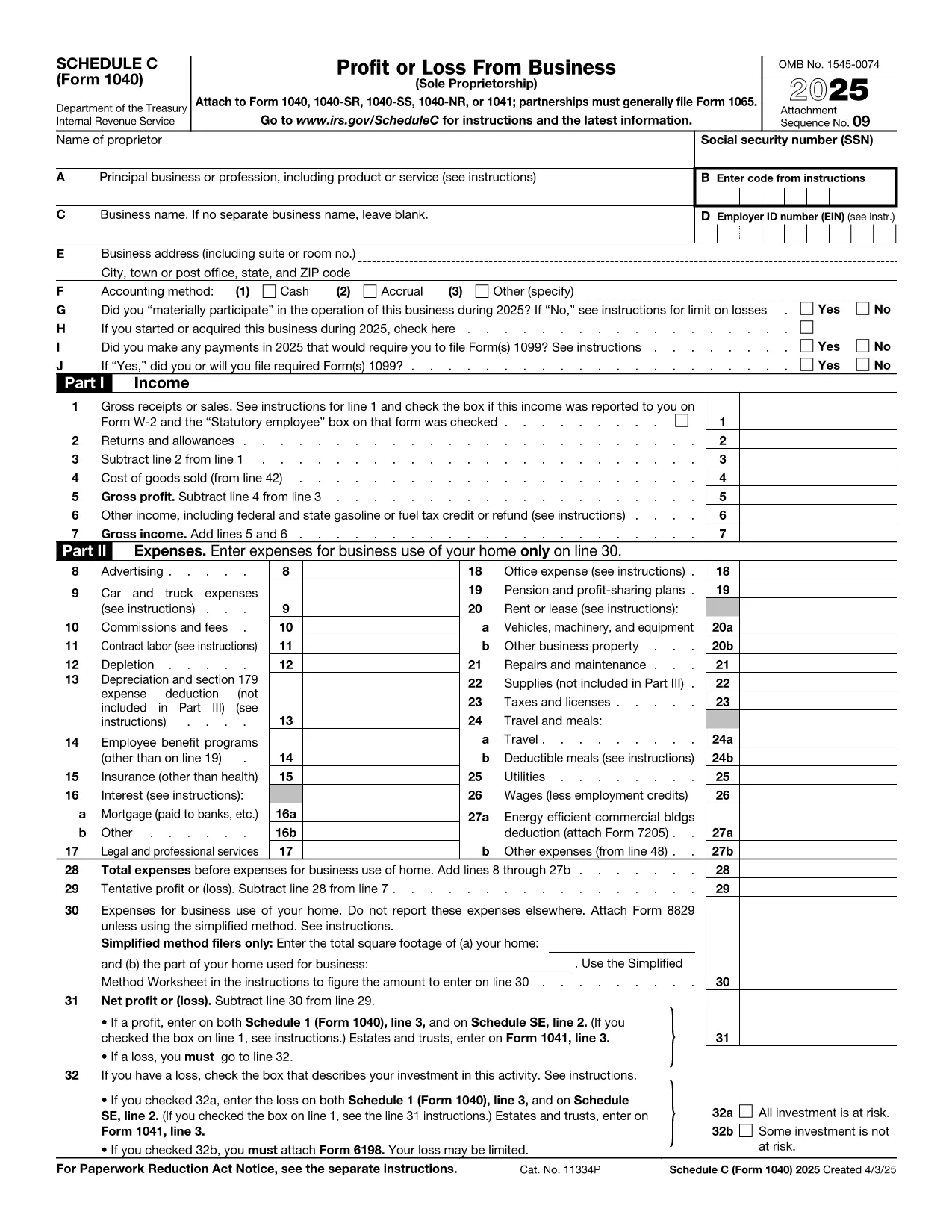
Form C, officially known as Schedule C (Form 1040), is the IRS form used by sole proprietors to report profit or loss from a business. It is required when you file your individual income tax return (Form 1040) and need to detail business income, expenses, and cost of goods sold.

How to Fill Out the Form C PDF Online

Instead of downloading the PDF and opening it in a separate editor, simply click the "Fill out this form" button on this page. The Formize PDF Filler app will load instantly, letting you complete every field directly in your browser.

Common Mistakes to Avoid on Schedule C

  • Incorrect Business Code: Use the correct six‑digit NAICS code for your industry.
  • Missing Expense Categories: List all deductible expenses (supplies, travel, home office, etc.) in the appropriate sections.
  • Math Errors: The Formize filler automatically calculates totals, but double‑check any hand‑entered numbers.
  • Wrong Tax Year: Ensure the form reflects the calendar year you are filing for.

Where to Submit Your Completed Form

After you finish, download the completed PDF and attach it to your electronic Form 1040 filing through tax‑software or print it for a paper return. The IRS accepts the PDF as part of your e‑file package.

Need Help? Quick Resources

Visit the IRS Schedule C page for detailed instructions, and check the IRS Interactive Tax Assistant for specific questions about deductions.

よくある質問
  • What is the purpose of Form C (Schedule C)?

    Schedule C reports profit or loss from a sole‑proprietor business and is attached to your Form 1040 personal tax return.

  • Can I fill out Schedule C on a mobile device?

    Yes. The Formize PDF Filler is responsive and works on phones, tablets, and desktops.

  • Do I need a separate EIN for Schedule C?

    Only if you have employees or are required to file certain excise taxes. Otherwise, you can use your Social Security Number.

  • How do I claim home‑office expenses?

    Enter the square footage of your home office in Part II, line 30, and follow the IRS instructions for the simplified or regular method.

  • Is the Formize filler free to use?

    Yes. Filling out, saving, and downloading the completed Schedule C PDF is completely free.

  • What if I make a mistake after saving?

    Open the saved PDF again in the Formize filler, correct the fields, and re‑save the document.

  • Do I need to attach receipts to the PDF?

    No. Keep receipts for your records, but the PDF itself only requires the summarized totals.

  • When is the deadline to file Schedule C?

    Schedule C is due with your individual tax return, typically April 15 of the following year.

  • Can I file Schedule C electronically?

    Yes. Most tax‑software programs accept the completed PDF as part of an electronic filing.

  • Where can I find the official IRS PDF for Schedule C?

    The official fillable PDF is available at the IRS website: https://www.irs.gov/pub/irs-pdf/f1040sc.pdf

方法

オンラインで 4 回の簡単なステップで Form C PDF を無料で入力する方法:

  1. 1
    Open the Fillable Form
    Click the blue "Fill out this form" button on the page. The Formize PDF Filler app will open in a new tab.
  2. 2
    Enter Your Information
    Type directly into each field – name, business details, income, expenses, and deductions. The app validates entries in real time.
  3. 3
    Review Calculations
    All totals and subtotals are auto‑calculated. Verify the numbers, then click "Save" to generate a completed PDF.
  4. 4
    Download or Submit
    Download the finished Schedule C PDF or attach it to your e‑file. No additional software is required.
Formize PDF Filler アプリ
だいたい

納税フォーム

Form C PDF は、税金に関する情報を関連する税務当局に報告するために使用される文書である納税申告書の 1 つです。納税者の状況や場所によって、連邦税、州税、地方税など、さまざまな種類の納税申告書があります。

特徴

PDFフィラー

オンラインで PDF フォームに記入する最も簡単な方法

  • Form C PDF をすばやく入力してください
    Form C PDF をオンラインですばやく入力する方法をお探しですか?オンラインの無料 PDF フォーム フィラーを使用すると、この PDF ドキュメントを 1 分以内に編集して入力する方法がわかります。
  • 使いやすいオンライン PDF エディター
    再スキャンして返送する前に、編集できるように PDF ファイルを印刷することにうんざりしていませんか? PDFドキュメントをオンラインで無料で編集.当社のオンライン PDF エディターを使用して、時間と紙を節約してください。
  • 優れたツール、すべてのプラットフォーム
    Mac で Form C PDF を入力する方法や、PDF フィラーを無料で使用する方法を知りたいですか?当社のオンライン PDF ツールは、すべてのプラットフォームで動作します。
  • 安全なファイル ストレージ
    完成した「Form C PDF」ファイルは、Amazon クラウド ホスティングが管理する安全なデータベースに保存されます。いつでもシステムからファイルを削除できます。いずれにせよ、これらのファイルは 24 時間後に自動的に削除されます。
  • {キーワード} とチャットする
    無料の PDF リーダー アシスタントである Chatize で「Form C PDF」とチャットします。質問すると、「Form C PDF」から回答が得られます。上の [ドキュメントとチャット] ボタンをクリックするだけです。

フィルセッションを削除

選択したフィルセッションを削除しますか?この場合、フォームへの記入の進捗状況は失われます。

編集セッションを削除する

選択した編集セッションを削除しますか?この場合、フォームの作成および編集の進行状況は失われます。