
言語を選択する

Turn Your PDF into a Fillable Form in Seconds

  1. アメリカ合衆国
  2. 言語 英語
  3. アクティビティ 税金
  4. デパートメント IRS
Turn Your PDF into a Fillable Form in Seconds

Whether you need a contract, an application, or a simple questionnaire, turning a static PDF into an interactive, fillable form saves time and eliminates printing hassles. With Formize’s PDF Filler you can convert and complete any PDF directly in your browser – no Adobe Acrobat license required.

Why Use an Online Fillable PDF?

  • Accessible from any device – desktop, tablet, or smartphone.
  • Data is saved automatically, reducing the risk of lost information.
  • Easy to share via email or a secure link.
  • Compliant with PDF/A standards for long‑term archiving.

Step‑by‑Step: Convert and Fill Your PDF

Follow the quick guide below to turn your PDF into a fillable form and start entering data right away.

Common Mistakes & How to Avoid Them

  • Skipping field naming: Give each field a clear label so users know what information to enter.
  • Using low‑resolution PDFs: High‑quality source files ensure crisp, readable fields.
  • Forgetting to test: Preview the form in the Filler app before sharing.

Download the Sample PDF Form

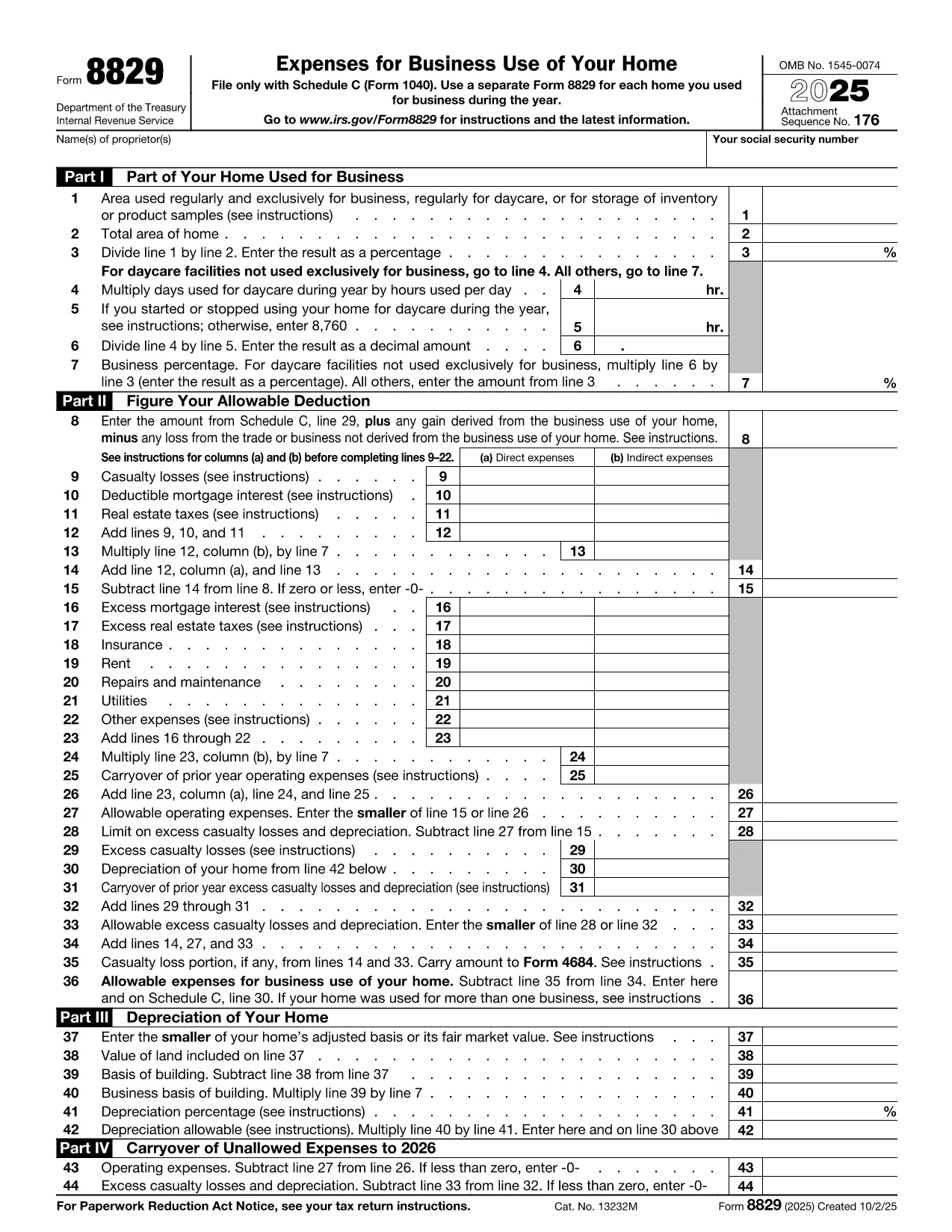
Use our sample IRS Form 8829 (Home Office Deduction) as a real‑world example. Click the button below to open it in the Formize PDF Filler and see how easy it is to turn a regular PDF into a fillable one.

Where to Get Help

If you run into any issues, the Formize help center offers step‑by‑step tutorials and troubleshooting tips.

よくある質問
  • Do I need any software to turn a PDF into a fillable form?

    No. Formize PDF Filler runs entirely in your web browser, so you don’t need Adobe Acrobat or any other desktop software.

  • Can I convert a scanned PDF into a fillable form?

    Yes. Upload the scanned PDF, use Formize’s OCR tool to recognize text, then add fillable fields on top of the recognized content.

  • Is my data secure while I’m filling out the form?

    Formize uses SSL encryption for all data transmission and stores files on secure servers that comply with industry standards.

  • Can I share the fillable PDF with others?

    Absolutely. After saving, you can generate a shareable link or send the completed PDF via email directly from the app.

  • What if I make a mistake while filling the form?

    All changes are saved automatically, and you can use the “Undo” button or simply edit any field again before finalizing.

  • Do I need a Formize account to use the filler?

    You can fill out the form without an account, but creating an account lets you save progress, access history, and reuse templates.

  • Is there a limit to the size of PDF I can convert?

    Formize supports PDFs up to 50 MB. Larger files may need to be split or compressed before uploading.

方法

オンラインで 4 回の簡単なステップで turn PDF into form を無料で入力する方法:

  1. 1
    Click the “Fill out this form” button
    Locate the button on this page and press it. The Formize PDF Filler app will open in a new tab.
  2. 2
    Wait for the Formize PDF Filler to load
    The app loads the PDF automatically. You’ll see editable fields appear where you can type, check boxes, or select dates.
  3. 3
    Enter your information
    Click into each field and fill out the required data. All changes are saved in real time.
  4. 4
    Save or download the completed form
    When you’re finished, click “Save” to store the form in your Formize account or “Download” to get a copy on your device.
Formize PDF Filler アプリ
だいたい

納税フォーム

turn PDF into form は、税金に関する情報を関連する税務当局に報告するために使用される文書である納税申告書の 1 つです。納税者の状況や場所によって、連邦税、州税、地方税など、さまざまな種類の納税申告書があります。
特徴

PDFフィラー

オンラインで PDF フォームに記入する最も簡単な方法

  • turn PDF into form をすばやく入力してください
    turn PDF into form をオンラインですばやく入力する方法をお探しですか?オンラインの無料 PDF フォーム フィラーを使用すると、この PDF ドキュメントを 1 分以内に編集して入力する方法がわかります。
  • 使いやすいオンライン PDF エディター
    再スキャンして返送する前に、編集できるように PDF ファイルを印刷することにうんざりしていませんか? PDFドキュメントをオンラインで無料で編集.当社のオンライン PDF エディターを使用して、時間と紙を節約してください。
  • 優れたツール、すべてのプラットフォーム
    Mac で turn PDF into form を入力する方法や、PDF フィラーを無料で使用する方法を知りたいですか?当社のオンライン PDF ツールは、すべてのプラットフォームで動作します。
  • 安全なファイル ストレージ
    完成した「turn PDF into form」ファイルは、Amazon クラウド ホスティングが管理する安全なデータベースに保存されます。いつでもシステムからファイルを削除できます。いずれにせよ、これらのファイルは 24 時間後に自動的に削除されます。
  • {キーワード} とチャットする
    無料の PDF リーダー アシスタントである Chatize で「turn PDF into form」とチャットします。質問すると、「turn PDF into form」から回答が得られます。上の [ドキュメントとチャット] ボタンをクリックするだけです。

フィルセッションを削除

選択したフィルセッションを削除しますか?この場合、フォームへの記入の進捗状況は失われます。

編集セッションを削除する

選択した編集セッションを削除しますか?この場合、フォームの作成および編集の進行状況は失われます。