
言語を選択する

IRS Form 2106 – Fillable Vehicle Interest Tax Form

  1. アメリカ合衆国
  2. 言語 英語
  3. アクティビティ 税金
  4. デパートメント IRS
IRS Form 2106 – Fillable Vehicle Interest Tax Form

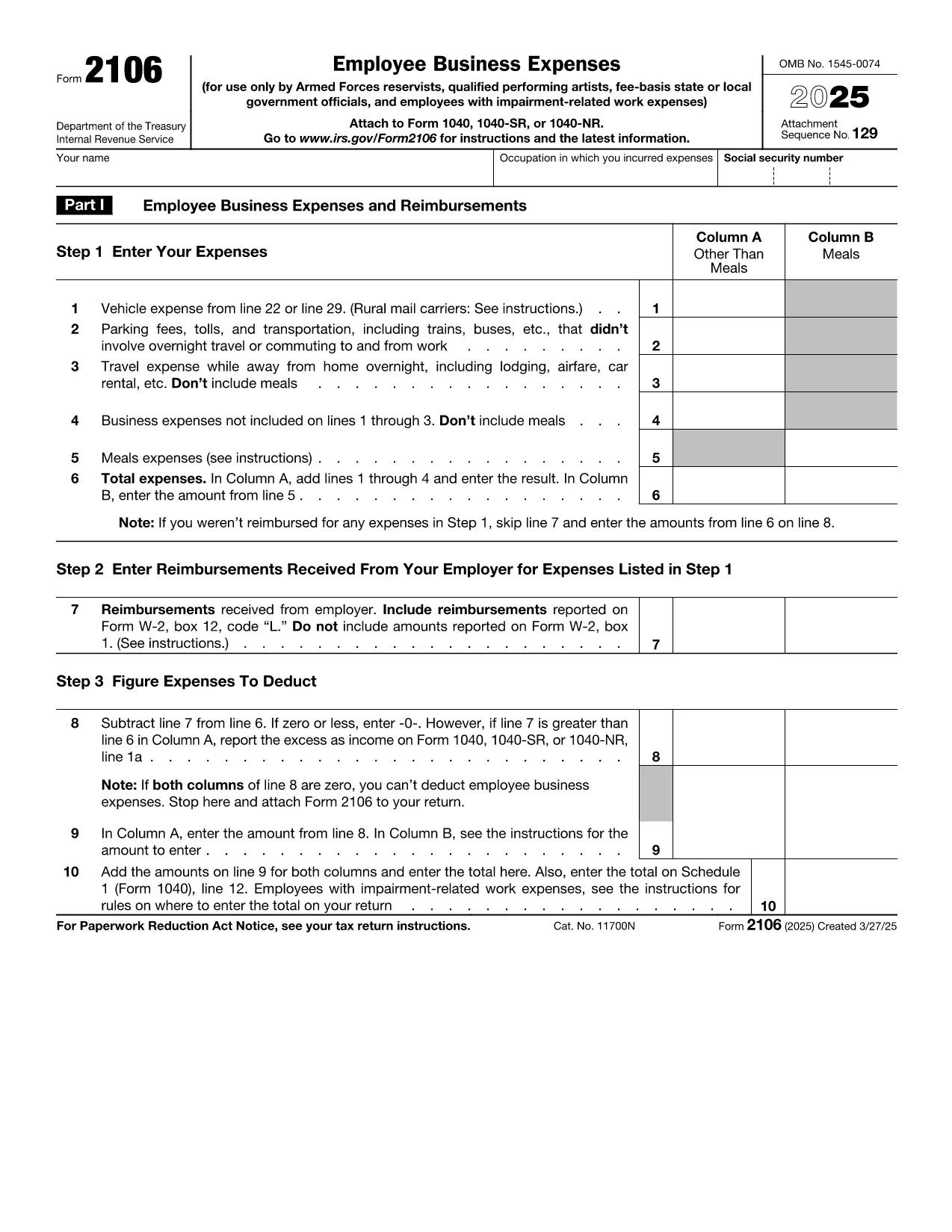
If you paid interest on a vehicle loan for business or employment purposes, IRS Form 2106 is the official document you need to claim that deduction. With Formize’s Fill out this form button, you can complete the form directly in your browser—no PDF editor required.

What Is IRS Form 2106?

Form 2106, Employee Business Expenses, allows employees to deduct ordinary and necessary expenses incurred while performing their job. The Vehicle Interest line (Part II, line 22) captures interest paid on a car loan used for work‑related travel.

How to Complete the Vehicle Interest Section

Follow these simple steps after clicking the “Fill out this form” button:

  1. Enter your name, Social Security Number, and employer’s EIN in the header.
  2. In Part II, locate Line 22 – Vehicle loan interest. Input the total interest paid during the tax year (see your loan statement).
  3. Provide a brief description of the vehicle’s business use (mileage, percentage, etc.).
  4. Attach supporting documentation (loan statements) when you file your return.

Common Mistakes & Tips for Accuracy

  • Don’t mix personal interest with business interest—only the portion attributable to business use is deductible.
  • Ensure the interest amount matches the figure on your lender’s year‑end statement.
  • Round mileage to the nearest whole number; the IRS does not accept fractions.
  • Double‑check that the form is signed and dated before submission.

Where to Submit the Completed Form

Attach Form 2106 to your Form 1040 when filing your individual tax return. If you e‑file, upload the PDF through your tax‑software’s “Supporting Documents” section.

Need a quick start? Click the button below, wait for the Formize PDF Filler app to load, and begin entering your information instantly.

よくある質問
  • Can I deduct interest on a personal vehicle?

    Only the portion of interest that relates to business use is deductible on Form 2106. Personal use interest is not allowed.

  • Do I need a separate form for vehicle expenses?

    Vehicle expenses (mileage, lease payments, interest, etc.) are all reported on Form 2106. Use the appropriate lines for each expense type.

  • What documentation should I keep?

    Keep loan statements showing interest paid, a mileage log, and any receipts that support the business‑use percentage.

  • Is Form 2106 still required for 2024?

    Yes. Employees who claim unreimbursed business expenses, including vehicle interest, must file Form 2106 with their 2024 Form 1040.

  • Can I e‑file Form 2106?

    Most tax software allows you to upload the completed Form 2106 PDF as a supporting document when you e‑file your return.

  • What if my employer reimburses my vehicle costs?

    Reimbursed amounts are not deductible. Only unreimbursed interest you actually paid can be claimed.

  • Is there a limit to the amount of vehicle interest I can deduct?

    The deduction is limited to the amount of interest actually paid and the percentage of business use. There is no separate dollar cap.

  • Do I need to file Form 2106 if I’m self‑employed?

    Self‑employed individuals report vehicle interest on Schedule C, not Form 2106.

  • How long should I keep the form and supporting documents?

    The IRS recommends retaining tax records, including Form 2106 and supporting documents, for at least three years after the filing date.

  • Will Formize store my completed form?

    Formize does not store your data. After you complete the form, you can download it to your device or upload it directly to your tax software.

方法

オンラインで 5 回の簡単なステップで vehicle interest tax form を無料で入力する方法:

  1. 1
    Open the Fillable Form
    Click the “Fill out this form” button on the page. The Formize PDF Filler will load in your browser.
  2. 2
    Enter Personal Information
    Fill in your name, SSN, and employer’s EIN in the header fields.
  3. 3
    Add Vehicle Interest Details
    Navigate to Part II, line 22. Type the total interest paid on your business vehicle loan and indicate the business‑use percentage.
  4. 4
    Review and Sign
    Check all entries for accuracy, then add your electronic signature and date.
  5. 5
    Save or Submit
    Download the completed PDF or submit it directly through your tax‑software’s attachment feature.
Formize PDF Filler アプリ
だいたい

納税フォーム

vehicle interest tax form は、税金に関する情報を関連する税務当局に報告するために使用される文書である納税申告書の 1 つです。納税者の状況や場所によって、連邦税、州税、地方税など、さまざまな種類の納税申告書があります。

特徴

PDFフィラー

オンラインで PDF フォームに記入する最も簡単な方法

  • vehicle interest tax form をすばやく入力してください
    vehicle interest tax form をオンラインですばやく入力する方法をお探しですか?オンラインの無料 PDF フォーム フィラーを使用すると、この PDF ドキュメントを 1 分以内に編集して入力する方法がわかります。
  • 使いやすいオンライン PDF エディター
    再スキャンして返送する前に、編集できるように PDF ファイルを印刷することにうんざりしていませんか? PDFドキュメントをオンラインで無料で編集.当社のオンライン PDF エディターを使用して、時間と紙を節約してください。
  • 優れたツール、すべてのプラットフォーム
    Mac で vehicle interest tax form を入力する方法や、PDF フィラーを無料で使用する方法を知りたいですか?当社のオンライン PDF ツールは、すべてのプラットフォームで動作します。
  • 安全なファイル ストレージ
    完成した「vehicle interest tax form」ファイルは、Amazon クラウド ホスティングが管理する安全なデータベースに保存されます。いつでもシステムからファイルを削除できます。いずれにせよ、これらのファイルは 24 時間後に自動的に削除されます。
  • {キーワード} とチャットする
    無料の PDF リーダー アシスタントである Chatize で「vehicle interest tax form」とチャットします。質問すると、「vehicle interest tax form」から回答が得られます。上の [ドキュメントとチャット] ボタンをクリックするだけです。

フィルセッションを削除

選択したフィルセッションを削除しますか?この場合、フォームへの記入の進捗状況は失われます。

編集セッションを削除する

選択した編集セッションを削除しますか?この場合、フォームの作成および編集の進行状況は失われます。