
hamburger-menu icon
Აირჩიეთ ენა

Form W‑4P Fillable PDF – Complete Your Pension Withholding Online

  1. ქვეყანა აშშ
  2. Ენა ინგლისური
  3. აქტივობა Გადასახადები
  4. დეპარტამენტი შიდა შემოსავლების სამსახური
Form W‑4P Fillable PDF – Complete Your Pension Withholding Online

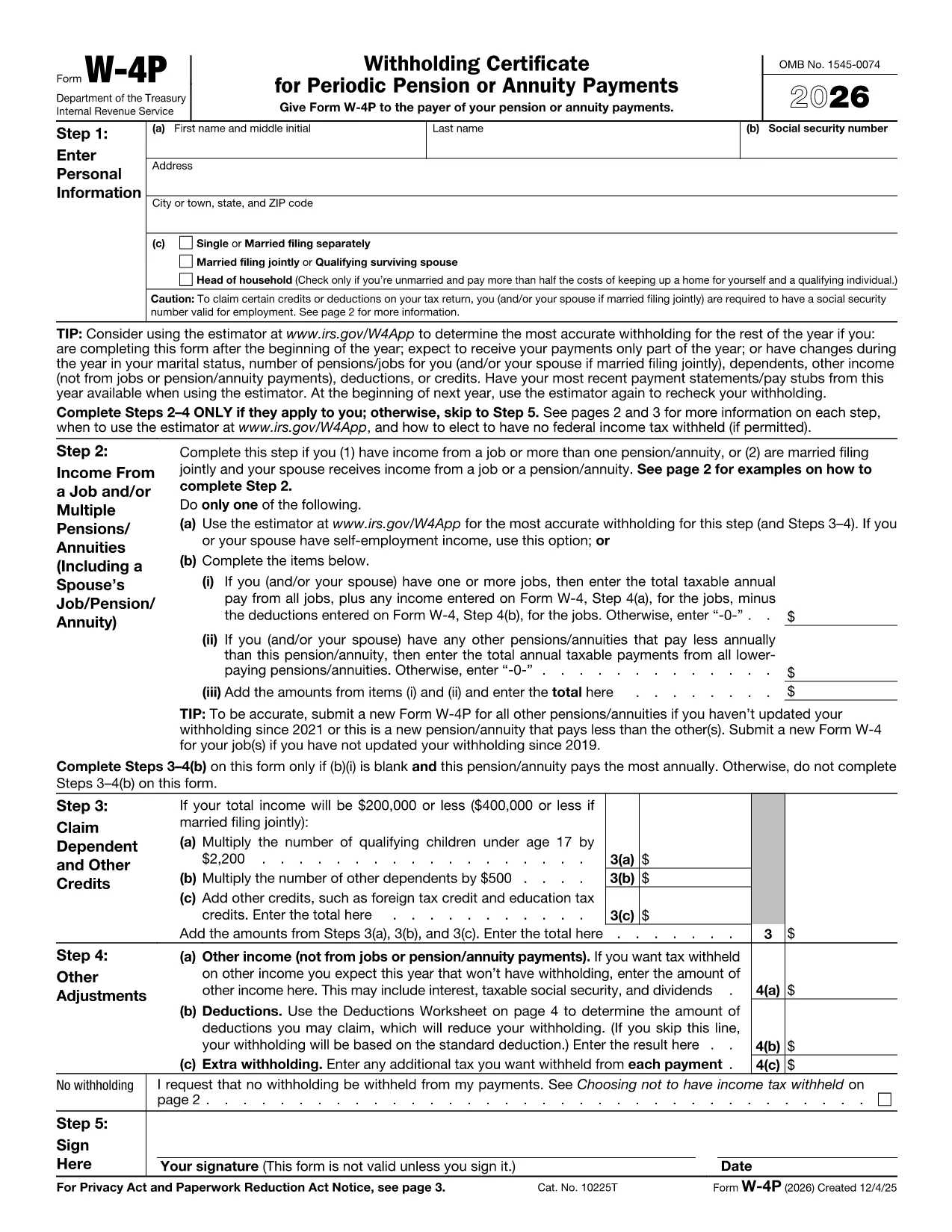
Form W‑4P is the IRS document used to request federal income‑tax withholding from pension, annuity, or other retirement payments. Instead of downloading a static PDF and hunting for a PDF editor, you can fill this form directly in your browser with Formize’s secure PDF Filler app.

What Is Form W‑4P?

The IRS Form W‑4P tells payers how much tax to withhold from retirement distributions. It is required for:

  • Traditional pensions
  • IRA distributions
  • Annuity payments
  • Social Security benefits (if you elect withholding)

Accurate completion helps you avoid an unexpected tax bill or over‑withholding that reduces your cash flow.

How to Fill Out Form W‑4P with Formize

Follow the simple steps below – no PDF software needed.

  1. Click the **"Fill out this form"** button on this page.
  2. Wait a few seconds while the Formize PDF Filler loads the fillable W‑4P template.
  3. Enter your personal information, tax filing status, and the amount you want withheld.
  4. Review the preview, then click **"Save & Download"** to get a completed PDF you can email or print.

The filler saves your data securely in the browser, so you stay in control of your personal details.

Common Mistakes & Tips for Accurate Completion

  • Incorrect filing status: Choose the status that matches your most recent tax return (single, married, etc.).
  • Leaving the withholding amount blank: If you want no tax withheld, write “0” in the appropriate box; otherwise, specify the exact dollar amount.
  • Outdated address: Ensure the mailing address is current; the payer uses this for any correspondence.
  • Signature: After downloading, print and sign the form before sending it to the payer.

Following these tips reduces the risk of processing delays and ensures your retirement income is taxed correctly.

Ready to get started? Click the button below and let Formize handle the heavy lifting.

FAQ
  • Who needs to file Form W‑4P?

    Anyone receiving pension, annuity, IRA distributions, or other retirement income who wants federal tax withheld.

  • Can I claim exemption from withholding on Form W‑4P?

    Yes, if you had no tax liability last year and expect none this year, you can write “Exempt” in the appropriate box.

  • How often should I update Form W‑4P?

    Update it whenever your filing status, number of dependents, or desired withholding amount changes.

  • Do I need to submit a new Form W‑4P each year?

    No, the form remains in effect until you submit a revised version or the payer notifies you otherwise.

  • What happens if I don’t submit Form W‑4P?

    The payer may withhold tax at the default rate (usually 10%), which could be higher than you need.

  • Is the Formize filler secure?

    Yes, all data is processed locally in your browser; nothing is stored on our servers.

  • Can I fill out Form W‑4P on a mobile device?

    Absolutely—Formize’s PDF Filler works on smartphones and tablets with modern browsers.

  • Do I need Adobe Acrobat to use this form?

    No. The online filler replaces Adobe Acrobat; you only need a web browser.

  • Where can I find official instructions for Form W‑4P?

    Visit the IRS page at IRS Instructions for Form W‑4P.

  • What if I make a mistake after submitting?

    Submit a new, corrected Form W‑4P to the payer as soon as possible to avoid incorrect withholding.

ᲠᲝᲒᲝᲠ

როგორ შეავსოთ Form W-4P PDF უფასოდ, ონლაინ 4 მარტივი ნაბიჯებით:

  1. 1
    Open the Fillable Form
    Click the "Fill out this form" button on the page. The Formize PDF Filler app will launch in a new window.
  2. 2
    Enter Your Information
    Fill in all required fields—name, SSN, address, filing status, and the amount you want withheld.
  3. 3
    Review and Save
    Check the preview for errors, then click "Save & Download" to obtain the completed PDF.
  4. 4
    Print and Sign
    Print the downloaded file, sign it, and send it to the payer (pension administrator, annuity provider, etc.).
PDF შემავსებლის აპლიკაციის ფორმირება
ᲨᲔᲡᲐᲮᲔᲑ

საგადასახადო ფორმები

Form W-4P PDF არის ერთ-ერთი საგადასახადო ფორმა, რომელიც წარმოადგენს დოკუმენტებს, რომლებიც გამოიყენება გადასახადებთან დაკავშირებული ინფორმაციის შესაბამის საგადასახადო ორგანოში მოსახსენებლად. არსებობს სხვადასხვა სახის საგადასახადო ფორმები, მათ შორის ფედერალური, სახელმწიფო და ადგილობრივი საგადასახადო ფორმები, რომლებიც შეიძლება განსხვავდებოდეს გადასახადის გადამხდელის გარემოებებისა და ადგილმდებარეობის მიხედვით.

ᲛᲐᲮᲐᲡᲘᲐᲗᲔᲑᲚᲔᲑᲘ

PDF შემავსებელი

ონლაინ Form W-4P PDF-ის შევსების უმარტივესი გზა

  • სწრაფად შეავსეთ Form W-4P PDF
    ეძებთ გზას სწრაფად შეავსოთ Form W-4P PDF ონლაინ? ჩვენი ონლაინ უფასო PDF ფორმის შემავსებლით, თქვენ გეცოდინებათ როგორ შეცვალოთ და შეავსოთ ეს pdf დოკუმენტი ერთ წუთზე ნაკლებ დროში.
  • მარტივი გამოსაყენებელი ონლაინ PDF რედაქტორი
    მოგბეზრდათ PDF ფაილების დაბეჭდვა, რათა მათი რედაქტირება შეძლოთ, ხელახლა სკანირებამდე და უკან გაგზავნამდე? შეცვალეთ PDF დოკუმენტები უფასოდ ონლაინ. გამოიყენეთ ჩვენი ონლაინ pdf რედაქტორი დროისა და ქაღალდის დაზოგვისთვის.
  • შესანიშნავი ხელსაწყოები, ყველა პლატფორმა
    გაინტერესებთ როგორ შეავსოთ Form W-4P PDF Mac-ზე, ან იქნებ როგორ გამოიყენოთ PDF შემავსებელი უფასოდ? ჩვენი ონლაინ PDF ინსტრუმენტები მუშაობს ყველა პლატფორმაზე.
  • ფაილების უსაფრთხო შენახვა
    დასრულებული „Form W-4P PDF“ ფაილები ინახება დაცულ მონაცემთა ბაზაში, რომელსაც მართავს Amazon Cloud ჰოსტინგი. თქვენ შეგიძლიათ წაშალოთ თქვენი ფაილები ჩვენი სისტემიდან ნებისმიერ დროს. ნებისმიერ შემთხვევაში, ეს ფაილები ავტომატურად იშლება 24 საათის შემდეგ.
  • ჩატი Form W-4P PDF-ით
    ესაუბრეთ „Form W-4P PDF“-ს Chatize-ზე, რომელიც არის PDF წამკითხველის უფასო ასისტენტი. დასვით კითხვები და მიიღეთ პასუხები „Form W-4P PDF“-დან. უბრალოდ დააწკაპუნეთ ღილაკზე ჩატი დოკუმენტთან ზემოთ.

შევსების სესიის წაშლა

წაშალოთ არჩეული შევსების სესია? ამ შემთხვევაში, თქვენი პროგრესი ფორმის შევსებაში დაიკარგება.

რედაქტირების სესიის წაშლა

წაშალოთ არჩეული რედაქტირების სესია? ამ შემთხვევაში, თქვენი პროგრესი ფორმის შექმნასა და რედაქტირებაში დაიკარგება.