
hamburger-menu icon
Აირჩიეთ ენა

IRS Form 8949 – Fillable PDF for Reporting House Sale Gains

  1. ქვეყანა აშშ
  2. Ენა ინგლისური
  3. აქტივობა Გადასახადები
  4. დეპარტამენტი IRS
IRS Form 8949 – Fillable PDF for Reporting House Sale Gains

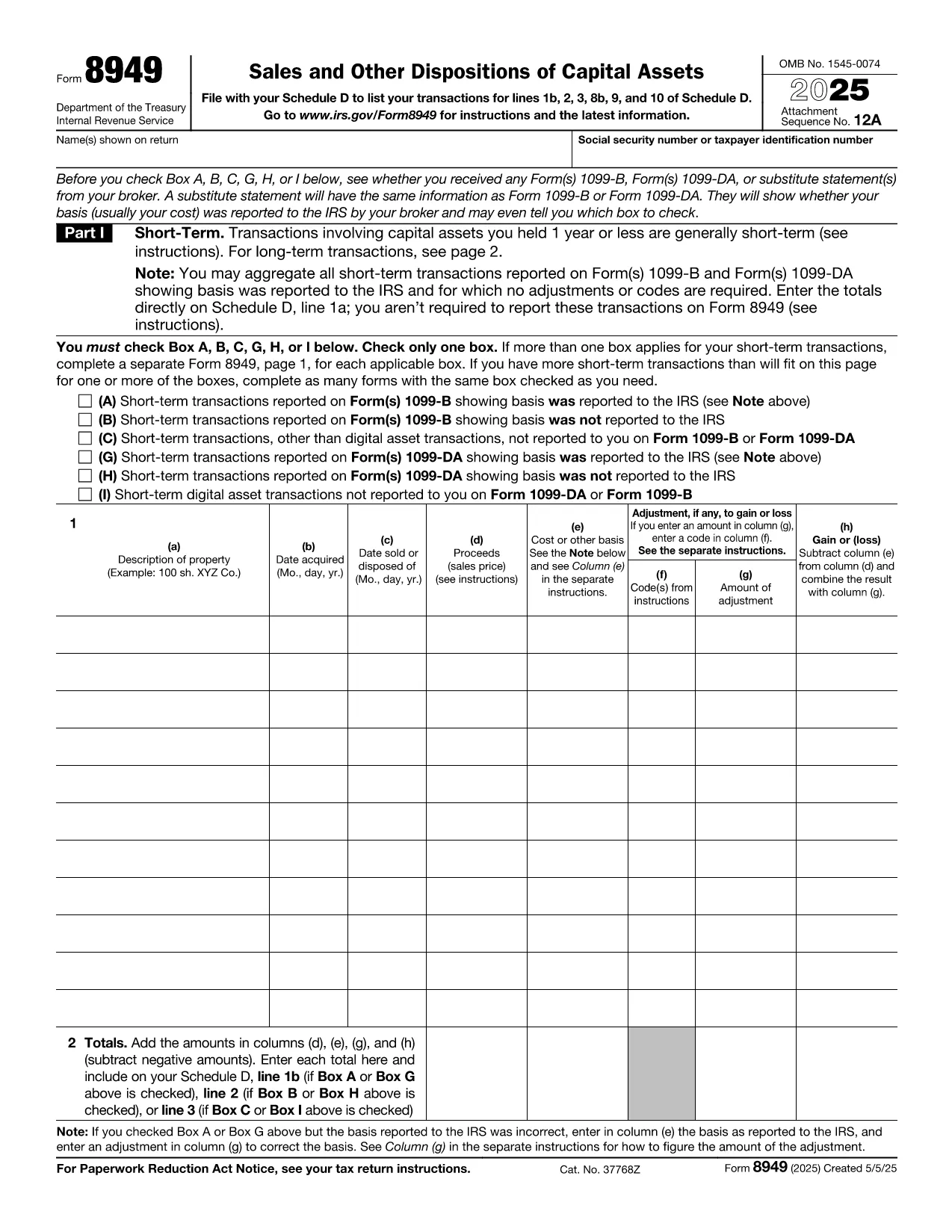
When you sell a primary residence or an investment property, the IRS requires you to report the transaction on Form 8949. This fillable PDF makes it easy to capture capital‑gain details, calculate taxable amounts, and attach the form to your Schedule D filing.

Why You Need Form 8949 After Selling a Home

The IRS Form 8949 is the official document for reporting sales of capital assets, including real estate. Even if you qualify for the home‑sale exclusion, you must still list the transaction on Form 8949 and then transfer the net gain (or loss) to Schedule D.

Key Sections of the Form Explained

  • Part I – Short‑Term Transactions: Use this section if you owned the property for one year or less.
  • Part II – Long‑Term Transactions: Most home sales fall here because the ownership period exceeds one year.
  • Column (a) – Description of Property: Enter the address of the house sold.
  • Column (b) – Date Acquired: Provide the purchase date (or construction date).
  • Column (c) – Date Sold: The closing date of the sale.
  • Column (d) – Proceeds: Gross amount received (usually from Form 1099‑S).
  • Column (e) – Cost or Adjusted Basis: Purchase price plus improvements, minus depreciation.
  • Column (f) – Adjustments: Any codes for exclusions, like the $250,000 (or $500,000) home‑sale exclusion.
  • Column (g) – Gain or (Loss): The calculator will auto‑populate when you fill the previous columns.

Common Mistakes to Avoid

  • Leaving Column (f) blank when the exclusion applies.
  • Using the wrong acquisition date (e.g., the date of a major renovation instead of the original purchase).
  • Reporting the sale on the wrong part of the form (short‑term vs. long‑term).
  • Forgetting to attach Form 8949 to Schedule D, which can delay processing.

How to Submit Your Completed Form

After you finish the fillable PDF, save it as a PDF file and attach it to your tax return when you file electronically through approved tax‑software, or print and mail it with your paper return. The Formize PDF Filler ensures the data is saved correctly, so you won’t have to re‑type anything.

Ready to start? Just click the button below and the Formize PDF Filler will load the fillable version of IRS Form 8949 directly in your browser.

FAQ
  • Do I need to file Form 8949 if I qualify for the home‑sale exclusion?

    Yes. Even if the entire gain is excluded, the IRS still requires you to list the sale on Form 8949 and then mark the exclusion in Column (f).

  • What is the difference between Part I and Part II of Form 8949?

    Part I reports short‑term capital gains (property held ≤1 year). Part II reports long‑term gains (property held >1 year), which is most common for home sales.

  • Can I use the same Form 8949 for multiple property sales?

    Yes. List each property on a separate line within the appropriate part of the form.

  • How do I calculate the adjusted basis for my house?

    Start with the purchase price, add capital improvements, and subtract any depreciation claimed (if the home was partially rented).

  • What code should I use for the $250,000/$500,000 exclusion?

    Enter code “B” in Column (f) and write “Home‑sale exclusion” in the accompanying description.

  • Do I need to attach Form 1099‑S with my return?

    If you received Form 1099‑S from the closing agent, attach it. It provides the gross proceeds that you report on Form 8949.

  • Is the fillable PDF compatible with Mac and Windows?

    Yes. The Formize PDF Filler works in any modern browser on macOS, Windows, Linux, and mobile devices.

  • What should I do if I discover an error after filing?

    Amend your return using Form 1040‑X and attach a corrected Form 8949 with the proper figures.

ᲠᲝᲒᲝᲠ

როგორ შეავსოთ tax form after selling house უფასოდ, ონლაინ 5 მარტივი ნაბიჯებით:

  1. 1
    Click the Fill‑out Button
    Press the “Fill out this form” button on the page. The Formize PDF Filler app will open in a new tab.
  2. 2
    Wait for the Filler to Load
    The app loads the fillable IRS Form 8949 instantly. No download or extra software is needed.
  3. 3
    Enter Your Information
    Complete each column (description, dates, proceeds, basis, adjustments). The calculator auto‑fills the gain/loss column.
  4. 4
    Review and Save
    Double‑check for errors, then click “Save PDF”. Your completed form is ready to attach to Schedule D.
  5. 5
    Submit with Your Tax Return
    Upload the saved PDF to your e‑file software or print and mail it with your paper return.
PDF შემავსებლის აპლიკაციის ფორმირება
ᲨᲔᲡᲐᲮᲔᲑ

საგადასახადო ფორმები

tax form after selling house არის ერთ-ერთი საგადასახადო ფორმა, რომელიც წარმოადგენს დოკუმენტებს, რომლებიც გამოიყენება შემოსავლის, გამოქვითვისა და საგადასახადო ვალდებულების შესატყობინებლად შესაბამის საგადასახადო ორგანოში. ეს ფორმები წარმოადგენს საგადასახადო შეტანის პროცესის არსებით ნაწილს და გამოიყენება იმისთვის, რომ უზრუნველყონ ფიზიკური პირები და ბიზნესი შეასრულონ საგადასახადო კანონმდებლობა და ზუსტად გამოთვალონ თავიანთი საგადასახადო ვალდებულებები.

საჭირო კონკრეტული საგადასახადო ფორმები შეიძლება განსხვავდებოდეს ისეთი ფაქტორების მიხედვით, როგორიცაა პიროვნების განაცხადის სტატუსი, შემოსავლის წყარო და ქვეყნის საგადასახადო კანონმდებლობა. თუმცა, აქ მოცემულია საგადასახადო ფორმების რამდენიმე გავრცელებული ტიპი:

ინდივიდუალური საშემოსავლო გადასახადის ფორმები: ეს ფორმები, როგორიცაა 1040 სერია შეერთებულ შტატებში გამოიყენება ფიზიკური პირების მიერ თავიანთი შემოსავალის შესახებ, გამოქვითვებისა და კრედიტების მოთხოვნით და მათი საგადასახადო ვალდებულების გამოთვლა.

ბიზნესის საგადასახადო ფორმები: ბიზნესებს, მათ შორის ინდივიდუალურ მეწარმეებს, ამხანაგობებს, კორპორაციებს და თვითდასაქმებულ პირებს, შეიძლება მოუწიონ სხვადასხვა ფორმის წარდგენა თავიანთი შემოსავლის, ხარჯებისა და გადასახადების შესახებ. მაგალითებია განრიგი C (მოგება ან ზარალი ბიზნესიდან) და ფორმა 1120 (აშშ კორპორაციის საშემოსავლო გადასახადის დეკლარაცია).

დასაქმების საგადასახადო ფორმები: დამსაქმებლებს მოეთხოვებათ შეატყობინონ თანამშრომელთა ხელფასები და დააკავონ და გადაიხადონ სახელფასო გადასახადები. ამ მიზნით გამოიყენება ისეთი ფორმები, როგორიცაა W-2 (ხელფასი და საგადასახადო განცხადება) და 941 (დამსაქმებლის კვარტალური ფედერალური საგადასახადო დეკლარაცია).

ინვესტიციისა და საპენსიო ანგარიშის ფორმები: ეს ფორმები გამოიყენება საინვესტიციო შემოსავლების, კაპიტალის მოგებისა და ზარალის, აგრეთვე საპენსიო ანგარიშებიდან შენატანებისა და განაწილების შესახებ. მაგალითებია ფორმა 1099-DIV (დივიდენდები და დისტრიბუციები) და ფორმა 5498 (IRA კონტრიბუციის ინფორმაცია).

ქონებისა და საჩუქრების გადასახადის ფორმები: როდესაც ადამიანი გარდაიცვალა ან აკეთებს მნიშვნელოვან საჩუქრებს, კონკრეტული ფორმები, როგორიცაა ფორმა 706 (შეერთებული შტატების ქონების (და თაობის გამოტოვების) საგადასახადო დეკლარაცია) და ფორმა 709 (შეერთებული შტატების საჩუქარი (და თაობა- გადარიცხვის გამოტოვება) საგადასახადო დეკლარაცია) გამოიყენება ნებისმიერი მოქმედი ქონების ან საჩუქრის გადასახადის დასაანგარიშებლად და გამოსათვლელად.

მნიშვნელოვანია აღინიშნოს, რომ საგადასახადო კანონები და ფორმები შეიძლება შეიცვალოს დროთა განმავლობაში, ამიტომ ფიზიკურმა და ბიზნესმა უნდა მიმართონ შესაბამის საგადასახადო ორგანოს ან მოიძიონ პროფესიული საგადასახადო რჩევა მიმდინარე მოთხოვნებთან შესაბამისობის უზრუნველსაყოფად.

ᲛᲐᲮᲐᲡᲘᲐᲗᲔᲑᲚᲔᲑᲘ

PDF შემავსებელი

ონლაინ tax form after selling house-ის შევსების უმარტივესი გზა

  • სწრაფად შეავსეთ tax form after selling house
    ეძებთ გზას სწრაფად შეავსოთ tax form after selling house ონლაინ? ჩვენი ონლაინ უფასო PDF ფორმის შემავსებლით, თქვენ გეცოდინებათ როგორ შეცვალოთ და შეავსოთ ეს pdf დოკუმენტი ერთ წუთზე ნაკლებ დროში.
  • მარტივი გამოსაყენებელი ონლაინ PDF რედაქტორი
    მოგბეზრდათ PDF ფაილების დაბეჭდვა, რათა მათი რედაქტირება შეძლოთ, ხელახლა სკანირებამდე და უკან გაგზავნამდე? შეცვალეთ PDF დოკუმენტები უფასოდ ონლაინ. გამოიყენეთ ჩვენი ონლაინ pdf რედაქტორი დროისა და ქაღალდის დაზოგვისთვის.
  • შესანიშნავი ხელსაწყოები, ყველა პლატფორმა
    გაინტერესებთ როგორ შეავსოთ tax form after selling house Mac-ზე, ან იქნებ როგორ გამოიყენოთ PDF შემავსებელი უფასოდ? ჩვენი ონლაინ PDF ინსტრუმენტები მუშაობს ყველა პლატფორმაზე.
  • ფაილების უსაფრთხო შენახვა
    დასრულებული „tax form after selling house“ ფაილები ინახება დაცულ მონაცემთა ბაზაში, რომელსაც მართავს Amazon Cloud ჰოსტინგი. თქვენ შეგიძლიათ წაშალოთ თქვენი ფაილები ჩვენი სისტემიდან ნებისმიერ დროს. ნებისმიერ შემთხვევაში, ეს ფაილები ავტომატურად იშლება 24 საათის შემდეგ.
  • ჩატი tax form after selling house-ით
    ესაუბრეთ „tax form after selling house“-ს Chatize-ზე, რომელიც არის PDF წამკითხველის უფასო ასისტენტი. დასვით კითხვები და მიიღეთ პასუხები „tax form after selling house“-დან. უბრალოდ დააწკაპუნეთ ღილაკზე ჩატი დოკუმენტთან ზემოთ.

შევსების სესიის წაშლა

წაშალოთ არჩეული შევსების სესია? ამ შემთხვევაში, თქვენი პროგრესი ფორმის შევსებაში დაიკარგება.

რედაქტირების სესიის წაშლა

წაშალოთ არჩეული რედაქტირების სესია? ამ შემთხვევაში, თქვენი პროგრესი ფორმის შექმნასა და რედაქტირებაში დაიკარგება.