hamburger-menu icon
Აირჩიეთ ენა

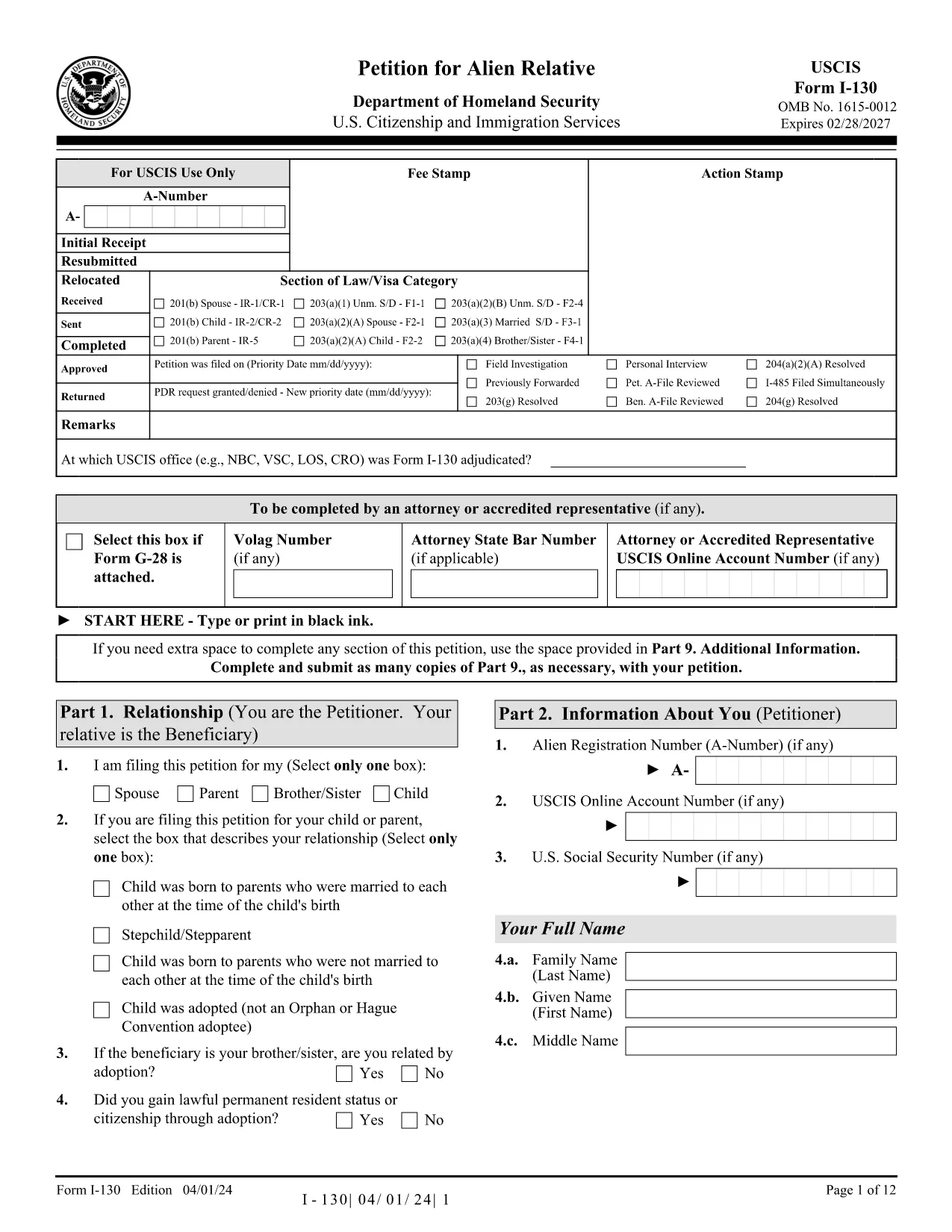
Fillable I-130 Petition for Alien Relative – Complete Online

  1. ქვეყანა აშშ
  2. Ენა ინგლისური
  3. დეპარტამენტი USCIS
  4. აქტივობა Საიმიგრაციო
Fillable I-130 Petition for Alien Relative – Complete Online

The I-130, Petition for Alien Relative is the first step for U.S. citizens and permanent residents who want to bring a family member to the United States. Historically you would download a static PDF, print it, hand‑write answers, and mail it to USCIS. With Formize’s Fillable I-130 PDF, you can complete the entire petition directly in your browser—no PDF editor required.

What Is the I-130 Form?

The I-130 establishes a qualifying relationship between the petitioner (U.S. citizen or green‑card holder) and the beneficiary (spouse, child, parent, or sibling). USCIS uses this form to verify eligibility before processing a visa or adjustment of status application.

How to Fill the I-130 Online with Formize

Follow the simple steps below to complete the form in minutes:

  • Click the "Fill out this form" button on this page.
  • Wait while the Formize PDF Filler app loads the official USCIS I-130 PDF.
  • Enter your information in the highlighted fields. The filler auto‑saves as you type.
  • Use the built‑in validation to catch missing or incorrectly formatted data.
  • When finished, download the completed PDF or print it for submission.

Common Mistakes to Avoid

Even with a fillable form, some errors can delay your case. Keep an eye out for:

  • Incorrect relationship wording – USCIS expects precise terms (e.g., "biological son" vs. "step‑son").
  • Missing signatures – The petitioner and, when required, the interpreter must sign.
  • Wrong dates – Use the MM/DD/YYYY format and double‑check birth dates.
  • Unclear photocopies – If you attach supporting documents, ensure they are legible.

Submission Tips & Next Steps

After downloading the completed I-130 PDF, you have two filing options:

  1. Online filing through USCIS myUSCIS – Upload the PDF, pay the filing fee, and track your case.
  2. Paper filing – Mail the PDF and supporting documents to the address listed in the form instructions.

Remember to keep a copy of the submitted form for your records. The Formize filler also lets you export a clean, searchable PDF for easy storage.

Frequently Asked Questions

Below are answers to the most common questions about the I-130 petition.

FAQ
  • Who can file an I-130 petition?

    U.S. citizens and lawful permanent residents (green‑card holders) can file an I-130 for spouses, children, parents, and siblings.

  • What is the filing fee for the I-130?

    As of 2024, the fee is $535. Fees are payable online through myUSCIS or by check when filing a paper petition.

  • Can I file the I-130 online instead of using a PDF?

    Yes. USCIS allows online filing through the myUSCIS portal, but many prefer the fillable PDF for offline review before uploading.

  • How long does USCIS take to process an I-130?

    Processing times vary by relationship and service center, ranging from 6 months for spouses to over 2 years for siblings.

  • Do I need to include supporting documents?

    Yes. Include proof of the qualifying relationship (marriage certificate, birth certificates, etc.) and any required translations.

  • What happens after the I-130 is approved?

    If the beneficiary is abroad, the case moves to the National Visa Center for consular processing. If already in the U.S., they may file for adjustment of status.

  • Can I edit the I-130 after I’ve submitted it?

    Once submitted, you cannot edit the form. If you discover an error, file a new I-130 and request a withdrawal of the original.

ᲠᲝᲒᲝᲠ

როგორ შეავსოთ I-130 PDF უფასოდ, ონლაინ 5 მარტივი ნაბიჯებით:

  1. 1
    Open the Fillable Form
    Click the "Fill out this form" button on this page. The Formize PDF Filler will open the official I-130 PDF in a new window.
  2. 2
    Load the Formize PDF Filler
    Wait a few seconds while the app loads. All fillable fields become highlighted for easy entry.
  3. 3
    Enter Your Information
    Type your answers directly into each field. The filler automatically saves your progress and checks for formatting errors.
  4. 4
    Validate and Review
    Use the built‑in validation to ensure every required field is completed and signatures are added.
  5. 5
    Download or Submit
    When the form is complete, click "Download PDF" to save a copy, or print it for mailing to USCIS.
PDF შემავსებლის აპლიკაციის ფორმირება
ᲨᲔᲡᲐᲮᲔᲑ

I-130 PDF შაბლონი

PDF დოკუმენტის სანახავად და შევსების ფუნქციების ტრადიციული ნაკრებით, ვებ აპლიკაციის უპირატესობებთან და საპასუხო განლაგებასთან ერთად, შეგიძლიათ შეავსოთ I-130 PDF წუთებში.

ᲛᲐᲮᲐᲡᲘᲐᲗᲔᲑᲚᲔᲑᲘ

PDF შემავსებელი

ონლაინ I-130 PDF-ის შევსების უმარტივესი გზა

  • სწრაფად შეავსეთ I-130 PDF
    ეძებთ გზას სწრაფად შეავსოთ I-130 PDF ონლაინ? ჩვენი ონლაინ უფასო PDF ფორმის შემავსებლით, თქვენ გეცოდინებათ როგორ შეცვალოთ და შეავსოთ ეს pdf დოკუმენტი ერთ წუთზე ნაკლებ დროში.
  • მარტივი გამოსაყენებელი ონლაინ PDF რედაქტორი
    მოგბეზრდათ PDF ფაილების დაბეჭდვა, რათა მათი რედაქტირება შეძლოთ, ხელახლა სკანირებამდე და უკან გაგზავნამდე? შეცვალეთ PDF დოკუმენტები უფასოდ ონლაინ. გამოიყენეთ ჩვენი ონლაინ pdf რედაქტორი დროისა და ქაღალდის დაზოგვისთვის.
  • შესანიშნავი ხელსაწყოები, ყველა პლატფორმა
    გაინტერესებთ როგორ შეავსოთ I-130 PDF Mac-ზე, ან იქნებ როგორ გამოიყენოთ PDF შემავსებელი უფასოდ? ჩვენი ონლაინ PDF ინსტრუმენტები მუშაობს ყველა პლატფორმაზე.
  • ფაილების უსაფრთხო შენახვა
    დასრულებული „I-130 PDF“ ფაილები ინახება დაცულ მონაცემთა ბაზაში, რომელსაც მართავს Amazon Cloud ჰოსტინგი. თქვენ შეგიძლიათ წაშალოთ თქვენი ფაილები ჩვენი სისტემიდან ნებისმიერ დროს. ნებისმიერ შემთხვევაში, ეს ფაილები ავტომატურად იშლება 24 საათის შემდეგ.
  • ჩატი I-130 PDF-ით
    ესაუბრეთ „I-130 PDF“-ს Chatize-ზე, რომელიც არის PDF წამკითხველის უფასო ასისტენტი. დასვით კითხვები და მიიღეთ პასუხები „I-130 PDF“-დან. უბრალოდ დააწკაპუნეთ ღილაკზე ჩატი დოკუმენტთან ზემოთ.

შევსების სესიის წაშლა

წაშალოთ არჩეული შევსების სესია? ამ შემთხვევაში, თქვენი პროგრესი ფორმის შევსებაში დაიკარგება.

რედაქტირების სესიის წაშლა

წაშალოთ არჩეული რედაქტირების სესია? ამ შემთხვევაში, თქვენი პროგრესი ფორმის შექმნასა და რედაქტირებაში დაიკარგება.