
언어 선택

Schedule C – Profit or Loss from Business (Fillable PDF)

  1. 국가 미국
  2. 언어 영어
  3. 활동 구실
  4. 부서 국세청
Schedule C – Profit or Loss from Business (Fillable PDF)

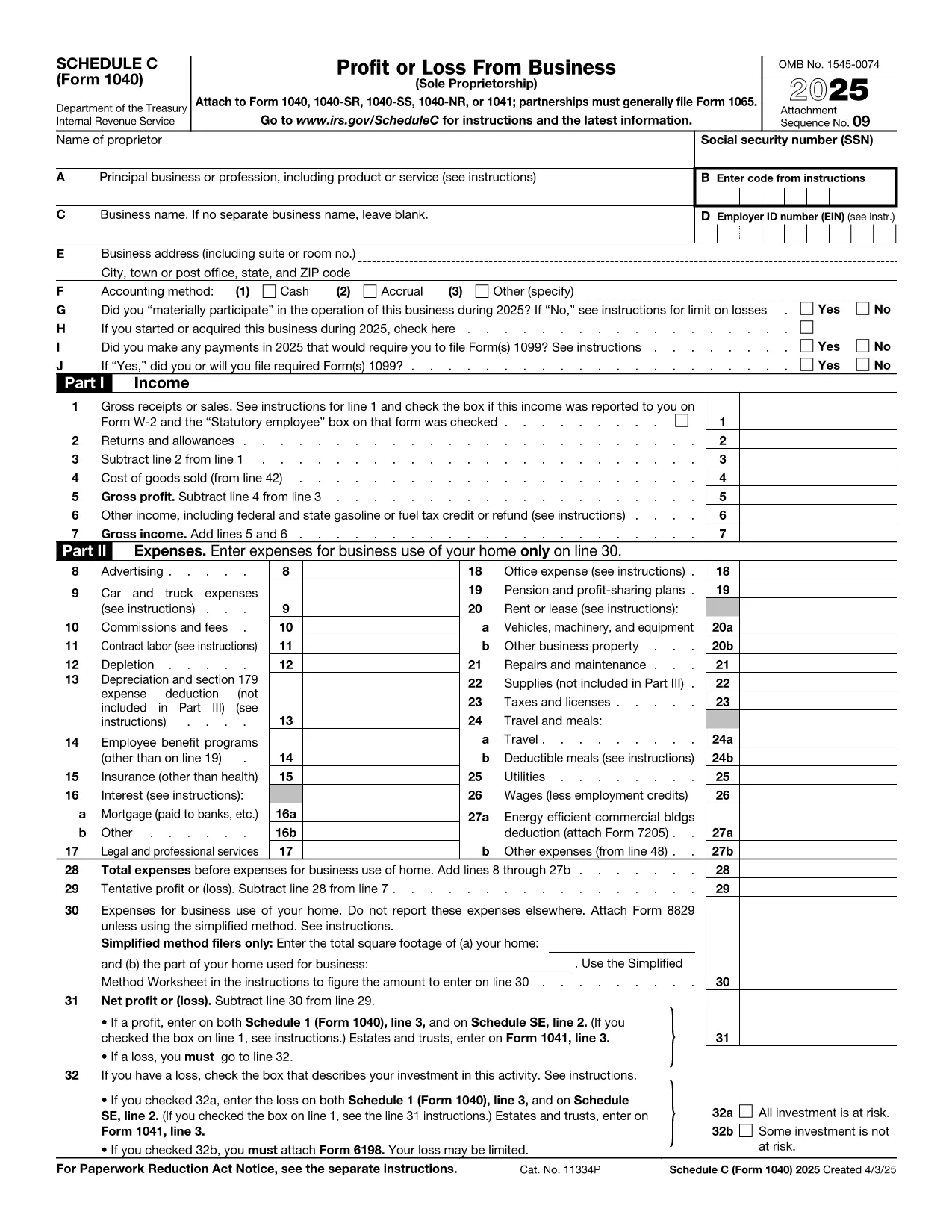
Schedule C (Form 1040) is the IRS form used by sole proprietors, single‑member LLCs, and independent contractors to report profit or loss from a business. Our fillable PDF lets you complete the form directly in your browser—no Adobe Acrobat or printer required.

What Is Schedule C and Who Needs It?

The Schedule C form captures income, expenses, cost of goods sold, and vehicle mileage for a trade or business. If you earned self‑employment income in the last tax year, you’ll likely need to file Schedule C with your Form 1040.

Key Sections of the Schedule C Form

  • Part I – Income: Gross receipts, returns, and other income.
  • Part II – Expenses: Advertising, car expenses, depreciation, supplies, and more.
  • Part III – Cost of Goods Sold: Beginning inventory, purchases, and ending inventory.
  • Part IV – Information About Your Vehicle: Mileage and expenses if you use a car for business.
  • Part V – Other Expenses: Any additional costs not listed in Part II.

How to Fill Out Schedule C Online

Instead of downloading the PDF and opening it in a desktop editor, simply click the “Fill out this form” button below. The Formize PDF Filler app will load in seconds, and you can start entering your numbers right away.

Common Mistakes & Tips

  • Double‑check that all income is reported—missed cash sales can trigger an audit.
  • Keep receipts for every expense; the IRS may request documentation.
  • Use the correct expense categories; mis‑classifying can reduce your deduction.
  • Don’t forget to fill out the vehicle information section if you claim mileage.
  • Review the totals in Part I and Part II to ensure they balance before attaching to Form 1040.

When you’re finished, you can download a completed PDF, print it, or submit it electronically with your tax return.

지침

자주하는 질문
  • Who must file Schedule C?

    Anyone who earned self‑employment income, operated a sole proprietorship, or had a single‑member LLC taxed as a disregarded entity must file Schedule C with their Form 1040.

  • Can I use Schedule C for multiple businesses?

    Yes. If you run more than one trade or profession, you file a separate Schedule C for each business and attach all of them to your return.

  • What expenses are deductible on Schedule C?

    Ordinary and necessary business expenses such as advertising, rent, utilities, supplies, vehicle costs, depreciation, home‑office expenses, and cost of goods sold are deductible.

  • Do I need a separate EIN for Schedule C?

    An EIN is not required; you can use your Social Security Number. However, an EIN is recommended if you have employees or want to keep personal and business IDs separate.

  • How do I report home‑office expenses?

    Complete Form 8829 to calculate the home‑office deduction, then transfer the amount to Schedule C, line 30.

  • What if I discover an error after filing?

    File Form 1040‑X, Amended U.S. Individual Income Tax Return, and attach a corrected Schedule C showing the updated numbers.

어떻게

5개의 간단한 단계를 통해 온라인으로 Schedule C PDF를 무료로 작성하는 방법:

  1. 1
    Click the Fill Out Button
    Press the “Fill out this form” button on this page. The Formize PDF Filler will open in a new tab.
  2. 2
    Wait for the Filler to Load
    The app loads the fillable Schedule C PDF in seconds—no download required.
  3. 3
    Enter Your Information
    Complete each field, following the on‑screen prompts for income, expenses, and vehicle data.
  4. 4
    Review and Validate
    Use the built‑in calculator to verify totals and correct any errors before saving.
  5. 5
    Save, Print or E‑File
    Download the finished PDF, print a hard copy, or attach it to your electronic tax filing.
Formize PDF 필러 앱
에 대한

국세청(IRS) 양식

Schedule C PDF는 미국에서 소득 신고, 공제 및 세액공제 청구, 납세 의무 계산, 기타 세금 관련 의무 이행에 사용되는 공식 세금 양식 중 하나입니다. IRS는 미국 내 수입법을 관리하고 집행하는 연방 기관입니다.

다음은 국세청 양식의 몇 가지 예입니다.

양식 1040: 이는 대부분의 납세자가 사용하는 기본 개인 소득세 신고 양식입니다. 이는 다양한 유형의 소득을 신고하고, 공제 및 세액공제를 청구하고, 납세 의무를 계산하고, 납세자가 추가 세금을 납부해야 하는지 또는 환급받을 자격이 있는지 여부를 결정하는 데 사용됩니다.

양식 1099: 양식 1099에는 1099-MISC, 1099-INT, 1099-DIV 등. 이 양식은 자영업 등 고용 이외의 다양한 출처에서 개인이나 기업이 받은 소득을 신고하는 데 사용됩니다. 소득, 이자소득, 배당소득, 임대소득이 있습니다.

양식 W-2: 이 양식은 고용주가 직원에게 지급한 임금과 세금을 신고하는 데 사용됩니다. 급여에서 원천징수됩니다. 직원들은 양식 W-2의 정보를 사용하여 개인 세금 신고서를 작성합니다.

양식 941: 고용주는 이 양식을 사용하여 원천징수된 연방 소득세, 사회보장세, 메디케어 세금을 포함하여 직원에 대한 고용세를 신고합니다.

양식 1065: 이 양식은 파트너십이 소득, 공제 및 납세 의무를 신고하는 데 사용됩니다. 파트너십 자체는 소득세를 납부하지 않습니다. 대신 파트너는 개인 세금 신고서에 파트너십 소득 지분을 보고합니다.

양식 1120: 이는 C 기업이 소득을 보고하기 위해 사용하는 법인 소득세 신고서입니다. 공제 및 세금 책임.

양식 990: 이 양식은 비영리 단체 및 자선 단체와 같은 면세 조직에서 다음을 수행하는 데 사용됩니다. 재무 정보, 활동 및 세법 준수 여부를 보고합니다.

양식 8862: 이 양식은 이전에 근로소득세액공제(EITC)를 신청한 납세자가 사용합니다. 하지만 허용되지 않았는데 이제 다시 소유권을 주장하고 싶습니다.

이는 다양한 세금 관련 의무를 이행하기 위해 존재하는 수많은 IRS 양식 중 몇 가지 예일 뿐입니다. 개인이나 사업체에 필요한 특정 양식은 고유한 상황, 소득원 및 공제액에 따라 다릅니다. 특정 IRS에 관한 정확한 최신 정보를 얻으려면 국세청 공식 웹사이트(www.irs.gov)를 참조하거나 세무 전문 조언을 구하는 것이 좋습니다. 귀하의 세금 상황과 관련된 양식입니다.

특징

PDF 필러

온라인에서 PDF 양식을 채우는 가장 쉬운 방법

  • Schedule C PDF를 빠르게 작성하세요.
    온라인에서 Schedule C PDF을(를) 빠르게 채우는 방법을 찾고 계십니까? 온라인 무료 PDF 양식 필러를 사용하면 1분 이내에 이 PDF 문서를 편집하고 채우는 방법을 알 수 있습니다.
  • 사용하기 쉬운 온라인 PDF 편집기
    다시 스캔하여 다시 보내기 전에 편집할 수 있도록 PDF 파일을 인쇄하는 데 지쳤습니까? 온라인에서 무료로 PDF 문서를 편집하세요. 온라인 PDF 편집기를 사용하여 시간과 종이를 절약하십시오.
  • 훌륭한 도구, 모든 플랫폼
    Mac에서 Schedule C PDF를 채우는 방법이나 PDF 필러를 무료로 사용하는 방법이 궁금하십니까? 당사의 온라인 PDF 도구는 모든 플랫폼에서 작동합니다.
  • 안전한 파일 저장
    완료된 "Schedule C PDF" 파일은 Amazon 클라우드 호스팅에서 관리하는 보안 데이터베이스에 저장됩니다. 언제든지 시스템에서 파일을 삭제할 수 있습니다. 어쨌든 이러한 파일은 24시간 후에 자동으로 삭제됩니다.
  • Schedule C PDF님과 채팅
    무료 PDF 리더 도우미인 Chatize에서 "Schedule C PDF"와 채팅하세요. "Schedule C PDF"에서 질문하고 답변을 받으세요. 위의 문서와 채팅 버튼을 클릭하세요.

필링 세션 삭제

선택한 필링 세션을 삭제하시겠습니까?이 경우 양식 작성 진행 상황이 손실됩니다.

편집 세션 삭제

선택한 편집 세션을 삭제하시겠습니까? 이 경우 양식 작성 및 편집 진행 상황이 손실됩니다.