
언어 선택

IRS Form 1099‑SA – Fillable HSA Distribution Tax Form

  1. 국가 미국
  2. 언어 영어
  3. 활동 구실
  4. 부서 국세청
IRS Form 1099‑SA – Fillable HSA Distribution Tax Form

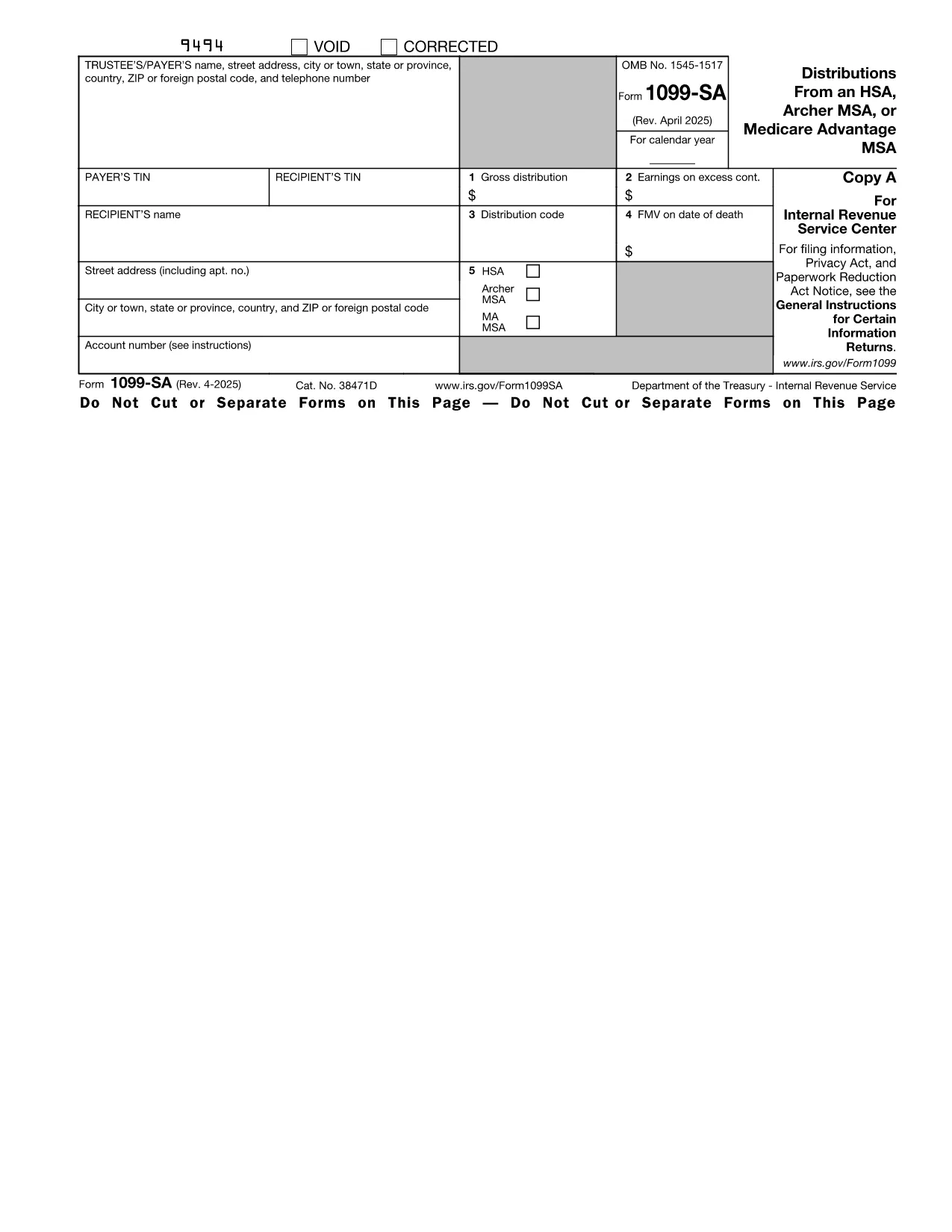
The IRS Form 1099‑SA reports distributions from a Health Savings Account (HSA), Archer MSA, or Medicare Advantage MSA. Financial institutions issue this form to you and the IRS whenever you receive a distribution. Accurate reporting is essential to avoid penalties and to correctly calculate any taxable amount on your tax return.

What Is Form 1099‑SA?

Form 1099‑SA is a one‑page informational return that shows the total amount distributed from your HSA during the calendar year, the type of distribution (e.g., normal, excess, or rollover), and any federal income tax withheld. You use the information on this form when completing Form 8889 (Health Savings Accounts) on your individual tax return.

How to Fill Out the HSA Distribution Form Online

Instead of downloading the PDF and opening it in a separate editor, simply click the "Fill out this form" button on this page. The Formize PDF Filler app will load directly in your browser, letting you complete every field instantly.

Common Mistakes to Avoid

  • Entering the wrong distribution code – double‑check the box that matches the reason for the distribution.
  • Omitting the amount of federal tax withheld – even a $0 entry must be entered.
  • Failing to sign the form if you are printing it for paper filing.
  • Using the wrong tax year version – make sure you are on the 2023 (or current year) PDF.

Where to Submit Your Completed Form

Form 1099‑SA is sent to the IRS by the payer (your bank or HSA custodian). You, the recipient, keep a copy for your records and use the figures when preparing your personal tax return. If you file electronically, the data from the fillable PDF can be imported directly into most tax‑software programs.

Need a printable copy? After you finish filling the form in Formize, click **Download PDF** and print it for your records.

지침

자주하는 질문
  • Do I need to file Form 1099‑SA with the IRS?

    No. The payer (your HSA custodian) files Form 1099‑SA with the IRS. You keep the copy for your records and use the information on your personal return.

  • What is the distribution code on Form 1099‑SA?

    The code indicates why the money was taken out (e.g., normal distribution, excess contribution, rollover). Choose the code that matches your situation to avoid errors on Form 8889.

  • Can I edit a downloaded PDF after I fill it in Formize?

    Yes. After you complete the form, you can download the PDF and reopen it in any standard PDF editor if further changes are needed.

  • Is there a fee to use the Formize PDF Filler?

    Formize offers a free basic filler for most IRS forms, including Form 1099‑SA. No credit‑card information is required.

  • What if my HSA custodian issued a corrected Form 1099‑SA?

    Download the corrected PDF, fill it out again using Formize, and keep both versions for your records. Use the corrected amounts when completing Form 8889.

  • How long should I keep Form 1099‑SA?

    Retain the form for at least three years from the date you filed your tax return, as required by IRS record‑keeping rules.

  • Can I fill out Form 1099‑SA on a mobile device?

    Yes. The Formize PDF Filler is responsive and works on smartphones and tablets as long as you have a modern browser.

어떻게

5개의 간단한 단계를 통해 온라인으로 Form 1099-SA를 무료로 작성하는 방법:

  1. 1
    Click the Fill‑out Button
    On this page, click the blue "Fill out this form" button. The Formize PDF Filler will open in a new tab.
  2. 2
    Wait for the Filler to Load
    The app loads within seconds. You’ll see a fully interactive version of Form 1099‑SA ready for input.
  3. 3
    Enter Your Information
    Type directly into each field—payer name, distribution amount, tax withheld, and distribution code. All calculations are automatic.
  4. 4
    Review and Save
    Double‑check every entry, then click "Save" to store the completed PDF in your browser or download it to your device.
  5. 5
    Print or Submit
    Print a hard copy for your records or upload the saved PDF to your tax‑software program.
Formize PDF 필러 앱
에 대한

세금 양식

Form 1099-SA는 개인 또는 기업의 소득, 공제 및 납세 의무에 대한 정보를 관련 세무 당국에 보고하는 데 사용되는 문서인 세금 양식 중 하나입니다. 이 양식은 세법을 준수하고 납세 의무를 이행하는 데 필요합니다. 세금 양식은 국가 및 특정 세금 요건에 따라 다릅니다. 다음은 몇 가지 일반적인 세금 양식 유형입니다.

개인 세금 양식: 이 양식은 개인 납세자가 개인 소득과 청구 공제, 공제 및 면제를 신고하는 데 사용됩니다. 예를 들어 미국의 1040 양식 또는 영국의 자진 신고서 양식이 있습니다.

사업세 양식: 사업세 양식은 회사, 파트너십 또는 자영업자가 사업 소득, 비용 및 기타 세금 관련 정보를 보고하는 데 사용됩니다. 예를 들어 미국의 Schedule C 양식(사업 이익 또는 손실) 또는 영국의 CT600 양식(회사 세금 신고서)이 있습니다.

급여 세금 양식: 이 양식은 고용주가 직원의 급여에서 원천징수된 임금, 급여 및 세금을 보고하는 데 사용됩니다. 예를 들어 미국의 W-2 양식 또는 영국의 P60 양식이 있습니다.

판매세 양식: 판매세 양식은 기업이 과세 대상 상품이나 서비스에 대해 징수한 판매세를 신고하고 송금하는 데 사용됩니다. 구체적인 판매세 양식은 관할권에 따라 다릅니다.

부가가치세(VAT) 양식: VAT 양식은 판매 시 징수된 VAT를 신고 및 납부하고 구매 시 VAT 공제를 청구하기 위해 부가가치세를 부과하는 국가에서 사용됩니다. 그 예로는 많은 국가에서 사용되는 VAT 신고 양식이 있습니다.

추정 세금 양식: 추정 세금 양식은 자영업 소득, 투자 소득 등 원천징수 대상이 아닌 소득에 대한 추정세를 신고하고 납부하는 데 사용됩니다.

이는 존재할 수 있는 수많은 세금 양식 중 몇 가지 예일 뿐입니다. 필요한 특정 양식은 해당 국가 또는 관할권의 세법 및 규정에 따라 다릅니다. 귀하의 상황에 어떤 양식이 적용되는지 결정하려면 세무 당국의 지침을 참조하거나 전문가의 조언을 구하는 것이 중요합니다.

특징

PDF 필러

온라인에서 PDF 양식을 채우는 가장 쉬운 방법

  • Form 1099-SA를 빠르게 작성하세요.
    온라인에서 Form 1099-SA을(를) 빠르게 채우는 방법을 찾고 계십니까? 온라인 무료 PDF 양식 필러를 사용하면 1분 이내에 이 PDF 문서를 편집하고 채우는 방법을 알 수 있습니다.
  • 사용하기 쉬운 온라인 PDF 편집기
    다시 스캔하여 다시 보내기 전에 편집할 수 있도록 PDF 파일을 인쇄하는 데 지쳤습니까? 온라인에서 무료로 PDF 문서를 편집하세요. 온라인 PDF 편집기를 사용하여 시간과 종이를 절약하십시오.
  • 훌륭한 도구, 모든 플랫폼
    Mac에서 Form 1099-SA를 채우는 방법이나 PDF 필러를 무료로 사용하는 방법이 궁금하십니까? 당사의 온라인 PDF 도구는 모든 플랫폼에서 작동합니다.
  • 안전한 파일 저장
    완료된 "Form 1099-SA" 파일은 Amazon 클라우드 호스팅에서 관리하는 보안 데이터베이스에 저장됩니다. 언제든지 시스템에서 파일을 삭제할 수 있습니다. 어쨌든 이러한 파일은 24시간 후에 자동으로 삭제됩니다.
  • Form 1099-SA님과 채팅
    무료 PDF 리더 도우미인 Chatize에서 "Form 1099-SA"와 채팅하세요. "Form 1099-SA"에서 질문하고 답변을 받으세요. 위의 문서와 채팅 버튼을 클릭하세요.

필링 세션 삭제

선택한 필링 세션을 삭제하시겠습니까?이 경우 양식 작성 진행 상황이 손실됩니다.

편집 세션 삭제

선택한 편집 세션을 삭제하시겠습니까? 이 경우 양식 작성 및 편집 진행 상황이 손실됩니다.