
언어 선택

IRS 1099‑SA HSA Distribution Form – Fillable PDF

  1. 국가 미국
  2. 언어 영어
  3. 활동 구실
  4. 부서 IRS
IRS 1099‑SA HSA Distribution Form – Fillable PDF

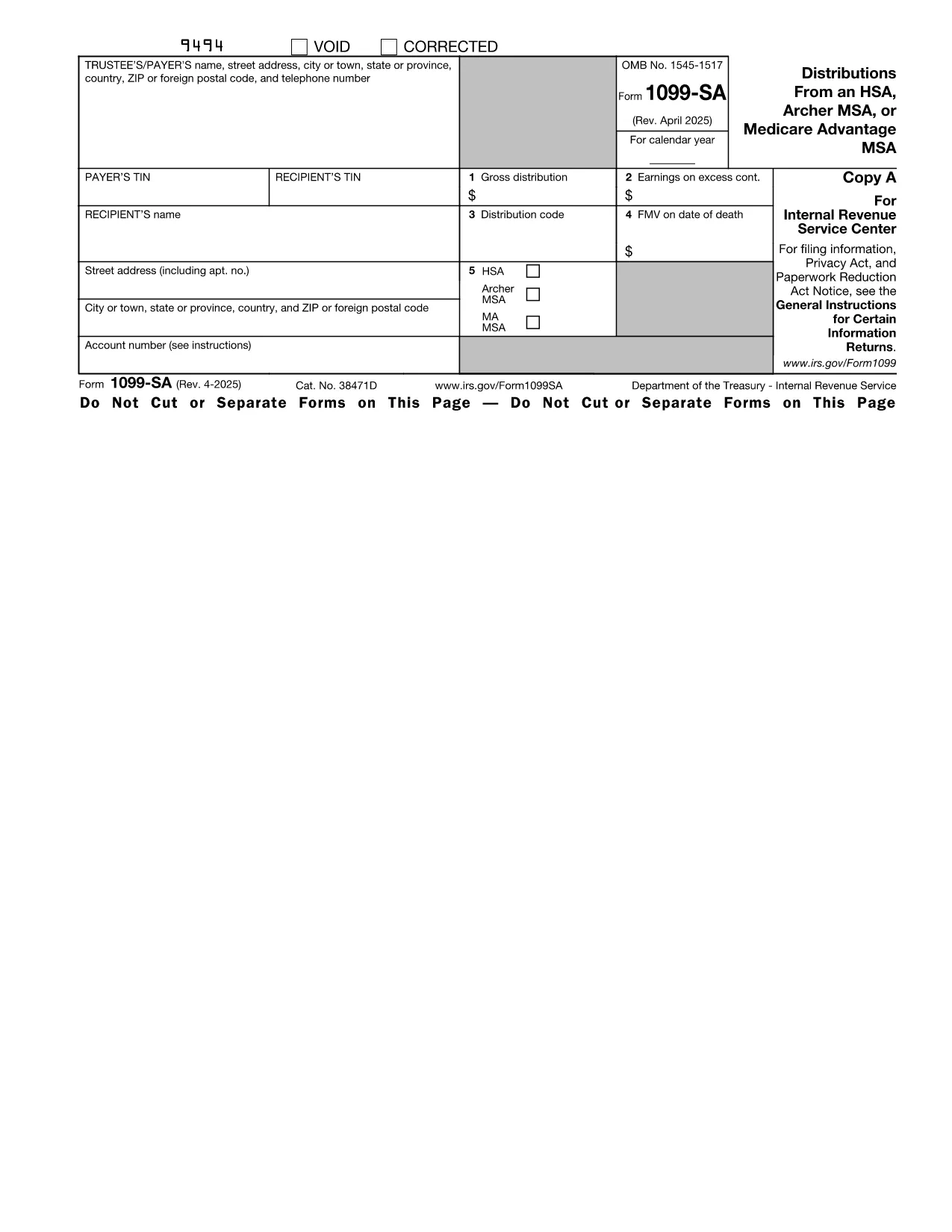
The IRS Form 1099‑SA is the official tax document used to report distributions from a Health Savings Account (HSA), Archer MSA, or Medicare Advantage MSA. Whether you took a qualified medical expense withdrawal or a non‑qualified distribution, the information must be reported to the IRS and to the account holder.

Formize provides a fillable PDF version of the 1099‑SA so you can complete it online, save a copy, and print or email it directly to the IRS—no additional PDF editor required.

What Is the 1099‑SA HSA Distribution Form?

The 1099‑SA captures the total amount distributed from your HSA during the tax year, the taxable portion, and any earnings that must be reported as income. The form is issued by the HSA trustee (bank, credit union, or other custodian) and must be attached to your individual tax return (Form 1040).

How to Fill Out the Form Using Formize

Instead of downloading the PDF and opening it in a separate editor, simply click the "Fill out this form" button on this page. The Formize PDF Filler app will load in your browser, letting you type directly into each field.

Common Mistakes & Tips for Accurate Filing

  • Incorrect payer information – double‑check the trustee’s name, address, and EIN.
  • Mis‑classifying qualified vs. non‑qualified withdrawals – only qualified medical expenses are tax‑free.
  • Leaving Box 2 (Taxable amount) blank – the IRS requires this even if the amount is $0.
  • Using the wrong tax year – the form must reflect the calendar year in which the distribution occurred.

Where to Submit the Completed 1099‑SA

After you finish the form in Formize, you can:

  • Download a PDF copy for your records.
  • Print and mail it to the IRS with your Form 1040.
  • Email the PDF to your HSA trustee if they accept electronic submissions.

Always keep a copy for your personal files in case the IRS requests additional documentation.

자주하는 질문
  • Do I need a PDF editor to fill out Form 1099‑SA?

    No. Formize’s online PDF filler lets you complete the form directly in your browser without any additional software.

  • Can I edit the form after I download it?

    Yes. The saved PDF remains fully editable in any standard PDF viewer, but it’s easier to make changes before downloading by using the Formize filler.

  • What is the deadline for filing a 1099‑SA?

    The payer must furnish the form to the recipient by January 31 and file with the IRS by February 28 (paper) or March 31 (electronic) of the following year.

  • Is a distribution always taxable?

    Only non‑qualified withdrawals are taxable. Qualified medical expense distributions are tax‑free, but you still report them on the 1099‑SA.

  • What happens if I make a mistake on the form?

    Correct the error in the Formize filler, save a new version, and resend the corrected form to the IRS and the account holder. You may also need to file a corrected 1099‑SA (Form 1099‑SA Corrected).

  • Do I need to attach supporting documents?

    Generally, you do not attach receipts with the 1099‑SA, but keep documentation of qualified expenses in case of an audit.

  • Can I use this form for a Medicare Advantage MSA?

    Yes. Form 1099‑SA covers distributions from HSAs, Archer MSAs, and Medicare Advantage MSAs.

  • Is the fillable PDF free to use?

    Yes. Formize provides the fillable version at no cost; you only pay if you choose premium features like e‑signatures.

어떻게

5개의 간단한 단계를 통해 온라인으로 HSA distribution form를 무료로 작성하는 방법:

  1. 1
    Open the Fillable Form
    Click the "Fill out this form" button on this page. The Formize PDF Filler will launch directly in your browser.
  2. 2
    Enter Your Information
    Type into each highlighted field—payer details, recipient name, distribution amount, taxable amount, and any applicable codes.
  3. 3
    Review for Accuracy
    Use the built‑in validation to ensure all required fields are completed and numbers add up correctly.
  4. 4
    Save or Print
    When finished, click "Save PDF" to download a copy, or click "Print" to produce a hard copy for mailing to the IRS.
  5. 5
    Submit to the IRS
    Attach the completed 1099‑SA to your Form 1040 filing, or follow your HSA trustee’s electronic submission guidelines.
Formize PDF 필러 앱
에 대한

세금 양식

HSA distribution form는 세금 관련 정보를 해당 세무 당국에 보고하는 데 사용되는 문서인 세금 양식 중 하나입니다. 납세자의 상황과 위치에 따라 연방, 주 및 지방 세금 양식을 포함하여 다양한 유형의 세금 양식이 있습니다.

특징

PDF 필러

온라인에서 PDF 양식을 채우는 가장 쉬운 방법

  • HSA distribution form를 빠르게 작성하세요.
    온라인에서 HSA distribution form을(를) 빠르게 채우는 방법을 찾고 계십니까? 온라인 무료 PDF 양식 필러를 사용하면 1분 이내에 이 PDF 문서를 편집하고 채우는 방법을 알 수 있습니다.
  • 사용하기 쉬운 온라인 PDF 편집기
    다시 스캔하여 다시 보내기 전에 편집할 수 있도록 PDF 파일을 인쇄하는 데 지쳤습니까? 온라인에서 무료로 PDF 문서를 편집하세요. 온라인 PDF 편집기를 사용하여 시간과 종이를 절약하십시오.
  • 훌륭한 도구, 모든 플랫폼
    Mac에서 HSA distribution form를 채우는 방법이나 PDF 필러를 무료로 사용하는 방법이 궁금하십니까? 당사의 온라인 PDF 도구는 모든 플랫폼에서 작동합니다.
  • 안전한 파일 저장
    완료된 "HSA distribution form" 파일은 Amazon 클라우드 호스팅에서 관리하는 보안 데이터베이스에 저장됩니다. 언제든지 시스템에서 파일을 삭제할 수 있습니다. 어쨌든 이러한 파일은 24시간 후에 자동으로 삭제됩니다.
  • HSA distribution form님과 채팅
    무료 PDF 리더 도우미인 Chatize에서 "HSA distribution form"와 채팅하세요. "HSA distribution form"에서 질문하고 답변을 받으세요. 위의 문서와 채팅 버튼을 클릭하세요.

필링 세션 삭제

선택한 필링 세션을 삭제하시겠습니까?이 경우 양식 작성 진행 상황이 손실됩니다.

편집 세션 삭제

선택한 편집 세션을 삭제하시겠습니까? 이 경우 양식 작성 및 편집 진행 상황이 손실됩니다.