
언어 선택

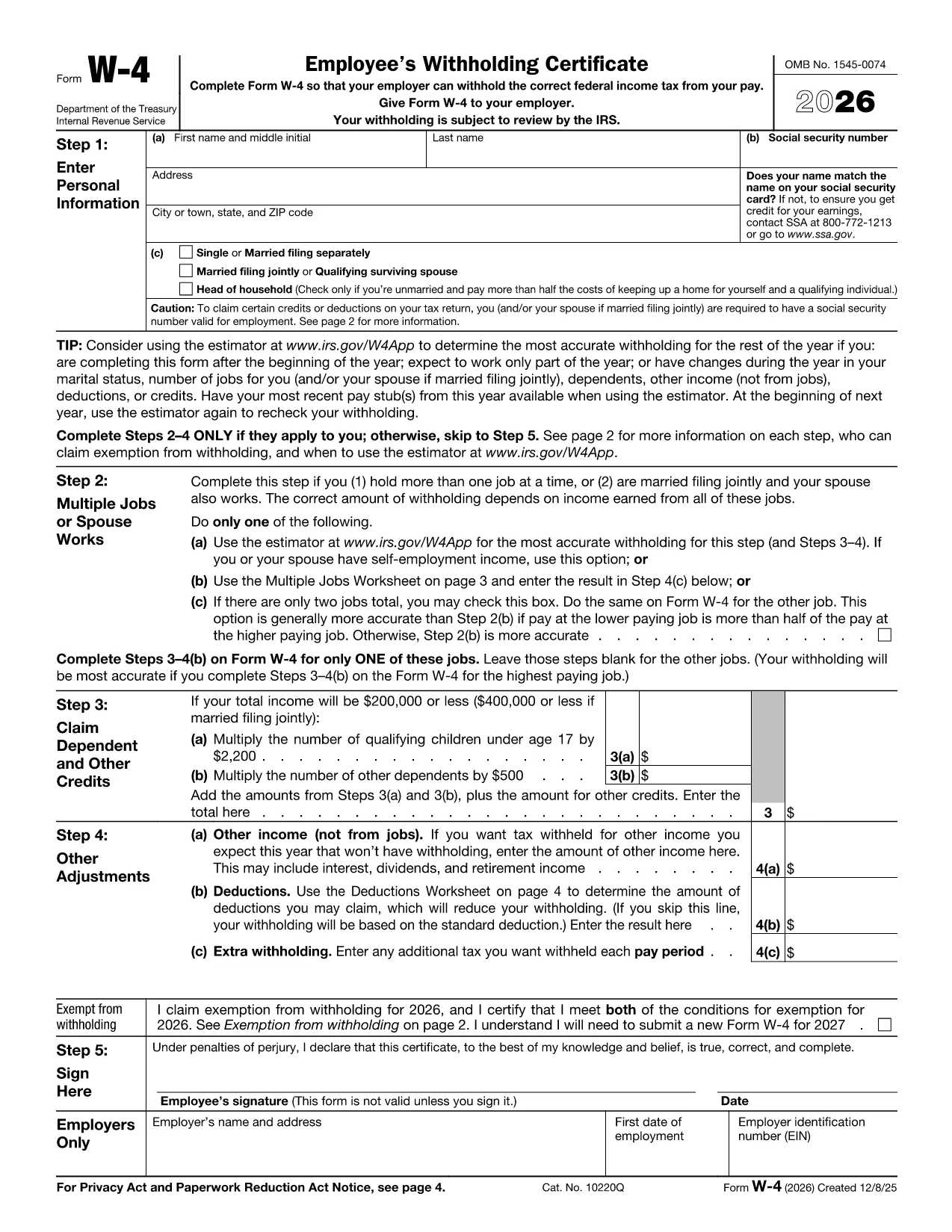
Kaiser Tax Form W‑4 – Fillable PDF Online

  1. 국가 미국
  2. 언어 영어
  3. 활동 구실
  4. 부서 IRS
Kaiser Tax Form W‑4 – Fillable PDF Online

Employers like Kaiser Permanente require the IRS Form W‑4 to determine the correct amount of federal income tax to withhold from each paycheck. Instead of printing, printing, and manually entering data, you can fill out the fillable Kaiser tax form directly in your browser.

Why Choose the Fillable Kaiser Tax Form?

The fillable PDF is:

  • Secure – data never leaves the Formize platform unless you choose to download.
  • Fast – no need to install a PDF editor; the Formize PDF Filler loads in seconds.
  • Accurate – built‑in validation prevents common entry errors.

How to Complete the Kaiser W‑4 Online

Follow the simple steps below. The process works on any modern browser and on both desktop and mobile devices.

Common Mistakes & Tips for Accurate Filing

Avoid these pitfalls to ensure your tax withholding is correct:

  • Leaving the Step 2 (multiple jobs) blank when you have more than one job.
  • Incorrectly claiming dependents – double‑check the numbers.
  • Not updating the form after a life‑event (marriage, new child, etc.).

Where to Submit or Save Your Completed Form

Once you finish, you can:

  • Download a PDF copy and give it to your HR department.
  • Save it to a cloud storage service (Google Drive, OneDrive, etc.).
  • Print it directly from the Formize interface.

Need help? Review the FAQ section below or contact your HR representative for specific Kaiser policies.

자주하는 질문
  • Is the Kaiser W‑4 form really fillable online?

    Yes. The PDF hosted by the IRS is fully fillable in the Formize PDF Filler, so you never need a separate editor.

  • Do I need Adobe Acrobat to complete the form?

    No. Formize provides a browser‑based filler that works without any additional software.

  • Can I save my progress and return later?

    While the Formize session does not autosave, you can download a partially completed PDF and reload it later.

  • Is my personal data safe?

    All data stays in your browser until you choose to download or print. Formize does not store any information on its servers.

  • What if I make a mistake after submitting to HR?

    You can submit a new, corrected W‑4 at any time. Just repeat the steps above and give the updated copy to HR.

  • Do I need to fill out a new W‑4 each year?

    Only if your tax situation changes (e.g., marriage, dependents, second job). Otherwise the existing form remains valid.

  • Can I use this form for state tax withholding?

    The federal W‑4 only covers federal withholding. Check with your state’s tax agency for a separate state form.

  • What browsers are supported?

    Formize works with the latest versions of Chrome, Edge, Firefox, and Safari.

  • Is there a cost to use the Formize PDF Filler?

    No. The filler is free for standard PDFs like the IRS W‑4.

  • Where can I find the official PDF source?

    The official IRS version is hosted at the URL provided in the “pdf” field below.

어떻게

4개의 간단한 단계를 통해 온라인으로 Kaiser tax form를 무료로 작성하는 방법:

  1. 1
    Click the Fillable Form Button
    On this page, locate the blue “Fill out this form” button and click it. The Formize PDF Filler app will open in a new tab.
  2. 2
    Wait for the Formize PDF Filler to Load
    A short loading screen appears while the fillable PDF is prepared. This usually takes less than 5 seconds.
  3. 3
    Enter Your Information
    Type directly into each field – the form validates entries in real time (e.g., Social Security Number format, numeric fields).
  4. 4
    Review and Save
    Use the “Review” button to double‑check all entries, then click “Download” to save a copy or “Print” to send a hard copy to HR.
Formize PDF 필러 앱
에 대한

세금 양식

Kaiser tax form는 개인 또는 기업의 소득, 공제 및 납세 의무에 대한 정보를 관련 세무 당국에 보고하는 데 사용되는 문서인 세금 양식 중 하나입니다. 이 양식은 세법을 준수하고 납세 의무를 이행하는 데 필요합니다. 세금 양식은 국가 및 특정 세금 요건에 따라 다릅니다. 다음은 몇 가지 일반적인 세금 양식 유형입니다.

개인 세금 양식: 이 양식은 개인 납세자가 개인 소득과 청구 공제, 공제 및 면제를 신고하는 데 사용됩니다. 예를 들어 미국의 1040 양식 또는 영국의 자진 신고서 양식이 있습니다.

사업세 양식: 사업세 양식은 회사, 파트너십 또는 자영업자가 사업 소득, 비용 및 기타 세금 관련 정보를 보고하는 데 사용됩니다. 예를 들어 미국의 Schedule C 양식(사업 이익 또는 손실) 또는 영국의 CT600 양식(회사 세금 신고서)이 있습니다.

급여 세금 양식: 이 양식은 고용주가 직원의 급여에서 원천징수된 임금, 급여 및 세금을 보고하는 데 사용됩니다. 예를 들어 미국의 W-2 양식 또는 영국의 P60 양식이 있습니다.

판매세 양식: 판매세 양식은 기업이 과세 대상 상품이나 서비스에 대해 징수한 판매세를 신고하고 송금하는 데 사용됩니다. 구체적인 판매세 양식은 관할권에 따라 다릅니다.

부가가치세(VAT) 양식: VAT 양식은 판매 시 징수된 VAT를 신고 및 납부하고 구매 시 VAT 공제를 청구하기 위해 부가가치세를 부과하는 국가에서 사용됩니다. 그 예로는 많은 국가에서 사용되는 VAT 신고 양식이 있습니다.

추정 세금 양식: 추정 세금 양식은 자영업 소득, 투자 소득 등 원천징수 대상이 아닌 소득에 대한 추정세를 신고하고 납부하는 데 사용됩니다.

이는 존재할 수 있는 수많은 세금 양식 중 몇 가지 예일 뿐입니다. 필요한 특정 양식은 해당 국가 또는 관할권의 세법 및 규정에 따라 다릅니다. 귀하의 상황에 어떤 양식이 적용되는지 결정하려면 세무 당국의 지침을 참조하거나 전문가의 조언을 구하는 것이 중요합니다.

특징

PDF 필러

온라인에서 PDF 양식을 채우는 가장 쉬운 방법

  • Kaiser tax form를 빠르게 작성하세요.
    온라인에서 Kaiser tax form을(를) 빠르게 채우는 방법을 찾고 계십니까? 온라인 무료 PDF 양식 필러를 사용하면 1분 이내에 이 PDF 문서를 편집하고 채우는 방법을 알 수 있습니다.
  • 사용하기 쉬운 온라인 PDF 편집기
    다시 스캔하여 다시 보내기 전에 편집할 수 있도록 PDF 파일을 인쇄하는 데 지쳤습니까? 온라인에서 무료로 PDF 문서를 편집하세요. 온라인 PDF 편집기를 사용하여 시간과 종이를 절약하십시오.
  • 훌륭한 도구, 모든 플랫폼
    Mac에서 Kaiser tax form를 채우는 방법이나 PDF 필러를 무료로 사용하는 방법이 궁금하십니까? 당사의 온라인 PDF 도구는 모든 플랫폼에서 작동합니다.
  • 안전한 파일 저장
    완료된 "Kaiser tax form" 파일은 Amazon 클라우드 호스팅에서 관리하는 보안 데이터베이스에 저장됩니다. 언제든지 시스템에서 파일을 삭제할 수 있습니다. 어쨌든 이러한 파일은 24시간 후에 자동으로 삭제됩니다.
  • Kaiser tax form님과 채팅
    무료 PDF 리더 도우미인 Chatize에서 "Kaiser tax form"와 채팅하세요. "Kaiser tax form"에서 질문하고 답변을 받으세요. 위의 문서와 채팅 버튼을 클릭하세요.

필링 세션 삭제

선택한 필링 세션을 삭제하시겠습니까?이 경우 양식 작성 진행 상황이 손실됩니다.

편집 세션 삭제

선택한 편집 세션을 삭제하시겠습니까? 이 경우 양식 작성 및 편집 진행 상황이 손실됩니다.