
언어 선택

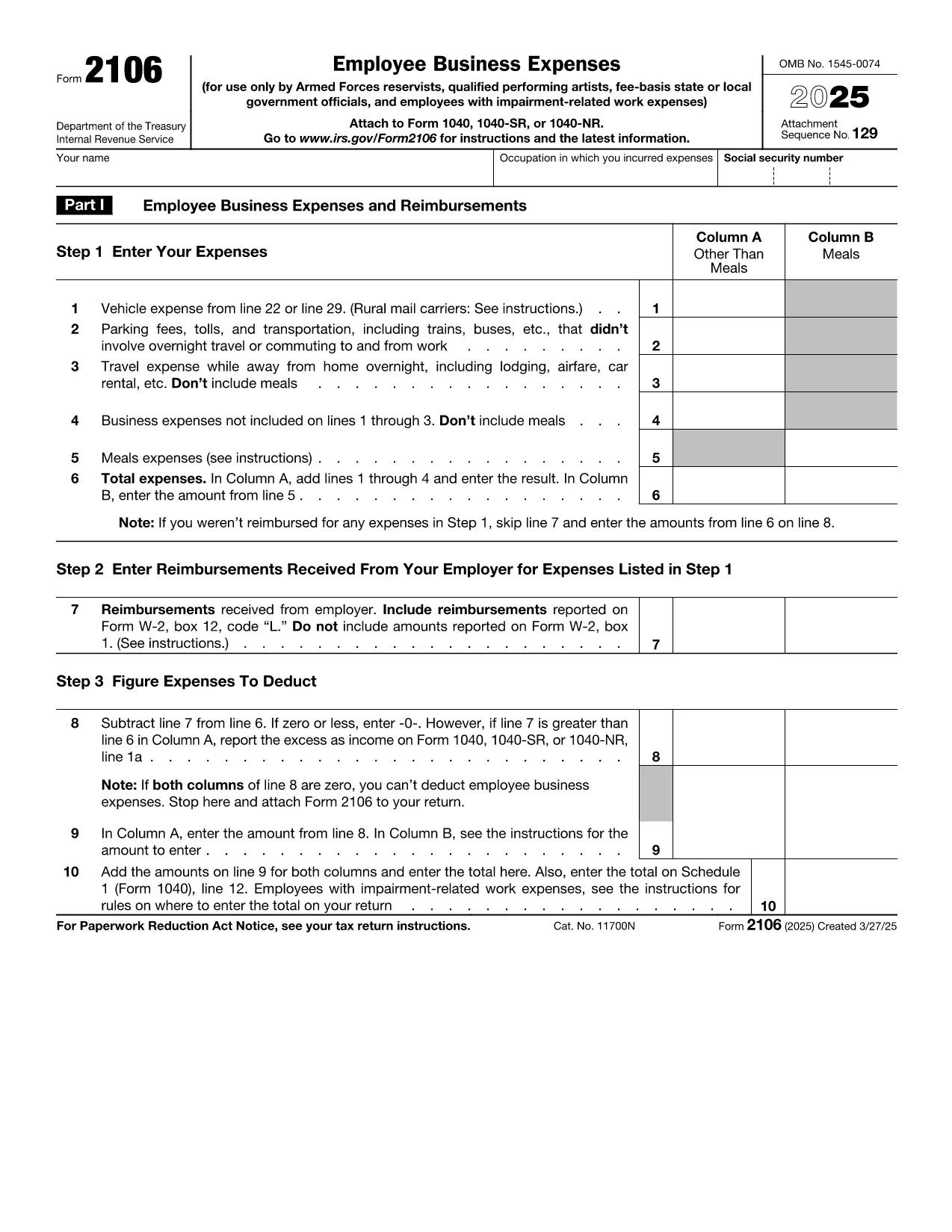
IRS Form 2106 – Fillable Vehicle Interest Tax Form

  1. 국가 미국
  2. 언어 영어
  3. 활동 구실
  4. 부서 IRS
IRS Form 2106 – Fillable Vehicle Interest Tax Form

If you paid interest on a vehicle loan for business or employment purposes, IRS Form 2106 is the official document you need to claim that deduction. With Formize’s Fill out this form button, you can complete the form directly in your browser—no PDF editor required.

What Is IRS Form 2106?

Form 2106, Employee Business Expenses, allows employees to deduct ordinary and necessary expenses incurred while performing their job. The Vehicle Interest line (Part II, line 22) captures interest paid on a car loan used for work‑related travel.

How to Complete the Vehicle Interest Section

Follow these simple steps after clicking the “Fill out this form” button:

  1. Enter your name, Social Security Number, and employer’s EIN in the header.
  2. In Part II, locate Line 22 – Vehicle loan interest. Input the total interest paid during the tax year (see your loan statement).
  3. Provide a brief description of the vehicle’s business use (mileage, percentage, etc.).
  4. Attach supporting documentation (loan statements) when you file your return.

Common Mistakes & Tips for Accuracy

  • Don’t mix personal interest with business interest—only the portion attributable to business use is deductible.
  • Ensure the interest amount matches the figure on your lender’s year‑end statement.
  • Round mileage to the nearest whole number; the IRS does not accept fractions.
  • Double‑check that the form is signed and dated before submission.

Where to Submit the Completed Form

Attach Form 2106 to your Form 1040 when filing your individual tax return. If you e‑file, upload the PDF through your tax‑software’s “Supporting Documents” section.

Need a quick start? Click the button below, wait for the Formize PDF Filler app to load, and begin entering your information instantly.

자주하는 질문
  • Can I deduct interest on a personal vehicle?

    Only the portion of interest that relates to business use is deductible on Form 2106. Personal use interest is not allowed.

  • Do I need a separate form for vehicle expenses?

    Vehicle expenses (mileage, lease payments, interest, etc.) are all reported on Form 2106. Use the appropriate lines for each expense type.

  • What documentation should I keep?

    Keep loan statements showing interest paid, a mileage log, and any receipts that support the business‑use percentage.

  • Is Form 2106 still required for 2024?

    Yes. Employees who claim unreimbursed business expenses, including vehicle interest, must file Form 2106 with their 2024 Form 1040.

  • Can I e‑file Form 2106?

    Most tax software allows you to upload the completed Form 2106 PDF as a supporting document when you e‑file your return.

  • What if my employer reimburses my vehicle costs?

    Reimbursed amounts are not deductible. Only unreimbursed interest you actually paid can be claimed.

  • Is there a limit to the amount of vehicle interest I can deduct?

    The deduction is limited to the amount of interest actually paid and the percentage of business use. There is no separate dollar cap.

  • Do I need to file Form 2106 if I’m self‑employed?

    Self‑employed individuals report vehicle interest on Schedule C, not Form 2106.

  • How long should I keep the form and supporting documents?

    The IRS recommends retaining tax records, including Form 2106 and supporting documents, for at least three years after the filing date.

  • Will Formize store my completed form?

    Formize does not store your data. After you complete the form, you can download it to your device or upload it directly to your tax software.

어떻게

5개의 간단한 단계를 통해 온라인으로 vehicle interest tax form를 무료로 작성하는 방법:

  1. 1
    Open the Fillable Form
    Click the “Fill out this form” button on the page. The Formize PDF Filler will load in your browser.
  2. 2
    Enter Personal Information
    Fill in your name, SSN, and employer’s EIN in the header fields.
  3. 3
    Add Vehicle Interest Details
    Navigate to Part II, line 22. Type the total interest paid on your business vehicle loan and indicate the business‑use percentage.
  4. 4
    Review and Sign
    Check all entries for accuracy, then add your electronic signature and date.
  5. 5
    Save or Submit
    Download the completed PDF or submit it directly through your tax‑software’s attachment feature.
Formize PDF 필러 앱
에 대한

연방 세금 양식

vehicle interest tax form는 미국 국세청(IRS)에 연방 소득세를 보고하고 제출하는 데 사용되는 문서인 연방 세금 양식 중 하나입니다. 이 양식은 개인, 기업 및 조직이 소득, 공제 및 연방 세금 납부액 계산에 필요한 기타 관련 정보를 보고하는 데 사용됩니다.

가장 일반적으로 사용되는 연방 세금 양식은 개인 납세자가 개인 소득세를 신고하는 데 사용하는 양식 1040입니다. 일반적으로 사용되는 기타 양식으로는 파트너십을 위한 양식 1065, 양식 1120, 면세 조직의 경우 양식 990.

연방 세금 양식에서는 일반적으로 납세자가 임금, 급여, 팁 등 다양한 소득원은 물론 투자 소득, 임대 부동산 및 기타 소득원을 보고하도록 요구합니다. 또한 이 양식을 통해 납세자는 자선 기부금, 모기지 이자, 의료비 등 다양한 비용에 대해 공제 및 세액공제를 청구할 수 있습니다.

연방 세금 양식을 정확하고 제때에 제출하는 것이 중요합니다. 그렇게 하지 않으면 IRS로부터 벌금과 이자가 부과될 수 있습니다.

특징

PDF 필러

온라인에서 PDF 양식을 채우는 가장 쉬운 방법

  • vehicle interest tax form를 빠르게 작성하세요.
    온라인에서 vehicle interest tax form을(를) 빠르게 채우는 방법을 찾고 계십니까? 온라인 무료 PDF 양식 필러를 사용하면 1분 이내에 이 PDF 문서를 편집하고 채우는 방법을 알 수 있습니다.
  • 사용하기 쉬운 온라인 PDF 편집기
    다시 스캔하여 다시 보내기 전에 편집할 수 있도록 PDF 파일을 인쇄하는 데 지쳤습니까? 온라인에서 무료로 PDF 문서를 편집하세요. 온라인 PDF 편집기를 사용하여 시간과 종이를 절약하십시오.
  • 훌륭한 도구, 모든 플랫폼
    Mac에서 vehicle interest tax form를 채우는 방법이나 PDF 필러를 무료로 사용하는 방법이 궁금하십니까? 당사의 온라인 PDF 도구는 모든 플랫폼에서 작동합니다.
  • 안전한 파일 저장
    완료된 "vehicle interest tax form" 파일은 Amazon 클라우드 호스팅에서 관리하는 보안 데이터베이스에 저장됩니다. 언제든지 시스템에서 파일을 삭제할 수 있습니다. 어쨌든 이러한 파일은 24시간 후에 자동으로 삭제됩니다.
  • vehicle interest tax form님과 채팅
    무료 PDF 리더 도우미인 Chatize에서 "vehicle interest tax form"와 채팅하세요. "vehicle interest tax form"에서 질문하고 답변을 받으세요. 위의 문서와 채팅 버튼을 클릭하세요.

필링 세션 삭제

선택한 필링 세션을 삭제하시겠습니까?이 경우 양식 작성 진행 상황이 손실됩니다.

편집 세션 삭제

선택한 편집 세션을 삭제하시겠습니까? 이 경우 양식 작성 및 편집 진행 상황이 손실됩니다.