
언어 선택

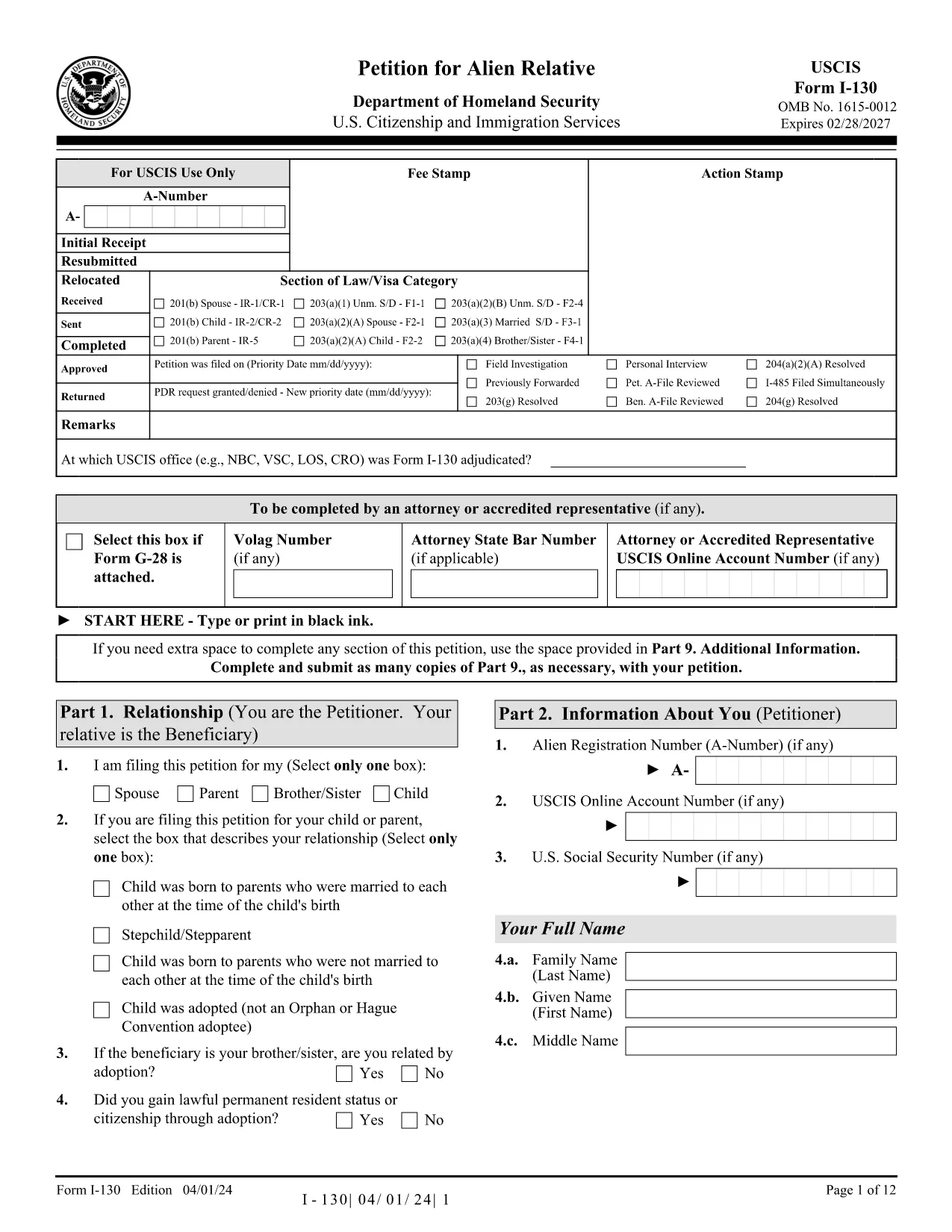
USCIS Form I-130 – Fillable PDF Application Form

  1. 국가 미국
  2. 언어 영어
  3. 부서 USCIS
  4. 활동 이민
USCIS Form I-130 – Fillable PDF Application Form

Looking for a fast, secure way to complete the USCIS Form I-130 without juggling downloads and PDF editors? You’ve landed on the right page. Our Formize PDF Filler loads the official Application for Alien Relative as a fully fillable PDF directly in your browser.

What Is the USCIS Form I-130 Application?

The Form I-130 is the first step in sponsoring a family member for a U.S. green card. It establishes the qualifying relationship between the U.S. citizen or permanent resident petitioner and the foreign‑national beneficiary.

How to Fill Out the I-130 Form Online

Instead of downloading the PDF and opening it in a separate editor, simply click the "Fill out this form" button below. The Formize PDF Filler app will load within seconds, letting you type, check boxes, and sign directly on the page.

Common Mistakes to Avoid When Completing the Form

  • Leaving required fields blank: The online filler highlights empty mandatory sections before you can proceed.
  • Mismatched names: Use the exact spelling as it appears on the beneficiary’s passport.
  • Incorrect filing fee information: The form does not collect payment, but you must attach the correct fee with your paper submission.

Where to Submit Your Completed Form

After you finish, download a copy of the completed I-130 PDF, print it, and mail it to the USCIS address listed in the official filing instructions. Keep the downloaded copy for your records.

Ready to start? Click the button below and let Formize do the heavy lifting.

자주하는 질문
  • Do I need to install any software to use the fillable PDF?

    No. Formize runs completely in your web browser, so there’s nothing to install.

  • Is the online filler secure?

    Yes. All data is processed locally in your browser and is never stored on our servers.

  • Can I submit the form electronically to USCIS?

    USCIS currently requires a printed and signed paper copy for Form I-130, so you’ll need to download and mail it.

  • What if I make a mistake after saving?

    Open the saved PDF again with Formize, correct the error, and re‑save. The fillable fields remain editable.

  • Is there a fee to use Formize’s PDF filler?

    The basic fillable PDF feature is free. Premium features are optional but not required for completing Form I-130.

  • Can I attach supporting documents within the filler?

    Yes. Use the "Attach File" button to embed PDFs, images, or scanned documents directly into the form.

  • How do I know which version of Form I-130 is current?

    The PDF linked on this page is always the latest version from the official USCIS website.

어떻게

5개의 간단한 단계를 통해 온라인으로 application form link를 무료로 작성하는 방법:

  1. 1
    Click the "Fill out this form" button
    Locate the button on this page and click it. The Formize PDF Filler will open the I-130 PDF in a new window.
  2. 2
    Wait for the Formize app to load
    Within a few seconds the fillable fields become active. No download or extra software is required.
  3. 3
    Complete each section
    Enter your information, select check boxes, and upload any required supporting documents directly in the browser.
  4. 4
    Review and validate
    Use the built‑in validation to catch missing or incorrectly formatted entries before you finish.
  5. 5
    Save and download
    When you’re satisfied, click "Save & Download" to get a copy of the completed PDF for printing and mailing.
Formize PDF 필러 앱
에 대한

{키워드} 템플릿

PDF 문서를 보고 작성하기 위한 기존 기능 세트와 웹 애플리케이션 및 반응형 레이아웃의 이점을 결합하면 몇 분 만에 application form link을(를) 완료할 수 있습니다.

특징

PDF 필러

온라인에서 PDF 양식을 채우는 가장 쉬운 방법

  • application form link를 빠르게 작성하세요.
    온라인에서 application form link을(를) 빠르게 채우는 방법을 찾고 계십니까? 온라인 무료 PDF 양식 필러를 사용하면 1분 이내에 이 PDF 문서를 편집하고 채우는 방법을 알 수 있습니다.
  • 사용하기 쉬운 온라인 PDF 편집기
    다시 스캔하여 다시 보내기 전에 편집할 수 있도록 PDF 파일을 인쇄하는 데 지쳤습니까? 온라인에서 무료로 PDF 문서를 편집하세요. 온라인 PDF 편집기를 사용하여 시간과 종이를 절약하십시오.
  • 훌륭한 도구, 모든 플랫폼
    Mac에서 application form link를 채우는 방법이나 PDF 필러를 무료로 사용하는 방법이 궁금하십니까? 당사의 온라인 PDF 도구는 모든 플랫폼에서 작동합니다.
  • 안전한 파일 저장
    완료된 "application form link" 파일은 Amazon 클라우드 호스팅에서 관리하는 보안 데이터베이스에 저장됩니다. 언제든지 시스템에서 파일을 삭제할 수 있습니다. 어쨌든 이러한 파일은 24시간 후에 자동으로 삭제됩니다.
  • application form link님과 채팅
    무료 PDF 리더 도우미인 Chatize에서 "application form link"와 채팅하세요. "application form link"에서 질문하고 답변을 받으세요. 위의 문서와 채팅 버튼을 클릭하세요.

필링 세션 삭제

선택한 필링 세션을 삭제하시겠습니까?이 경우 양식 작성 진행 상황이 손실됩니다.

편집 세션 삭제

선택한 편집 세션을 삭제하시겠습니까? 이 경우 양식 작성 및 편집 진행 상황이 손실됩니다.