
언어 선택

Fillable I-130 Petition for Alien Relative – Complete Online

  1. 국가 미국
  2. 언어 영어
  3. 부서 USCIS
  4. 활동 이민
Fillable I-130 Petition for Alien Relative – Complete Online

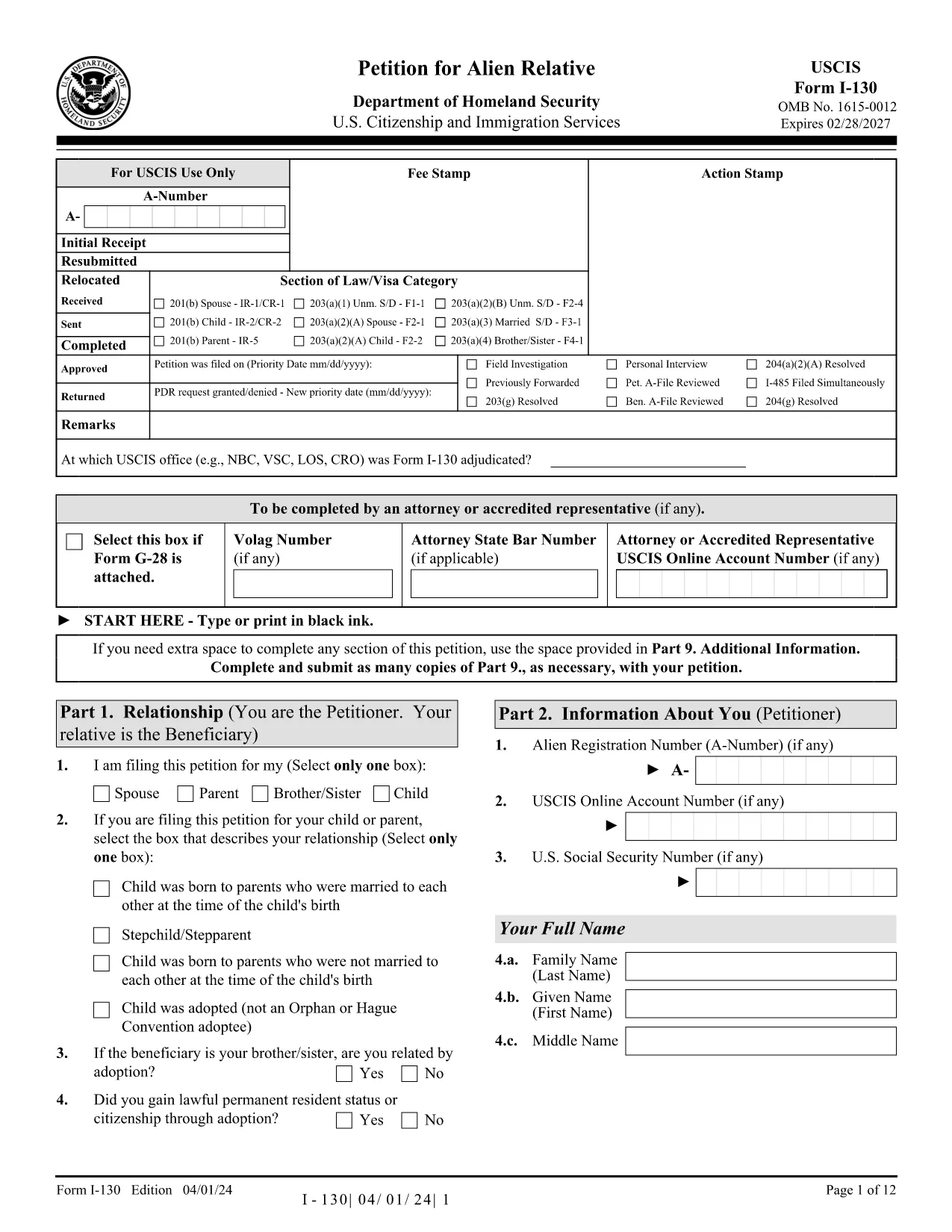
The I-130, Petition for Alien Relative is the first step for U.S. citizens and permanent residents who want to bring a family member to the United States. Historically you would download a static PDF, print it, hand‑write answers, and mail it to USCIS. With Formize’s Fillable I-130 PDF, you can complete the entire petition directly in your browser—no PDF editor required.

What Is the I-130 Form?

The I-130 establishes a qualifying relationship between the petitioner (U.S. citizen or green‑card holder) and the beneficiary (spouse, child, parent, or sibling). USCIS uses this form to verify eligibility before processing a visa or adjustment of status application.

How to Fill the I-130 Online with Formize

Follow the simple steps below to complete the form in minutes:

  • Click the "Fill out this form" button on this page.
  • Wait while the Formize PDF Filler app loads the official USCIS I-130 PDF.
  • Enter your information in the highlighted fields. The filler auto‑saves as you type.
  • Use the built‑in validation to catch missing or incorrectly formatted data.
  • When finished, download the completed PDF or print it for submission.

Common Mistakes to Avoid

Even with a fillable form, some errors can delay your case. Keep an eye out for:

  • Incorrect relationship wording – USCIS expects precise terms (e.g., "biological son" vs. "step‑son").
  • Missing signatures – The petitioner and, when required, the interpreter must sign.
  • Wrong dates – Use the MM/DD/YYYY format and double‑check birth dates.
  • Unclear photocopies – If you attach supporting documents, ensure they are legible.

Submission Tips & Next Steps

After downloading the completed I-130 PDF, you have two filing options:

  1. Online filing through USCIS myUSCIS – Upload the PDF, pay the filing fee, and track your case.
  2. Paper filing – Mail the PDF and supporting documents to the address listed in the form instructions.

Remember to keep a copy of the submitted form for your records. The Formize filler also lets you export a clean, searchable PDF for easy storage.

Frequently Asked Questions

Below are answers to the most common questions about the I-130 petition.

자주하는 질문
  • Who can file an I-130 petition?

    U.S. citizens and lawful permanent residents (green‑card holders) can file an I-130 for spouses, children, parents, and siblings.

  • What is the filing fee for the I-130?

    As of 2024, the fee is $535. Fees are payable online through myUSCIS or by check when filing a paper petition.

  • Can I file the I-130 online instead of using a PDF?

    Yes. USCIS allows online filing through the myUSCIS portal, but many prefer the fillable PDF for offline review before uploading.

  • How long does USCIS take to process an I-130?

    Processing times vary by relationship and service center, ranging from 6 months for spouses to over 2 years for siblings.

  • Do I need to include supporting documents?

    Yes. Include proof of the qualifying relationship (marriage certificate, birth certificates, etc.) and any required translations.

  • What happens after the I-130 is approved?

    If the beneficiary is abroad, the case moves to the National Visa Center for consular processing. If already in the U.S., they may file for adjustment of status.

  • Can I edit the I-130 after I’ve submitted it?

    Once submitted, you cannot edit the form. If you discover an error, file a new I-130 and request a withdrawal of the original.

어떻게

5개의 간단한 단계를 통해 온라인으로 I-130 PDF를 무료로 작성하는 방법:

  1. 1
    Open the Fillable Form
    Click the "Fill out this form" button on this page. The Formize PDF Filler will open the official I-130 PDF in a new window.
  2. 2
    Load the Formize PDF Filler
    Wait a few seconds while the app loads. All fillable fields become highlighted for easy entry.
  3. 3
    Enter Your Information
    Type your answers directly into each field. The filler automatically saves your progress and checks for formatting errors.
  4. 4
    Validate and Review
    Use the built‑in validation to ensure every required field is completed and signatures are added.
  5. 5
    Download or Submit
    When the form is complete, click "Download PDF" to save a copy, or print it for mailing to USCIS.
Formize PDF 필러 앱
에 대한

{키워드} 템플릿

PDF 문서를 보고 작성하기 위한 기존 기능 세트와 웹 애플리케이션 및 반응형 레이아웃의 이점을 결합하면 몇 분 만에 I-130 PDF을(를) 완료할 수 있습니다.
특징

PDF 필러

온라인에서 PDF 양식을 채우는 가장 쉬운 방법

  • I-130 PDF를 빠르게 작성하세요.
    온라인에서 I-130 PDF을(를) 빠르게 채우는 방법을 찾고 계십니까? 온라인 무료 PDF 양식 필러를 사용하면 1분 이내에 이 PDF 문서를 편집하고 채우는 방법을 알 수 있습니다.
  • 사용하기 쉬운 온라인 PDF 편집기
    다시 스캔하여 다시 보내기 전에 편집할 수 있도록 PDF 파일을 인쇄하는 데 지쳤습니까? 온라인에서 무료로 PDF 문서를 편집하세요. 온라인 PDF 편집기를 사용하여 시간과 종이를 절약하십시오.
  • 훌륭한 도구, 모든 플랫폼
    Mac에서 I-130 PDF를 채우는 방법이나 PDF 필러를 무료로 사용하는 방법이 궁금하십니까? 당사의 온라인 PDF 도구는 모든 플랫폼에서 작동합니다.
  • 안전한 파일 저장
    완료된 "I-130 PDF" 파일은 Amazon 클라우드 호스팅에서 관리하는 보안 데이터베이스에 저장됩니다. 언제든지 시스템에서 파일을 삭제할 수 있습니다. 어쨌든 이러한 파일은 24시간 후에 자동으로 삭제됩니다.
  • I-130 PDF님과 채팅
    무료 PDF 리더 도우미인 Chatize에서 "I-130 PDF"와 채팅하세요. "I-130 PDF"에서 질문하고 답변을 받으세요. 위의 문서와 채팅 버튼을 클릭하세요.

필링 세션 삭제

선택한 필링 세션을 삭제하시겠습니까?이 경우 양식 작성 진행 상황이 손실됩니다.

편집 세션 삭제

선택한 편집 세션을 삭제하시겠습니까? 이 경우 양식 작성 및 편집 진행 상황이 손실됩니다.