
Pasirinkite kalbą

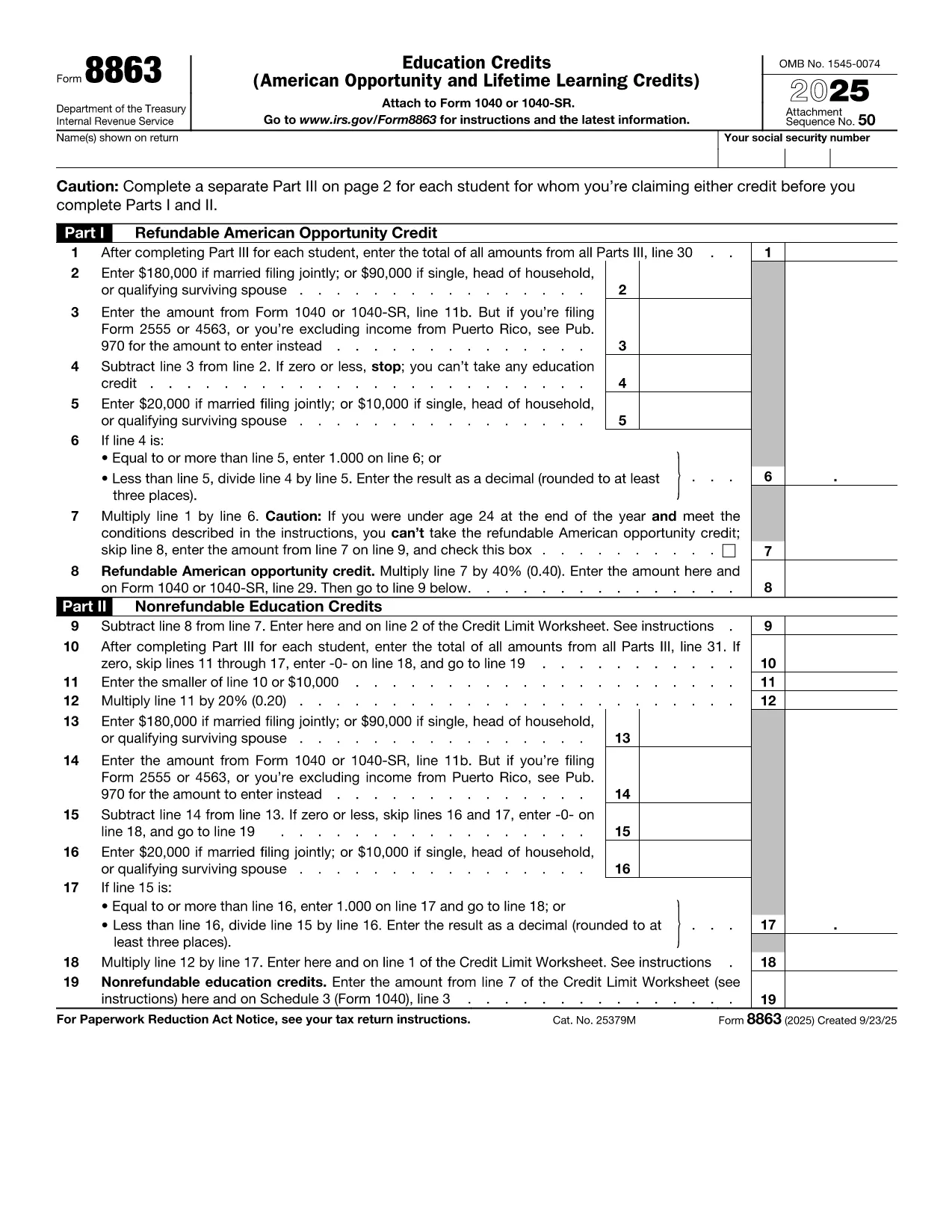
Fillable IRS Form 8863 – Tuition and Education Credits

  1. Šalis JAV
  2. Kalba Anglų
  3. Veikla Mokesčiai
  4. skyrius IRS
Fillable IRS Form 8863 – Tuition and Education Credits

Students, parents, and educators often wonder how to claim the valuable education tax credits on their federal return. IRS Form 8863, also known as the Education Credits (American Opportunity and Lifetime Learning), is the official document you need to report qualified tuition and related expenses.

What Is IRS Form 8863?

Form 8863 is used to calculate two major tax benefits:

  • American Opportunity Credit (AOC) – up to $2,500 per eligible student.
  • Lifetime Learning Credit (LLC) – up to $2,000 per tax return.

The form requires basic information about the student, the educational institution, and the amount of qualified tuition and related expenses you paid during the tax year.

How to Fill Out the Tuition Tax Form Online

Instead of downloading the PDF and opening a separate editor, simply click the "Fill out this form" button below. The Formize PDF Filler app will load in your browser, letting you complete every field instantly.

Common Mistakes & Tips for Success

  • Incorrect school name or EIN – double‑check the information on your Form 1098‑T.
  • Mixing AOC and LLC on the same line – the credits are calculated separately; follow the worksheet on each page.
  • Leaving the "Amount of qualified expenses" blank – the IRS will reject the return if this field is empty.

Where to Submit Your Completed Form

After you finish, download the filled PDF and attach it to your e‑file or mail it with your Form 1040. Keep a copy for your records.

Ready to start? Click the button below and let Formize do the heavy lifting.

DUK
  • Do I need a printed copy of Form 8863 to claim the credit?

    No. You can complete the fillable PDF online, download it, and attach it electronically when you e‑file.

  • Can I claim both the American Opportunity Credit and Lifetime Learning Credit on the same return?

    You can claim only one credit per student per year. Choose the credit that provides the larger benefit.

  • What qualifies as "qualified tuition" for Form 8863?

    Qualified tuition includes fees required for enrollment or attendance at an eligible educational institution, as shown on Form 1098‑T.

  • Is Form 8863 required for all students?

    Only if you are claiming the AOC or LLC. If you have no education expenses, you do not need to file this form.

  • How do I get my school’s EIN for the form?

    The school’s Employer Identification Number (EIN) is listed on your Form 1098‑T. If you didn’t receive a 1098‑T, contact the school’s financial office.

  • What if I make a mistake after filing?

    You can file an amended return using Form 1040‑X and attach a corrected Form 8863.

  • Is there a deadline to submit Form 8863?

    Form 8863 must be filed with your federal tax return, typically by April 15 of the year following the tax year.

  • Can I claim the credit for a student who is not a dependent?

    Yes, you may claim the Lifetime Learning Credit for yourself, your spouse, or a dependent, even if the student isn’t claimed as a dependent.

KAIP

Kaip nemokamai užpildyti IRS Form 8863 internete, atlikdami 5 paprastus veiksmus:

  1. 1
    Open the Fillable Form
    Click the "Fill out this form" button on the page. The Formize PDF Filler will launch directly in your browser.
  2. 2
    Enter Your Information
    Complete each section – student details, school EIN, qualified tuition, and select the appropriate credit (AOC or LLC).
  3. 3
    Review & Validate
    Use the built‑in validation to check for missing or incorrect entries. Correct any highlighted fields.
  4. 4
    Download the Completed PDF
    When all fields are filled, click "Download" to save the filled PDF to your device.
  5. 5
    Submit with Your Tax Return
    Attach the downloaded Form 8863 to your e‑filed return or include it with your mailed Form 1040.
Formuokite PDF užpildymo programą
APIE

Mokesčių formos

IRS Form 8863 yra viena iš mokesčių formų, kurios yra dokumentai, naudojami su mokesčiais susijusiai informacijai pranešti atitinkamai mokesčių institucijai. Yra įvairių tipų mokesčių formų, įskaitant federalines, valstijos ir vietines mokesčių formas, kurios gali skirtis priklausomai nuo mokesčių mokėtojo aplinkybių ir vietos.

FUNKCIJOS

PDF užpildas

Lengviausias būdas užpildyti IRS Form 8863 internete

  • Greitai užpildykite IRS Form 8863
    Ieškote būdo greitai užpildyti IRS Form 8863 internete? Naudodami internetinį nemokamą PDF formų užpildą sužinosite, kaip redaguoti ir užpildyti šį pdf dokumentą greičiau nei per minutę.
  • Lengva naudoti internetinį PDF redaktorių
    Atsibodo spausdinti PDF failus, kad galėtumėte juos redaguoti prieš nuskaitydami iš naujo ir siųsdami atgal? Redaguoti PDF dokumentus internete nemokamai. Norėdami sutaupyti laiko ir popieriaus, naudokite mūsų internetinį pdf redaktorių.
  • Puikūs įrankiai, visos platformos
    Svarstote, kaip užpildyti IRS Form 8863 „Mac“ kompiuteryje, o gal kaip nemokamai naudoti PDF užpildą? Mūsų internetiniai PDF įrankiai veikia visose platformose.
  • Saugi failų saugykla
    Užbaigti „IRS Form 8863“ failai saugomi saugioje duomenų bazėje, kurią valdo „Amazon Cloud“ priegloba. Galite bet kada ištrinti failus iš mūsų sistemos. Bet kokiu atveju šie failai automatiškai ištrinami po 24 valandų.
  • Kalbėkitės su IRS Form 8863
    Kalbėkite su „IRS Form 8863“ naudodami Chatize, kuri yra nemokama PDF skaitymo priemonė. Užduokite klausimų ir gaukite atsakymus iš „IRS Form 8863“. Tiesiog spustelėkite aukščiau esantį mygtuką Kalbėtis su dokumentu.

Ištrinti užpildymo seansą

Ištrinti pasirinktą pildymo seansą? Tokiu atveju jūsų pažanga pildant formą bus prarasta.

Ištrinti redagavimo sesiją

Ištrinti pasirinktą redagavimo sesiją? Tokiu atveju jūsų pažanga kuriant ir redaguojant formą bus prarasta.