
Pasirinkite kalbą

IRS Form 8962 – Fillable Medical Insurance Tax Credit Form

  1. Šalis JAV
  2. Kalba Anglų
  3. Veikla Mokesčiai
  4. skyrius IRS
IRS Form 8962 – Fillable Medical Insurance Tax Credit Form

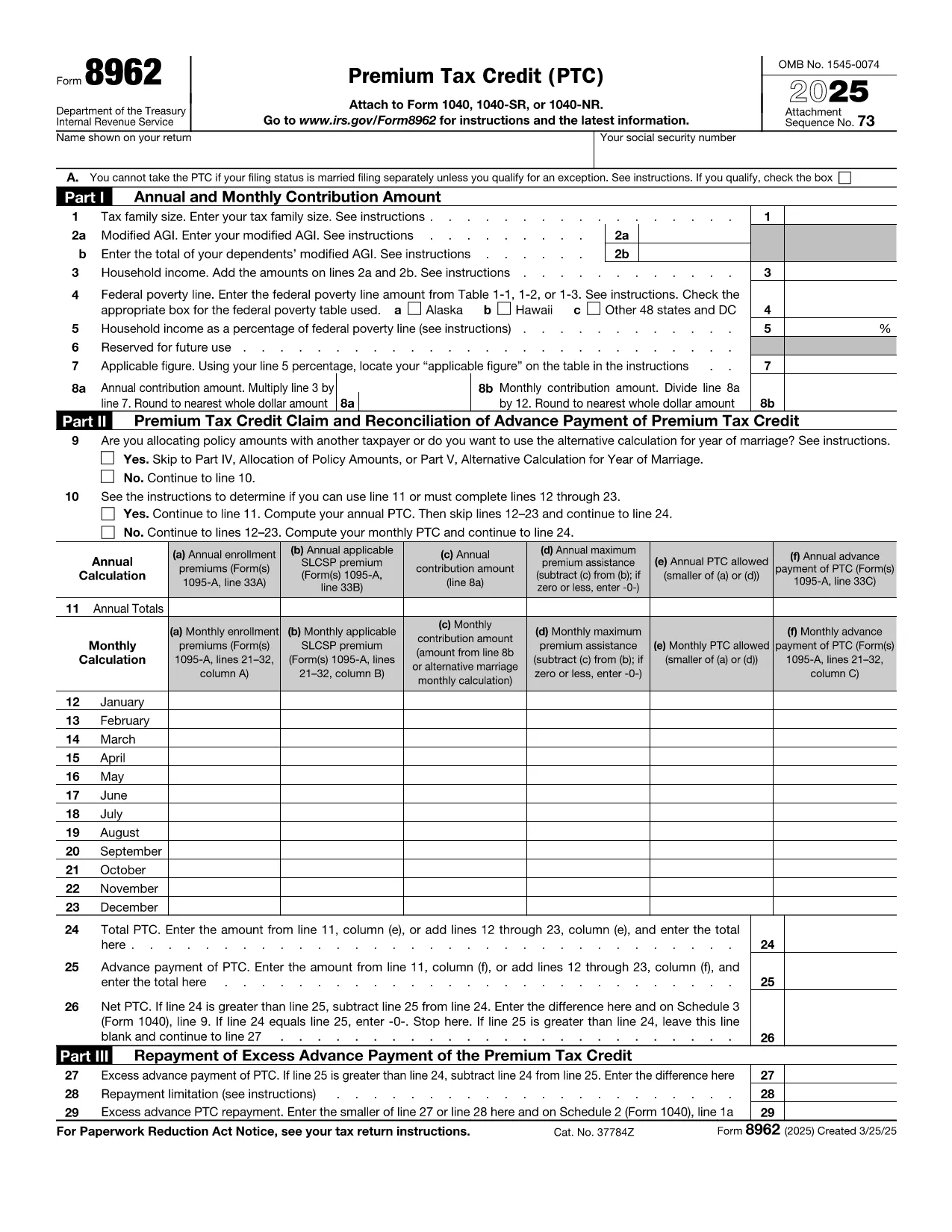
Looking for a fast, secure way to complete your medical insurance tax form? Formize.com hosts a fully fillable PDF of IRS Form 8962, the Premium Tax Credit (PTC) worksheet used for health‑insurance Marketplace filings.

What Is IRS Form 8962?

Form 8962 calculates the Premium Tax Credit you may claim on your federal tax return. It links the information from your Form 1095‑A (Health Insurance Marketplace Statement) to the credit amount you’re eligible for based on household income and coverage.

How to Fill Out Form 8962 Online

Instead of downloading the PDF and opening a separate editor, simply click the "Fill out this form" button on this page. The Formize PDF Filler app loads in your browser, letting you:

  • Enter data directly into each field.
  • Save a copy to your computer or cloud storage.
  • Print or submit electronically to the IRS.

Common Mistakes to Avoid

  • Incorrect household income: Use the exact Modified Adjusted Gross Income (MAGI) from your tax return.
  • Mismatched coverage months: Ensure the months listed on Form 1095‑A match the periods you report on Form 8962.
  • Leaving fields blank: Even if a line is not applicable, write “0” or “N/A” as instructed.

Where to Find Help and Resources

The IRS provides detailed instructions on the Form 8962 Instructions page. For additional guidance, you can consult a tax professional or visit the HealthCare.gov support center.

Ready to start? Click the button below, let Formize load the fillable PDF, and complete your medical‑insurance tax credit quickly and accurately.

DUK
  • Do I need a PDF reader to use Formize’s fillable form?

    No. Formize’s PDF Filler works entirely in the browser, so you don’t need Adobe Acrobat or any additional software.

  • Can I submit Form 8962 electronically after filling it out?

    Yes. After completing the form, you can save the PDF and attach it to your e‑filed tax return using approved tax‑software programs.

  • Is the Formize service free for this tax form?

    Filling out the PDF with Formize is free. There is no charge to download, edit, or save the completed form.

  • What if I make a mistake after saving the PDF?

    Open the saved PDF again with Formize’s filler, correct the error, and re‑save. The changes are applied instantly.

  • How do I know which tax year the form is for?

    The PDF linked on this page is the current year’s Form 8962 (e.g., 2024). The form header clearly displays the tax year.

  • Where can I find the instructions for Form 8962?

    The official IRS instructions are available at https://www.irs.gov/instructions/i8962 and are linked directly from the landing page.

KAIP

Kaip nemokamai užpildyti IRS Form 8962 internete, atlikdami 3 paprastus veiksmus:

  1. 1
    Click the Fill‑out Button
    Press the "Fill out this form" button on the page. The Formize PDF Filler app will open in a new tab.
  2. 2
    Wait for the Form to Load
    Allow a few seconds for the fillable PDF to load completely. All fields will become editable directly in your browser.
  3. 3
    Complete, Save, and Submit
    Enter the required information, review for accuracy, then save the completed PDF to your device or print it for IRS filing.
Formuokite PDF užpildymo programą
APIE

Federalinės mokesčių formos

IRS Form 8962 yra viena iš federalinių mokesčių formų, kurios yra dokumentai, naudojami pranešant apie federalinius pajamų mokesčius ir pateikiant juos JAV Vidaus pajamų tarnybai (IRS). Šias formas asmenys, įmonės ir organizacijos naudoja norėdami pranešti apie savo pajamas, atskaitymus ir kitą svarbią informaciją, reikalingą apskaičiuojant jų federalinius mokesčius.

Dažniausiai naudojama federalinė mokesčių forma yra 1040 forma, kurią naudoja individualūs mokesčių mokėtojai, norėdami pranešti apie savo gyventojų pajamų mokestį. Kitos dažniausiai naudojamos formos apima 1065 formą, skirtą partnerystei, 1120 forma korporacijoms ir 990 forma neapmokestinamoms organizacijoms.

Federalinėse mokesčių formose paprastai reikalaujama, kad mokesčių mokėtojai praneštų apie įvairius pajamų šaltinius, tokius kaip darbo užmokestis, atlyginimai ir arbatpinigiai, taip pat pajamas iš investicijų, nuomojamo turto ir kitų šaltinių. Formos taip pat leidžia mokesčių mokėtojams reikalauti atskaityti ir kredituoti įvairias išlaidas, tokias kaip labdaros įnašai, hipotekos palūkanos ir sveikatos priežiūros išlaidos.

Svarbu tiksliai ir laiku pateikti federalines mokesčių formas, nes to nepadarius, IRS gali skirti baudas ir palūkanas.

FUNKCIJOS

PDF užpildas

Lengviausias būdas užpildyti IRS Form 8962 internete

  • Greitai užpildykite IRS Form 8962
    Ieškote būdo greitai užpildyti IRS Form 8962 internete? Naudodami internetinį nemokamą PDF formų užpildą sužinosite, kaip redaguoti ir užpildyti šį pdf dokumentą greičiau nei per minutę.
  • Lengva naudoti internetinį PDF redaktorių
    Atsibodo spausdinti PDF failus, kad galėtumėte juos redaguoti prieš nuskaitydami iš naujo ir siųsdami atgal? Redaguoti PDF dokumentus internete nemokamai. Norėdami sutaupyti laiko ir popieriaus, naudokite mūsų internetinį pdf redaktorių.
  • Puikūs įrankiai, visos platformos
    Svarstote, kaip užpildyti IRS Form 8962 „Mac“ kompiuteryje, o gal kaip nemokamai naudoti PDF užpildą? Mūsų internetiniai PDF įrankiai veikia visose platformose.
  • Saugi failų saugykla
    Užbaigti „IRS Form 8962“ failai saugomi saugioje duomenų bazėje, kurią valdo „Amazon Cloud“ priegloba. Galite bet kada ištrinti failus iš mūsų sistemos. Bet kokiu atveju šie failai automatiškai ištrinami po 24 valandų.
  • Kalbėkitės su IRS Form 8962
    Kalbėkite su „IRS Form 8962“ naudodami Chatize, kuri yra nemokama PDF skaitymo priemonė. Užduokite klausimų ir gaukite atsakymus iš „IRS Form 8962“. Tiesiog spustelėkite aukščiau esantį mygtuką Kalbėtis su dokumentu.

Ištrinti užpildymo seansą

Ištrinti pasirinktą pildymo seansą? Tokiu atveju jūsų pažanga pildant formą bus prarasta.

Ištrinti redagavimo sesiją

Ištrinti pasirinktą redagavimo sesiją? Tokiu atveju jūsų pažanga kuriant ir redaguojant formą bus prarasta.