
Pasirinkite kalbą

Fillable IRS Schedule B – Qualified Dividends Tax Form

  1. Šalis JAV
  2. Kalba Anglų
  3. Veikla Mokesčiai
  4. skyrius IRS
Fillable IRS Schedule B – Qualified Dividends Tax Form

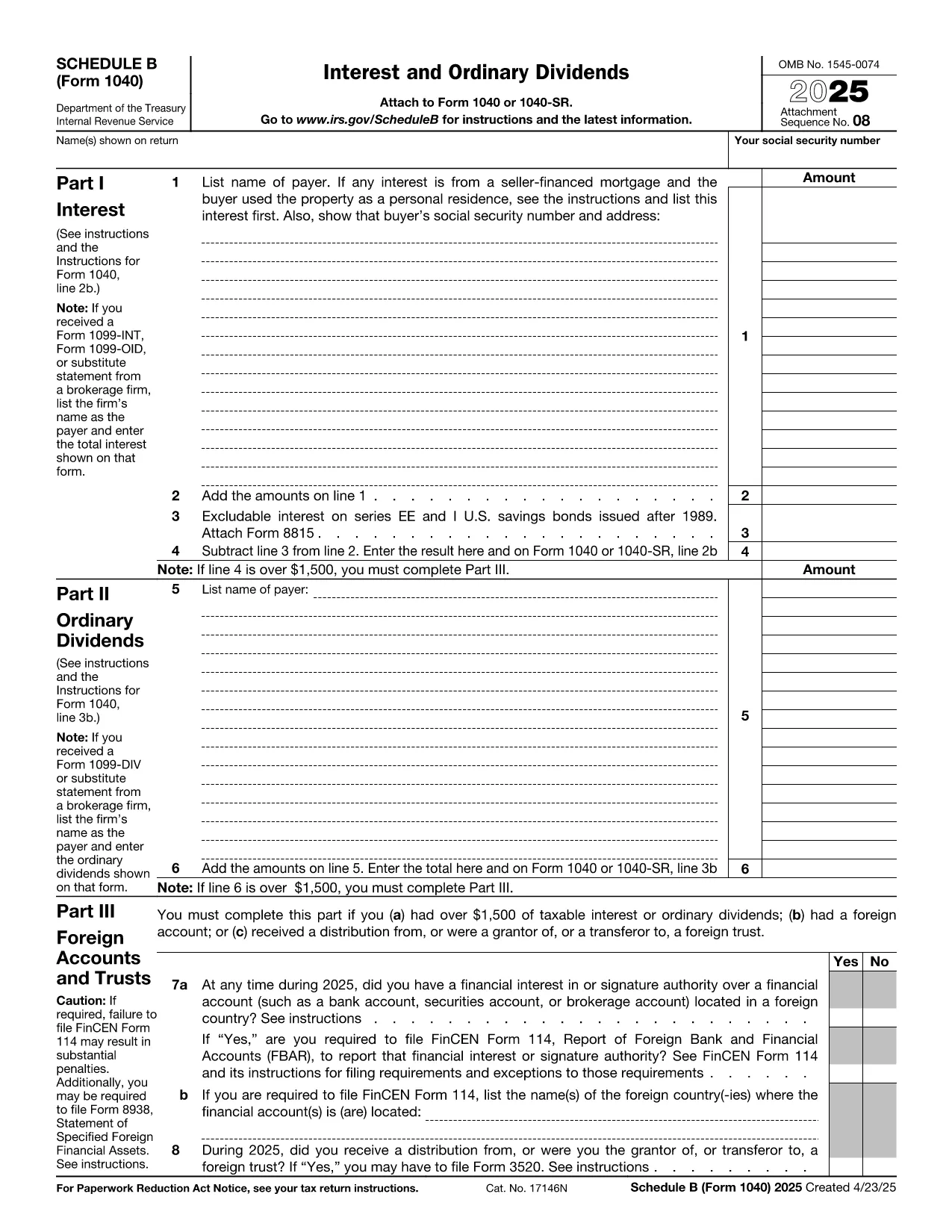
When you receive dividend income, the IRS requires you to report it on Schedule B (Form 1040). The section for qualified dividends determines the lower tax rate you may qualify for. Our fillable PDF lets you complete Schedule B directly in your browser—no Adobe Acrobat or printer required.

What Is Schedule B and Why It Matters

Schedule B is part of the individual income tax return (Form 1040). It captures interest and ordinary dividend income. The qualified dividends line (line 3b on Form 1040) is calculated from the amounts you enter on Schedule B, helping you benefit from the reduced 0%, 15% or 20% tax rates.

How to Fill Out the Qualified Dividends Section

Follow these simple steps after you click the "Fill out this form" button:

  1. The Formize PDF Filler loads the IRS Schedule B PDF in a secure editor.
  2. Enter your name, Social Security Number, and tax year at the top of the form.
  3. Locate Part II – Ordinary Dividends. For each payer, type the amount of dividends received in the "Amount" column.
  4. Identify which dividends are qualified. Check the box next to each qualified entry or type "Yes" in the provided field.
  5. Review the totals automatically calculated by the filler and transfer the qualified dividend total to Form 1040 line 3b.

Common Mistakes to Avoid

  • Omitting a payer: Every dividend source must be listed; missing one can trigger an audit.
  • Mis‑classifying ordinary dividends as qualified: Only dividends meeting IRS criteria qualify for the lower rate.
  • Leaving fields blank: The online filler highlights empty required fields before you can save.
  • Using the wrong tax year PDF: Ensure you select the Schedule B for the correct filing year.

Where to Submit Your Completed Form

After you finish, download the completed PDF and attach it to your electronic Form 1040 filing through approved tax‑software, or print and mail it with your paper return to the appropriate IRS address for your state.

Get the Fillable Form Instantly

Simply click the "Fill out this form" button below. The Formize PDF Filler app will open in seconds, letting you start entering data right away. No download, no installation—just a fast, secure way to file your qualified dividends correctly.

DUK
  • What is the difference between ordinary and qualified dividends?

    Ordinary dividends are taxed at your regular income tax rate, while qualified dividends meet specific IRS criteria and are taxed at the lower 0%, 15%, or 20% rates.

  • Do I need Schedule B if I only have qualified dividends?

    Yes. If your total ordinary dividends exceed $1,500, or you have any qualified dividends, the IRS requires you to file Schedule B.

  • Can I file Schedule B electronically?

    Absolutely. After completing the fillable PDF, you can upload the PDF to any IRS‑approved e‑file software or attach it to a paper return.

  • Is the Formize filler secure?

    Formize uses SSL encryption and stores your data only in your browser session. No information is saved on our servers unless you choose to download the file.

  • What if I make a mistake after submitting?

    You can file an amended return using Form 1040‑X and attach a corrected Schedule B. The fillable PDF makes corrections quick and accurate.

  • Do I need to attach Schedule B if I file using tax‑software?

    Most tax‑software packages automatically generate Schedule B based on the data you enter. You can still use the fillable PDF for a manual review or paper filing.

  • How do I know if my dividends are qualified?

    Dividends are qualified if they are paid by U.S. corporations or qualified foreign corporations and you meet the holding‑period requirement (typically more than 60 days).

  • Is there a fee to use the Formize PDF Filler?

    No. The fillable PDF is offered free of charge on Formize.com.

KAIP

Kaip nemokamai užpildyti qualified dividends tax form internete, atlikdami 4 paprastus veiksmus:

  1. 1
    Open the Fillable Form
    Click the "Fill out this form" button on the page. The Formize PDF Filler app loads the Schedule B PDF in your browser.
  2. 2
    Enter Your Information
    Fill in your name, SSN, and tax year at the top, then add each dividend payer and amount in Part II.
  3. 3
    Mark Qualified Dividends
    For each dividend, indicate whether it is qualified by checking the box or typing "Yes" in the provided field.
  4. 4
    Review and Save
    Use the built‑in validation to correct any empty required fields, then download or print the completed Schedule B.
Formuokite PDF užpildymo programą
APIE

Mokesčių formos

qualified dividends tax form yra viena iš mokesčių formų, kurios yra dokumentai, naudojami informacijai apie asmens ar įmonės pajamas, atskaitymus ir mokesčių prievolę pranešti atitinkamai mokesčių institucijai. Šios formos būtinos siekiant laikytis mokesčių įstatymų ir įvykdyti mokestines prievoles. Mokesčių formos skiriasi priklausomai nuo šalies ir taikomų konkrečių mokesčių reikalavimų. Štai keletas įprastų mokesčių formų tipų:

Asmens mokesčių formos: šias formas naudoja individualūs mokesčių mokėtojai norėdami pranešti apie savo asmenines pajamas ir reikalauti atskaitymų, kreditų ir atleidimo nuo mokesčių. Pavyzdžiai: 1040 forma Jungtinėse Amerikos Valstijose arba Self-Assessment Tax Return forma Jungtinėje Karalystėje.

Verslo mokesčių formos: verslo mokesčių formas naudoja įmonės, bendrijos arba savarankiškai dirbantys asmenys, norėdami pranešti apie savo verslo pajamas, išlaidas ir kitą su mokesčiais susijusią informaciją. Pavyzdžiai: C grafiko forma (verslo pelnas arba nuostolis) Jungtinėse Amerikos Valstijose arba CT600 forma (įmonės mokesčių deklaracija) Jungtinėje Karalystėje.

Darbo užmokesčio mokesčio formos: šias formas darbdaviai naudoja norėdami pranešti apie darbo užmokestį, atlyginimus ir mokesčius, išskaičiuotus iš darbuotojų atlyginimų. Pavyzdžiui, W-2 forma Jungtinėse Amerikos Valstijose arba P60 forma Jungtinėje Karalystėje.

Pardavimo mokesčio formos: pardavimo mokesčio formas įmonės naudoja pranešdamos ir pervesdamos pardavimo mokestį, surinktą už apmokestinamas prekes ar paslaugas. Konkrečios pardavimo mokesčio formos skiriasi priklausomai nuo jurisdikcijos.

Pridėtinės vertės mokesčio (PVM) formos: PVM formos naudojamos šalyse, kuriose taikomas pridėtinės vertės mokestis, norint pranešti ir pervesti PVM, surinktą už pardavimą, ir reikalauti PVM kreditų už pirkinius. Pavyzdžiui, daugelyje šalių naudojamos PVM deklaracijos formos.

Apskaičiuotų mokesčių formos: apskaičiuotų mokesčių formos naudojamos norint pranešti ir sumokėti apskaičiuotus mokesčius už pajamas, kurios nėra išskaičiuojamos, pvz., individualios veiklos arba investicijų pajamų.

Tai tik keli daugybės galimų mokesčių formų pavyzdžiai. Reikalingos konkrečios formos priklauso nuo jūsų šalies ar jurisdikcijos mokesčių įstatymų ir teisės aktų. Svarbu susipažinti su mokesčių institucijos gairėmis arba kreiptis į profesionalų patarimą, kad nustatytumėte, kurios formos yra taikomos jūsų situacijai.

FUNKCIJOS

PDF užpildas

Lengviausias būdas užpildyti qualified dividends tax form internete

  • Greitai užpildykite qualified dividends tax form
    Ieškote būdo greitai užpildyti qualified dividends tax form internete? Naudodami internetinį nemokamą PDF formų užpildą sužinosite, kaip redaguoti ir užpildyti šį pdf dokumentą greičiau nei per minutę.
  • Lengva naudoti internetinį PDF redaktorių
    Atsibodo spausdinti PDF failus, kad galėtumėte juos redaguoti prieš nuskaitydami iš naujo ir siųsdami atgal? Redaguoti PDF dokumentus internete nemokamai. Norėdami sutaupyti laiko ir popieriaus, naudokite mūsų internetinį pdf redaktorių.
  • Puikūs įrankiai, visos platformos
    Svarstote, kaip užpildyti qualified dividends tax form „Mac“ kompiuteryje, o gal kaip nemokamai naudoti PDF užpildą? Mūsų internetiniai PDF įrankiai veikia visose platformose.
  • Saugi failų saugykla
    Užbaigti „qualified dividends tax form“ failai saugomi saugioje duomenų bazėje, kurią valdo „Amazon Cloud“ priegloba. Galite bet kada ištrinti failus iš mūsų sistemos. Bet kokiu atveju šie failai automatiškai ištrinami po 24 valandų.
  • Kalbėkitės su qualified dividends tax form
    Kalbėkite su „qualified dividends tax form“ naudodami Chatize, kuri yra nemokama PDF skaitymo priemonė. Užduokite klausimų ir gaukite atsakymus iš „qualified dividends tax form“. Tiesiog spustelėkite aukščiau esantį mygtuką Kalbėtis su dokumentu.

Ištrinti užpildymo seansą

Ištrinti pasirinktą pildymo seansą? Tokiu atveju jūsų pažanga pildant formą bus prarasta.

Ištrinti redagavimo sesiją

Ištrinti pasirinktą redagavimo sesiją? Tokiu atveju jūsų pažanga kuriant ir redaguojant formą bus prarasta.