Pilih Bahasa

IRS Schedule D – Fillable PDF for Capital Gains & Losses

  1. Negara USA
  2. Bahasa Inggeris
  3. Aktiviti Cukai
  4. Jabatan Perkhidmatan Hasil Dalam Negeri
Isi borang ini
IRS Schedule D – Fillable PDF for Capital Gains & Losses

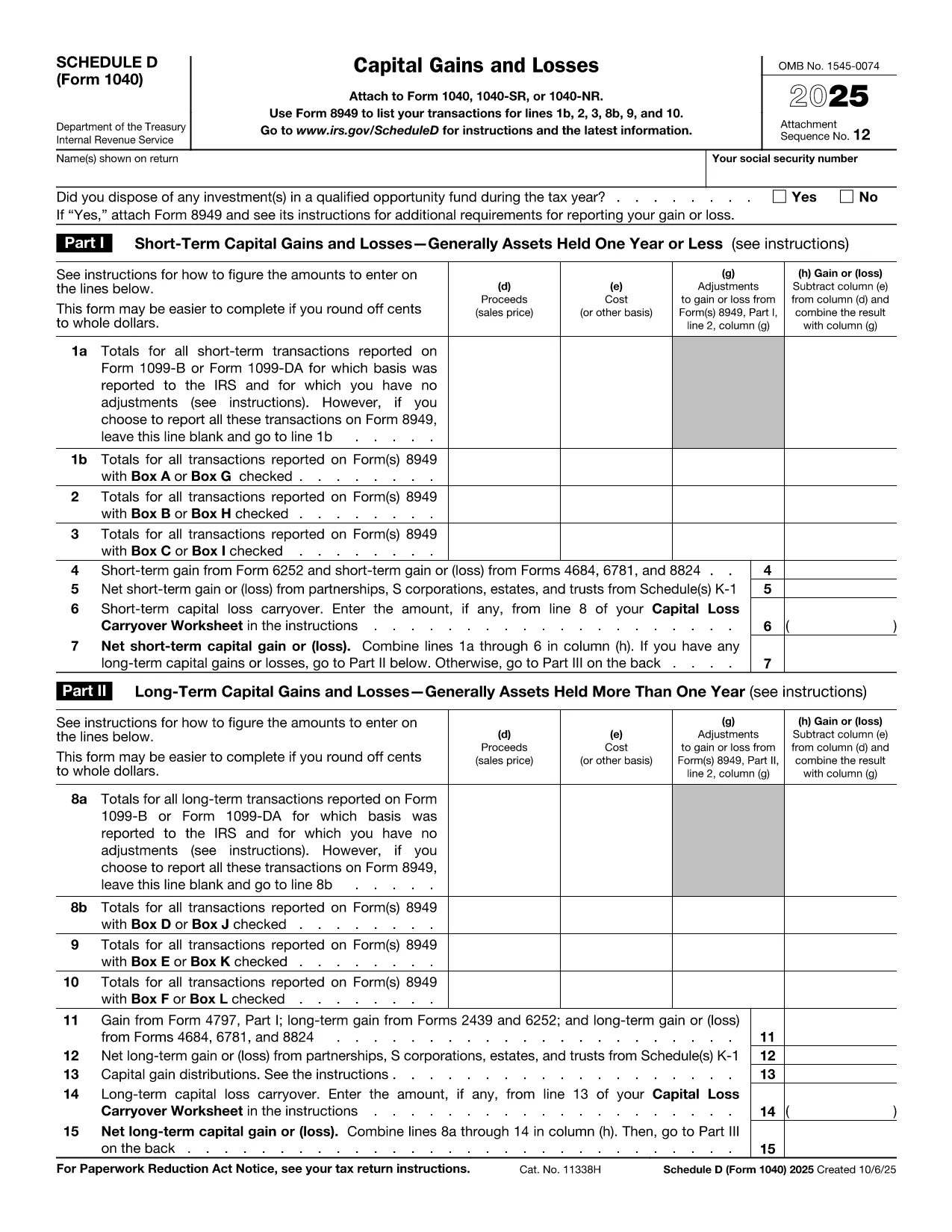
Schedule D (Form 1040SD) is the IRS worksheet used to report capital gains and losses from the sale of stocks, bonds, real estate, and other investment assets. Whether you’re a first‑time filer or a seasoned investor, a correctly completed Schedule D can lower your tax bill and keep the IRS happy.

Formize.com offers a fillable, web‑based PDF version of Schedule D. No need to download a PDF editor – simply click the Fill out this form button, wait for the Formize PDF Filler to load, and start entering your numbers.

What Is Schedule D and Who Needs It?

Schedule D is required when you have:

  • Capital gains from the sale of stocks, mutual funds, or other securities.
  • Capital losses that you want to deduct against gains.
  • Transactions involving collectibles, real estate, or crypto‑currency that are not reported on Form 8949.

If any of these apply to you, you must attach Schedule D to your Form 1040.

How to Fill Out Schedule D Using Formize

Follow the simple steps below to complete the form online. The Formize PDF Filler automatically saves your progress, validates numeric fields, and lets you download a printable PDF when you’re done.

Common Mistakes & Tips for a Clean Submission

Even small errors can delay processing. Keep these tips in mind:

  • Double‑check totals: The sum of short‑term and long‑term gains must match the totals on Form 8949.
  • Use the correct filing status: Your Schedule D totals feed into line 7 of Form 1040.
  • Don’t leave blanks: Enter “0” for any section that does not apply.
  • Review carry‑over losses: If you have a loss carryover from a previous year, include it on line 16.

When you’re ready, click the button below, fill the fields, review your entries, and download the completed Schedule D.

Fill out this form

Arahan

SOALAN LAZIM
  • Do I need Schedule D if I only have a few stock trades?

    Yes. Any sale of capital assets that results in a gain or loss must be reported on Schedule D, even if you have only one transaction.

  • Can I use the Formize filler on a mobile device?

    Absolutely. The PDF Filler works in modern browsers on smartphones and tablets, so you can complete Schedule D on the go.

  • What if I made a mistake after downloading the PDF?

    You can reopen the same Formize link, re‑enter the corrected data, and download a new PDF. The filler does not store personal data after you close the session.

  • Is the fillable Schedule D free?

    Yes. Formize offers the PDF filler for Schedule D at no cost. There are no hidden fees or subscription requirements.

  • How do I report a capital loss carryover?

    Enter the carryover amount on line 16 of Schedule D. The Formize filler includes a dedicated field for this entry.

  • Do I still need to attach Form 8949?

    If you have detailed transactions, you must attach Form 8949. Schedule D summarizes the totals from Form 8949.

  • What if my broker provides a 1099‑B with totals already calculated?

    You can copy the totals directly into Schedule D. Ensure the amounts match the 1099‑B and reconcile any differences on Form 8949.

  • Can I e‑file Schedule D using the filled PDF?

    Most tax software accepts the PDF data when you import your return. If your software does not, you can manually enter the numbers from the completed Schedule D.

BAGAIMANA UNTUK

Cara mengisi Schedule D PDF secara percuma, dalam talian dalam 5 langkah mudah:

  1. 1
    Click the Fill Out Button
    Press the "Fill out this form" button on the page. This opens the Formize PDF Filler in a new tab.
  2. 2
    Wait for the Filler to Load
    The Formize app loads the Schedule D PDF and makes every field editable. No download or extra software is required.
  3. 3
    Enter Your Information
    Type your capital gains, losses, and other required numbers directly into the highlighted fields. The tool validates numbers as you type.
  4. 4
    Review and Confirm
    Use the built‑in summary to verify totals. Correct any highlighted errors before proceeding.
  5. 5
    Save or Print
    When everything looks good, click "Download PDF" to save a completed Schedule D or print it to attach to your tax return.
Bentuk apl Pengisi PDF
TENTANG

Borang cukai

Schedule D PDF ialah salah satu borang Cukai yang merupakan dokumen yang digunakan untuk melaporkan maklumat yang berkaitan dengan cukai kepada pihak berkuasa cukai yang berkaitan. Terdapat pelbagai jenis borang cukai, termasuk borang cukai persekutuan, negeri dan tempatan, yang boleh berbeza-beza bergantung pada keadaan dan lokasi pembayar cukai.

CIRI-CIRI

Pengisi PDF

Cara paling mudah untuk mengisi Schedule D PDF dalam talian

  • Cepat isi Schedule D PDF
    Mencari cara untuk mengisi Schedule D PDF dengan cepat dalam talian? Dengan pengisi borang PDF percuma dalam talian kami, anda akan tahu cara mengedit dan mengisi dokumen pdf ini dalam masa kurang daripada satu minit.
  • Mudah untuk menggunakan editor PDF dalam talian
    Bosan dengan mencetak fail PDF supaya anda boleh mengeditnya, sebelum mengimbas semula dan menghantarnya semula? Edit dokumen PDF secara percuma dalam talian. Gunakan editor pdf dalam talian kami untuk menjimatkan masa dan kertas.
  • Alat yang hebat, semua platform
    Tertanya-tanya cara mengisi Schedule D PDF pada Mac, atau mungkin cara menggunakan pengisi PDF secara percuma? Alat PDF dalam talian kami berfungsi pada semua platform.
  • Simpanan fail selamat
    Fail "Schedule D PDF" yang lengkap disimpan dalam pangkalan data selamat yang diuruskan oleh pengehosan Amazon Cloud. Anda boleh memadamkan fail anda daripada sistem kami pada bila-bila masa. Walau apa pun, fail ini dipadamkan secara automatik selepas 24 jam.
  • Sembang dengan Schedule D PDF
    Sembang dengan "Schedule D PDF" di Chatize yang merupakan pembantu pembaca PDF percuma. Tanya soalan dan dapatkan jawapan daripada "Schedule D PDF". Cuma klik pada butang Sembang Dengan Dokumen di atas.

Padamkan sesi pengisian

Padamkan sesi pengisian yang dipilih? Dalam kes ini, kemajuan anda dalam melengkapkan borang akan hilang.

Padamkan sesi penyuntingan

Padamkan sesi penyuntingan yang dipilih? Dalam kes ini, kemajuan anda dalam membuat dan mengedit borang akan hilang.