
Pilih Bahasa

IRS Form 8863 – Education Credits for College Students

  1. Negara USA
  2. Bahasa Inggeris
  3. Aktiviti Cukai
  4. Jabatan IRS
Isi borang ini
IRS Form 8863 – Education Credits for College Students

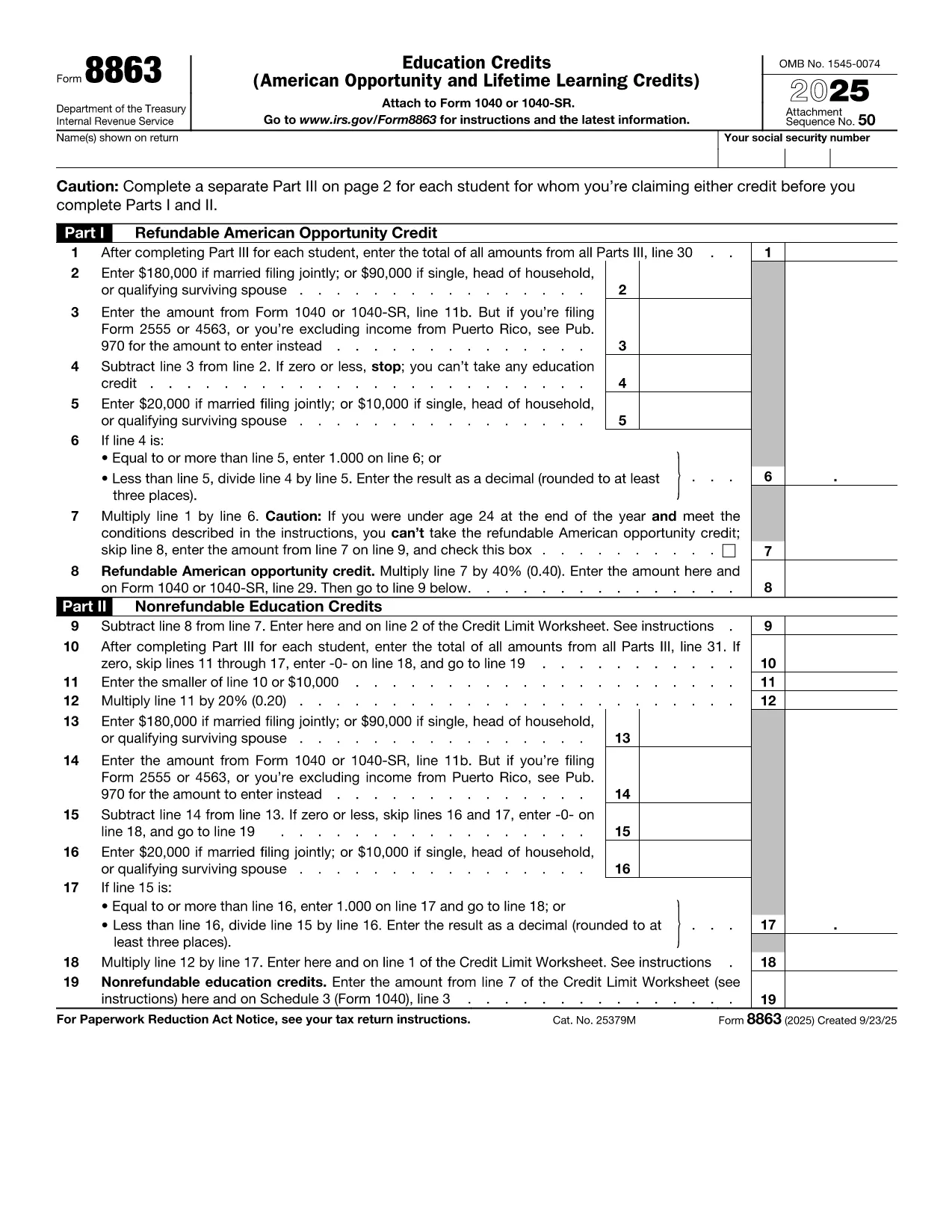
College tuition can be a big expense, but the IRS offers tax credits that can put money back in your pocket. IRS Form 8863Education Credits (American Opportunity and Lifetime Learning) – is the official form you need to claim these credits. With Formize, you can fill out the PDF directly in your browser, save time, and avoid printing errors.

What Is IRS Form 8863?

Form 8863 is used to claim two major education tax credits:

  • American Opportunity Credit (AOC) – up to $2,500 per eligible student for the first four years of post‑secondary education.
  • Lifetime Learning Credit (LLC) – up to $2,000 per tax return for any level of post‑secondary education, including courses to improve job skills.

The form is required for both credits and must be attached to your Form 1040 when you file.

How to Fill Out the Form Using Formize

Instead of downloading the PDF and opening a separate editor, simply click the "Fill out this form" button on this page. The Formize PDF Filler app will load in seconds, letting you:

  1. Enter personal information, school details, and qualified expenses.
  2. Automatically calculate the credit amount.
  3. Save your progress or download a completed PDF to attach to your tax return.

The process is secure, free, and works on any device.

Eligibility Requirements for College Students

To qualify for the credits on Form 8863, you must meet these criteria:

  • Be enrolled at an eligible educational institution.
  • Be pursuing a degree or recognized credential (AOC) or taking any post‑secondary course (LLC).
  • Have qualified tuition and related expenses paid during the tax year.
  • Not have exceeded the income limits for the credit.

Common Mistakes to Avoid

  • Incorrect Social Security Number: Double‑check both yours and the student’s SSN.
  • Double‑claiming expenses: You can’t claim the same expenses for both the AOC and the Lifetime Learning Credit.
  • Leaving fields blank: Even if a question doesn’t apply, write “0” or “N/A” to avoid processing delays.
  • Missing signatures: Form 8863 requires the taxpayer’s signature; an unsigned form will be rejected.

Where to Submit the Completed Form

After you finish, download the filled PDF and attach it to your Form 1040 when filing electronically or by mail. If you e‑file, the PDF is automatically included with your return. For paper filing, mail the complete Form 1040 package to the IRS address listed in the IRS mailing instructions.

If you need additional help, consult the IRS Form 8863 instructions or contact your college’s financial aid office.

SOALAN LAZIM
  • Which credit is better for me, the American Opportunity Credit or the Lifetime Learning Credit?

    The AOC offers a larger maximum credit ($2,500) but only for the first four years of college and requires at least half‑time enrollment. The LLC is smaller ($2,000) but can be used for any post‑secondary education, including part‑time courses.

  • Can I claim both credits in the same year?

    No. You must choose either the American Opportunity Credit or the Lifetime Learning Credit for each student in a tax year.

  • Do scholarships reduce the amount I can claim?

    Yes. Only qualified tuition and related expenses that are not covered by scholarships or grant money are eligible for the credit.

  • What if I make a mistake on the form after filing?

    You can file an amended return using Form 1040‑X. Attach a corrected Form 8863 and explain the changes.

  • Is there a deadline for submitting Form 8863?

    Form 8863 must be filed with your 2023 tax return, which is due April 15, 2024 (or the extended deadline if you filed for an extension).

  • Do I need a separate Form 8863 for each child in college?

    Yes. Each eligible student requires its own Form 8863 to claim the education credits.

  • Can I use Formize on a mobile device?

    Absolutely. The Formize PDF Filler works on smartphones and tablets, letting you complete the form anywhere.

  • Where can I find the official IRS instructions for Form 8863?

    Visit the IRS website at https://www.irs.gov/forms-pubs/about-form-8863 for the full instruction booklet.

BAGAIMANA UNTUK

Cara mengisi college student tax form secara percuma, dalam talian dalam 5 langkah mudah:

  1. 1
    Click the Fill‑out Button
    Press the blue “Fill out this form” button on this page. The Formize PDF Filler app will open in a new tab.
  2. 2
    Enter Your Information
    Complete every required field—personal data, school name, tuition paid, and any scholarships received.
  3. 3
    Review Calculations
    Formize automatically calculates the American Opportunity or Lifetime Learning credit based on the numbers you entered.
  4. 4
    Save or Download
    When you’re satisfied, click “Save” to store the form in your browser or “Download” to get a completed PDF ready for filing.
  5. 5
    Attach to Your Tax Return
    Include the filled Form 8863 with your Form 1040 when you e‑file or mail your paper return to the IRS.
Bentuk apl Pengisi PDF
TENTANG

Borang cukai

college student tax form ialah salah satu daripada borang Cukai yang merupakan dokumen yang digunakan untuk melaporkan pendapatan, potongan dan liabiliti cukai kepada pihak berkuasa cukai yang berkaitan. Borang ini merupakan bahagian penting dalam proses pemfailan cukai dan digunakan untuk memastikan individu dan perniagaan mematuhi undang-undang cukai dan mengira kewajipan cukai mereka dengan tepat.

Borang cukai khusus yang diperlukan boleh berbeza-beza bergantung pada faktor seperti status pemfailan individu, sumber pendapatan dan undang-undang cukai negara. Walau bagaimanapun, berikut ialah beberapa jenis borang cukai biasa:

Borang Cukai Pendapatan Individu: Borang ini, seperti siri 1040 di Amerika Syarikat, digunakan oleh individu untuk melaporkan pendapatan mereka, menuntut potongan dan kredit, dan mengira liabiliti cukai mereka.

Borang Cukai Perniagaan: Perniagaan, termasuk syarikat milikan tunggal, perkongsian, syarikat dan individu yang bekerja sendiri, mungkin perlu memfailkan pelbagai borang untuk melaporkan pendapatan, perbelanjaan dan cukai mereka yang terhutang. Contohnya termasuk Jadual C (Untung atau Rugi daripada Perniagaan) dan Borang 1120 (Pulangan Cukai Pendapatan Perbadanan A.S.).

Borang Cukai Pekerjaan: Majikan dikehendaki melaporkan gaji pekerja dan menahan serta menghantar cukai gaji. Borang seperti W-2 (Penyata Gaji dan Cukai) dan 941 (Nyata Cukai Persekutuan Suku Tahunan Majikan) digunakan untuk tujuan ini.

Borang Akaun Pelaburan dan Persaraan: Borang ini digunakan untuk melaporkan pendapatan pelaburan, keuntungan modal dan kerugian, serta sumbangan dan pengagihan daripada akaun persaraan. Contohnya termasuk Borang 1099-DIV (Dividen dan Pengagihan) dan Borang 5498 (Maklumat Sumbangan IRA).

Borang Cukai Harta Pusaka dan Hadiah: Apabila seseorang meninggal dunia atau membuat hadiah penting, borang khusus seperti Borang 706 (Penyata Cukai Harta Pusaka Amerika Syarikat (dan Pemindahan Melangkau Generasi)) dan Borang 709 (Hadiah Amerika Syarikat (dan Generasi- Skipping Transfer) Tax Return) digunakan untuk melaporkan dan mengira sebarang cukai harta pusaka atau hadiah yang berkenaan.

Adalah penting untuk ambil perhatian bahawa undang-undang dan borang cukai boleh berubah dari semasa ke semasa, jadi individu dan perniagaan harus berunding dengan pihak berkuasa cukai yang berkaitan atau mendapatkan nasihat cukai profesional untuk memastikan pematuhan dengan keperluan semasa.

CIRI-CIRI

Pengisi PDF

Cara paling mudah untuk mengisi college student tax form dalam talian

  • Cepat isi college student tax form
    Mencari cara untuk mengisi college student tax form dengan cepat dalam talian? Dengan pengisi borang PDF percuma dalam talian kami, anda akan tahu cara mengedit dan mengisi dokumen pdf ini dalam masa kurang daripada satu minit.
  • Mudah untuk menggunakan editor PDF dalam talian
    Bosan dengan mencetak fail PDF supaya anda boleh mengeditnya, sebelum mengimbas semula dan menghantarnya semula? Edit dokumen PDF secara percuma dalam talian. Gunakan editor pdf dalam talian kami untuk menjimatkan masa dan kertas.
  • Alat yang hebat, semua platform
    Tertanya-tanya cara mengisi college student tax form pada Mac, atau mungkin cara menggunakan pengisi PDF secara percuma? Alat PDF dalam talian kami berfungsi pada semua platform.
  • Simpanan fail selamat
    Fail "college student tax form" yang lengkap disimpan dalam pangkalan data selamat yang diuruskan oleh pengehosan Amazon Cloud. Anda boleh memadamkan fail anda daripada sistem kami pada bila-bila masa. Walau apa pun, fail ini dipadamkan secara automatik selepas 24 jam.
  • Sembang dengan college student tax form
    Sembang dengan "college student tax form" di Chatize yang merupakan pembantu pembaca PDF percuma. Tanya soalan dan dapatkan jawapan daripada "college student tax form". Cuma klik pada butang Sembang Dengan Dokumen di atas.

Padamkan sesi pengisian

Padamkan sesi pengisian yang dipilih? Dalam kes ini, kemajuan anda dalam melengkapkan borang akan hilang.

Padamkan sesi penyuntingan

Padamkan sesi penyuntingan yang dipilih? Dalam kes ini, kemajuan anda dalam membuat dan mengedit borang akan hilang.