
Pilih Bahasa

Free Fillable Request Form PDF – Fill Out Online with Formize

  1. Negara USA
  2. Bahasa Inggeris
  3. Aktiviti Cukai
  4. Jabatan IRS
Isi borang ini
Free Fillable Request Form PDF – Fill Out Online with Formize

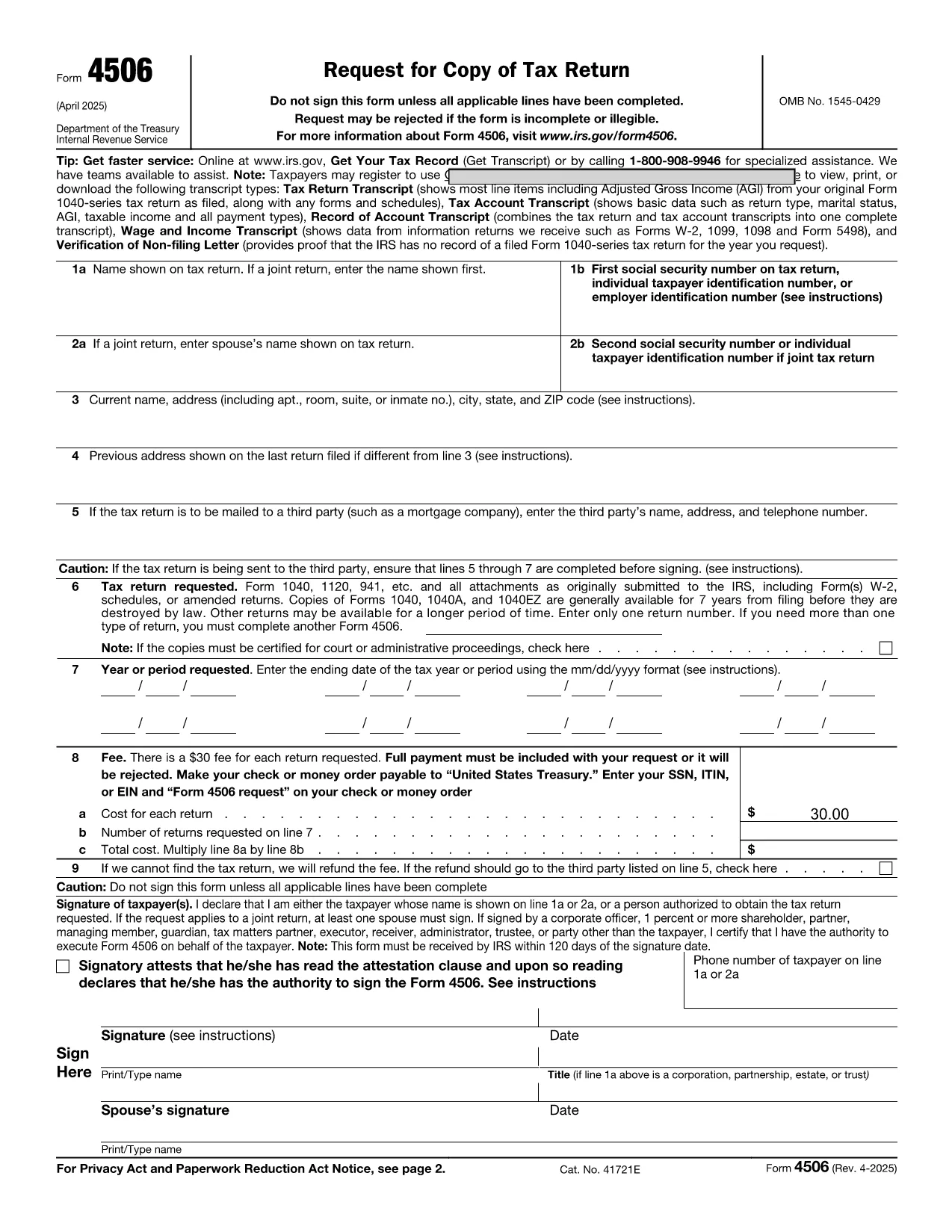
Need to submit a formal request but don’t want to wrestle with a static PDF? Our fillable Request Form PDF lets you complete the document directly in your browser, save time, and eliminate the need for any extra software.

What Is a Request Form PDF?

A request form PDF is a standardized document used by organizations—such as the IRS, government agencies, or private companies—to collect information from individuals who need a service, clarification, or official record. The form you’ll see on this page is the IRS Request for Transcript of Tax Return (Form 4506‑T), a widely‑searched “request form pdf”. It’s fully available from the IRS website and has been converted into a fillable version for instant online completion.

Why Use Formize’s Fillable PDF Filler?

  • No download required – click and start typing.
  • Secure cloud processing – your data never leaves your browser.
  • Auto‑save – return later without losing entered information.
  • Instant download or email – get a completed PDF ready for submission.

How to Complete the Request Form in Seconds

Follow the simple steps below; you won’t need Adobe Acrobat or any PDF editor.

Common Mistakes to Avoid

  • Leaving required fields blank – the filler will highlight missing information.
  • Using the wrong tax year – double‑check the year you’re requesting.
  • Submitting an unsigned form – remember to add your electronic signature at the end.

Where to Submit the Completed Form

Once you’ve filled out the form, you can either download the PDF and mail it to the IRS address listed on the form, or you can upload it directly through the IRS online portal if you have an account. For most users, downloading and mailing is the quickest route.

Ready to get started? Click the button below and let Formize do the heavy lifting.

SOALAN LAZIM
  • Do I need Adobe Acrobat to fill out this form?

    No. Formize’s online PDF filler works in any modern browser, so you can complete the request form without installing any software.

  • Is my data safe when I use the Formize filler?

    Yes. All data is processed locally in your browser and never stored on our servers. The connection is encrypted with HTTPS.

  • Can I save my progress and finish later?

    Absolutely. The filler includes an auto‑save feature that lets you download a draft version and reload it whenever you’re ready.

  • What if I make a mistake after downloading the PDF?

    You can reopen the saved PDF in the Formize filler by uploading it again, or you can edit it with any standard PDF editor.

  • Do I need a digital signature?

    The IRS accepts electronic signatures on Form 4506‑T. Use the built‑in signature tool to create a legally valid e‑signature.

  • How long does it take for the IRS to process my request?

    Processing times vary, but the IRS typically takes 10‑15 business days to send the requested transcript after receiving a correctly completed form.

  • Can I submit the form directly from Formize?

    Formize provides a download link. You can then attach the PDF to an email or upload it through the IRS online portal, depending on your preference.

  • Is there a cost to use the Formize filler?

    No. Filling out, signing, and downloading the request form PDF is completely free.

BAGAIMANA UNTUK

Cara mengisi request form pdf secara percuma, dalam talian dalam 5 langkah mudah:

  1. 1
    Click “Fill out this form”
    Locate the bright “Fill out this form” button on the page and click it. The Formize PDF Filler app will open in a new browser tab.
  2. 2
    Wait for the filler to load
    The app loads in seconds. You’ll see a preview of the Request Form with editable fields.
  3. 3
    Enter your information
    Type directly into each highlighted field. The filler automatically validates dates, numbers, and required entries.
  4. 4
    Review and sign
    Use the built‑in e‑signature tool to add your signature. Double‑check all entries for accuracy.
  5. 5
    Download or submit
    When you’re satisfied, click “Download PDF” to save a copy, or follow the on‑screen instructions to email the completed form directly to the IRS.
Bentuk apl Pengisi PDF
TENTANG

Borang cukai

request form pdf ialah salah satu borang Cukai yang merupakan dokumen yang digunakan untuk melaporkan maklumat yang berkaitan dengan cukai kepada pihak berkuasa cukai yang berkaitan. Terdapat pelbagai jenis borang cukai, termasuk borang cukai persekutuan, negeri dan tempatan, yang boleh berbeza-beza bergantung pada keadaan dan lokasi pembayar cukai.

CIRI-CIRI

Pengisi PDF

Cara paling mudah untuk mengisi request form pdf dalam talian

  • Cepat isi request form pdf
    Mencari cara untuk mengisi request form pdf dengan cepat dalam talian? Dengan pengisi borang PDF percuma dalam talian kami, anda akan tahu cara mengedit dan mengisi dokumen pdf ini dalam masa kurang daripada satu minit.
  • Mudah untuk menggunakan editor PDF dalam talian
    Bosan dengan mencetak fail PDF supaya anda boleh mengeditnya, sebelum mengimbas semula dan menghantarnya semula? Edit dokumen PDF secara percuma dalam talian. Gunakan editor pdf dalam talian kami untuk menjimatkan masa dan kertas.
  • Alat yang hebat, semua platform
    Tertanya-tanya cara mengisi request form pdf pada Mac, atau mungkin cara menggunakan pengisi PDF secara percuma? Alat PDF dalam talian kami berfungsi pada semua platform.
  • Simpanan fail selamat
    Fail "request form pdf" yang lengkap disimpan dalam pangkalan data selamat yang diuruskan oleh pengehosan Amazon Cloud. Anda boleh memadamkan fail anda daripada sistem kami pada bila-bila masa. Walau apa pun, fail ini dipadamkan secara automatik selepas 24 jam.
  • Sembang dengan request form pdf
    Sembang dengan "request form pdf" di Chatize yang merupakan pembantu pembaca PDF percuma. Tanya soalan dan dapatkan jawapan daripada "request form pdf". Cuma klik pada butang Sembang Dengan Dokumen di atas.

Padamkan sesi pengisian

Padamkan sesi pengisian yang dipilih? Dalam kes ini, kemajuan anda dalam melengkapkan borang akan hilang.

Padamkan sesi penyuntingan

Padamkan sesi penyuntingan yang dipilih? Dalam kes ini, kemajuan anda dalam membuat dan mengedit borang akan hilang.