
Pilih Bahasa

TurboTax Refund Request Form (IRS Form 843) – Fillable PDF

  1. Negara USA
  2. Bahasa Inggeris
  3. Aktiviti Cukai
  4. Jabatan IRS
Isi borang ini
TurboTax Refund Request Form (IRS Form 843) – Fillable PDF

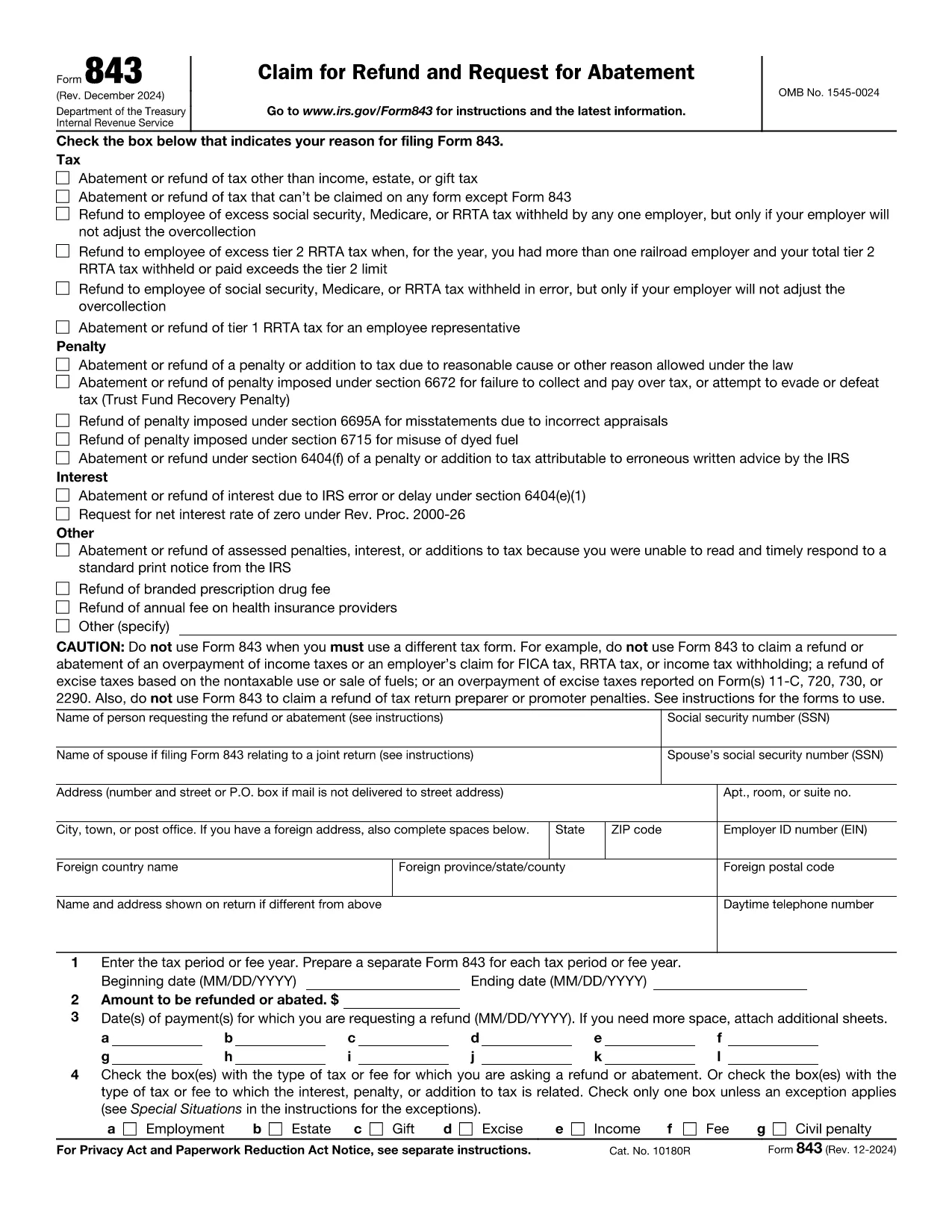
If you filed your taxes with TurboTax and need to claim a refund, the official document you’ll use is IRS Form 843 – Claim for Refund and Request for Abatement. This form lets you request a refund of taxes, penalties, or interest that you believe were incorrectly assessed.

What Is the TurboTax Refund Request Form?

Form 843 is a government‑issued PDF that works with any tax‑preparation software, including TurboTax. It is used for:

  • Refunding over‑paid taxes
  • Requesting an abatement of penalties or interest
  • Correcting a mistake after you’ve filed your return

The form is fully fillable, which means you can type directly into the fields, save your progress, and print or submit electronically.

How to Fill Out the Form Using Formize

Instead of downloading the PDF and opening it in a desktop editor, simply click the button below. The Formize PDF Filler app will load instantly, letting you complete the form in your browser.

Fill out this form

Common Mistakes & Tips for a Successful Refund Claim

  • Incorrect Tax Year: Double‑check that the tax year you’re claiming matches the year on your original TurboTax return.
  • Missing Signature: The form is not valid without a handwritten signature (or a qualified electronic signature).
  • Incomplete Explanation: Provide a clear, concise reason for the refund. Vague statements often lead to delays.
  • Attach Supporting Docs: Include copies of the original return, payment receipts, or any correspondence from the IRS.

Where to Get Help and Submit Your Refund Request

After completing Form 843, you can:

  • Mail it to the IRS address listed in the instructions (usually the address for your state).
  • Submit it through a tax professional who can forward it on your behalf.
  • Contact the IRS Help Line for specific questions.

Remember, TurboTax support can guide you on where to attach Form 843 within the TurboTax interface, but the actual refund claim is processed by the IRS.

SOALAN LAZIM
  • What is IRS Form 843 used for?

    Form 843 is the official claim for refund or request for abatement of taxes, penalties, or interest. It’s the form TurboTax users file when they need a refund after filing.

  • Can I file Form 843 electronically?

    The IRS does not accept Form 843 electronically. You must print, sign, and mail the completed form to the address indicated in the instructions.

  • Do I need a TurboTax account to use this form?

    No. Form 843 is an IRS document that works with any tax‑preparation software. You only need the form if you’re requesting a refund for a return prepared with TurboTax.

  • How long does the IRS take to process a refund claim?

    Processing times vary, but most refunds are issued within 6‑8 weeks after the IRS receives a complete and accurate Form 843.

  • What common errors cause delays?

    Missing signature, wrong tax year, incomplete explanation, and failure to attach supporting documents are the top reasons for delays.

  • Is there a fee to use Formize’s PDF filler?

    Formize offers a free basic filler for most standard fillable PDFs, including Form 843. No credit‑card information is required.

  • Can I request a refund for TurboTax fees using this form?

    Form 843 is for tax‑related refunds, not software fees. For TurboTax fee refunds, contact TurboTax customer support directly.

  • Do I need a tax professional to submit Form 843?

    While not required, a tax professional can help ensure the form is completed correctly and mailed to the proper IRS address.

BAGAIMANA UNTUK

Cara mengisi request refund form secara percuma, dalam talian dalam 5 langkah mudah:

  1. 1
    Click the Fill‑Out Button
    Press the "Fill out this form" button on the page. The Formize PDF Filler will open in a new tab.
  2. 2
    Wait for the Formize App to Load
    The filler loads in seconds. You’ll see all fields become editable directly in your browser.
  3. 3
    Enter Your Information
    Complete each required field: taxpayer name, SSN, tax year, amount of refund, and a brief explanation.
  4. 4
    Review and Sign
    Double‑check for errors, then add your handwritten signature (or use an approved electronic signature).
  5. 5
    Save, Print, or Submit
    Save the completed PDF, print it if you need a hard copy, or forward it to your tax professional for mailing to the IRS.
Bentuk apl Pengisi PDF
TENTANG

Borang cukai

request refund form ialah salah satu borang Cukai yang merupakan dokumen yang digunakan untuk melaporkan maklumat yang berkaitan dengan cukai kepada pihak berkuasa cukai yang berkaitan. Terdapat pelbagai jenis borang cukai, termasuk borang cukai persekutuan, negeri dan tempatan, yang boleh berbeza-beza bergantung pada keadaan dan lokasi pembayar cukai.

CIRI-CIRI

Pengisi PDF

Cara paling mudah untuk mengisi request refund form dalam talian

  • Cepat isi request refund form
    Mencari cara untuk mengisi request refund form dengan cepat dalam talian? Dengan pengisi borang PDF percuma dalam talian kami, anda akan tahu cara mengedit dan mengisi dokumen pdf ini dalam masa kurang daripada satu minit.
  • Mudah untuk menggunakan editor PDF dalam talian
    Bosan dengan mencetak fail PDF supaya anda boleh mengeditnya, sebelum mengimbas semula dan menghantarnya semula? Edit dokumen PDF secara percuma dalam talian. Gunakan editor pdf dalam talian kami untuk menjimatkan masa dan kertas.
  • Alat yang hebat, semua platform
    Tertanya-tanya cara mengisi request refund form pada Mac, atau mungkin cara menggunakan pengisi PDF secara percuma? Alat PDF dalam talian kami berfungsi pada semua platform.
  • Simpanan fail selamat
    Fail "request refund form" yang lengkap disimpan dalam pangkalan data selamat yang diuruskan oleh pengehosan Amazon Cloud. Anda boleh memadamkan fail anda daripada sistem kami pada bila-bila masa. Walau apa pun, fail ini dipadamkan secara automatik selepas 24 jam.
  • Sembang dengan request refund form
    Sembang dengan "request refund form" di Chatize yang merupakan pembantu pembaca PDF percuma. Tanya soalan dan dapatkan jawapan daripada "request refund form". Cuma klik pada butang Sembang Dengan Dokumen di atas.

Padamkan sesi pengisian

Padamkan sesi pengisian yang dipilih? Dalam kes ini, kemajuan anda dalam melengkapkan borang akan hilang.

Padamkan sesi penyuntingan

Padamkan sesi penyuntingan yang dipilih? Dalam kes ini, kemajuan anda dalam membuat dan mengedit borang akan hilang.