
Pilih Bahasa

Fillable IRS Form 8863 – College Tuition Tax Credit

  1. Negara USA
  2. Bahasa Inggeris
  3. Aktiviti Cukai
  4. Jabatan IRS
Isi borang ini
Fillable IRS Form 8863 – College Tuition Tax Credit

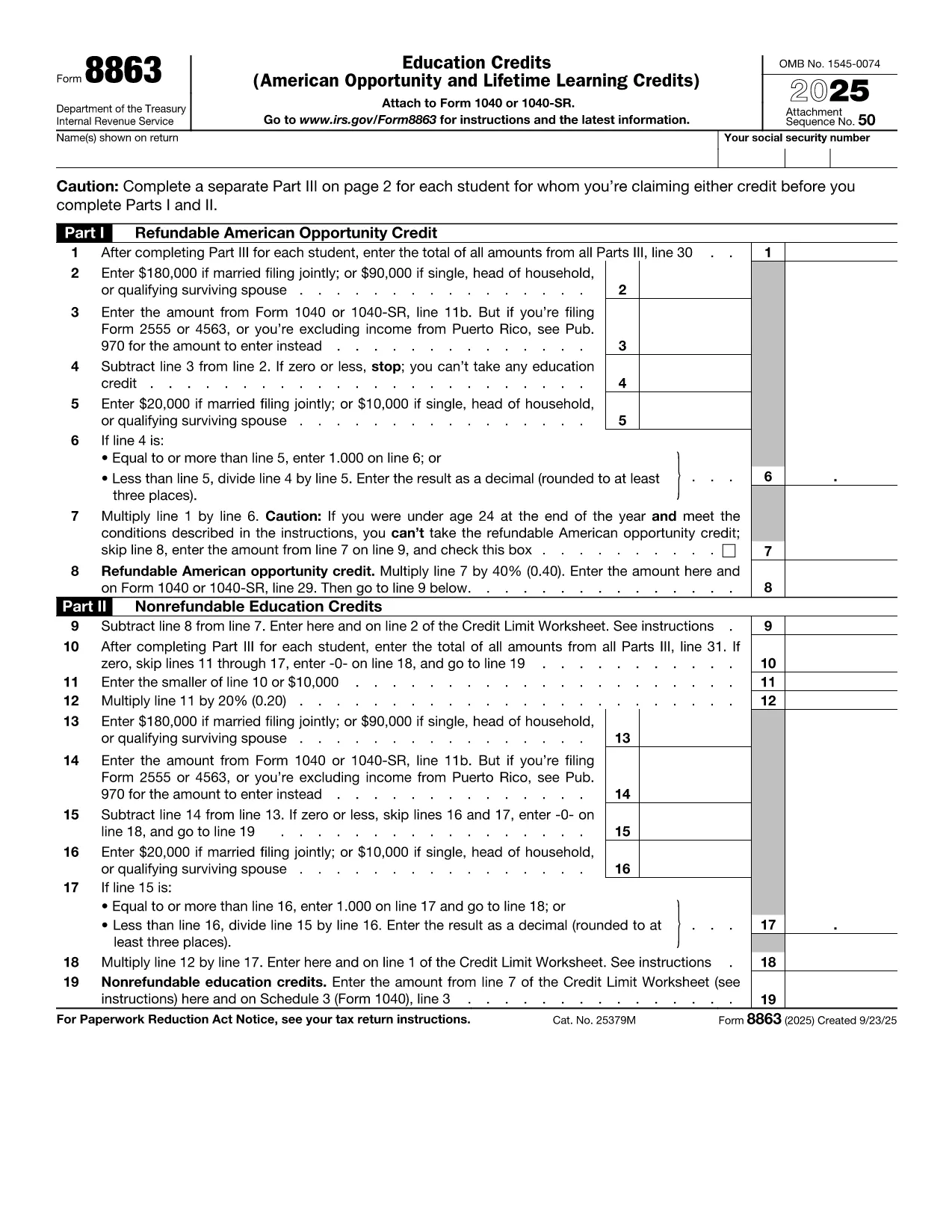
Looking for a fast, secure way to claim education credits for your college tuition? Formize.com offers a fully fillable PDF version of IRS Form 8863, the official tax form used to request the American Opportunity Credit and Lifetime Learning Credit.

What Is IRS Form 8863?

Form 8863, Education Credits (American Opportunity and Lifetime Learning), allows eligible students and parents to reduce their federal tax liability for qualified tuition and related expenses. The form is filed with your annual individual income tax return (Form 1040).

How to Fill Out Form 8863 Online

Instead of downloading the PDF and opening it in a separate editor, simply click the "Fill out this form" button on this page. The Formize PDF Filler app will load directly in your browser, letting you:

  • Enter personal information, school details, and qualified expenses.
  • See real‑time calculations for the credit amount.
  • Save a copy to your device or cloud storage.
  • Print the completed form for attachment to your tax return.

Common Mistakes to Avoid

  • Incorrect school EIN: Verify the Employer Identification Number on your Form 1098‑T.
  • Double‑claiming expenses: Tuition cannot be claimed on both Form 8863 and the Tuition and Fees Deduction.
  • Missing signature: The form requires the taxpayer’s signature; unsigned forms are rejected.

Where to Submit the Completed Form

Attach the finished Form 8863 to your Form 1040 when filing electronically or by mail. If you use tax‑preparation software, you can upload the PDF directly.

Download the Fillable PDF

For offline use, you can also download the official IRS PDF from the link below. The Formize version mirrors the exact layout, ensuring compliance with IRS standards.

Download IRS Form 8863 (PDF)

SOALAN LAZIM
  • Who is eligible to use Form 8863?

    Students who paid qualified tuition and related expenses for themselves, a spouse, or a dependent and meet income limits for the education credits.

  • Can I claim both the American Opportunity Credit and the Lifetime Learning Credit on the same return?

    No. You may claim only one credit per student per year, but you can claim different credits for different students.

  • Do I need a Form 1098‑T to complete Form 8863?

    While not required, the Form 1098‑T provides the tuition amount and school EIN, which simplify the filing process and reduce errors.

  • What is the maximum credit I can receive?

    The American Opportunity Credit offers up to $2,500 per eligible student; the Lifetime Learning Credit provides up to $2,000 per return.

  • Will the Formize filler work on mobile devices?

    Yes. The PDF filler is responsive and works on modern browsers for smartphones, tablets, and desktops.

  • Is there a filing deadline for Form 8863?

    Form 8863 must be attached to your tax return and filed by the regular tax deadline (typically April 15) or an approved extension.

  • Can I amend a previously filed Form 8863?

    If you need to correct a mistake, file Form 1040‑X (Amended U.S. Individual Income Tax Return) and include a revised Form 8863.

  • Do I need to sign Form 8863 electronically?

    When filing electronically, the software adds your electronic signature. For paper filing, print and sign the form manually.

BAGAIMANA UNTUK

Cara mengisi tax form college tuition secara percuma, dalam talian dalam 5 langkah mudah:

  1. 1
    Click the Fill‑out Button
    Press the "Fill out this form" button on the page. The Formize PDF Filler loads instantly in your browser.
  2. 2
    Enter All Required Information
    Complete each field – taxpayer name, Social Security Number, school EIN, qualified tuition, and expenses.
  3. 3
    Review Calculations
    The filler automatically calculates your American Opportunity or Lifetime Learning Credit. Verify the amounts.
  4. 4
    Save or Print the Form
    When finished, click "Save" to download a copy or "Print" to produce a hard copy for your tax return.
  5. 5
    Attach to Form 1040
    Include the completed Form 8863 with your Form 1040 when filing electronically or by mail.
Bentuk apl Pengisi PDF
TENTANG

Borang cukai

tax form college tuition ialah salah satu borang Cukai yang merupakan dokumen yang digunakan untuk melaporkan maklumat yang berkaitan dengan cukai kepada pihak berkuasa cukai yang berkaitan. Terdapat pelbagai jenis borang cukai, termasuk borang cukai persekutuan, negeri dan tempatan, yang boleh berbeza-beza bergantung pada keadaan dan lokasi pembayar cukai.

CIRI-CIRI

Pengisi PDF

Cara paling mudah untuk mengisi tax form college tuition dalam talian

  • Cepat isi tax form college tuition
    Mencari cara untuk mengisi tax form college tuition dengan cepat dalam talian? Dengan pengisi borang PDF percuma dalam talian kami, anda akan tahu cara mengedit dan mengisi dokumen pdf ini dalam masa kurang daripada satu minit.
  • Mudah untuk menggunakan editor PDF dalam talian
    Bosan dengan mencetak fail PDF supaya anda boleh mengeditnya, sebelum mengimbas semula dan menghantarnya semula? Edit dokumen PDF secara percuma dalam talian. Gunakan editor pdf dalam talian kami untuk menjimatkan masa dan kertas.
  • Alat yang hebat, semua platform
    Tertanya-tanya cara mengisi tax form college tuition pada Mac, atau mungkin cara menggunakan pengisi PDF secara percuma? Alat PDF dalam talian kami berfungsi pada semua platform.
  • Simpanan fail selamat
    Fail "tax form college tuition" yang lengkap disimpan dalam pangkalan data selamat yang diuruskan oleh pengehosan Amazon Cloud. Anda boleh memadamkan fail anda daripada sistem kami pada bila-bila masa. Walau apa pun, fail ini dipadamkan secara automatik selepas 24 jam.
  • Sembang dengan tax form college tuition
    Sembang dengan "tax form college tuition" di Chatize yang merupakan pembantu pembaca PDF percuma. Tanya soalan dan dapatkan jawapan daripada "tax form college tuition". Cuma klik pada butang Sembang Dengan Dokumen di atas.

Padamkan sesi pengisian

Padamkan sesi pengisian yang dipilih? Dalam kes ini, kemajuan anda dalam melengkapkan borang akan hilang.

Padamkan sesi penyuntingan

Padamkan sesi penyuntingan yang dipilih? Dalam kes ini, kemajuan anda dalam membuat dan mengedit borang akan hilang.