Pilih Bahasa

Fillable I‑9 Employment Eligibility Verification Form

  1. Negara USA
  2. Bahasa Inggeris
  3. Jabatan Perkhidmatan Kewarganegaraan dan Imigresen A.S.
Isi borang ini
Fillable I‑9 Employment Eligibility Verification Form

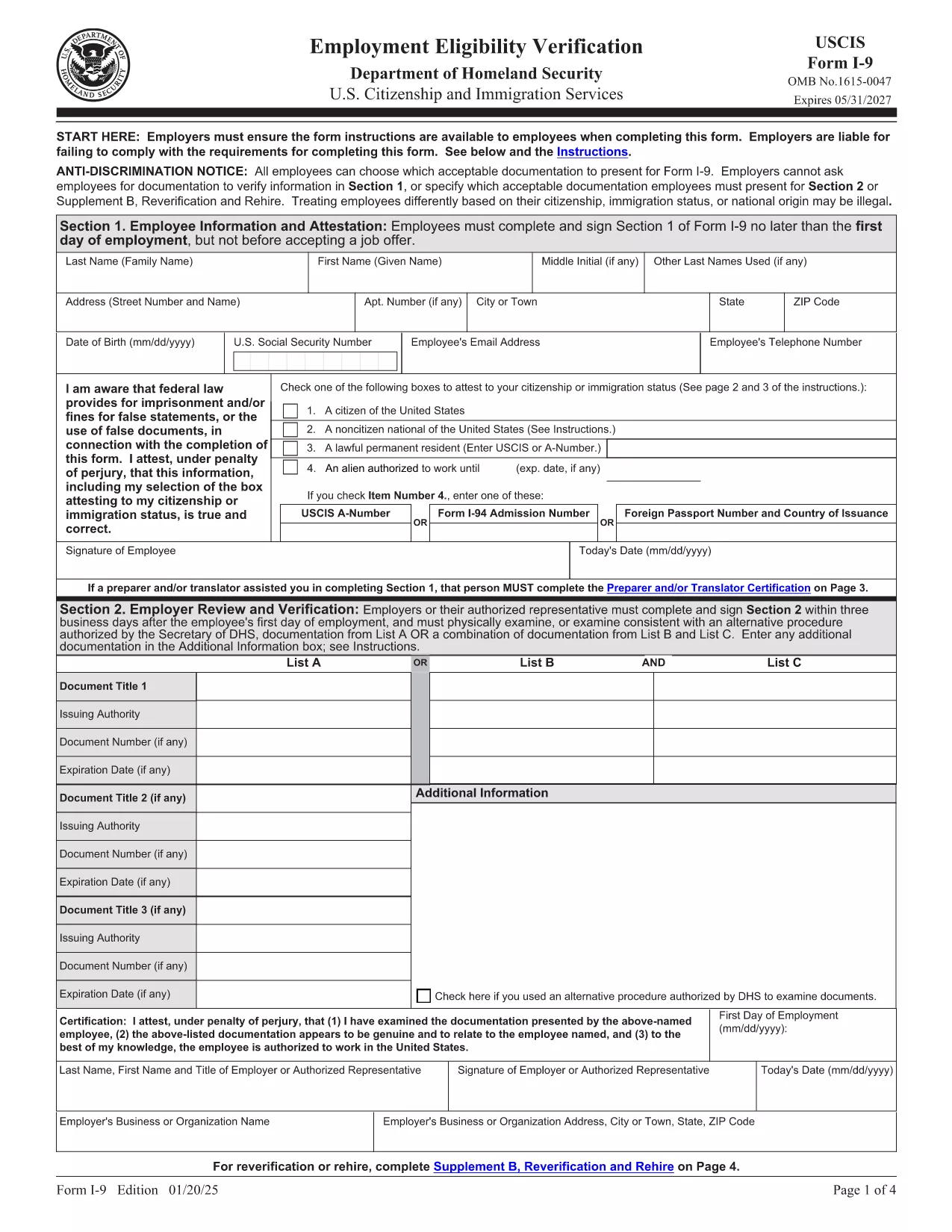
The Form I‑9 (Employment Eligibility Verification) is required for every new employee hired in the United States. Employers must verify both identity and work authorization within three business days of hiring. Our fillable PDF version lets you complete the form quickly, securely, and without the hassle of downloading a separate editor.

What Is the I‑9 Form and Why You Need It

The I‑9 is issued by the U.S. Citizenship and Immigration Services (USCIS). It ensures that all employees are legally authorized to work in the U.S. Failure to complete the form correctly can result in fines and penalties for both employer and employee.

How to Fill Out the I‑9 Form Online with Formize

Instead of downloading the PDF and opening it in a PDF editor, simply click the "Fill out this form" button on this page. The Formize PDF Filler app will load in your browser, allowing you to type, check boxes, and add signatures directly on the form.

Common Mistakes & Tips for a Perfect I‑9 Submission

  • Do not leave any required fields blank. Every box marked with an asterisk must be completed.
  • Use the correct document codes. Refer to the USCIS instructions for List A, B, and C documents.
  • Sign and date the form. Both employee and employer signatures are mandatory.
  • Keep the form on file for three years. Store it securely and separate from the employee’s personnel file.

When you’re ready, click the button below, fill the form, and download the completed PDF for your records.

SOALAN LAZIM
  • Is the I‑9 form required for all new hires?

    Yes. Every employee hired after November 6, 1986 must complete Form I‑9, regardless of citizenship or work status.

  • Can I use a scanned copy of a handwritten I‑9?

    No. The form must be completed electronically or on a legible, printable PDF. Handwritten forms that are scanned are not acceptable.

  • How long must I keep the I‑9 on file?

    Employers must retain the I‑9 for three years after the date of hire, or one year after employment ends, whichever is later.

  • What documents can I use for verification?

    You may present either one document from List A (identity + employment authorization) or a combination of one document from List B (identity) and one from List C (employment authorization).

  • Do I need to re‑verify an employee’s work authorization?

    Only if the employee’s work‑authorization document has an expiration date. Re‑verification must be done before the document expires.

  • Can I fill out the I‑9 on a mobile device?

    Yes. The Formize PDF Filler works on most modern browsers, including mobile Safari and Chrome, allowing you to complete the form on a phone or tablet.

  • Is there a fee to use Formize’s PDF filler?

    Formize offers a free basic filler for standard PDFs like the I‑9. No credit‑card information is required to complete the form.

  • What should I do if I make a mistake on the I‑9?

    Correct errors by striking through the incorrect entry, entering the correct information, and initialing the change. Do not erase or use white‑out.

  • Do I need to submit the I‑9 to USCIS?

    No. The I‑9 is kept by the employer for inspection by authorized government officials, such as the Department of Labor or ICE, upon request.

  • Is the PDF version of the I‑9 the same as the paper version?

    Yes. The official USCIS PDF is an exact replica of the paper form and meets all legal requirements when completed correctly.

BAGAIMANA UNTUK

Cara mengisi I-9 form secara percuma, dalam talian dalam 5 langkah mudah:

  1. 1
    Open the Fillable I‑9 Form
    Click the "Fill out this form" button on the page. The Formize PDF Filler app loads in your browser.
  2. 2
    Enter Employee Information
    Complete Section 1 with the employee’s name, address, date of birth, and Social Security Number. Select the appropriate citizenship status.
  3. 3
    Upload or Type Document Details
    In Section 2, choose the document type (List A, B, or C) and enter the document numbers, expiration dates, and issuing authority.
  4. 4
    Add Signatures
    Both the employee and the employer must sign and date the form. Use the signature tool in the Formize app.
  5. 5
    Save and Download
    When all fields are completed, click "Save" then "Download" to store the finished PDF on your computer or cloud storage.
Bentuk apl Pengisi PDF
TENTANG

templat I-9 form.

Dengan set ciri tradisional untuk melihat dan mengisi dokumen PDF, digabungkan dengan faedah aplikasi web dan reka letak responsif, anda boleh melengkapkan I-9 form dalam beberapa minit.

CIRI-CIRI

Pengisi PDF

Cara paling mudah untuk mengisi I-9 form dalam talian

  • Cepat isi I-9 form
    Mencari cara untuk mengisi I-9 form dengan cepat dalam talian? Dengan pengisi borang PDF percuma dalam talian kami, anda akan tahu cara mengedit dan mengisi dokumen pdf ini dalam masa kurang daripada satu minit.
  • Mudah untuk menggunakan editor PDF dalam talian
    Bosan dengan mencetak fail PDF supaya anda boleh mengeditnya, sebelum mengimbas semula dan menghantarnya semula? Edit dokumen PDF secara percuma dalam talian. Gunakan editor pdf dalam talian kami untuk menjimatkan masa dan kertas.
  • Alat yang hebat, semua platform
    Tertanya-tanya cara mengisi I-9 form pada Mac, atau mungkin cara menggunakan pengisi PDF secara percuma? Alat PDF dalam talian kami berfungsi pada semua platform.
  • Simpanan fail selamat
    Fail "I-9 form" yang lengkap disimpan dalam pangkalan data selamat yang diuruskan oleh pengehosan Amazon Cloud. Anda boleh memadamkan fail anda daripada sistem kami pada bila-bila masa. Walau apa pun, fail ini dipadamkan secara automatik selepas 24 jam.
  • Sembang dengan I-9 form
    Sembang dengan "I-9 form" di Chatize yang merupakan pembantu pembaca PDF percuma. Tanya soalan dan dapatkan jawapan daripada "I-9 form". Cuma klik pada butang Sembang Dengan Dokumen di atas.

Padamkan sesi pengisian

Padamkan sesi pengisian yang dipilih? Dalam kes ini, kemajuan anda dalam melengkapkan borang akan hilang.

Padamkan sesi penyuntingan

Padamkan sesi penyuntingan yang dipilih? Dalam kes ini, kemajuan anda dalam membuat dan mengedit borang akan hilang.