
Selecteer taal

Form W‑4P Fillable PDF – Complete Your Pension Withholding Online

  1. Land VS
  2. Taal Engels
  3. Activiteit Belastingen
  4. Afdeling Belastingdienst
Form W‑4P Fillable PDF – Complete Your Pension Withholding Online

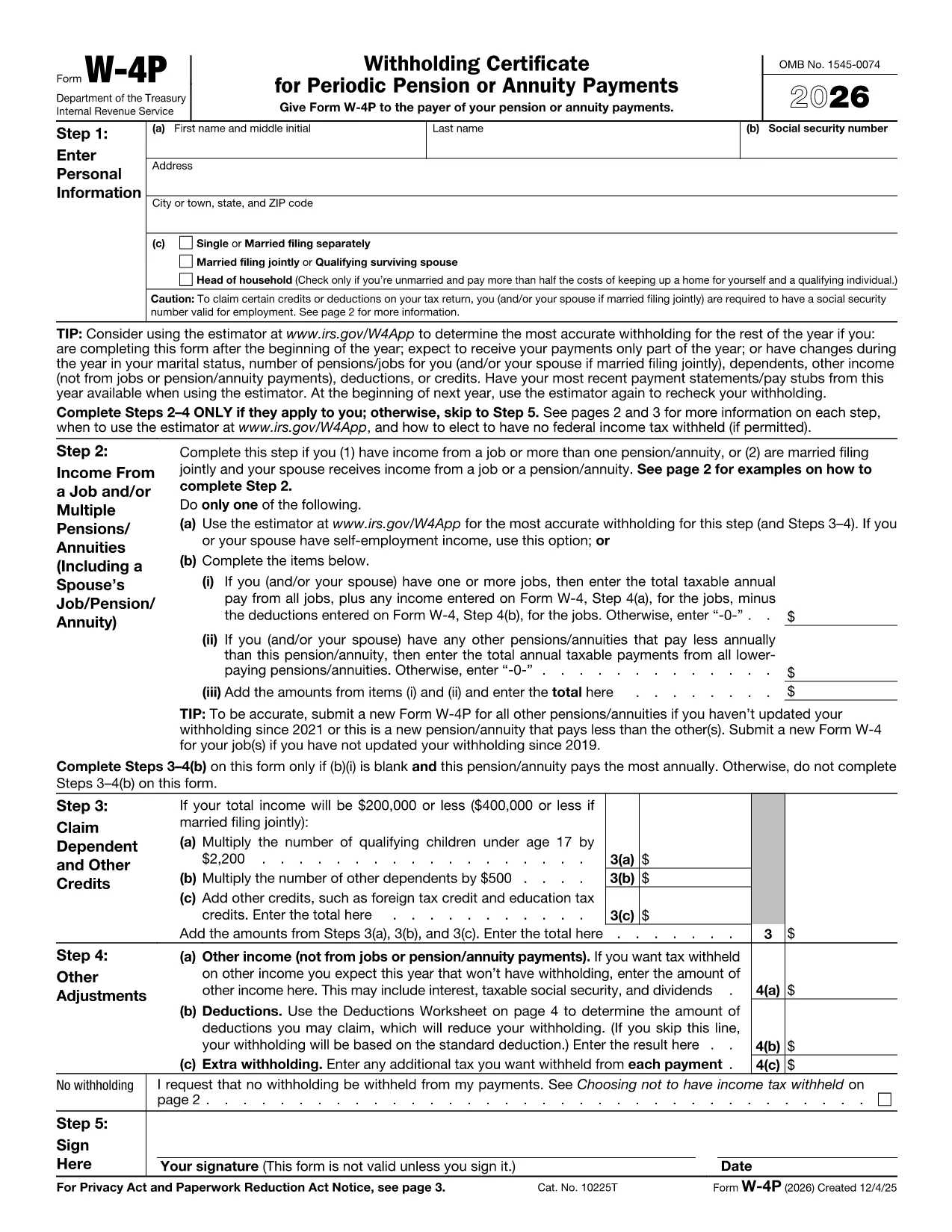
Form W‑4P is the IRS document used to request federal income‑tax withholding from pension, annuity, or other retirement payments. Instead of downloading a static PDF and hunting for a PDF editor, you can fill this form directly in your browser with Formize’s secure PDF Filler app.

What Is Form W‑4P?

The IRS Form W‑4P tells payers how much tax to withhold from retirement distributions. It is required for:

  • Traditional pensions
  • IRA distributions
  • Annuity payments
  • Social Security benefits (if you elect withholding)

Accurate completion helps you avoid an unexpected tax bill or over‑withholding that reduces your cash flow.

How to Fill Out Form W‑4P with Formize

Follow the simple steps below – no PDF software needed.

  1. Click the **"Fill out this form"** button on this page.
  2. Wait a few seconds while the Formize PDF Filler loads the fillable W‑4P template.
  3. Enter your personal information, tax filing status, and the amount you want withheld.
  4. Review the preview, then click **"Save & Download"** to get a completed PDF you can email or print.

The filler saves your data securely in the browser, so you stay in control of your personal details.

Common Mistakes & Tips for Accurate Completion

  • Incorrect filing status: Choose the status that matches your most recent tax return (single, married, etc.).
  • Leaving the withholding amount blank: If you want no tax withheld, write “0” in the appropriate box; otherwise, specify the exact dollar amount.
  • Outdated address: Ensure the mailing address is current; the payer uses this for any correspondence.
  • Signature: After downloading, print and sign the form before sending it to the payer.

Following these tips reduces the risk of processing delays and ensures your retirement income is taxed correctly.

Ready to get started? Click the button below and let Formize handle the heavy lifting.

FAQ
  • Who needs to file Form W‑4P?

    Anyone receiving pension, annuity, IRA distributions, or other retirement income who wants federal tax withheld.

  • Can I claim exemption from withholding on Form W‑4P?

    Yes, if you had no tax liability last year and expect none this year, you can write “Exempt” in the appropriate box.

  • How often should I update Form W‑4P?

    Update it whenever your filing status, number of dependents, or desired withholding amount changes.

  • Do I need to submit a new Form W‑4P each year?

    No, the form remains in effect until you submit a revised version or the payer notifies you otherwise.

  • What happens if I don’t submit Form W‑4P?

    The payer may withhold tax at the default rate (usually 10%), which could be higher than you need.

  • Is the Formize filler secure?

    Yes, all data is processed locally in your browser; nothing is stored on our servers.

  • Can I fill out Form W‑4P on a mobile device?

    Absolutely—Formize’s PDF Filler works on smartphones and tablets with modern browsers.

  • Do I need Adobe Acrobat to use this form?

    No. The online filler replaces Adobe Acrobat; you only need a web browser.

  • Where can I find official instructions for Form W‑4P?

    Visit the IRS page at IRS Instructions for Form W‑4P.

  • What if I make a mistake after submitting?

    Submit a new, corrected Form W‑4P to the payer as soon as possible to avoid incorrect withholding.

HOE

Zo vult u Form W-4P PDF gratis online in in 4 eenvoudige stappen:

  1. 1
    Open the Fillable Form
    Click the "Fill out this form" button on the page. The Formize PDF Filler app will launch in a new window.
  2. 2
    Enter Your Information
    Fill in all required fields—name, SSN, address, filing status, and the amount you want withheld.
  3. 3
    Review and Save
    Check the preview for errors, then click "Save & Download" to obtain the completed PDF.
  4. 4
    Print and Sign
    Print the downloaded file, sign it, and send it to the payer (pension administrator, annuity provider, etc.).
Formize PDF Filler-app
WAT BETREFT

Belasting formulieren

Form W-4P PDF is een van de belastingformulieren die documenten zijn die worden gebruikt om informatie met betrekking tot belastingen aan de relevante belastingdienst te rapporteren. Er zijn verschillende soorten belastingformulieren, waaronder federale, staats- en lokale belastingformulieren, die kunnen variëren afhankelijk van de omstandigheden en locatie van de belastingbetaler.

FUNCTIES

PDF-vuller

De eenvoudigste manier om online PDF-formulieren in te vullen

  • Vul snel Form W-4P PDF in
    Op zoek naar een manier om Form W-4P PDF snel online in te vullen? Met onze online gratis PDF-formulierinvuller weet u hoe u dit pdf-document in minder dan een minuut kunt bewerken en invullen.
  • Gebruiksvriendelijke online PDF-editor
    Ben je het beu om PDF-bestanden uit te printen zodat je ze kunt bewerken, voordat je ze opnieuw scant en terugstuurt? Bewerk PDF-documenten gratis online. Gebruik onze online pdf-editor om tijd en papier te besparen.
  • Geweldige tools, alle platforms
    Vraagt ​​u zich af hoe u Form W-4P PDF op een Mac moet invullen, of misschien hoe u gratis een PDF-filler kunt gebruiken? Onze online pdf-tools werken op alle platformen.
  • Veilige bestandsopslag
    Voltooide "Form W-4P PDF"-bestanden worden opgeslagen in een beveiligde database die wordt beheerd door Amazon Cloud hosting. U kunt uw bestanden op elk moment uit ons systeem verwijderen. Deze bestanden worden in ieder geval na 24 uur automatisch verwijderd.
  • Chat met {trefwoord}
    Chat met "Form W-4P PDF" op Chatize, een gratis PDF-lezerassistent. Stel vragen en krijg antwoorden van "Form W-4P PDF". Klik gewoon op de knop Chatten met document hierboven.

De vulsessie verwijderen

De geselecteerde vulsessie verwijderen? In dat geval gaat uw voortgang bij het invullen van het formulier verloren.

Bewerkingssessie verwijderen

De geselecteerde bewerkingssessie verwijderen? In dit geval gaat uw voortgang bij het maken en bewerken van het formulier verloren.