
Selecteer taal

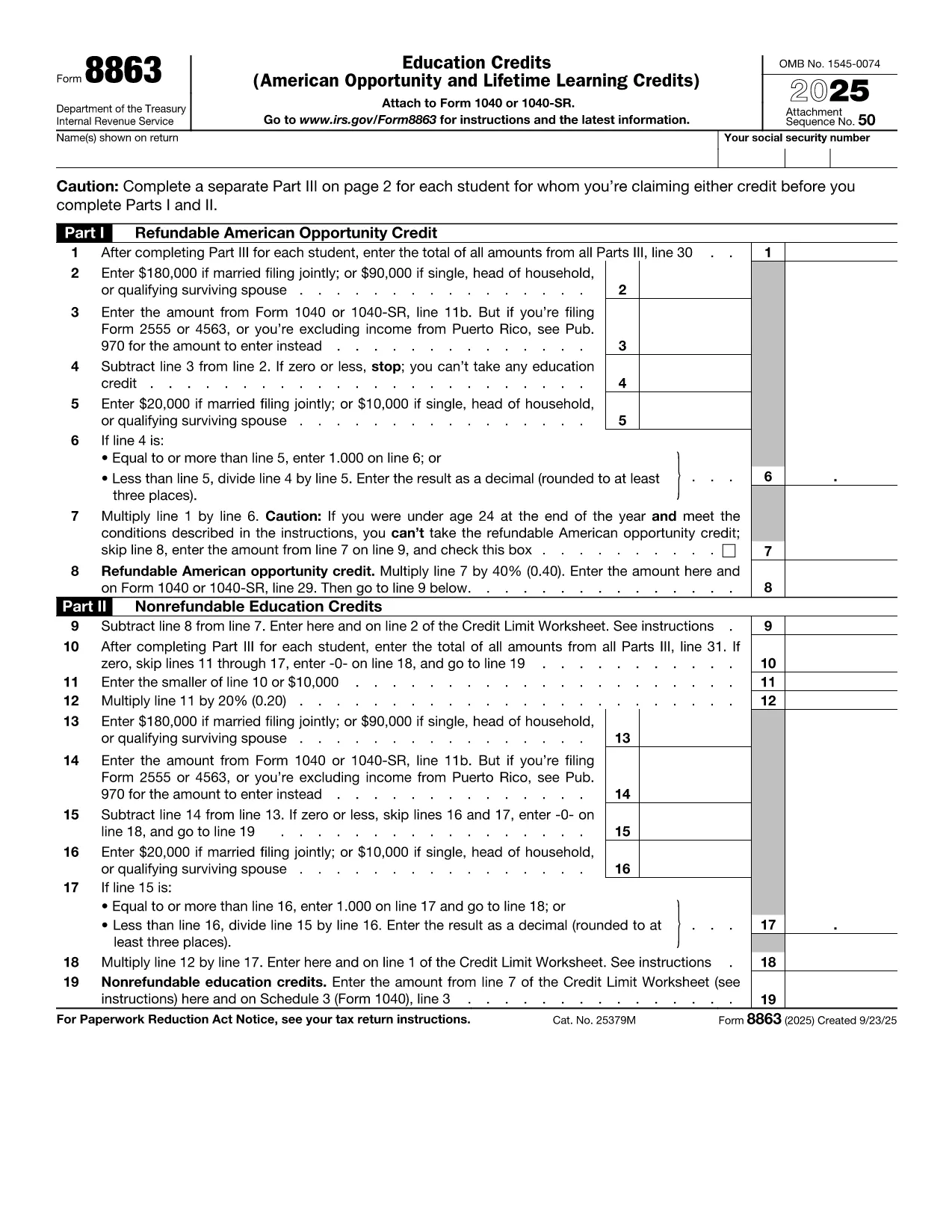
IRS Form 8863 – Education Credits for College Students

  1. Land VS
  2. Taal Engels
  3. Activiteit Belastingen
  4. Afdeling IRS
IRS Form 8863 – Education Credits for College Students

College tuition can be a big expense, but the IRS offers tax credits that can put money back in your pocket. IRS Form 8863Education Credits (American Opportunity and Lifetime Learning) – is the official form you need to claim these credits. With Formize, you can fill out the PDF directly in your browser, save time, and avoid printing errors.

What Is IRS Form 8863?

Form 8863 is used to claim two major education tax credits:

  • American Opportunity Credit (AOC) – up to $2,500 per eligible student for the first four years of post‑secondary education.
  • Lifetime Learning Credit (LLC) – up to $2,000 per tax return for any level of post‑secondary education, including courses to improve job skills.

The form is required for both credits and must be attached to your Form 1040 when you file.

How to Fill Out the Form Using Formize

Instead of downloading the PDF and opening a separate editor, simply click the "Fill out this form" button on this page. The Formize PDF Filler app will load in seconds, letting you:

  1. Enter personal information, school details, and qualified expenses.
  2. Automatically calculate the credit amount.
  3. Save your progress or download a completed PDF to attach to your tax return.

The process is secure, free, and works on any device.

Eligibility Requirements for College Students

To qualify for the credits on Form 8863, you must meet these criteria:

  • Be enrolled at an eligible educational institution.
  • Be pursuing a degree or recognized credential (AOC) or taking any post‑secondary course (LLC).
  • Have qualified tuition and related expenses paid during the tax year.
  • Not have exceeded the income limits for the credit.

Common Mistakes to Avoid

  • Incorrect Social Security Number: Double‑check both yours and the student’s SSN.
  • Double‑claiming expenses: You can’t claim the same expenses for both the AOC and the Lifetime Learning Credit.
  • Leaving fields blank: Even if a question doesn’t apply, write “0” or “N/A” to avoid processing delays.
  • Missing signatures: Form 8863 requires the taxpayer’s signature; an unsigned form will be rejected.

Where to Submit the Completed Form

After you finish, download the filled PDF and attach it to your Form 1040 when filing electronically or by mail. If you e‑file, the PDF is automatically included with your return. For paper filing, mail the complete Form 1040 package to the IRS address listed in the IRS mailing instructions.

If you need additional help, consult the IRS Form 8863 instructions or contact your college’s financial aid office.

FAQ
  • Which credit is better for me, the American Opportunity Credit or the Lifetime Learning Credit?

    The AOC offers a larger maximum credit ($2,500) but only for the first four years of college and requires at least half‑time enrollment. The LLC is smaller ($2,000) but can be used for any post‑secondary education, including part‑time courses.

  • Can I claim both credits in the same year?

    No. You must choose either the American Opportunity Credit or the Lifetime Learning Credit for each student in a tax year.

  • Do scholarships reduce the amount I can claim?

    Yes. Only qualified tuition and related expenses that are not covered by scholarships or grant money are eligible for the credit.

  • What if I make a mistake on the form after filing?

    You can file an amended return using Form 1040‑X. Attach a corrected Form 8863 and explain the changes.

  • Is there a deadline for submitting Form 8863?

    Form 8863 must be filed with your 2023 tax return, which is due April 15, 2024 (or the extended deadline if you filed for an extension).

  • Do I need a separate Form 8863 for each child in college?

    Yes. Each eligible student requires its own Form 8863 to claim the education credits.

  • Can I use Formize on a mobile device?

    Absolutely. The Formize PDF Filler works on smartphones and tablets, letting you complete the form anywhere.

  • Where can I find the official IRS instructions for Form 8863?

    Visit the IRS website at https://www.irs.gov/forms-pubs/about-form-8863 for the full instruction booklet.

HOE

Zo vult u college student tax form gratis online in in 5 eenvoudige stappen:

  1. 1
    Click the Fill‑out Button
    Press the blue “Fill out this form” button on this page. The Formize PDF Filler app will open in a new tab.
  2. 2
    Enter Your Information
    Complete every required field—personal data, school name, tuition paid, and any scholarships received.
  3. 3
    Review Calculations
    Formize automatically calculates the American Opportunity or Lifetime Learning credit based on the numbers you entered.
  4. 4
    Save or Download
    When you’re satisfied, click “Save” to store the form in your browser or “Download” to get a completed PDF ready for filing.
  5. 5
    Attach to Your Tax Return
    Include the filled Form 8863 with your Form 1040 when you e‑file or mail your paper return to the IRS.
Formize PDF Filler-app
WAT BETREFT

Belasting formulieren

college student tax form is een van de belastingformulieren die documenten zijn die worden gebruikt om informatie met betrekking tot belastingen aan de relevante belastingdienst te rapporteren. Er zijn verschillende soorten belastingformulieren, waaronder federale, staats- en lokale belastingformulieren, die kunnen variëren afhankelijk van de omstandigheden en locatie van de belastingbetaler.

FUNCTIES

PDF-vuller

De eenvoudigste manier om online PDF-formulieren in te vullen

  • Vul snel college student tax form in
    Op zoek naar een manier om college student tax form snel online in te vullen? Met onze online gratis PDF-formulierinvuller weet u hoe u dit pdf-document in minder dan een minuut kunt bewerken en invullen.
  • Gebruiksvriendelijke online PDF-editor
    Ben je het beu om PDF-bestanden uit te printen zodat je ze kunt bewerken, voordat je ze opnieuw scant en terugstuurt? Bewerk PDF-documenten gratis online. Gebruik onze online pdf-editor om tijd en papier te besparen.
  • Geweldige tools, alle platforms
    Vraagt ​​u zich af hoe u college student tax form op een Mac moet invullen, of misschien hoe u gratis een PDF-filler kunt gebruiken? Onze online pdf-tools werken op alle platformen.
  • Veilige bestandsopslag
    Voltooide "college student tax form"-bestanden worden opgeslagen in een beveiligde database die wordt beheerd door Amazon Cloud hosting. U kunt uw bestanden op elk moment uit ons systeem verwijderen. Deze bestanden worden in ieder geval na 24 uur automatisch verwijderd.
  • Chat met {trefwoord}
    Chat met "college student tax form" op Chatize, een gratis PDF-lezerassistent. Stel vragen en krijg antwoorden van "college student tax form". Klik gewoon op de knop Chatten met document hierboven.

De vulsessie verwijderen

De geselecteerde vulsessie verwijderen? In dat geval gaat uw voortgang bij het invullen van het formulier verloren.

Bewerkingssessie verwijderen

De geselecteerde bewerkingssessie verwijderen? In dit geval gaat uw voortgang bij het maken en bewerken van het formulier verloren.