
Selecteer taal

Rental Income Tax Form – Fillable Schedule E (PDF)

  1. Land VS
  2. Taal Engels
  3. Activiteit Belastingen
  4. Afdeling IRS
Rental Income Tax Form – Fillable Schedule E (PDF)

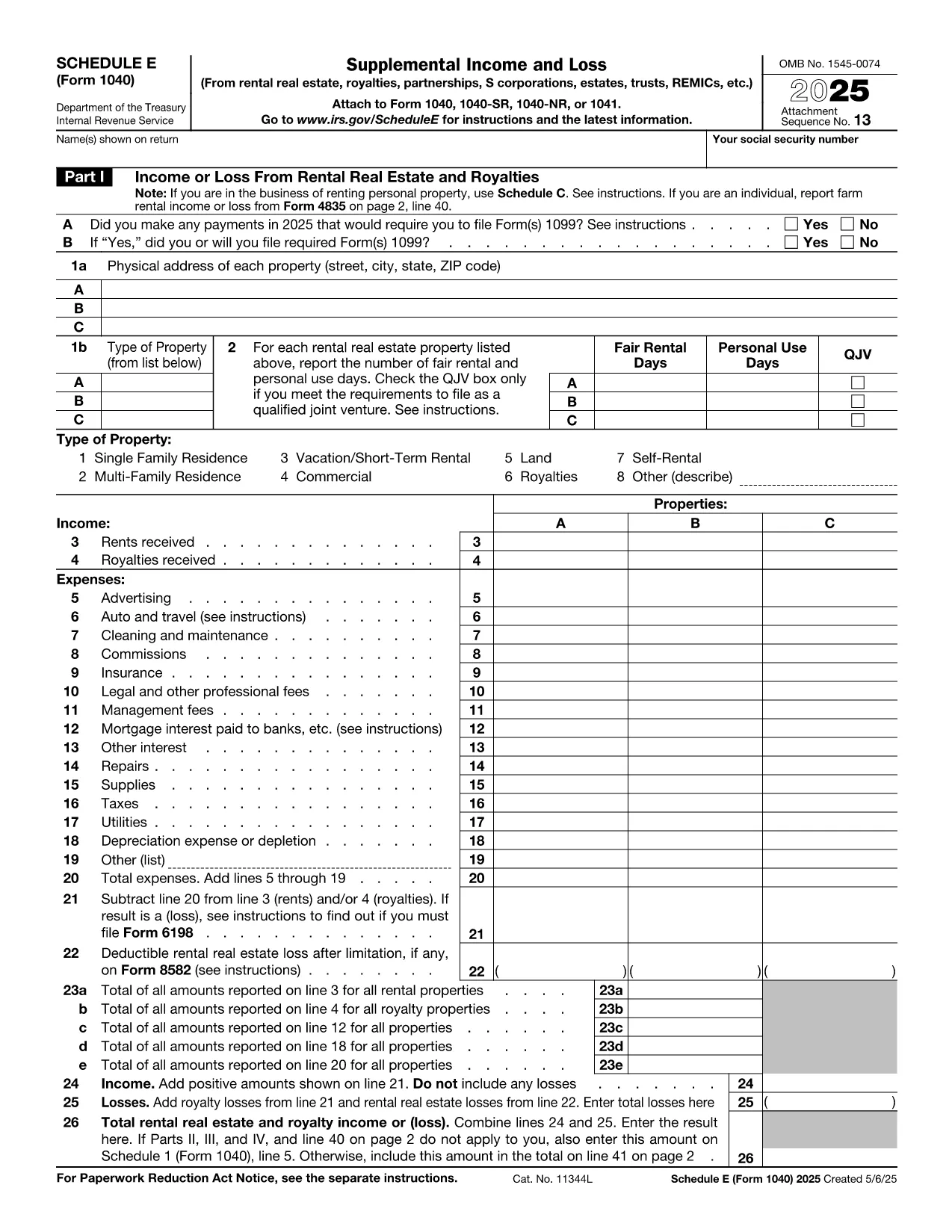
If you own a rental property in the United States, the IRS requires you to report the income and expenses on Schedule E (Form 1040). This fillable PDF lets you enter all the necessary details directly in your browser—no extra software needed.

What Is Schedule E and Who Needs It?

Schedule E, also called the Supplemental Income and Loss form, is used to report income from rental real estate, royalties, partnerships, S corporations, trusts, and more. Landlords, property managers, and anyone who receives rental payments must file this form with their annual Form 1040 tax return.

Key Sections of the Rental Income Form

  • Part I – Income: Total rent received, advances, and other income.
  • Part II – Expenses: Advertising, cleaning, commissions, insurance, legal fees, maintenance, mortgage interest, property taxes, utilities, and depreciation.
  • Part III – Summary: Net profit or loss that flows to line 8 of Form 1040.

How to Complete the Form Using Formize

Instead of downloading the PDF and opening it in a separate editor, simply click the "Fill out this form" button on this page. The Formize PDF Filler app will load in a secure overlay, allowing you to:

  1. Enter all rental income figures.
  2. List every deductible expense.
  3. Automatically calculate your net rental profit or loss.
  4. Save, print, or export the completed form as a PDF.

Common Mistakes to Avoid

  • Leaving any expense fields blank—enter "0" if you had none.
  • Double‑counting depreciation; use the IRS tables or your own schedule.
  • Forgetting to include security deposits that become rent.
  • Misclassifying personal expenses as rental deductions.

Where to Submit Your Completed Schedule E

After you finish, attach the filled Schedule E to your Form 1040 when you e‑file or mail your tax return to the IRS. Keep a copy for your records in case of an audit.

Ready to get started? Click the button below and let Formize handle the heavy lifting.

FAQ
  • Do I need Schedule E if I only rent one property?

    Yes. Any rental income, even from a single property, must be reported on Schedule E.

  • Can I claim home office expenses on Schedule E?

    Home office expenses belong on Schedule C. Schedule E is strictly for rental real estate.

  • What if my rental expenses exceed my rental income?

    You can report a net loss on Schedule E, which may offset other income subject to passive‑activity limits.

  • Is depreciation required on Schedule E?

    Depreciation is a major deduction for rental property. Use IRS Publication 946 to calculate it correctly.

  • How do I handle security deposits that become rent?

    If the deposit is later applied to rent, include it as rental income in the year it is applied.

  • Can I file Schedule E electronically?

    Yes. When you e‑file your Form 1040, the attached Schedule E PDF is submitted electronically.

  • What if I make a mistake after filing?

    You can file an amended return using Form 1040‑X and attach a corrected Schedule E.

  • Is the Formize filler secure?

    Formize uses SSL encryption and does not store your data on external servers unless you choose to save it in your account.

HOE

Zo vult u rental income tax form gratis online in in 5 eenvoudige stappen:

  1. 1
    Open the Fillable Form
    Click the "Fill out this form" button on this page. The Formize PDF Filler will appear in a secure overlay.
  2. 2
    Enter Your Rental Data
    Type your total rent, expenses, and any other required numbers into the highlighted fields.
  3. 3
    Review Calculations
    The app automatically totals income and expenses, showing your net profit or loss.
  4. 4
    Save or Export
    When finished, click "Save" to store the form in your account, or "Export" to download the completed PDF.
  5. 5
    Attach to Your Tax Return
    Print or upload the saved PDF and attach it to your Form 1040 when you file your taxes.
Formize PDF Filler-app
WAT BETREFT

Belasting formulieren

rental income tax form is een van de belastingformulieren die documenten zijn die worden gebruikt om informatie met betrekking tot belastingen aan de relevante belastingdienst te rapporteren. Er zijn verschillende soorten belastingformulieren, waaronder federale, staats- en lokale belastingformulieren, die kunnen variëren afhankelijk van de omstandigheden en locatie van de belastingbetaler.

FUNCTIES

PDF-vuller

De eenvoudigste manier om online PDF-formulieren in te vullen

  • Vul snel rental income tax form in
    Op zoek naar een manier om rental income tax form snel online in te vullen? Met onze online gratis PDF-formulierinvuller weet u hoe u dit pdf-document in minder dan een minuut kunt bewerken en invullen.
  • Gebruiksvriendelijke online PDF-editor
    Ben je het beu om PDF-bestanden uit te printen zodat je ze kunt bewerken, voordat je ze opnieuw scant en terugstuurt? Bewerk PDF-documenten gratis online. Gebruik onze online pdf-editor om tijd en papier te besparen.
  • Geweldige tools, alle platforms
    Vraagt ​​u zich af hoe u rental income tax form op een Mac moet invullen, of misschien hoe u gratis een PDF-filler kunt gebruiken? Onze online pdf-tools werken op alle platformen.
  • Veilige bestandsopslag
    Voltooide "rental income tax form"-bestanden worden opgeslagen in een beveiligde database die wordt beheerd door Amazon Cloud hosting. U kunt uw bestanden op elk moment uit ons systeem verwijderen. Deze bestanden worden in ieder geval na 24 uur automatisch verwijderd.
  • Chat met {trefwoord}
    Chat met "rental income tax form" op Chatize, een gratis PDF-lezerassistent. Stel vragen en krijg antwoorden van "rental income tax form". Klik gewoon op de knop Chatten met document hierboven.

De vulsessie verwijderen

De geselecteerde vulsessie verwijderen? In dat geval gaat uw voortgang bij het invullen van het formulier verloren.

Bewerkingssessie verwijderen

De geselecteerde bewerkingssessie verwijderen? In dit geval gaat uw voortgang bij het maken en bewerken van het formulier verloren.