
Selecteer taal

Fillable IRS Schedule E (Tax Form E) – Free Online PDF

  1. Land VS
  2. Taal Engels
  3. Activiteit Belastingen
  4. Afdeling IRS
Fillable IRS Schedule E (Tax Form E) – Free Online PDF

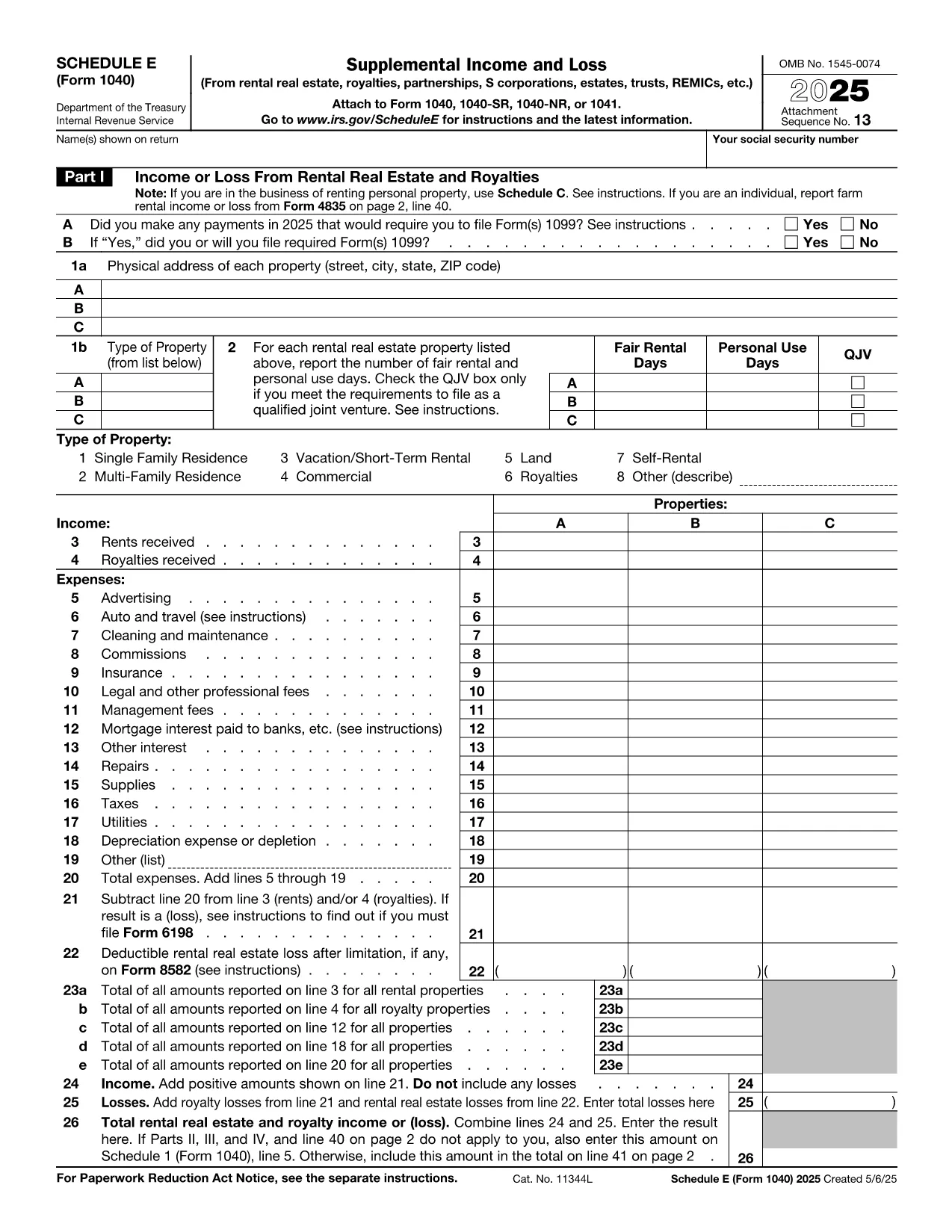
Schedule E (Form 1040‑SE) is the IRS tax form used to report supplemental income and loss from rentals, royalties, partnerships, S‑corporations, estates, trusts, and more. Filling it out correctly can affect your tax liability, so having a reliable, fillable PDF makes the process faster and error‑free.

What is IRS Schedule E?

Schedule E is part of the individual income tax return (Form 1040). It captures income or loss from:

  • Rental real estate and royalties
  • Partnerships and S‑corporations (K‑1 information)
  • Trusts and estates
  • Other sources of supplemental income

The form is required for any taxpayer who received a Schedule K‑1 or earned rental income during the tax year.

How to fill out Schedule E online with Formize

Instead of downloading the PDF and opening a separate editor, simply click the “Fill out this form” button on this page. The Formize PDF Filler app loads in your browser, letting you enter data directly into the fillable fields.

Common mistakes to avoid

  • Entering the wrong tax year in the header – always verify the year at the top.
  • Mixing up Part I (Rental) and Part II (Partnerships) sections – keep each source separate.
  • Leaving required fields blank – the Formize validator highlights missing entries before you save.
  • Incorrectly reporting depreciation – use IRS Publication 946 for guidance.

Where to submit Schedule E

Schedule E is attached to your Form 1040 when you e‑file or mail a paper return. The completed PDF can be saved, printed, and included with your other tax documents.

Need help with Schedule E?

For detailed instructions, see the IRS’s official Schedule E instructions. If you have specific questions about your K‑1 or rental calculations, consult a qualified tax professional.

FAQ
  • Do I need to download any software to use the fillable Schedule E?

    No. The Formize PDF Filler runs entirely in your web browser, so there’s nothing to install.

  • Can I edit the form after I’ve saved it?

    Yes. Open the saved PDF again with Formize or any standard PDF editor to make changes.

  • Is the fillable Schedule E accepted by the IRS?

    Yes. The PDF follows the exact IRS layout, so the printed version is identical to the official paper form.

  • What if I make a mistake while filling the form?

    Use the “Undo” button or simply click into the field and correct the entry. The validator will flag any remaining errors before you save.

  • Do I need a tax professional to complete Schedule E?

    Many taxpayers can complete it themselves, but complex partnership, royalty, or depreciation calculations may benefit from professional advice.

  • Is my data stored on Formize’s servers?

    No. Formize processes the PDF locally in your browser; nothing is uploaded or stored on external servers.

HOE

Zo vult u tax form e gratis online in in 5 eenvoudige stappen:

  1. 1
    Open the fillable form
    Click the “Fill out this form” button below. The Formize PDF Filler app will open in a new browser tab.
  2. 2
    Enter your information
    Type directly into each field. Use the navigation pane to jump to Part I, Part II, etc.
  3. 3
    Validate and save
    When you finish, click “Validate” to let Formize check for missing required fields, then press “Save” to download the completed PDF.
  4. 4
    Print or attach
    Print the saved PDF to attach to a paper return, or keep the file for electronic filing with your tax software.
  5. 5
    Secure your data
    All data stays in your browser; Formize does not store personal information on its servers.
Formize PDF Filler-app
WAT BETREFT

Federale belastingformulieren

tax form e is een van de federale belastingformulieren die worden gebruikt voor het rapporteren en indienen van federale inkomstenbelastingen bij de Internal Revenue Service (IRS) in de Verenigde Staten. Deze formulieren worden door individuen, bedrijven en organisaties gebruikt om hun inkomsten, inhoudingen en andere relevante informatie te rapporteren die nodig is voor het berekenen van hun federale belastingplicht.

Het meest gebruikte federale belastingformulier is het Formulier 1040, dat door individuele belastingbetalers wordt gebruikt om hun personenbelasting aan te geven. Andere veelgebruikte formulieren zijn het Formulier 1065 voor partnerschappen, Formulier 1120 voor bedrijven, en Formulier 990 voor belastingvrijgestelde organisaties.

Federale belastingformulieren vereisen doorgaans dat belastingbetalers verschillende bronnen van inkomsten rapporteren, zoals lonen, salarissen en fooien, evenals inkomsten uit investeringen, huurwoningen en andere bronnen. Met de formulieren kunnen belastingbetalers ook aftrekposten en tegoeden claimen voor verschillende uitgaven, zoals liefdadigheidsbijdragen, hypotheekrente en zorgkosten.

Het is belangrijk om federale belastingformulieren nauwkeurig en op tijd in te dienen, omdat het niet doen hiervan kan leiden tot boetes en rentelasten van de IRS.

FUNCTIES

PDF-vuller

De eenvoudigste manier om online PDF-formulieren in te vullen

  • Vul snel tax form e in
    Op zoek naar een manier om tax form e snel online in te vullen? Met onze online gratis PDF-formulierinvuller weet u hoe u dit pdf-document in minder dan een minuut kunt bewerken en invullen.
  • Gebruiksvriendelijke online PDF-editor
    Ben je het beu om PDF-bestanden uit te printen zodat je ze kunt bewerken, voordat je ze opnieuw scant en terugstuurt? Bewerk PDF-documenten gratis online. Gebruik onze online pdf-editor om tijd en papier te besparen.
  • Geweldige tools, alle platforms
    Vraagt ​​u zich af hoe u tax form e op een Mac moet invullen, of misschien hoe u gratis een PDF-filler kunt gebruiken? Onze online pdf-tools werken op alle platformen.
  • Veilige bestandsopslag
    Voltooide "tax form e"-bestanden worden opgeslagen in een beveiligde database die wordt beheerd door Amazon Cloud hosting. U kunt uw bestanden op elk moment uit ons systeem verwijderen. Deze bestanden worden in ieder geval na 24 uur automatisch verwijderd.
  • Chat met {trefwoord}
    Chat met "tax form e" op Chatize, een gratis PDF-lezerassistent. Stel vragen en krijg antwoorden van "tax form e". Klik gewoon op de knop Chatten met document hierboven.

De vulsessie verwijderen

De geselecteerde vulsessie verwijderen? In dat geval gaat uw voortgang bij het invullen van het formulier verloren.

Bewerkingssessie verwijderen

De geselecteerde bewerkingssessie verwijderen? In dit geval gaat uw voortgang bij het maken en bewerken van het formulier verloren.