Selecteer taal

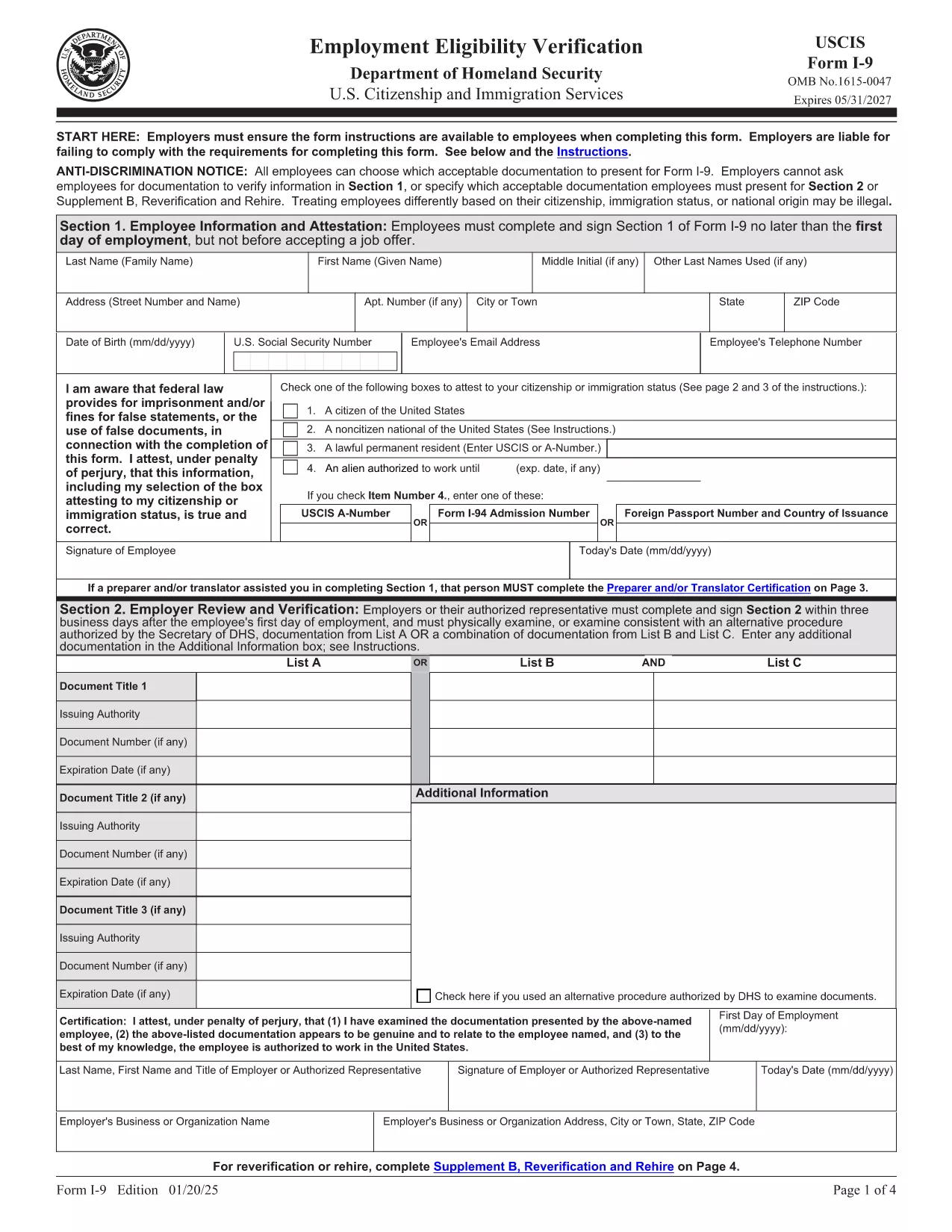
Fillable I‑9 Employment Eligibility Verification Form

  1. Land VS
  2. Taal Engels
  3. Afdeling Amerikaans staatsburgerschap en immigratiediensten
Fillable I‑9 Employment Eligibility Verification Form

The Form I‑9 (Employment Eligibility Verification) is required for every new employee hired in the United States. Employers must verify both identity and work authorization within three business days of hiring. Our fillable PDF version lets you complete the form quickly, securely, and without the hassle of downloading a separate editor.

What Is the I‑9 Form and Why You Need It

The I‑9 is issued by the U.S. Citizenship and Immigration Services (USCIS). It ensures that all employees are legally authorized to work in the U.S. Failure to complete the form correctly can result in fines and penalties for both employer and employee.

How to Fill Out the I‑9 Form Online with Formize

Instead of downloading the PDF and opening it in a PDF editor, simply click the "Fill out this form" button on this page. The Formize PDF Filler app will load in your browser, allowing you to type, check boxes, and add signatures directly on the form.

Common Mistakes & Tips for a Perfect I‑9 Submission

  • Do not leave any required fields blank. Every box marked with an asterisk must be completed.
  • Use the correct document codes. Refer to the USCIS instructions for List A, B, and C documents.
  • Sign and date the form. Both employee and employer signatures are mandatory.
  • Keep the form on file for three years. Store it securely and separate from the employee’s personnel file.

When you’re ready, click the button below, fill the form, and download the completed PDF for your records.

FAQ
  • Is the I‑9 form required for all new hires?

    Yes. Every employee hired after November 6, 1986 must complete Form I‑9, regardless of citizenship or work status.

  • Can I use a scanned copy of a handwritten I‑9?

    No. The form must be completed electronically or on a legible, printable PDF. Handwritten forms that are scanned are not acceptable.

  • How long must I keep the I‑9 on file?

    Employers must retain the I‑9 for three years after the date of hire, or one year after employment ends, whichever is later.

  • What documents can I use for verification?

    You may present either one document from List A (identity + employment authorization) or a combination of one document from List B (identity) and one from List C (employment authorization).

  • Do I need to re‑verify an employee’s work authorization?

    Only if the employee’s work‑authorization document has an expiration date. Re‑verification must be done before the document expires.

  • Can I fill out the I‑9 on a mobile device?

    Yes. The Formize PDF Filler works on most modern browsers, including mobile Safari and Chrome, allowing you to complete the form on a phone or tablet.

  • Is there a fee to use Formize’s PDF filler?

    Formize offers a free basic filler for standard PDFs like the I‑9. No credit‑card information is required to complete the form.

  • What should I do if I make a mistake on the I‑9?

    Correct errors by striking through the incorrect entry, entering the correct information, and initialing the change. Do not erase or use white‑out.

  • Do I need to submit the I‑9 to USCIS?

    No. The I‑9 is kept by the employer for inspection by authorized government officials, such as the Department of Labor or ICE, upon request.

  • Is the PDF version of the I‑9 the same as the paper version?

    Yes. The official USCIS PDF is an exact replica of the paper form and meets all legal requirements when completed correctly.

HOE

Zo vult u I-9 form gratis online in in 5 eenvoudige stappen:

  1. 1
    Open the Fillable I‑9 Form
    Click the "Fill out this form" button on the page. The Formize PDF Filler app loads in your browser.
  2. 2
    Enter Employee Information
    Complete Section 1 with the employee’s name, address, date of birth, and Social Security Number. Select the appropriate citizenship status.
  3. 3
    Upload or Type Document Details
    In Section 2, choose the document type (List A, B, or C) and enter the document numbers, expiration dates, and issuing authority.
  4. 4
    Add Signatures
    Both the employee and the employer must sign and date the form. Use the signature tool in the Formize app.
  5. 5
    Save and Download
    When all fields are completed, click "Save" then "Download" to store the finished PDF on your computer or cloud storage.
Formize PDF Filler-app
WAT BETREFT

I-9 form-sjabloon

Met de traditionele set functies voor het bekijken en invullen van een PDF-document, gecombineerd met de voordelen van een webapplicatie en responsieve lay-out, kunt u I-9 form binnen enkele minuten voltooien.

FUNCTIES

PDF-vuller

De eenvoudigste manier om online PDF-formulieren in te vullen

  • Vul snel I-9 form in
    Op zoek naar een manier om I-9 form snel online in te vullen? Met onze online gratis PDF-formulierinvuller weet u hoe u dit pdf-document in minder dan een minuut kunt bewerken en invullen.
  • Gebruiksvriendelijke online PDF-editor
    Ben je het beu om PDF-bestanden uit te printen zodat je ze kunt bewerken, voordat je ze opnieuw scant en terugstuurt? Bewerk PDF-documenten gratis online. Gebruik onze online pdf-editor om tijd en papier te besparen.
  • Geweldige tools, alle platforms
    Vraagt ​​u zich af hoe u I-9 form op een Mac moet invullen, of misschien hoe u gratis een PDF-filler kunt gebruiken? Onze online pdf-tools werken op alle platformen.
  • Veilige bestandsopslag
    Voltooide "I-9 form"-bestanden worden opgeslagen in een beveiligde database die wordt beheerd door Amazon Cloud hosting. U kunt uw bestanden op elk moment uit ons systeem verwijderen. Deze bestanden worden in ieder geval na 24 uur automatisch verwijderd.
  • Chat met {trefwoord}
    Chat met "I-9 form" op Chatize, een gratis PDF-lezerassistent. Stel vragen en krijg antwoorden van "I-9 form". Klik gewoon op de knop Chatten met document hierboven.

De vulsessie verwijderen

De geselecteerde vulsessie verwijderen? In dat geval gaat uw voortgang bij het invullen van het formulier verloren.

Bewerkingssessie verwijderen

De geselecteerde bewerkingssessie verwijderen? In dit geval gaat uw voortgang bij het maken en bewerken van het formulier verloren.