
Select language

Fillable IRS Schedule K‑1 (Estate) – Form 1041

  1. Country USA
  2. Language English
  3. Activity Taxes
  4. Department Internal Revenue Service
Fill out this form
Fillable IRS Schedule K‑1 (Estate) – Form 1041

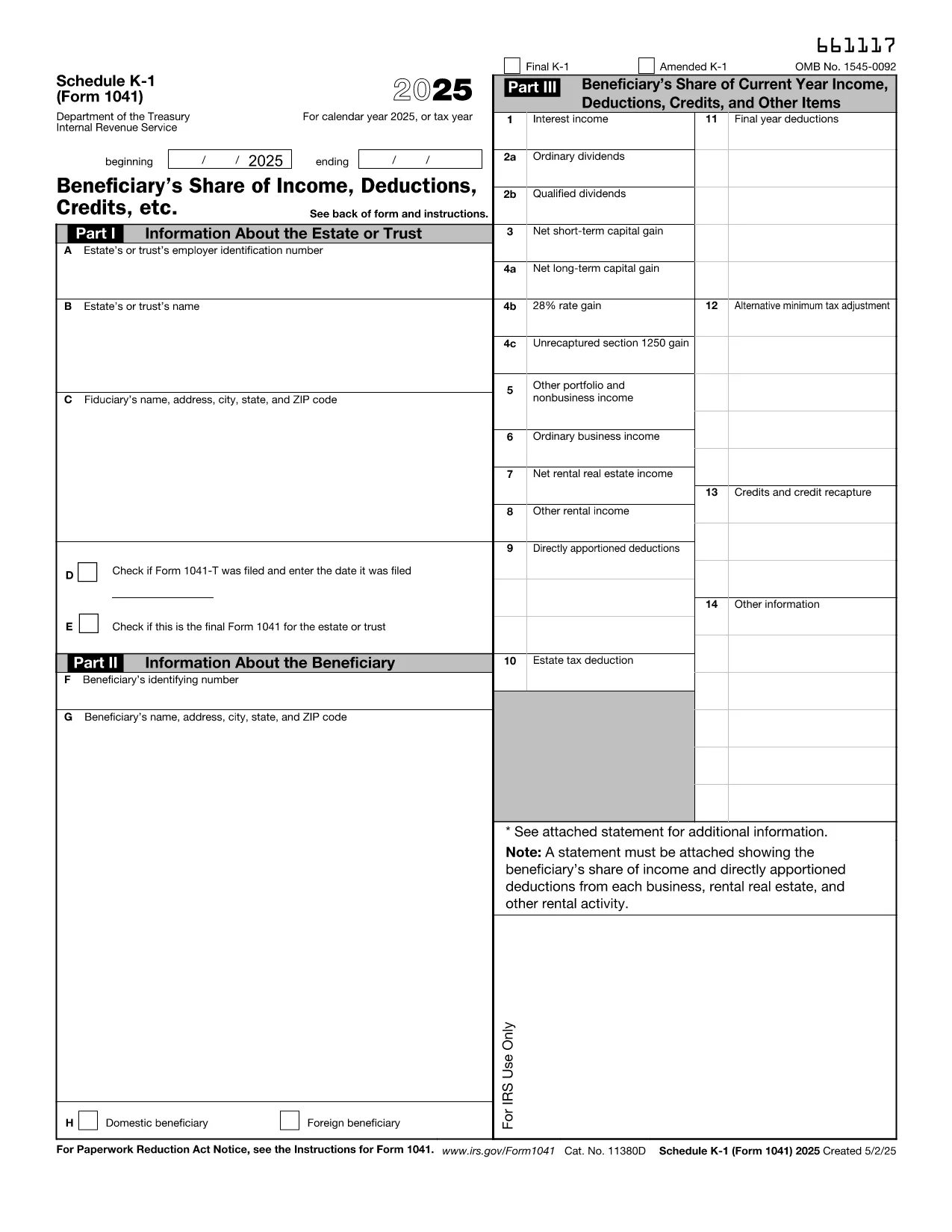
Schedule K‑1 (Form 1041) is the IRS document used by estates and trusts to report each beneficiary’s share of income, deductions, and credits. Our fillable PDF lets you complete the form directly in your browser – no extra software required.

What Is Schedule K‑1 (Form 1041)?

The Schedule K‑1 (Form 1041) accompanies the estate’s income tax return (Form 1041). It breaks down the taxable items that flow through to each beneficiary, such as interest income, capital gains, and charitable deductions. Beneficiaries use the information on the K‑1 to fill out their personal tax returns.

How to Complete the Fillable K‑1 Online

Instead of downloading the PDF and opening it in a separate editor, simply click the "Fill out this form" button on this page. The Formize PDF Filler app will load in seconds, allowing you to:

  • Enter beneficiary details, tax‑year information, and each line item directly on the screen.
  • Validate entries in real‑time, reducing the chance of arithmetic errors.
  • Save your progress and return later, or download a completed, printable PDF.

Common Mistakes & Tips for Estate Beneficiaries

  • Incorrect SSN or EIN: Double‑check the numbers before saving.
  • Missing Box 14 codes: Use the IRS instructions to match each code with the correct amount.
  • Failing to report foreign income: If the estate earned income abroad, it must appear on the K‑1.
  • Not signing the form: The executor’s signature is required for the K‑1 to be valid.

Where to Submit Your Completed K‑1

Beneficiaries attach the Schedule K‑1 to their individual tax returns (Form 1040). The estate’s executor files Form 1041 with the IRS, and each beneficiary includes the K‑1 information on the appropriate lines of their personal return.

If you need additional guidance, refer to the IRS instructions for Schedule K‑1 (Form 1041) or consult a qualified tax professional.

Instructions

FAQ
  • Who must receive a Schedule K‑1 (Form 1041)?

    Every person or entity that is a beneficiary of the estate or trust and receives a share of its taxable income must be issued a Schedule K‑1.

  • Can I edit the IRS PDF directly in my browser?

    Yes. By clicking "Fill out this form" you can use Formize’s online PDF filler to edit the form without downloading separate software.

  • What is Box 14 on the K‑1 used for?

    Box 14 contains codes that identify the type of income or deduction (e.g., capital gains, foreign tax credit). The code must match the amount shown in the corresponding box.

  • Do I need to file the K‑1 separately with the IRS?

    No. The Schedule K‑1 is attached to each beneficiary’s individual tax return (Form 1040). The estate files Form 1041 with the IRS.

  • What if the estate has foreign income?

    Foreign income must be reported on the K‑1 and may require additional forms (e.g., Form 1116) on the beneficiary’s return.

  • Is there a deadline for beneficiaries to receive their K‑1?

    The executor must provide Schedule K‑1 to beneficiaries by the due date of the estate’s Form 1041, typically March 15 for calendar‑year estates.

  • Can I correct a mistake after I’ve saved the PDF?

    Yes. Open the saved PDF again with the Formize filler, make the correction, and re‑save or re‑print the updated form.

HOW TO

How to fill out IRS Schedule K-1 estate for free, online in 4 easy steps:

  1. 1
    Open the Fillable Form
    Click the "Fill out this form" button on the page. The Formize PDF Filler app will launch in a new window.
  2. 2
    Enter Your Information
    Type the beneficiary’s name, SSN, and each line‑item amount directly into the fields. Real‑time validation will highlight any errors.
  3. 3
    Review & Save
    After completing all sections, review the summary, then click "Save" to download a filled‑out PDF or "Print" to generate a hard copy.
  4. 4
    Submit with Your Tax Return
    Attach the completed Schedule K‑1 to your personal Form 1040 when you file your federal income tax return.
Formize PDF Filler app
ABOUT

Tax forms

IRS Schedule K-1 estate is one of Tax forms that are documents used to report information about an individual's or business's income, deductions, and tax liability to the relevant tax authority. These forms are necessary to comply with tax laws and fulfill tax obligations. Tax forms vary depending on the country and the specific tax requirements in place. Here are some common types of tax forms:

Individual Tax Forms: These forms are used by individual taxpayers to report their personal income and claim deductions, credits, and exemptions. Examples include the 1040 form in the United States or the Self-Assessment Tax Return form in the United Kingdom.

Business Tax Forms: Business tax forms are used by companies, partnerships, or self-employed individuals to report their business income, expenses, and other tax-related information. Examples include the Schedule C form (Profit or Loss from Business) in the United States or the CT600 form (Company Tax Return) in the United Kingdom.

Payroll Tax Forms: These forms are used by employers to report the wages, salaries, and taxes withheld from their employees' paychecks. Examples include the W-2 form in the United States or the P60 form in the United Kingdom.

Sales Tax Forms: Sales tax forms are used by businesses to report and remit sales tax collected on taxable goods or services. The specific sales tax forms vary by jurisdiction.

Value Added Tax (VAT) Forms: VAT forms are used in countries that impose a value-added tax to report and remit VAT collected on sales and claim VAT credits for purchases. Examples include the VAT return forms used in many countries.

Estimated Tax Forms: Estimated tax forms are used to report and pay estimated taxes on income that is not subject to withholding, such as self-employment income or investment income.

These are just a few examples of the numerous tax forms that may exist. The specific forms required depend on the tax laws and regulations in your country or jurisdiction. It is important to consult the tax authority's guidelines or seek professional advice to determine which forms are applicable to your situation.

FEATURES

PDF Filler

The easiest way to fill IRS Schedule K-1 estate online

  • Quickly fill out IRS Schedule K-1 estate
    Looking for a way to quickly fill IRS Schedule K-1 estate online? With our online free PDF form filler, you’ll know how to how to edit and fill this pdf document in less than a minute.
  • Easy to use online PDF editor
    Fed up with printing out PDF files so you can edit them, before rescanning and sending them back? Edit PDF documents for free online. Use our online pdf editor to save time and paper.
  • Great tools, all platforms
    Wondering how to fill in IRS Schedule K-1 estate on a Mac, or maybe how to use a PDF filler free? Our online PDF tools work on all platforms.
  • Secure file storage
    Completed "IRS Schedule K-1 estate" files are stored in a secured database managed by Amazon Cloud hosting. You can delete your files from our system anytime. In any case, these files are automatically deleted after 24 hours.
  • Chat with IRS Schedule K-1 estate
    Chat with "IRS Schedule K-1 estate" on Chatize that is a free PDF reader assistant. Ask questions and get answers from "IRS Schedule K-1 estate". Just click on Chat With Document button above.

Delete filling session

Delete the selected filling session? In this case, your progress in completing the form will be lost.

Delete editing session

Delete the selected editing session? In this case, your progress in creating and editing the form will be lost.