Select language

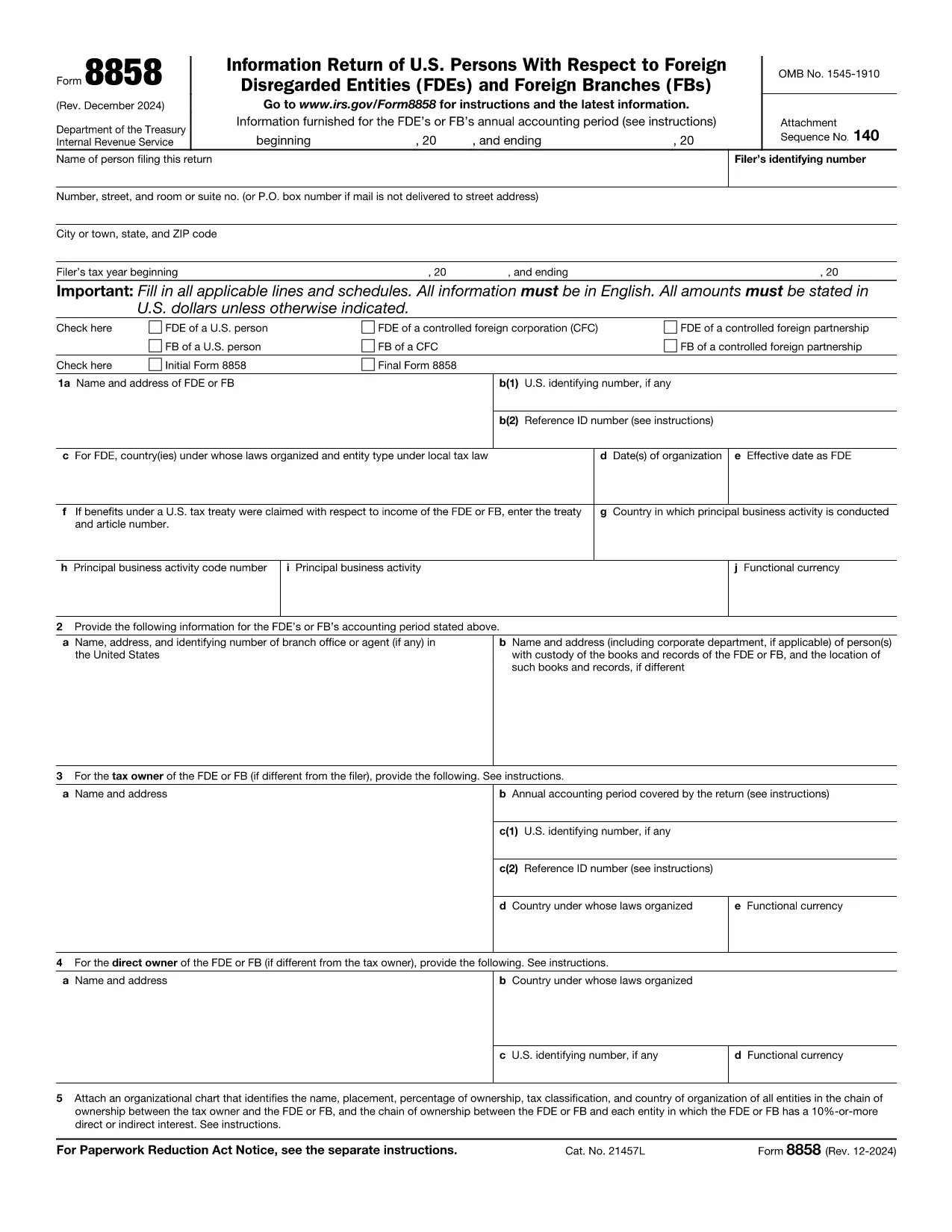
IRS Form 8858 Schedule M – Fillable PDF Online

  1. Country USA
  2. Language English
  3. Activity Taxes
  4. Department Internal Revenue Service
Fill out this form
IRS Form 8858 Schedule M – Fillable PDF Online

Form 8858 is the IRS information return for U.S. persons who own foreign disregarded entities (FDEs). Schedule M is the part of the form that reports the entity’s income, deductions, and other items that affect the U.S. tax liability. Our fillable PDF version lets you complete Schedule M directly in your browser—no extra software required.

What Is Schedule M on Form 8858?

Schedule M captures the financial results of the foreign disregarded entity for the tax year. It includes sections for gross receipts, cost of goods sold, deductions, and the calculation of taxable income that must be reported on your U.S. tax return.

How to Complete the Fillable PDF

Instead of downloading a static PDF and opening it in a separate editor, simply click the "Fill out this form" button on this page. The Formize PDF Filler app will load automatically, presenting an interactive version of Schedule M.

  • Navigate through each field using the Tab key or your mouse.
  • Enter numbers exactly as they appear on your foreign entity’s financial statements.
  • Use the built‑in calculator for totals where applicable.

Common Mistakes to Avoid

  • Leaving required fields blank: The filler highlights missing mandatory entries before you can save.
  • Entering foreign currency without conversion: Schedule M requires U.S. dollar amounts; use the IRS yearly exchange rate.
  • Mismatching line numbers: Follow the form layout exactly; the filler prevents out‑of‑order entries.

Where to Find Official Guidance

The official instructions for Form 8858, including Schedule M, are available on the IRS website. They provide detailed examples, exchange‑rate tables, and filing deadlines.

Download the Official PDF

If you need the original, non‑fillable version for reference, you can download it directly from the IRS:

IRS Form 8858 (including Schedule M) – PDF

Ready to start? Click the button below, fill out Schedule M in seconds, then save or print your completed form for submission.

Instructions

  • Form 8858 Instructions - Instructions for Form 8858, Information Return of U.S. Persons With Respect to Foreign Disregarded Entities (FDEs) and Foreign Branches (FBs)
FAQ
  • Do I need to download the PDF before filling Schedule M?

    No. Click the "Fill out this form" button and the Formize PDF Filler loads the fillable version directly in your browser.

  • Is the fillable version accepted by the IRS?

    Yes. The filler creates a standard PDF that matches the IRS’s official form layout, so it can be submitted electronically or by mail.

  • Can I save my progress and return later?

    Absolutely. Use the "Save" option to download a draft copy, then reopen it later with any PDF reader to continue.

  • What exchange rate should I use for foreign currency amounts?

    Schedule M requires U.S. dollar amounts. Use the yearly average exchange rate published by the IRS in the instructions for Form 8858.

  • Where can I find the official instructions for Form 8858?

    The full instructions are available on the IRS website at https://www.irs.gov/pub/irs-pdf/i8858.pdf.

  • Do I need to file Schedule M if my foreign entity had no activity?

    If the entity is a foreign disregarded entity, Schedule M must still be filed even if there is no income, to report a zero result.

  • How do I correct an error after I’ve submitted the form?

    File an amended Form 8858 with corrected Schedule M information. Follow the IRS amendment guidelines in the instructions.

  • Is there a filing deadline for Form 8858 Schedule M?

    Form 8858, including Schedule M, is due with the U.S. taxpayer’s return (generally April 15, with extensions available).

HOW TO

How to fill out Form 8858 Schedule M for free, online in 5 easy steps:

  1. 1
    Click the Fill Out Button
    Press the "Fill out this form" button on the page to launch the Formize PDF Filler.
  2. 2
    Wait for the Filler to Load
    The online filler loads in seconds; a progress bar shows when it’s ready.
  3. 3
    Enter Your Data
    Complete each field of Schedule M with the required figures from your foreign entity’s books.
  4. 4
    Validate and Review
    Use the built‑in validation to ensure all required sections are filled correctly.
  5. 5
    Save or Print
    When finished, click "Save" to download a completed PDF or "Print" to produce a hard copy for filing.
Formize PDF Filler app
ABOUT

Tax forms

Form 8858 Schedule M is one of Tax forms that are documents used to report information related to taxes to the relevant tax authority. There are various types of tax forms, including federal, state, and local tax forms, which can vary depending on the taxpayer's circumstances and location.

FEATURES

PDF Filler

The easiest way to fill Form 8858 Schedule M online

  • Quickly fill out Form 8858 Schedule M
    Looking for a way to quickly fill Form 8858 Schedule M online? With our online free PDF form filler, you’ll know how to how to edit and fill this pdf document in less than a minute.
  • Easy to use online PDF editor
    Fed up with printing out PDF files so you can edit them, before rescanning and sending them back? Edit PDF documents for free online. Use our online pdf editor to save time and paper.
  • Great tools, all platforms
    Wondering how to fill in Form 8858 Schedule M on a Mac, or maybe how to use a PDF filler free? Our online PDF tools work on all platforms.
  • Secure file storage
    Completed "Form 8858 Schedule M" files are stored in a secured database managed by Amazon Cloud hosting. You can delete your files from our system anytime. In any case, these files are automatically deleted after 24 hours.
  • Chat with Form 8858 Schedule M
    Chat with "Form 8858 Schedule M" on Chatize that is a free PDF reader assistant. Ask questions and get answers from "Form 8858 Schedule M". Just click on Chat With Document button above.

Delete filling session

Delete the selected filling session? In this case, your progress in completing the form will be lost.

Delete editing session

Delete the selected editing session? In this case, your progress in creating and editing the form will be lost.