
Wybierz język

Turn Your PDF into a Fillable Form in Seconds

  1. Kraj USA
  2. Język język angielski
  3. Działalność podatki
  4. Dział IRS
Turn Your PDF into a Fillable Form in Seconds

Whether you need a contract, an application, or a simple questionnaire, turning a static PDF into an interactive, fillable form saves time and eliminates printing hassles. With Formize’s PDF Filler you can convert and complete any PDF directly in your browser – no Adobe Acrobat license required.

Why Use an Online Fillable PDF?

  • Accessible from any device – desktop, tablet, or smartphone.
  • Data is saved automatically, reducing the risk of lost information.
  • Easy to share via email or a secure link.
  • Compliant with PDF/A standards for long‑term archiving.

Step‑by‑Step: Convert and Fill Your PDF

Follow the quick guide below to turn your PDF into a fillable form and start entering data right away.

Common Mistakes & How to Avoid Them

  • Skipping field naming: Give each field a clear label so users know what information to enter.
  • Using low‑resolution PDFs: High‑quality source files ensure crisp, readable fields.
  • Forgetting to test: Preview the form in the Filler app before sharing.

Download the Sample PDF Form

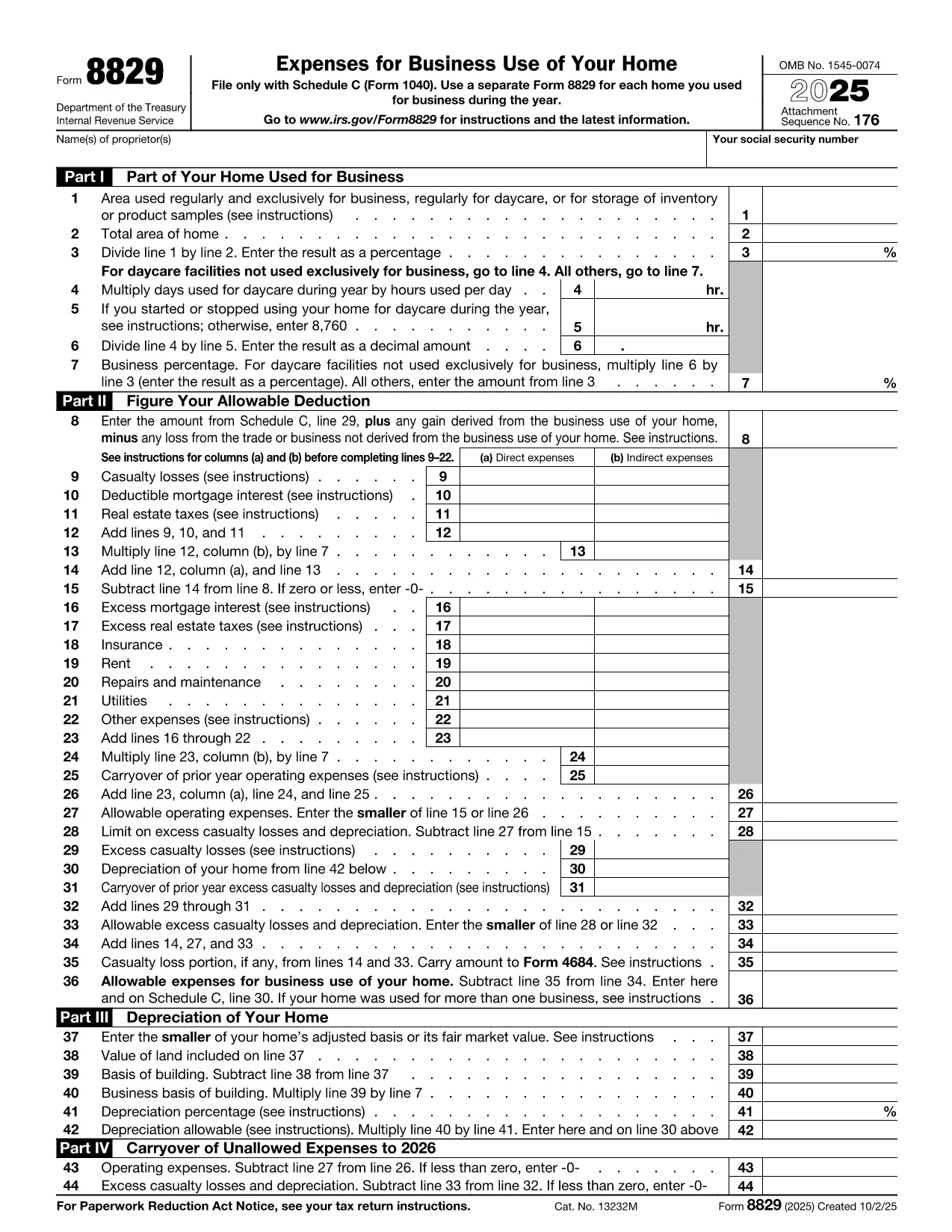
Use our sample IRS Form 8829 (Home Office Deduction) as a real‑world example. Click the button below to open it in the Formize PDF Filler and see how easy it is to turn a regular PDF into a fillable one.

Where to Get Help

If you run into any issues, the Formize help center offers step‑by‑step tutorials and troubleshooting tips.

CZĘSTO ZADAWANE PYTANIA
  • Do I need any software to turn a PDF into a fillable form?

    No. Formize PDF Filler runs entirely in your web browser, so you don’t need Adobe Acrobat or any other desktop software.

  • Can I convert a scanned PDF into a fillable form?

    Yes. Upload the scanned PDF, use Formize’s OCR tool to recognize text, then add fillable fields on top of the recognized content.

  • Is my data secure while I’m filling out the form?

    Formize uses SSL encryption for all data transmission and stores files on secure servers that comply with industry standards.

  • Can I share the fillable PDF with others?

    Absolutely. After saving, you can generate a shareable link or send the completed PDF via email directly from the app.

  • What if I make a mistake while filling the form?

    All changes are saved automatically, and you can use the “Undo” button or simply edit any field again before finalizing.

  • Do I need a Formize account to use the filler?

    You can fill out the form without an account, but creating an account lets you save progress, access history, and reuse templates.

  • Is there a limit to the size of PDF I can convert?

    Formize supports PDFs up to 50 MB. Larger files may need to be split or compressed before uploading.

JAK

Jak wypełnić turn PDF into form za darmo online w 4 prostych krokach:

  1. 1
    Click the “Fill out this form” button
    Locate the button on this page and press it. The Formize PDF Filler app will open in a new tab.
  2. 2
    Wait for the Formize PDF Filler to load
    The app loads the PDF automatically. You’ll see editable fields appear where you can type, check boxes, or select dates.
  3. 3
    Enter your information
    Click into each field and fill out the required data. All changes are saved in real time.
  4. 4
    Save or download the completed form
    When you’re finished, click “Save” to store the form in your Formize account or “Download” to get a copy on your device.
Aplikacja Formize PDF Filler
O

Formularze podatkowe

turn PDF into form to jeden z formularzy podatkowych, które są dokumentami służącymi do zgłaszania informacji związanych z podatkami do właściwego organu podatkowego. Istnieją różne rodzaje formularzy podatkowych, w tym federalne, stanowe i lokalne formularze podatkowe, które mogą się różnić w zależności od sytuacji i lokalizacji podatnika.

CECHY

Wypełniacz PDF

Najłatwiejszy sposób wypełniania formularzy PDF online

  • Szybko wypełnij turn PDF into form
    Szukasz sposobu na szybkie wypełnienie turn PDF into form online? Dzięki naszemu bezpłatnemu wypełniaczowi formularzy PDF online dowiesz się, jak edytować i wypełniać ten dokument PDF w mniej niż minutę.
  • Łatwy w użyciu edytor PDF online
    Masz dość drukowania plików PDF, aby móc je edytować przed ponownym zeskanowaniem i odesłaniem? Edytuj dokumenty PDF za darmo online. Skorzystaj z naszego internetowego edytora pdf, aby zaoszczędzić czas i papier.
  • Świetne narzędzia, wszystkie platformy
    Zastanawiasz się, jak wypełnić turn PDF into form na komputerze Mac, a może jak bezpłatnie skorzystać z wypełniacza PDF? Nasze narzędzia PDF online działają na wszystkich platformach.
  • Bezpieczne przechowywanie plików
    Gotowe pliki „turn PDF into form” są przechowywane w zabezpieczonej bazie danych zarządzanej przez hosting Amazon Cloud. W każdej chwili możesz usunąć swoje pliki z naszego systemu. W każdym przypadku pliki te są automatycznie usuwane po 24 godzinach.
  • Czatuj z turn PDF into form
    Porozmawiaj z „turn PDF into form” na Chatize, który jest bezpłatnym asystentem czytnika plików PDF. Zadawaj pytania i uzyskuj odpowiedzi od „turn PDF into form”. Po prostu kliknij przycisk Czatuj z dokumentem powyżej.

Usuń sesję napełniania

Usunąć wybraną sesję napełniania? W takim przypadku Twoje postępy w wypełnianiu formularza zostaną utracone.

Usuń sesję edycji

Usunąć wybraną sesję edycji? W takim przypadku Twój postęp w tworzeniu i edytowaniu formularza zostanie utracony.