
Selecione o idioma

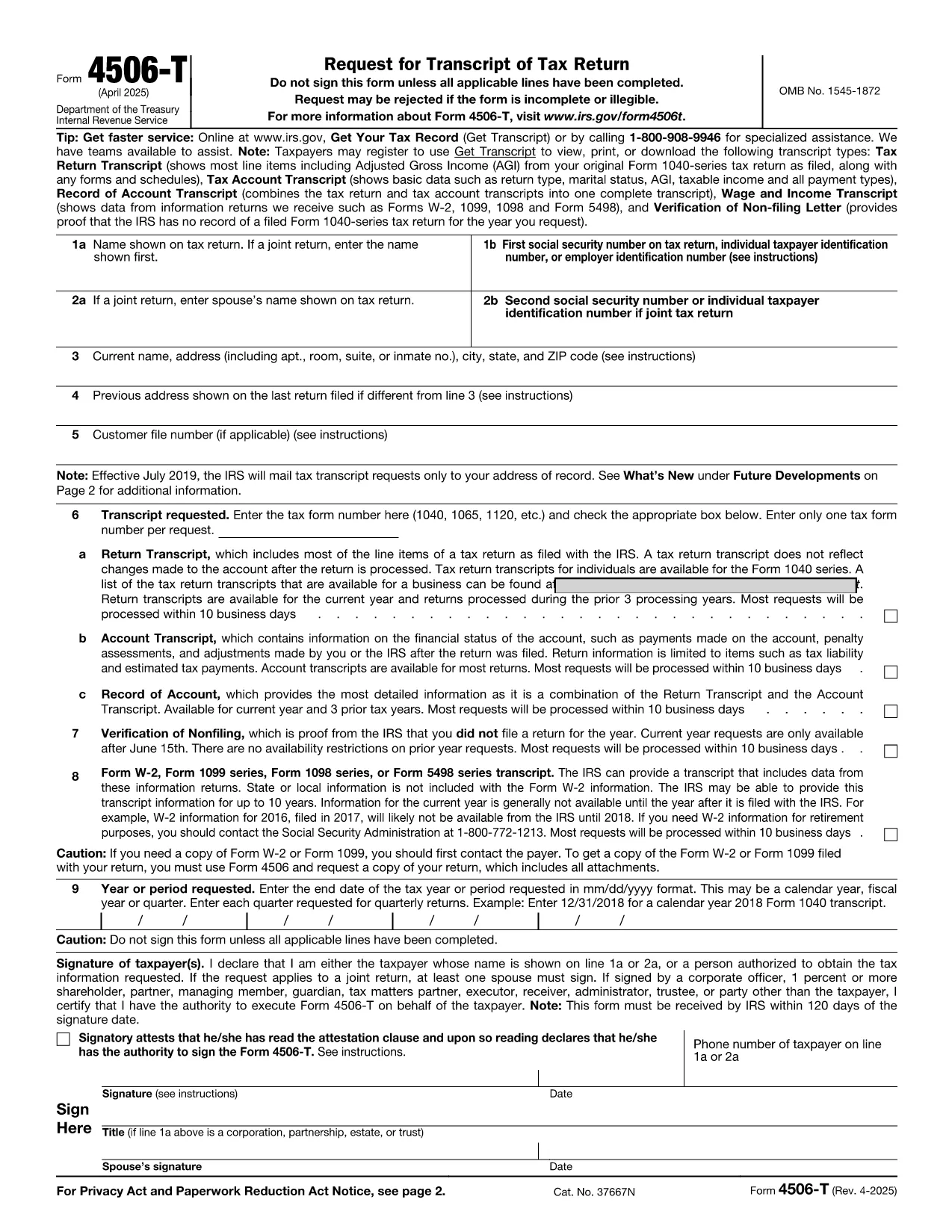
IRS Form 4506‑T – Request for Tax Return Transcript (Fillable PDF)

  1. País EUA
  2. Linguagem Inglês
  3. Atividade impostos
  4. Departamento IRS
IRS Form 4506‑T – Request for Tax Return Transcript (Fillable PDF)

IRS Form 4506‑T is the standard request form of a tax return transcript. It allows individuals, businesses, and tax professionals to obtain a free transcript of a previously filed return, which is often required for loan applications, mortgage approvals, or verification of income.

What Is IRS Form 4506‑T?

This fillable PDF is issued by the Internal Revenue Service (IRS). The form asks for basic identifying information, the tax year(s) you need, and the type of transcript you are requesting (e.g., Return Transcript, Account Transcript, Record of Account).

How to Fill Out the Form Online with Formize

Instead of downloading the PDF and opening it in a separate editor, you can complete the form directly on our page:

  1. Click the "Fill out this form" button below.
  2. Wait a few seconds while the Formize PDF Filler app loads.
  3. Enter your information in the highlighted fields. The filler validates dates, SSN/EIN formats, and required fields in real time.
  4. Review the completed form, add an electronic signature if needed, and click Submit to download or email the finished PDF.

Common Mistakes to Avoid

  • Incorrect SSN or EIN: Double‑check the nine‑digit number; a single digit off will cause the IRS to reject the request.
  • Missing Signature: The form must be signed. Use the built‑in e‑signature tool in Formize.
  • Wrong Tax Year: Specify the exact year(s) you need. Selecting the wrong year can delay processing.
  • Incomplete Address: Provide a complete mailing address; PO boxes are acceptable but must be exact.

Where to Submit the Completed Form

After you download the filled PDF, you can:

  • Mail it to the IRS address listed in the form’s instructions.
  • Fax it to the appropriate IRS fax number (if you have one).
  • Submit it through an authorized tax professional who can forward it on your behalf.

Frequently Asked Questions

Below are the most common questions about IRS Form 4506‑T and how to use our online filler.

PERGUNTAS FREQUENTES
  • Do I need a PDF editor to use Form 4506‑T?

    No. The Formize PDF Filler works in your browser, so you can fill, sign, and download the form without installing any software.

  • How long does the IRS take to process a transcript request?

    Standard processing usually takes 5–10 business days after the IRS receives the completed Form 4506‑T.

  • Can I request transcripts for multiple years on one form?

    Yes. Use the “Multiple Years” section of the form to list each tax year you need.

  • Is there a fee for a tax return transcript?

    No. The IRS provides free transcripts for most requests, though there is a small processing fee for certain paid services.

  • What if I make a mistake after submitting?

    Correct the error on a new copy of the form and resend it. The IRS does not accept handwritten corrections on the original PDF.

  • Can I submit the form electronically to the IRS?

    The IRS currently accepts Form 4506‑T only by mail or fax. Electronic submission is not yet available.

  • Do I need a notary for the signature?

    No. An electronic signature is sufficient for IRS processing, provided it is clear and legible.

  • What if I don’t have a Social Security Number?

    You must provide an Individual Taxpayer Identification Number (ITIN) or Employer Identification Number (EIN) instead.

COMO

Como preencher IRS Form 4506-T gratuitamente, online em 5 etapas fáceis:

  1. 1
    Click the Fill‑out Button
    Press the “Fill out this form” button on the page to launch the Formize PDF Filler.
  2. 2
    Wait for the Filler to Load
    A short loading screen appears while the secure filler app prepares the fillable PDF.
  3. 3
    Enter Your Information
    Complete each highlighted field – the filler will automatically validate dates, SSN/EIN, and required entries.
  4. 4
    Add an Electronic Signature
    Use the built‑in e‑signature tool to sign the form; no printer or scanner needed.
  5. 5
    Download or Email the Completed Form
    When you’re satisfied, click “Submit” to download the PDF or send it directly to your email for printing or mailing.
Aplicativo Formize PDF Filler
SOBRE

formulários de impostos

IRS Form 4506-T é um dos formulários fiscais que são documentos usados ​​para relatar informações relacionadas a impostos à autoridade fiscal relevante. Existem vários tipos de formulários fiscais, incluindo formulários fiscais federais, estaduais e locais, que podem variar dependendo das circunstâncias e localização do contribuinte.

RECURSOS

Preenchimento de PDF

A maneira mais fácil de preencher formulários PDF online

  • Preencha IRS Form 4506-T rapidamente
    Procurando uma maneira de preencher rapidamente IRS Form 4506-T online? Com nosso preenchedor de formulário PDF online gratuito, você saberá como editar e preencher este documento PDF em menos de um minuto.
  • Editor de PDF online fácil de usar
    Cansado de imprimir arquivos PDF para poder editá-los antes de digitalizá-los novamente e enviá-los de volta? Edite documentos PDF gratuitamente online. Use nosso editor de PDF online para economizar tempo e papel.
  • Ótimas ferramentas, todas as plataformas
    Quer saber como preencher IRS Form 4506-T em um Mac, ou talvez como usar um preenchimento de PDF grátis? Nossas ferramentas online de PDF funcionam em todas as plataformas.
  • Armazenamento seguro de arquivos
    Os arquivos "IRS Form 4506-T" concluídos são armazenados em um banco de dados seguro gerenciado pela hospedagem Amazon Cloud. Você pode excluir seus arquivos do nosso sistema a qualquer momento. Em qualquer caso, esses arquivos são excluídos automaticamente após 24 horas.
  • Converse com {palavra-chave}
    Converse com "IRS Form 4506-T" no Chatize, que é um assistente gratuito de leitura de PDF. Faça perguntas e obtenha respostas de "IRS Form 4506-T". Basta clicar no botão Bate-papo com documento acima.

Excluir sessão de preenchimento

Excluir a sessão de preenchimento selecionada? Nesse caso, seu progresso no preenchimento do formulário será perdido.

Excluir sessão de edição

Excluir a sessão de edição selecionada? Neste caso, o seu progresso na criação e edição do formulário será perdido.