
Zvoľ jazyk

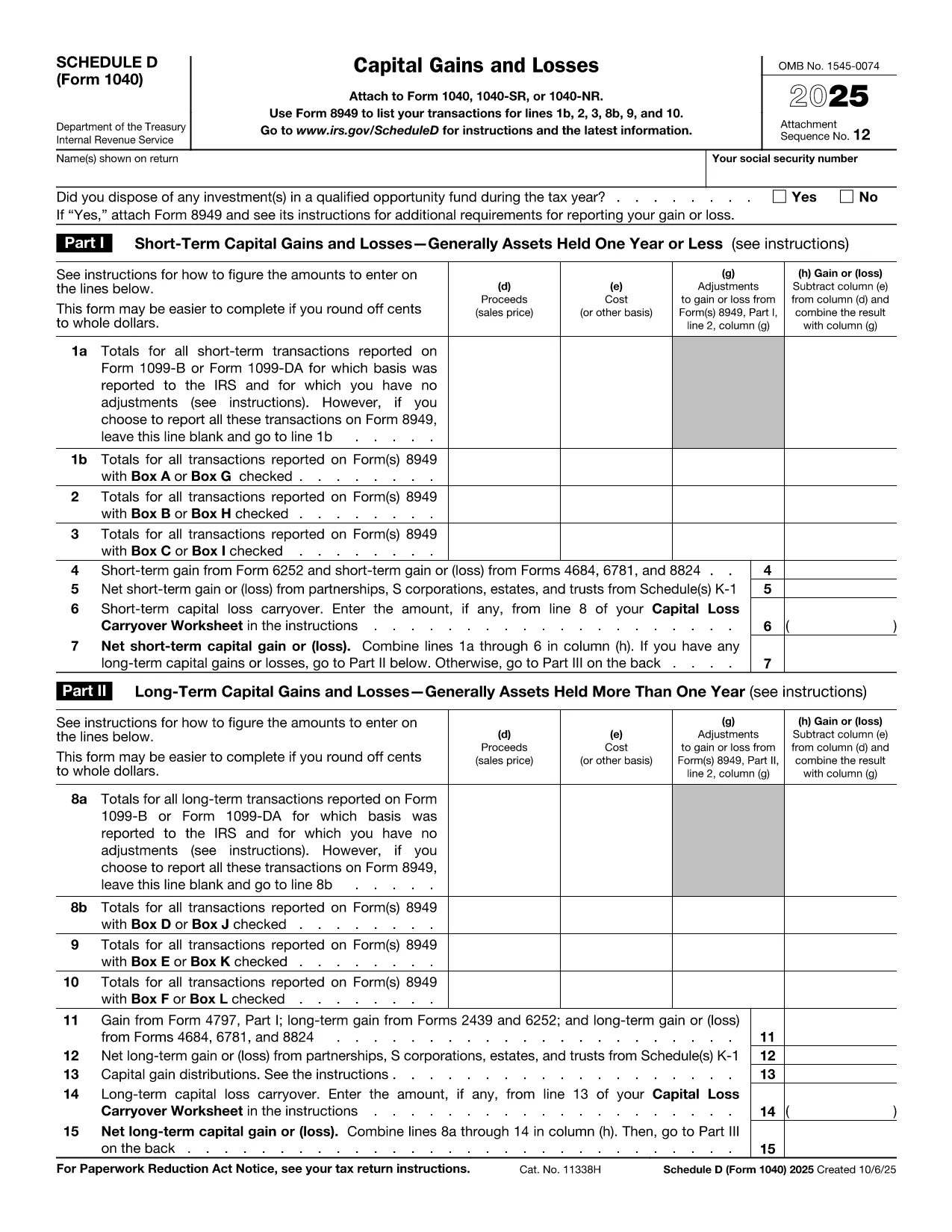
IRS Schedule D – Fillable PDF for Capital Gains & Losses

  1. Krajina USA
  2. Jazyk Angličtina
  3. Aktivita dane
  4. oddelenie Internal Revenue Service
IRS Schedule D – Fillable PDF for Capital Gains & Losses

Schedule D (Form 1040SD) is the IRS worksheet used to report capital gains and losses from the sale of stocks, bonds, real estate, and other investment assets. Whether you’re a first‑time filer or a seasoned investor, a correctly completed Schedule D can lower your tax bill and keep the IRS happy.

Formize.com offers a fillable, web‑based PDF version of Schedule D. No need to download a PDF editor – simply click the Fill out this form button, wait for the Formize PDF Filler to load, and start entering your numbers.

What Is Schedule D and Who Needs It?

Schedule D is required when you have:

  • Capital gains from the sale of stocks, mutual funds, or other securities.
  • Capital losses that you want to deduct against gains.
  • Transactions involving collectibles, real estate, or crypto‑currency that are not reported on Form 8949.

If any of these apply to you, you must attach Schedule D to your Form 1040.

How to Fill Out Schedule D Using Formize

Follow the simple steps below to complete the form online. The Formize PDF Filler automatically saves your progress, validates numeric fields, and lets you download a printable PDF when you’re done.

Common Mistakes & Tips for a Clean Submission

Even small errors can delay processing. Keep these tips in mind:

  • Double‑check totals: The sum of short‑term and long‑term gains must match the totals on Form 8949.
  • Use the correct filing status: Your Schedule D totals feed into line 7 of Form 1040.
  • Don’t leave blanks: Enter “0” for any section that does not apply.
  • Review carry‑over losses: If you have a loss carryover from a previous year, include it on line 16.

When you’re ready, click the button below, fill the fields, review your entries, and download the completed Schedule D.

Fill out this form

Inštrukcie

FAQ
  • Do I need Schedule D if I only have a few stock trades?

    Yes. Any sale of capital assets that results in a gain or loss must be reported on Schedule D, even if you have only one transaction.

  • Can I use the Formize filler on a mobile device?

    Absolutely. The PDF Filler works in modern browsers on smartphones and tablets, so you can complete Schedule D on the go.

  • What if I made a mistake after downloading the PDF?

    You can reopen the same Formize link, re‑enter the corrected data, and download a new PDF. The filler does not store personal data after you close the session.

  • Is the fillable Schedule D free?

    Yes. Formize offers the PDF filler for Schedule D at no cost. There are no hidden fees or subscription requirements.

  • How do I report a capital loss carryover?

    Enter the carryover amount on line 16 of Schedule D. The Formize filler includes a dedicated field for this entry.

  • Do I still need to attach Form 8949?

    If you have detailed transactions, you must attach Form 8949. Schedule D summarizes the totals from Form 8949.

  • What if my broker provides a 1099‑B with totals already calculated?

    You can copy the totals directly into Schedule D. Ensure the amounts match the 1099‑B and reconcile any differences on Form 8949.

  • Can I e‑file Schedule D using the filled PDF?

    Most tax software accepts the PDF data when you import your return. If your software does not, you can manually enter the numbers from the completed Schedule D.

AKO

Ako bezplatne vyplniť Schedule D PDF online v 5 jednoduchých krokoch:

  1. 1
    Click the Fill Out Button
    Press the "Fill out this form" button on the page. This opens the Formize PDF Filler in a new tab.
  2. 2
    Wait for the Filler to Load
    The Formize app loads the Schedule D PDF and makes every field editable. No download or extra software is required.
  3. 3
    Enter Your Information
    Type your capital gains, losses, and other required numbers directly into the highlighted fields. The tool validates numbers as you type.
  4. 4
    Review and Confirm
    Use the built‑in summary to verify totals. Correct any highlighted errors before proceeding.
  5. 5
    Save or Print
    When everything looks good, click "Download PDF" to save a completed Schedule D or print it to attach to your tax return.
Aplikácia Formize PDF Filler
O

Daňové formuláre

Schedule D PDF je jedným z daňových formulárov, ktoré sú dokumentmi používanými na oznamovanie informácií súvisiacich s daňami príslušnému daňovému úradu. Existujú rôzne typy daňových formulárov vrátane federálnych, štátnych a miestnych daňových formulárov, ktoré sa môžu líšiť v závislosti od okolností a miesta daňovníka.

VLASTNOSTI

PDF Filler

Najjednoduchší spôsob, ako vyplniť Schedule D PDF online

  • Rýchlo vyplňte Schedule D PDF
    Hľadáte spôsob, ako rýchlo vyplniť Schedule D PDF online? S našou online bezplatnou výplňou formulárov PDF budete vedieť, ako upraviť a vyplniť tento dokument PDF za menej ako minútu.
  • Ľahko použiteľný online editor PDF
    Nebaví vás tlačiť súbory PDF, aby ste ich mohli upravovať pred opätovným naskenovaním a odoslaním späť? Upravujte dokumenty PDF zadarmo online. Použite náš online editor PDF, aby ste ušetrili čas a papier.
  • Skvelé nástroje, všetky platformy
    Zaujíma vás, ako vyplniť Schedule D PDF na počítači Mac, alebo ako možno použiť bezplatný výplň PDF? Naše online nástroje PDF fungujú na všetkých platformách.
  • Bezpečné ukladanie súborov
    Dokončené súbory „Schedule D PDF“ sú uložené v zabezpečenej databáze spravovanej hostingom Amazon Cloud. Svoje súbory môžete z nášho systému kedykoľvek odstrániť. V každom prípade sa tieto súbory automaticky vymažú po 24 hodinách.
  • Četovať s Schedule D PDF
    Četujte s „Schedule D PDF“ na Chatize, čo je bezplatný pomocník na čítanie súborov PDF. Pýtajte sa otázky a získajte odpovede z „Schedule D PDF“. Stačí kliknúť na tlačidlo Rozhovor s dokumentom vyššie.

Odstrániť reláciu plnenia

Chcete odstrániť vybratú reláciu plnenia? V takom prípade sa stratí váš postup pri vypĺňaní formulára.

Odstrániť reláciu úprav

Chcete odstrániť vybratú reláciu úprav? V takom prípade sa stratí váš postup pri vytváraní a úprave formulára.