Zvoľ jazyk

USCIS Form I-90 – Fillable Application Form Link

  1. Krajina USA
  2. Jazyk Angličtina
  3. oddelenie USCIS
  4. Aktivita imigrácia
USCIS Form I-90 – Fillable Application Form Link

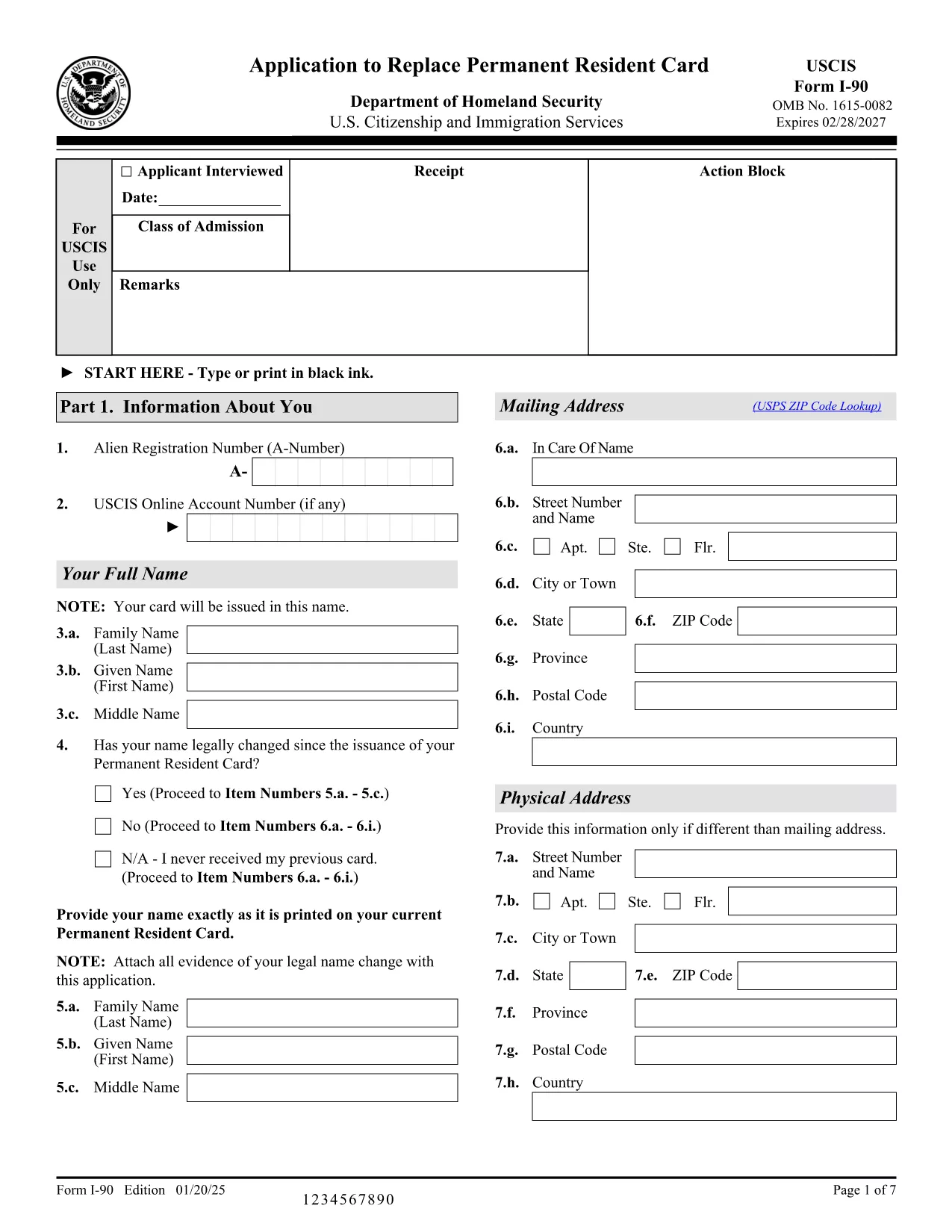
Need a fast, secure way to complete the USCIS Form I-90 (Application to Replace Permanent Resident Card)? You’re in the right place. This landing page provides a direct application form link to the official fillable PDF and lets you finish the entire process in your browser with the Formize PDF Filler – no extra software required.

What Is Form I-90?

Form I-90 is the United States Citizenship and Immigration Services (USCIS) application used to replace a lost, stolen, or expired green card. The form asks for personal details, residency information, and the reason for the replacement. Submitting a correctly completed form is essential to avoid processing delays.

Why Use the Formize PDF Filler?

  • Instant loading – Click the button and the fillable PDF opens in seconds.
  • Secure cloud processing – Your data never leaves the encrypted Formize environment.
  • Auto‑save – Your progress is saved automatically, so you can return later.
  • Print‑ready – Export a completed PDF ready for USCIS submission.

How to Complete the Form I-90 Online

Follow the simple steps below. No need to download the PDF or install a PDF editor.

Common Mistakes to Avoid

  • Leaving required fields blank – the filler will highlight missing information.
  • Using an outdated address – double‑check your mailing address before saving.
  • Submitting an unsigned form – the filler adds a digital signature field; sign before exporting.

Where to Get Help

If you have questions about the I-90 process, visit the USCIS I-90 page. For technical assistance with the Formize filler, consult the Formize Help Center.

FAQ
  • Do I need to install any software to use the Formize filler?

    No. The Formize PDF Filler runs completely in your web browser, so there’s nothing to install.

  • Can I save my progress and finish the form later?

    Yes. The filler automatically saves your entries to a secure cloud session. Simply reopen the link and continue where you left off.

  • Is my personal information safe?

    Formize uses SSL encryption and does not store your data after you export the completed PDF.

  • What if I make a mistake after exporting?

    You can re‑open the same fillable PDF link, correct the error, and export a new version. USCIS accepts the most recent PDF you submit.

  • Which browsers are supported?

    The filler works with the latest versions of Chrome, Firefox, Edge, and Safari.

  • Do I need a PDF reader to view the completed form?

    After exporting, you can open the PDF with any standard PDF viewer, including the free Adobe Reader.

  • How do I print the form for mailing?

    Open the exported PDF, choose “Print,” and select high‑quality settings. Ensure the entire form fits on one page per USCIS guidelines.

  • Can I sign the form electronically?

    Formize provides a digital signature field. Add your signature, then export the PDF for submission.

  • Is there a fee to use Formize?

    Formize offers a free tier for completing standard USCIS forms like I-90. No payment is required for this fillable PDF.

  • What should I do if the form won’t load?

    Refresh the page, clear your browser cache, or try a different browser. If the issue persists, contact the Formize support page.

AKO

Ako bezplatne vyplniť fillable application form online v 5 jednoduchých krokoch:

  1. 1
    Click the Fill Out Button
    Locate the blue “Fill out this form” button on this page and click it. The Formize PDF Filler app will launch in a new tab.
  2. 2
    Wait for the Filler to Load
    The fillable PDF loads within seconds. All fields become editable directly in your browser.
  3. 3
    Complete Each Section
    Enter your information exactly as it appears on your green card and supporting documents. Required fields are marked with an asterisk.
  4. 4
    Save and Review
    Use the “Save” button to store your progress. Review the form for any highlighted errors before finalizing.
  5. 5
    Export the Completed PDF
    When you’re satisfied, click “Export” to download the fully‑filled PDF. Print it and mail it to USCIS as instructed on the form.
Aplikácia Formize PDF Filler
O

šablóny fillable application form

S tradičnou sadou funkcií na prezeranie a vypĺňanie dokumentu PDF v kombinácii s výhodami webovej aplikácie a responzívneho rozloženia môžete fillable application form dokončiť za pár minút.

VLASTNOSTI

PDF Filler

Najjednoduchší spôsob, ako vyplniť fillable application form online

  • Rýchlo vyplňte fillable application form
    Hľadáte spôsob, ako rýchlo vyplniť fillable application form online? S našou online bezplatnou výplňou formulárov PDF budete vedieť, ako upraviť a vyplniť tento dokument PDF za menej ako minútu.
  • Ľahko použiteľný online editor PDF
    Nebaví vás tlačiť súbory PDF, aby ste ich mohli upravovať pred opätovným naskenovaním a odoslaním späť? Upravujte dokumenty PDF zadarmo online. Použite náš online editor PDF, aby ste ušetrili čas a papier.
  • Skvelé nástroje, všetky platformy
    Zaujíma vás, ako vyplniť fillable application form na počítači Mac, alebo ako možno použiť bezplatný výplň PDF? Naše online nástroje PDF fungujú na všetkých platformách.
  • Bezpečné ukladanie súborov
    Dokončené súbory „fillable application form“ sú uložené v zabezpečenej databáze spravovanej hostingom Amazon Cloud. Svoje súbory môžete z nášho systému kedykoľvek odstrániť. V každom prípade sa tieto súbory automaticky vymažú po 24 hodinách.
  • Četovať s fillable application form
    Četujte s „fillable application form“ na Chatize, čo je bezplatný pomocník na čítanie súborov PDF. Pýtajte sa otázky a získajte odpovede z „fillable application form“. Stačí kliknúť na tlačidlo Rozhovor s dokumentom vyššie.

Odstrániť reláciu plnenia

Chcete odstrániť vybratú reláciu plnenia? V takom prípade sa stratí váš postup pri vypĺňaní formulára.

Odstrániť reláciu úprav

Chcete odstrániť vybratú reláciu úprav? V takom prípade sa stratí váš postup pri vytváraní a úprave formulára.