
Välj språk

Schedule C – Profit or Loss from Business (Fillable PDF)

  1. Land USA
  2. Språk engelsk
  3. Aktivitet Skatter
  4. Avdelning Internal Revenue Service
Schedule C – Profit or Loss from Business (Fillable PDF)

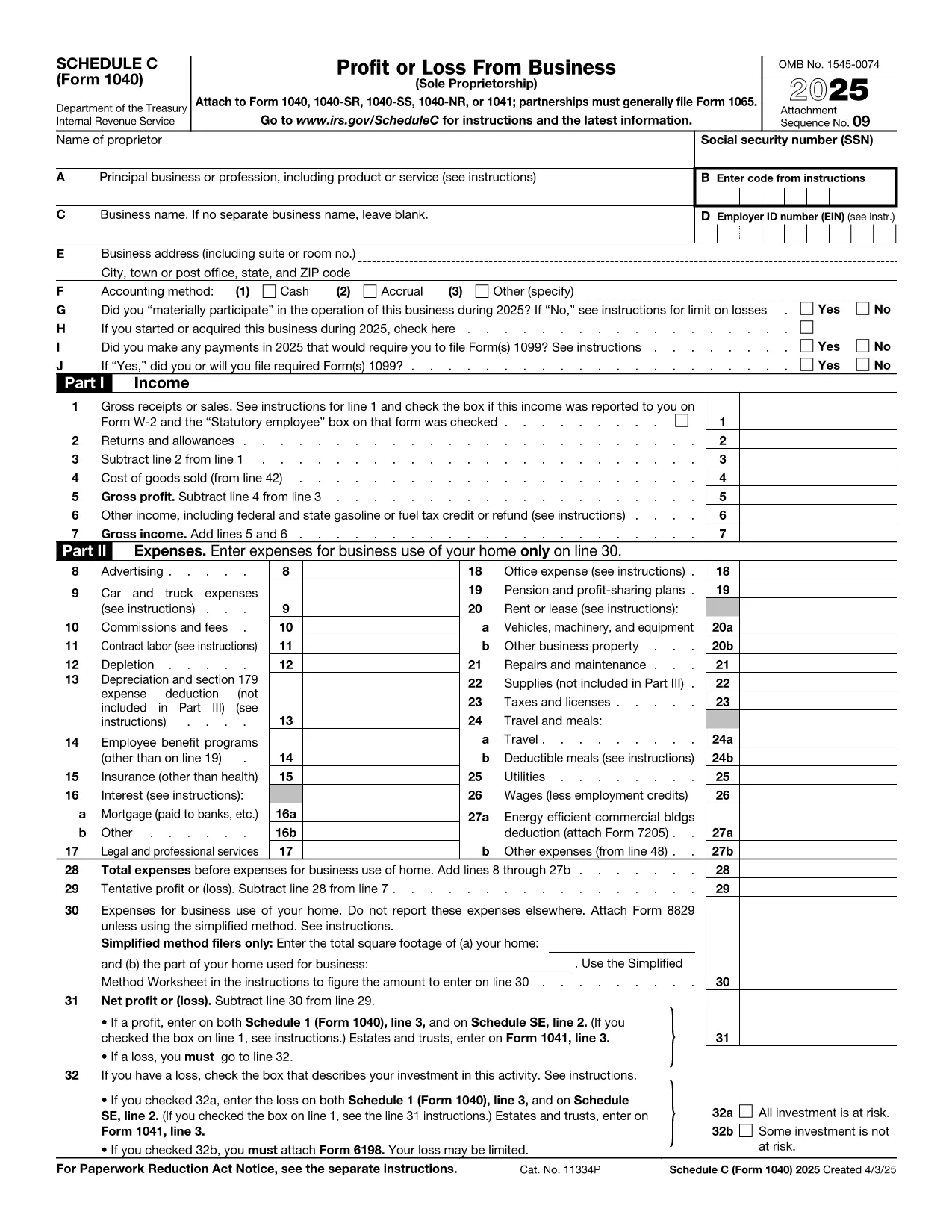
Schedule C (Form 1040) is the IRS form used by sole proprietors, single‑member LLCs, and independent contractors to report profit or loss from a business. Our fillable PDF lets you complete the form directly in your browser—no Adobe Acrobat or printer required.

What Is Schedule C and Who Needs It?

The Schedule C form captures income, expenses, cost of goods sold, and vehicle mileage for a trade or business. If you earned self‑employment income in the last tax year, you’ll likely need to file Schedule C with your Form 1040.

Key Sections of the Schedule C Form

  • Part I – Income: Gross receipts, returns, and other income.
  • Part II – Expenses: Advertising, car expenses, depreciation, supplies, and more.
  • Part III – Cost of Goods Sold: Beginning inventory, purchases, and ending inventory.
  • Part IV – Information About Your Vehicle: Mileage and expenses if you use a car for business.
  • Part V – Other Expenses: Any additional costs not listed in Part II.

How to Fill Out Schedule C Online

Instead of downloading the PDF and opening it in a desktop editor, simply click the “Fill out this form” button below. The Formize PDF Filler app will load in seconds, and you can start entering your numbers right away.

Common Mistakes & Tips

  • Double‑check that all income is reported—missed cash sales can trigger an audit.
  • Keep receipts for every expense; the IRS may request documentation.
  • Use the correct expense categories; mis‑classifying can reduce your deduction.
  • Don’t forget to fill out the vehicle information section if you claim mileage.
  • Review the totals in Part I and Part II to ensure they balance before attaching to Form 1040.

When you’re finished, you can download a completed PDF, print it, or submit it electronically with your tax return.

Instruktioner

FAQ
  • Who must file Schedule C?

    Anyone who earned self‑employment income, operated a sole proprietorship, or had a single‑member LLC taxed as a disregarded entity must file Schedule C with their Form 1040.

  • Can I use Schedule C for multiple businesses?

    Yes. If you run more than one trade or profession, you file a separate Schedule C for each business and attach all of them to your return.

  • What expenses are deductible on Schedule C?

    Ordinary and necessary business expenses such as advertising, rent, utilities, supplies, vehicle costs, depreciation, home‑office expenses, and cost of goods sold are deductible.

  • Do I need a separate EIN for Schedule C?

    An EIN is not required; you can use your Social Security Number. However, an EIN is recommended if you have employees or want to keep personal and business IDs separate.

  • How do I report home‑office expenses?

    Complete Form 8829 to calculate the home‑office deduction, then transfer the amount to Schedule C, line 30.

  • What if I discover an error after filing?

    File Form 1040‑X, Amended U.S. Individual Income Tax Return, and attach a corrected Schedule C showing the updated numbers.

HUR

Så här fyller du i Schedule C PDF gratis, online i 5 enkla steg:

  1. 1
    Click the Fill Out Button
    Press the “Fill out this form” button on this page. The Formize PDF Filler will open in a new tab.
  2. 2
    Wait for the Filler to Load
    The app loads the fillable Schedule C PDF in seconds—no download required.
  3. 3
    Enter Your Information
    Complete each field, following the on‑screen prompts for income, expenses, and vehicle data.
  4. 4
    Review and Validate
    Use the built‑in calculator to verify totals and correct any errors before saving.
  5. 5
    Save, Print or E‑File
    Download the finished PDF, print a hard copy, or attach it to your electronic tax filing.
Formize PDF Filler app
HANDLA OM

Skatteformulär

Schedule C PDF är ett av skatteformulären som är dokument som används för att rapportera information om skatter till relevant skattemyndighet. Det finns olika typer av skatteformulär, inklusive federala, statliga och lokala skatteformulär, som kan variera beroende på skattebetalarens omständigheter och plats.

FUNKTIONER

PDF-fyllare

Det enklaste sättet att fylla i Schedule C PDF online

  • Fyll snabbt i Schedule C PDF
    Letar du efter ett sätt att snabbt fylla Schedule C PDF online? Med vår online gratis PDF-formulärfyllare vet du hur du redigerar och fyller i detta pdf-dokument på mindre än en minut.
  • Lätt att använda online PDF-redigerare
    Är du trött på att skriva ut PDF-filer så att du kan redigera dem innan du skannar om och skickar tillbaka dem? Redigera PDF-dokument gratis online. Använd vår online pdf-redigerare för att spara tid och papper.
  • Bra verktyg, alla plattformar
    Undrar du hur man fyller i Schedule C PDF på en Mac, eller kanske hur man använder ett PDF-fyllmedel gratis? Våra online PDF-verktyg fungerar på alla plattformar.
  • Säker fillagring
    Färdiga "Schedule C PDF"-filer lagras i en säker databas som hanteras av Amazon Cloud-hosting. Du kan ta bort dina filer från vårt system när som helst. I alla fall raderas dessa filer automatiskt efter 24 timmar.
  • Chatta med Schedule C PDF
    Chatta med "Schedule C PDF" på Chatize som är en gratis PDF-läsare. Ställ frågor och få svar från "Schedule C PDF". Klicka bara på knappen Chatta med dokument ovan.

Ta bort fyllningssession

Ta bort den valda fyllningssessionen? I det här fallet kommer dina framsteg i att fylla i formuläret att gå förlorade.

Ta bort redigeringssession

Vill du ta bort den valda redigeringssessionen? I det här fallet kommer dina framsteg i att skapa och redigera formuläret att gå förlorade.