
Välj språk

IRS Form 1099‑SA – Fillable HSA Distribution Tax Form

  1. Land USA
  2. Språk engelsk
  3. Aktivitet Skatter
  4. Avdelning Internal Revenue Service
IRS Form 1099‑SA – Fillable HSA Distribution Tax Form

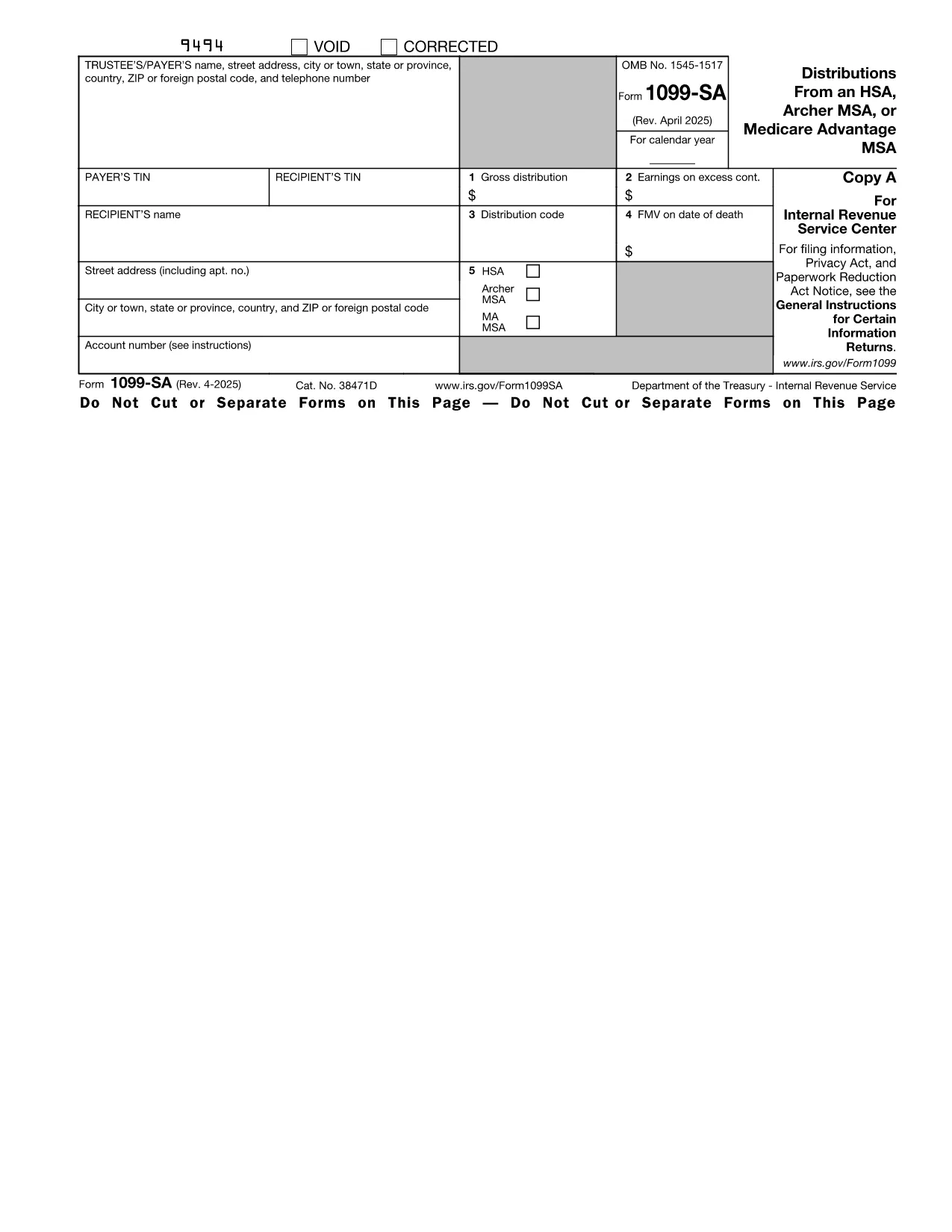
The IRS Form 1099‑SA reports distributions from a Health Savings Account (HSA), Archer MSA, or Medicare Advantage MSA. Financial institutions issue this form to you and the IRS whenever you receive a distribution. Accurate reporting is essential to avoid penalties and to correctly calculate any taxable amount on your tax return.

What Is Form 1099‑SA?

Form 1099‑SA is a one‑page informational return that shows the total amount distributed from your HSA during the calendar year, the type of distribution (e.g., normal, excess, or rollover), and any federal income tax withheld. You use the information on this form when completing Form 8889 (Health Savings Accounts) on your individual tax return.

How to Fill Out the HSA Distribution Form Online

Instead of downloading the PDF and opening it in a separate editor, simply click the "Fill out this form" button on this page. The Formize PDF Filler app will load directly in your browser, letting you complete every field instantly.

Common Mistakes to Avoid

  • Entering the wrong distribution code – double‑check the box that matches the reason for the distribution.
  • Omitting the amount of federal tax withheld – even a $0 entry must be entered.
  • Failing to sign the form if you are printing it for paper filing.
  • Using the wrong tax year version – make sure you are on the 2023 (or current year) PDF.

Where to Submit Your Completed Form

Form 1099‑SA is sent to the IRS by the payer (your bank or HSA custodian). You, the recipient, keep a copy for your records and use the figures when preparing your personal tax return. If you file electronically, the data from the fillable PDF can be imported directly into most tax‑software programs.

Need a printable copy? After you finish filling the form in Formize, click **Download PDF** and print it for your records.

Instruktioner

  • Instruktioner för formulär 1099-SA och 5498-SA - Instruktioner för formulär 1099-SA och 5498-SA, Distributions från en HSA, Archer MSA eller Medicare Advantage MSA, och HSA, Archer MSA eller Medicare Advantage MSA Information om information
FAQ
  • Do I need to file Form 1099‑SA with the IRS?

    No. The payer (your HSA custodian) files Form 1099‑SA with the IRS. You keep the copy for your records and use the information on your personal return.

  • What is the distribution code on Form 1099‑SA?

    The code indicates why the money was taken out (e.g., normal distribution, excess contribution, rollover). Choose the code that matches your situation to avoid errors on Form 8889.

  • Can I edit a downloaded PDF after I fill it in Formize?

    Yes. After you complete the form, you can download the PDF and reopen it in any standard PDF editor if further changes are needed.

  • Is there a fee to use the Formize PDF Filler?

    Formize offers a free basic filler for most IRS forms, including Form 1099‑SA. No credit‑card information is required.

  • What if my HSA custodian issued a corrected Form 1099‑SA?

    Download the corrected PDF, fill it out again using Formize, and keep both versions for your records. Use the corrected amounts when completing Form 8889.

  • How long should I keep Form 1099‑SA?

    Retain the form for at least three years from the date you filed your tax return, as required by IRS record‑keeping rules.

  • Can I fill out Form 1099‑SA on a mobile device?

    Yes. The Formize PDF Filler is responsive and works on smartphones and tablets as long as you have a modern browser.

HUR

Så här fyller du i Form 1099-SA gratis, online i 5 enkla steg:

  1. 1
    Click the Fill‑out Button
    On this page, click the blue "Fill out this form" button. The Formize PDF Filler will open in a new tab.
  2. 2
    Wait for the Filler to Load
    The app loads within seconds. You’ll see a fully interactive version of Form 1099‑SA ready for input.
  3. 3
    Enter Your Information
    Type directly into each field—payer name, distribution amount, tax withheld, and distribution code. All calculations are automatic.
  4. 4
    Review and Save
    Double‑check every entry, then click "Save" to store the completed PDF in your browser or download it to your device.
  5. 5
    Print or Submit
    Print a hard copy for your records or upload the saved PDF to your tax‑software program.
Formize PDF Filler app
HANDLA OM

Skatteformulär

Form 1099-SA är ett av skatteformulären som är dokument som används för att rapportera inkomst, avdrag och skatteskuld till relevant skattemyndighet. Dessa formulär är en viktig del av skatteanmälan och används för att säkerställa att individer och företag följer skattelagstiftningen och exakt beräknar sina skatteförpliktelser.

De specifika skatteformulär som krävs kan variera beroende på faktorer som en individs ansökningsstatus, inkomstkällor och landets skattelagar. Men här är några vanliga typer av skatteformulär:

Individuella inkomstskatteformulär: Dessa formulär, till exempel 1040-serien i USA, används av enskilda att redovisa sin inkomst, kräva avdrag och krediter samt beräkna sin skatteskuld.

Skatteformulär för företag: Företag, inklusive enskild firma, partnerskap, företag och egenföretagare, kan behöva lämna in olika formulär för att rapportera sina inkomster, utgifter och skatter. Exempel inkluderar schema C (vinst eller förlust från företag) och formulär 1120 (inkomstdeklaration för amerikanska företag).

Anställningsskatteformulär: Arbetsgivare är skyldiga att rapportera anställdas löner och innehålla och betala ut löneskatter. Blanketter som W-2 (löne- och skattedeklaration) och 941 (Employer's Quarterly Federal Tax Return) används för detta ändamål.

Investerings- och pensionskontoformulär: Dessa formulär används för att rapportera investeringsintäkter, kapitalvinster och förluster, såväl som bidrag och utdelningar från pensionskonton. Exempel inkluderar blankett 1099-DIV (utdelningar och utdelningar) och Formulär 5498 (IRA-bidragsinformation).

Bostads- och gåvoskatteformulär: När en person går bort eller ger betydande gåvor, specifika formulär som Form 706 a> (United States Estate (and Generation-Skipping Transfer) Skattedeklaration) och blankett 709 (United States Gift (och Generation- Skipping Transfer) Skattedeklaration) används för att rapportera och beräkna eventuella tillämpliga fastighets- eller gåvoskatter.

Det är viktigt att notera att skattelagar och skatteformer kan förändras över tiden, så individer och företag bör rådfråga den relevanta skattemyndigheten eller söka professionell skatterådgivning för att säkerställa efterlevnad av de nuvarande kraven.

FUNKTIONER

PDF-fyllare

Det enklaste sättet att fylla i Form 1099-SA online

  • Fyll snabbt i Form 1099-SA
    Letar du efter ett sätt att snabbt fylla Form 1099-SA online? Med vår online gratis PDF-formulärfyllare vet du hur du redigerar och fyller i detta pdf-dokument på mindre än en minut.
  • Lätt att använda online PDF-redigerare
    Är du trött på att skriva ut PDF-filer så att du kan redigera dem innan du skannar om och skickar tillbaka dem? Redigera PDF-dokument gratis online. Använd vår online pdf-redigerare för att spara tid och papper.
  • Bra verktyg, alla plattformar
    Undrar du hur man fyller i Form 1099-SA på en Mac, eller kanske hur man använder ett PDF-fyllmedel gratis? Våra online PDF-verktyg fungerar på alla plattformar.
  • Säker fillagring
    Färdiga "Form 1099-SA"-filer lagras i en säker databas som hanteras av Amazon Cloud-hosting. Du kan ta bort dina filer från vårt system när som helst. I alla fall raderas dessa filer automatiskt efter 24 timmar.
  • Chatta med Form 1099-SA
    Chatta med "Form 1099-SA" på Chatize som är en gratis PDF-läsare. Ställ frågor och få svar från "Form 1099-SA". Klicka bara på knappen Chatta med dokument ovan.

Ta bort fyllningssession

Ta bort den valda fyllningssessionen? I det här fallet kommer dina framsteg i att fylla i formuläret att gå förlorade.

Ta bort redigeringssession

Vill du ta bort den valda redigeringssessionen? I det här fallet kommer dina framsteg i att skapa och redigera formuläret att gå förlorade.