
Välj språk

IRS Form 8655 – Automatic Extension for Exempt Organizations (Fillable PDF)

  1. Land USA
  2. Språk engelsk
  3. Aktivitet Skatter
  4. Avdelning IRS
IRS Form 8655 – Automatic Extension for Exempt Organizations (Fillable PDF)

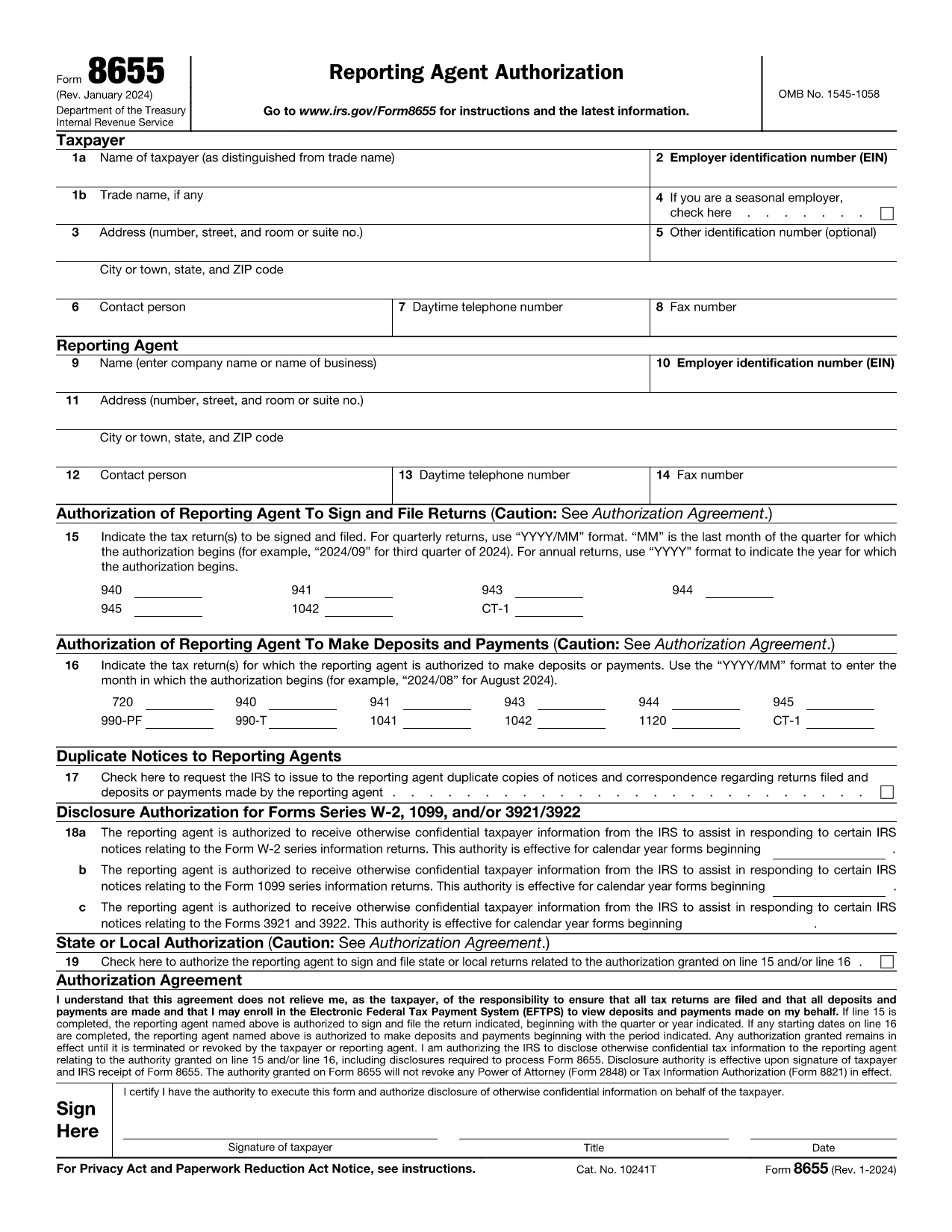
What Is Form 8655?

Form 8655, Application for Automatic Extension of Time To File an Exempt Organization Return, is used by tax‑exempt organizations to request an automatic six‑month filing extension for their annual return (Form 990, 990‑EZ, or 990‑PF). The IRS grants the extension automatically when the form is filed correctly and on time.

How to Complete Form 8655 Online

Instead of downloading the PDF and opening it in a desktop editor, you can fill the form directly on this page:

  1. Click the blue "Fill out this form" button below.
  2. Wait a few seconds while the Formize PDF Filler app loads securely in your browser.
  3. Enter the required information in the fillable fields. The app saves your data automatically.
  4. When you’re done, click Save & Download to get a completed PDF that you can print or e‑file.

All data stays on your device; Formize does not store personal information.

Common Mistakes to Avoid

  • Incorrect EIN: Double‑check the Employer Identification Number; a typo will delay the extension.
  • Missing Signature: The authorized officer must sign the form. The online filler lets you add a digital signature.
  • Wrong Tax Year: Ensure the tax year you are extending matches the year on your original return.
  • Late Submission: File the form before the original due date (including any extensions) to qualify for the automatic extension.

Where to Submit the Form

After completing Form 8655, mail or fax it to the address listed in the instructions for your type of return. Most organizations mail it to:

Internal Revenue Service
P.O. Box 7604
Ben Franklin Station
Washington, DC 20044-7604

Or fax to: 855‑214‑7520 (if applicable). Keep a copy for your records.

Ready to start? Click the button below and fill out Form 8655 instantly.

FAQ
  • Who can use Form 8655?

    Any tax‑exempt organization that files Form 990, 990‑EZ, or 990‑PF and needs a six‑month extension.

  • Do I need to attach Form 8655 to my original return?

    No. Form 8655 is filed separately. It must be submitted before the original due date of the return.

  • Can I e‑file Form 8655?

    Yes. After completing the fillable PDF you can upload the file through the IRS e‑file system for exempt organizations.

  • What happens if I miss the extension deadline?

    The IRS will not grant an automatic extension, and penalties may apply for late filing of the original return.

  • Is a digital signature accepted on Form 8655?

    A handwritten signature is preferred, but a clear electronic signature created in the Formize filler is accepted by the IRS.

  • Do I need to pay a fee to use Formize’s PDF filler?

    No. The online filler is free for this form and does not require any subscription.

  • Can I edit the form after I download it?

    Yes, but you must keep the completed version as the official record. Any further edits would require a new submission.

  • Where can I find the official instructions for Form 8655?

    The IRS provides detailed instructions on the same page as the PDF: https://www.irs.gov/instructions/i8655

  • What is the filing deadline for Form 8655?

    Form 8655 must be filed on or before the original due date (including extensions) of the organization’s annual return.

  • Do I need to include any supporting documents?

    No additional documents are required with Form 8655, but keep your return and supporting records handy in case the IRS requests them.

HUR

Så här fyller du i Form 8655 gratis, online i 5 enkla steg:

  1. 1
    Click the Fill Out Button
    Press the "Fill out this form" button on the page to launch the Formize PDF Filler.
  2. 2
    Wait for the Filler to Load
    A few seconds later the fillable form appears in your browser—no download needed.
  3. 3
    Enter Your Information
    Complete all required fields. The app validates data in real time.
  4. 4
    Add a Signature
    Use the built‑in signature field to sign electronically.
  5. 5
    Save and Download
    Click "Save & Download" to get a completed PDF you can print or e‑file.
Formize PDF Filler app
HANDLA OM

Skatteformulär

Form 8655 är ett av skatteformulären som är dokument som används för att rapportera information om skatter till relevant skattemyndighet. Det finns olika typer av skatteformulär, inklusive federala, statliga och lokala skatteformulär, som kan variera beroende på skattebetalarens omständigheter och plats.

FUNKTIONER

PDF-fyllare

Det enklaste sättet att fylla i Form 8655 online

  • Fyll snabbt i Form 8655
    Letar du efter ett sätt att snabbt fylla Form 8655 online? Med vår online gratis PDF-formulärfyllare vet du hur du redigerar och fyller i detta pdf-dokument på mindre än en minut.
  • Lätt att använda online PDF-redigerare
    Är du trött på att skriva ut PDF-filer så att du kan redigera dem innan du skannar om och skickar tillbaka dem? Redigera PDF-dokument gratis online. Använd vår online pdf-redigerare för att spara tid och papper.
  • Bra verktyg, alla plattformar
    Undrar du hur man fyller i Form 8655 på en Mac, eller kanske hur man använder ett PDF-fyllmedel gratis? Våra online PDF-verktyg fungerar på alla plattformar.
  • Säker fillagring
    Färdiga "Form 8655"-filer lagras i en säker databas som hanteras av Amazon Cloud-hosting. Du kan ta bort dina filer från vårt system när som helst. I alla fall raderas dessa filer automatiskt efter 24 timmar.
  • Chatta med Form 8655
    Chatta med "Form 8655" på Chatize som är en gratis PDF-läsare. Ställ frågor och få svar från "Form 8655". Klicka bara på knappen Chatta med dokument ovan.

Ta bort fyllningssession

Ta bort den valda fyllningssessionen? I det här fallet kommer dina framsteg i att fylla i formuläret att gå förlorade.

Ta bort redigeringssession

Vill du ta bort den valda redigeringssessionen? I det här fallet kommer dina framsteg i att skapa och redigera formuläret att gå förlorade.