
Välj språk

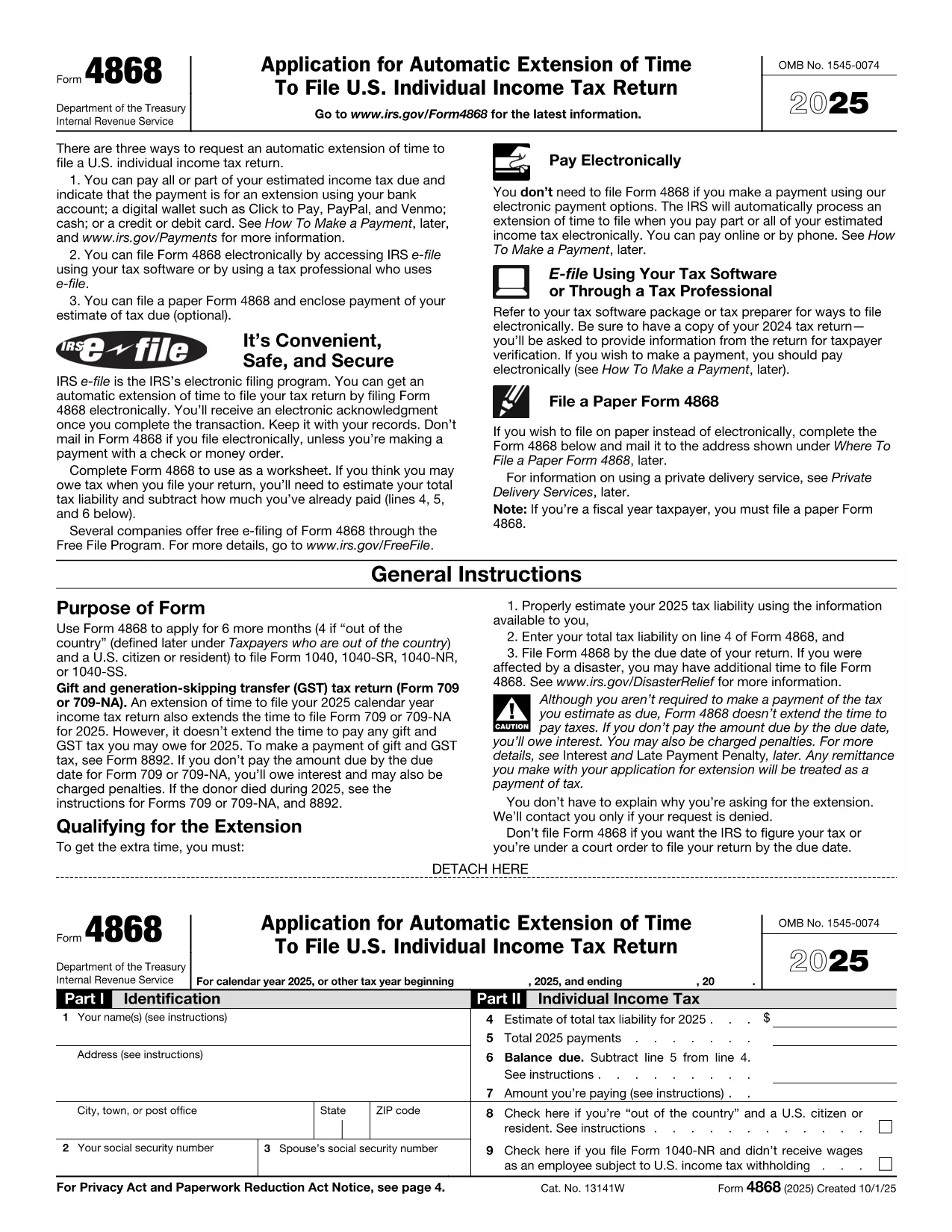
Request Extension Form – Fillable PDF

  1. Land USA
  2. Språk engelsk
  3. Aktivitet Skatter
  4. Avdelning IRS
Request Extension Form – Fillable PDF

Need more time to file your tax return? The Request Extension Form (IRS Form 4868) gives you an automatic six‑month extension when filed correctly. With Formize’s fillable PDF you can complete the form directly in your browser—no Adobe Acrobat or other editor required.

What Is the Request Extension Form?

Form 4868 is the official IRS application for an automatic extension of time to file an individual income‑tax return (Form 1040). It is simple, consists of just a few fields, and can be filed electronically or mailed to the IRS.

How to Fill Out the Form Using Formize

Follow the step‑by‑step guide below. The process is fast, secure, and works on any device.

Common Mistakes to Avoid

  • Leaving the estimated tax liability blank – the IRS requires an estimate.
  • Entering an incorrect Social Security Number.
  • Forgetting to sign the form; an unsigned Form 4868 will be rejected.
  • Submitting after the original filing deadline; the extension must be filed by the due date.

Where to Submit the Completed Form

You have two options:

  1. Electronic filing: Use the IRS e‑file system or a tax‑software provider that supports Form 4868.
  2. Mail: Send the signed PDF to the address listed in the IRS mailing instructions for your state.

Need More Help?

Review the official IRS instructions for detailed guidance, or contact a qualified tax professional.

FAQ
  • Do I need to pay my taxes when I file Form 4868?

    No. Form 4868 only extends the filing deadline. Any tax owed is still due by the original due date to avoid interest and penalties.

  • Can I file Form 4868 electronically?

    Yes. The IRS accepts electronic submissions through its e‑file system or via most tax‑software programs.

  • How long does the extension last?

    The automatic extension gives you six additional months, typically moving the deadline from April 15 to October 15.

  • What if I miss the extension deadline?

    If you file after the original deadline, the IRS may assess a failure‑to‑file penalty. It’s best to submit Form 4868 on or before the due date.

  • Is Form 4868 the same for businesses?

    No. Businesses use Form 7004 for a filing extension. Form 4868 is only for individual income‑tax returns (Form 1040).

  • Can I use the same extension form for state taxes?

    State tax extensions are separate. Check your state’s revenue department for the appropriate form.

  • Do I need to include a payment with the extension request?

    Including a payment is optional but recommended. If you underpay, interest and penalties may accrue on the unpaid balance.

  • What if I need more than six months?

    The IRS does not grant extensions beyond six months for individual returns. You would need to file an amended return after the extended deadline.

HUR

Så här fyller du i request extension form gratis, online i 5 enkla steg:

  1. 1
    Step 1 – Click the Fill‑out Button
    On this page, click the bright “Fill out this form” button. The Formize PDF Filler app will launch in a new tab.
  2. 2
    Step 2 – Wait for the Formize PDF Filler to Load
    The fillable PDF loads in seconds. No download or installation is required.
  3. 3
    Step 3 – Complete All Required Fields
    Enter your name, Social Security Number, address, and estimated tax liability. The form validates data in real time.
  4. 4
    Step 4 – Review and Sign
    Double‑check every entry, then add your electronic signature using the built‑in signature tool.
  5. 5
    Step 5 – Save or Submit
    When finished, download the completed PDF or use the “Submit to IRS” option if you prefer electronic filing.
Formize PDF Filler app
HANDLA OM

Federala skatteformulär

request extension form är ett av federala skatteformulär som är dokument som används för att rapportera och lämna in federal inkomstskatt till Internal Revenue Service (IRS) i USA. Dessa formulär används av individer, företag och organisationer för att rapportera sina inkomster, avdrag och annan relevant information som behövs för att beräkna deras federala skatteskuld.

Det vanligaste federala skatteformuläret är formulär 1040, som används av enskilda skattebetalare för att rapportera sin personliga inkomstskatt. Andra vanliga formulär inkluderar formulär 1065 för partnerskap, formulär 1120 för företag och formulär 990 för skattebefriade organisationer.

Federala skatteformulär kräver vanligtvis att skattebetalarna rapporterar olika inkomstkällor, såsom löner, löner och tips, såväl som inkomster från investeringar, hyresfastigheter och andra källor. Blanketterna tillåter också skattebetalare att kräva avdrag och krediter för olika utgifter, såsom välgörenhetsbidrag, ränta på bolån och sjukvårdskostnader.

Det är viktigt att lämna in federala skatteformulär korrekt och i tid, eftersom underlåtenhet att göra det kan resultera i straffavgifter och ränteavgifter från IRS.

FUNKTIONER

PDF-fyllare

Det enklaste sättet att fylla i request extension form online

  • Fyll snabbt i request extension form
    Letar du efter ett sätt att snabbt fylla request extension form online? Med vår online gratis PDF-formulärfyllare vet du hur du redigerar och fyller i detta pdf-dokument på mindre än en minut.
  • Lätt att använda online PDF-redigerare
    Är du trött på att skriva ut PDF-filer så att du kan redigera dem innan du skannar om och skickar tillbaka dem? Redigera PDF-dokument gratis online. Använd vår online pdf-redigerare för att spara tid och papper.
  • Bra verktyg, alla plattformar
    Undrar du hur man fyller i request extension form på en Mac, eller kanske hur man använder ett PDF-fyllmedel gratis? Våra online PDF-verktyg fungerar på alla plattformar.
  • Säker fillagring
    Färdiga "request extension form"-filer lagras i en säker databas som hanteras av Amazon Cloud-hosting. Du kan ta bort dina filer från vårt system när som helst. I alla fall raderas dessa filer automatiskt efter 24 timmar.
  • Chatta med request extension form
    Chatta med "request extension form" på Chatize som är en gratis PDF-läsare. Ställ frågor och få svar från "request extension form". Klicka bara på knappen Chatta med dokument ovan.

Ta bort fyllningssession

Ta bort den valda fyllningssessionen? I det här fallet kommer dina framsteg i att fylla i formuläret att gå förlorade.

Ta bort redigeringssession

Vill du ta bort den valda redigeringssessionen? I det här fallet kommer dina framsteg i att skapa och redigera formuläret att gå förlorade.