Välj språk

Fillable I-130 Petition for Alien Relative – Complete Online

  1. Land USA
  2. Språk engelsk
  3. Avdelning USCIS
  4. Aktivitet Invandring
Fillable I-130 Petition for Alien Relative – Complete Online

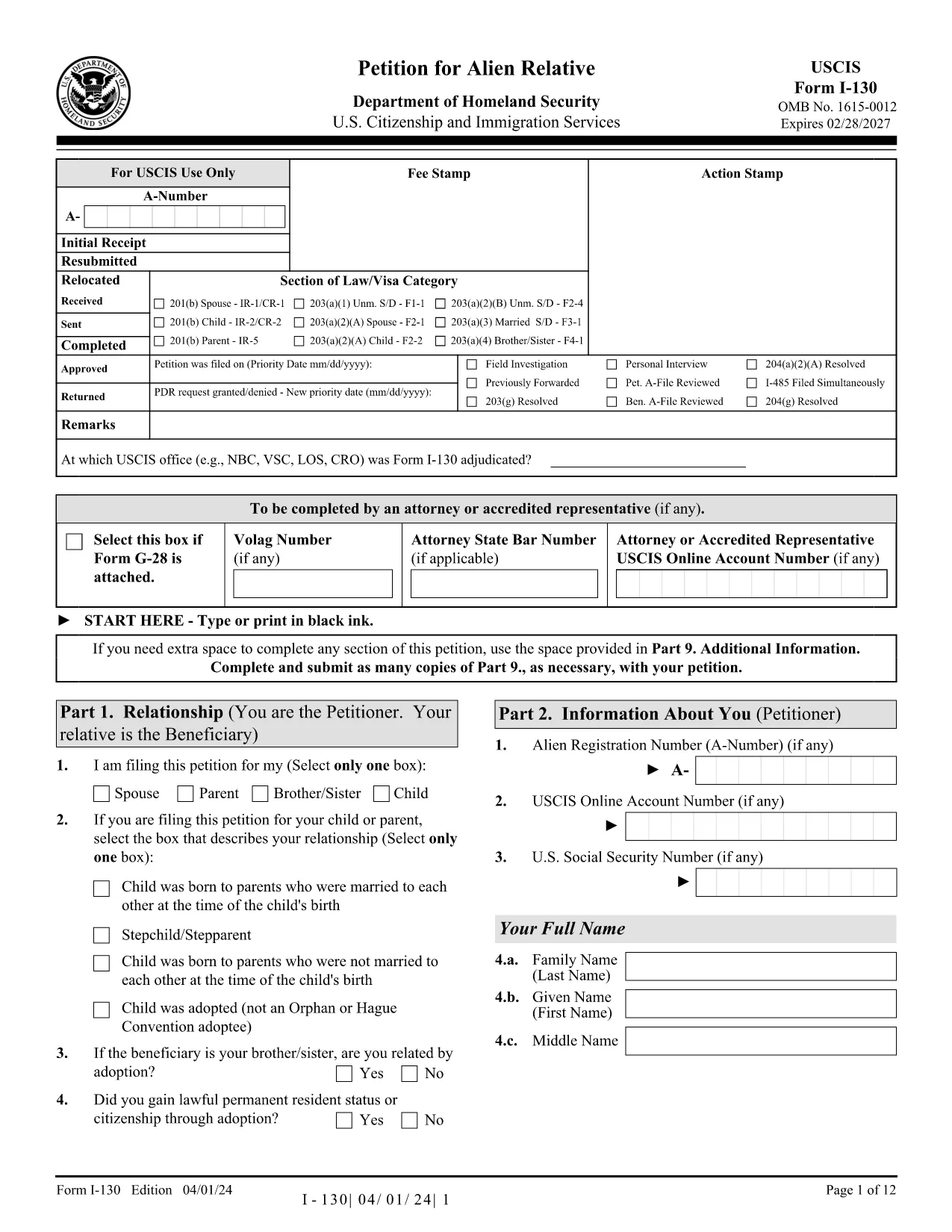
The I-130, Petition for Alien Relative is the first step for U.S. citizens and permanent residents who want to bring a family member to the United States. Historically you would download a static PDF, print it, hand‑write answers, and mail it to USCIS. With Formize’s Fillable I-130 PDF, you can complete the entire petition directly in your browser—no PDF editor required.

What Is the I-130 Form?

The I-130 establishes a qualifying relationship between the petitioner (U.S. citizen or green‑card holder) and the beneficiary (spouse, child, parent, or sibling). USCIS uses this form to verify eligibility before processing a visa or adjustment of status application.

How to Fill the I-130 Online with Formize

Follow the simple steps below to complete the form in minutes:

  • Click the "Fill out this form" button on this page.
  • Wait while the Formize PDF Filler app loads the official USCIS I-130 PDF.
  • Enter your information in the highlighted fields. The filler auto‑saves as you type.
  • Use the built‑in validation to catch missing or incorrectly formatted data.
  • When finished, download the completed PDF or print it for submission.

Common Mistakes to Avoid

Even with a fillable form, some errors can delay your case. Keep an eye out for:

  • Incorrect relationship wording – USCIS expects precise terms (e.g., "biological son" vs. "step‑son").
  • Missing signatures – The petitioner and, when required, the interpreter must sign.
  • Wrong dates – Use the MM/DD/YYYY format and double‑check birth dates.
  • Unclear photocopies – If you attach supporting documents, ensure they are legible.

Submission Tips & Next Steps

After downloading the completed I-130 PDF, you have two filing options:

  1. Online filing through USCIS myUSCIS – Upload the PDF, pay the filing fee, and track your case.
  2. Paper filing – Mail the PDF and supporting documents to the address listed in the form instructions.

Remember to keep a copy of the submitted form for your records. The Formize filler also lets you export a clean, searchable PDF for easy storage.

Frequently Asked Questions

Below are answers to the most common questions about the I-130 petition.

FAQ
  • Who can file an I-130 petition?

    U.S. citizens and lawful permanent residents (green‑card holders) can file an I-130 for spouses, children, parents, and siblings.

  • What is the filing fee for the I-130?

    As of 2024, the fee is $535. Fees are payable online through myUSCIS or by check when filing a paper petition.

  • Can I file the I-130 online instead of using a PDF?

    Yes. USCIS allows online filing through the myUSCIS portal, but many prefer the fillable PDF for offline review before uploading.

  • How long does USCIS take to process an I-130?

    Processing times vary by relationship and service center, ranging from 6 months for spouses to over 2 years for siblings.

  • Do I need to include supporting documents?

    Yes. Include proof of the qualifying relationship (marriage certificate, birth certificates, etc.) and any required translations.

  • What happens after the I-130 is approved?

    If the beneficiary is abroad, the case moves to the National Visa Center for consular processing. If already in the U.S., they may file for adjustment of status.

  • Can I edit the I-130 after I’ve submitted it?

    Once submitted, you cannot edit the form. If you discover an error, file a new I-130 and request a withdrawal of the original.

HUR

Så här fyller du i I-130 PDF gratis, online i 5 enkla steg:

  1. 1
    Open the Fillable Form
    Click the "Fill out this form" button on this page. The Formize PDF Filler will open the official I-130 PDF in a new window.
  2. 2
    Load the Formize PDF Filler
    Wait a few seconds while the app loads. All fillable fields become highlighted for easy entry.
  3. 3
    Enter Your Information
    Type your answers directly into each field. The filler automatically saves your progress and checks for formatting errors.
  4. 4
    Validate and Review
    Use the built‑in validation to ensure every required field is completed and signatures are added.
  5. 5
    Download or Submit
    When the form is complete, click "Download PDF" to save a copy, or print it for mailing to USCIS.
Formize PDF Filler app
HANDLA OM

I-130 PDF mall

Med den traditionella uppsättningen funktioner för att visa och fylla i ett PDF-dokument, kombinerat med fördelarna med en webbapplikation och responsiv layout, kan du slutföra I-130 PDF på några minuter.

FUNKTIONER

PDF-fyllare

Det enklaste sättet att fylla i I-130 PDF online

  • Fyll snabbt i I-130 PDF
    Letar du efter ett sätt att snabbt fylla I-130 PDF online? Med vår online gratis PDF-formulärfyllare vet du hur du redigerar och fyller i detta pdf-dokument på mindre än en minut.
  • Lätt att använda online PDF-redigerare
    Är du trött på att skriva ut PDF-filer så att du kan redigera dem innan du skannar om och skickar tillbaka dem? Redigera PDF-dokument gratis online. Använd vår online pdf-redigerare för att spara tid och papper.
  • Bra verktyg, alla plattformar
    Undrar du hur man fyller i I-130 PDF på en Mac, eller kanske hur man använder ett PDF-fyllmedel gratis? Våra online PDF-verktyg fungerar på alla plattformar.
  • Säker fillagring
    Färdiga "I-130 PDF"-filer lagras i en säker databas som hanteras av Amazon Cloud-hosting. Du kan ta bort dina filer från vårt system när som helst. I alla fall raderas dessa filer automatiskt efter 24 timmar.
  • Chatta med I-130 PDF
    Chatta med "I-130 PDF" på Chatize som är en gratis PDF-läsare. Ställ frågor och få svar från "I-130 PDF". Klicka bara på knappen Chatta med dokument ovan.

Ta bort fyllningssession

Ta bort den valda fyllningssessionen? I det här fallet kommer dina framsteg i att fylla i formuläret att gå förlorade.

Ta bort redigeringssession

Vill du ta bort den valda redigeringssessionen? I det här fallet kommer dina framsteg i att skapa och redigera formuläret att gå förlorade.