
hamburger-menu icon
เลือกภาษา

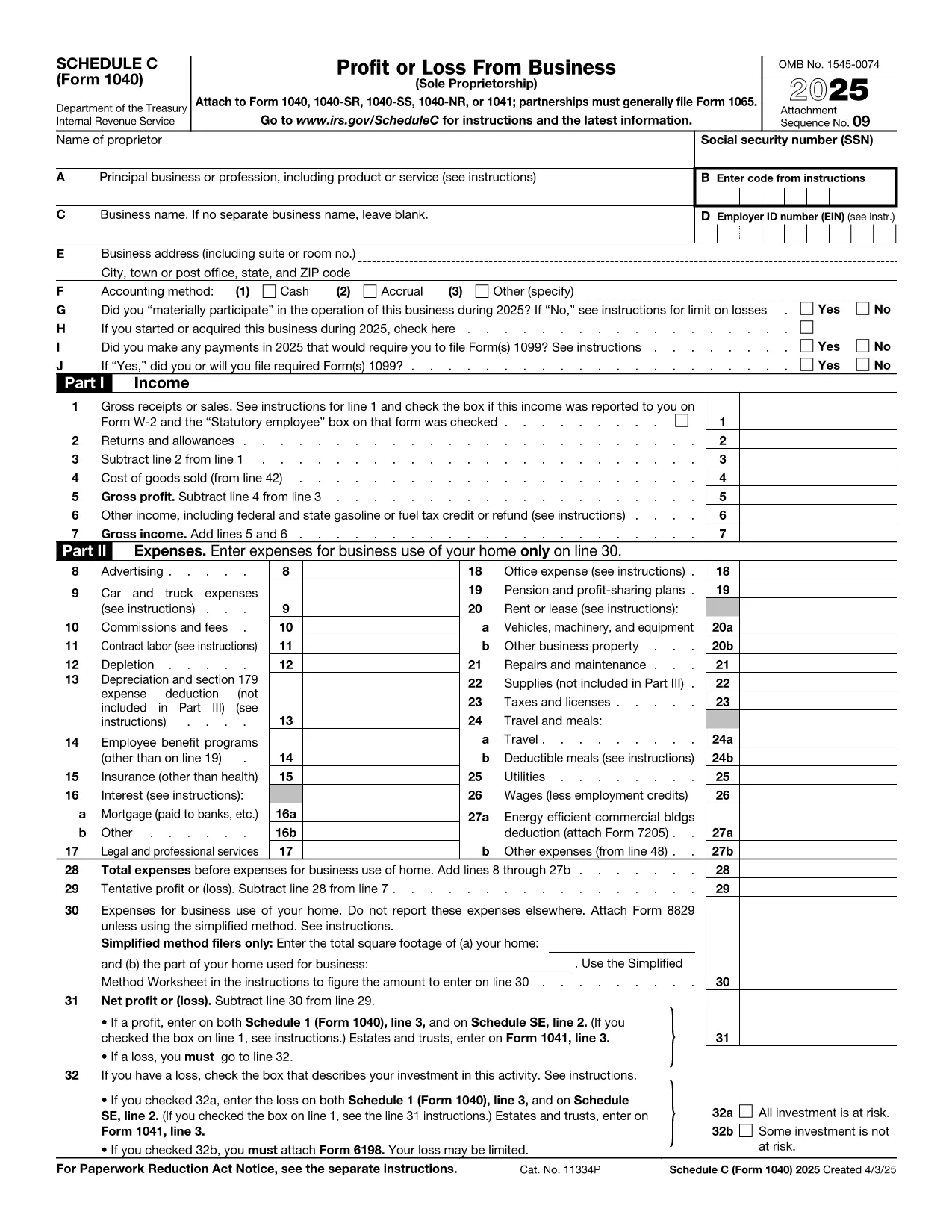
Schedule C – Profit or Loss from Business (Fillable PDF)

  1. ประเทศ สหรัฐอเมริกา
  2. ภาษา ภาษาอังกฤษ
  3. กิจกรรม ภาษี
  4. แผนก สรรพากรพื้นที่
Schedule C – Profit or Loss from Business (Fillable PDF)

Schedule C (Form 1040) is the IRS form used by sole proprietors, single‑member LLCs, and independent contractors to report profit or loss from a business. Our fillable PDF lets you complete the form directly in your browser—no Adobe Acrobat or printer required.

What Is Schedule C and Who Needs It?

The Schedule C form captures income, expenses, cost of goods sold, and vehicle mileage for a trade or business. If you earned self‑employment income in the last tax year, you’ll likely need to file Schedule C with your Form 1040.

Key Sections of the Schedule C Form

  • Part I – Income: Gross receipts, returns, and other income.
  • Part II – Expenses: Advertising, car expenses, depreciation, supplies, and more.
  • Part III – Cost of Goods Sold: Beginning inventory, purchases, and ending inventory.
  • Part IV – Information About Your Vehicle: Mileage and expenses if you use a car for business.
  • Part V – Other Expenses: Any additional costs not listed in Part II.

How to Fill Out Schedule C Online

Instead of downloading the PDF and opening it in a desktop editor, simply click the “Fill out this form” button below. The Formize PDF Filler app will load in seconds, and you can start entering your numbers right away.

Common Mistakes & Tips

  • Double‑check that all income is reported—missed cash sales can trigger an audit.
  • Keep receipts for every expense; the IRS may request documentation.
  • Use the correct expense categories; mis‑classifying can reduce your deduction.
  • Don’t forget to fill out the vehicle information section if you claim mileage.
  • Review the totals in Part I and Part II to ensure they balance before attaching to Form 1040.

When you’re finished, you can download a completed PDF, print it, or submit it electronically with your tax return.

คำแนะนำ

  • Form 1040 ตารางงาน - คําสั่งสําหรับกําหนดการ C (Form 1040 หรือ Form 1040-SR), Fishit หรือ Loasts from Business (Sole Princess)
คำถามที่พบบ่อย
  • Who must file Schedule C?

    Anyone who earned self‑employment income, operated a sole proprietorship, or had a single‑member LLC taxed as a disregarded entity must file Schedule C with their Form 1040.

  • Can I use Schedule C for multiple businesses?

    Yes. If you run more than one trade or profession, you file a separate Schedule C for each business and attach all of them to your return.

  • What expenses are deductible on Schedule C?

    Ordinary and necessary business expenses such as advertising, rent, utilities, supplies, vehicle costs, depreciation, home‑office expenses, and cost of goods sold are deductible.

  • Do I need a separate EIN for Schedule C?

    An EIN is not required; you can use your Social Security Number. However, an EIN is recommended if you have employees or want to keep personal and business IDs separate.

  • How do I report home‑office expenses?

    Complete Form 8829 to calculate the home‑office deduction, then transfer the amount to Schedule C, line 30.

  • What if I discover an error after filing?

    File Form 1040‑X, Amended U.S. Individual Income Tax Return, and attach a corrected Schedule C showing the updated numbers.

ทำอย่างไร

วิธีกรอก Schedule C PDF ฟรีทางออนไลน์ใน 5 ขั้นตอนง่ายๆ:

  1. 1
    Click the Fill Out Button
    Press the “Fill out this form” button on this page. The Formize PDF Filler will open in a new tab.
  2. 2
    Wait for the Filler to Load
    The app loads the fillable Schedule C PDF in seconds—no download required.
  3. 3
    Enter Your Information
    Complete each field, following the on‑screen prompts for income, expenses, and vehicle data.
  4. 4
    Review and Validate
    Use the built‑in calculator to verify totals and correct any errors before saving.
  5. 5
    Save, Print or E‑File
    Download the finished PDF, print a hard copy, or attach it to your electronic tax filing.
สร้างแอป PDF Filler
เกี่ยวกับ

แบบฟอร์มสรรพากรบริการ (IRS)

Schedule C PDF เป็นหนึ่งในแบบฟอร์มภาษีอย่างเป็นทางการที่ใช้ในสหรัฐอเมริกาเพื่อรายงานรายได้ การเรียกร้องการหักเงินและเครดิต คำนวณภาระภาษี และปฏิบัติตามภาระผูกพันอื่นๆ ที่เกี่ยวข้องกับภาษี IRS เป็นหน่วยงานรัฐบาลกลางที่รับผิดชอบในการบริหารและบังคับใช้กฎหมายรายได้ภายในสหรัฐอเมริกา

นี่คือตัวอย่างบางส่วนของแบบฟอร์ม Internal Revenue Service:

แบบฟอร์ม 1040: นี่คือแบบฟอร์มการคืนภาษีเงินได้บุคคลธรรมดาหลักที่ผู้เสียภาษีส่วนใหญ่ใช้ ใช้เพื่อรายงานรายได้ประเภทต่างๆ การเรียกร้องการหักเงินและเครดิต การคำนวณภาระภาษี และพิจารณาว่าผู้เสียภาษีมีหนี้ภาษีเพิ่มเติมหรือมีสิทธิ์ได้รับเงินคืนหรือไม่

แบบฟอร์ม 1099: แบบฟอร์ม 1099 มีหลากหลายรูปแบบ เช่น 1099-MISC, 1099-INT, 1099-DIV ฯลฯ แบบฟอร์มเหล่านี้ใช้เพื่อรายงานรายได้ที่บุคคลหรือธุรกิจได้รับจากแหล่งต่างๆ นอกเหนือจากการจ้างงาน เช่น การจ้างงานตนเอง รายได้ ดอกเบี้ยรับ เงินปันผลรับ และรายได้ค่าเช่า

แบบฟอร์ม W-2: นายจ้างใช้แบบฟอร์มนี้เพื่อรายงานค่าจ้างที่จ่ายให้กับลูกจ้างและภาษี ระงับจากค่าจ้างของพวกเขา พนักงานใช้ข้อมูลในแบบฟอร์ม W-2 เพื่อกรอกแบบฟอร์มขอคืนภาษีส่วนบุคคล

แบบฟอร์ม 941: นายจ้างใช้แบบฟอร์มนี้เพื่อรายงานภาษีการจ้างงาน รวมถึงภาษีเงินได้หัก ณ ที่จ่ายของรัฐบาลกลาง ภาษีประกันสังคม และภาษี Medicare สำหรับพนักงาน

แบบฟอร์ม 1065: ห้างหุ้นส่วนใช้เพื่อรายงานรายได้ การหักเงิน และความรับผิดทางภาษี ห้างหุ้นส่วนไม่ต้องจ่ายภาษีเงินได้ พันธมิตรจะรายงานส่วนแบ่งรายได้ของหุ้นส่วนในการคืนภาษีแต่ละรายการแทน

แบบฟอร์ม 1120: นี่คือแบบฟอร์มคืนภาษีเงินได้นิติบุคคลที่บริษัท C ใช้เพื่อรายงานรายได้ การหักเงิน และความรับผิดทางภาษี

แบบฟอร์ม 990: แบบฟอร์มนี้ใช้โดยองค์กรที่ได้รับการยกเว้นภาษี เช่น องค์กรไม่แสวงผลกำไรและองค์กรการกุศล เพื่อ รายงานข้อมูลทางการเงิน กิจกรรม และการปฏิบัติตามกฎหมายภาษีอากร

แบบฟอร์ม 8862: แบบฟอร์มนี้ใช้โดยผู้เสียภาษีที่เคยอ้างสิทธิ์รับเครดิตภาษีเงินได้ (EITC) แต่กลับไม่ได้รับอนุญาตและต้องการจะเรียกร้องอีกครั้ง

นี่เป็นเพียงตัวอย่างเล็กๆ น้อยๆ ของแบบฟอร์ม IRS จำนวนมากที่มีอยู่เพื่อปฏิบัติตามภาระผูกพันที่เกี่ยวข้องกับภาษีต่างๆ แบบฟอร์มเฉพาะที่จำเป็นสำหรับบุคคลหรือธุรกิจขึ้นอยู่กับสถานการณ์เฉพาะ แหล่งที่มาของรายได้ และการหักเงิน ขอแนะนำให้ดูเว็บไซต์อย่างเป็นทางการของ Internal Revenue Service (www.irs.gov) หรือขอคำแนะนำด้านภาษีจากผู้เชี่ยวชาญเพื่อรับข้อมูลที่ถูกต้องและทันสมัยเกี่ยวกับ IRS ที่เฉพาะเจาะจง แบบฟอร์มที่เกี่ยวข้องกับสถานการณ์ทางภาษีของคุณ

คุณสมบัติ

PDF ฟิลเลอร์

วิธีที่ง่ายที่สุดในการกรอกแบบฟอร์ม PDF ทางออนไลน์

  • กรอก Schedule C PDF อย่างรวดเร็ว
    กำลังมองหาวิธีเติม Schedule C PDF ทางออนไลน์อย่างรวดเร็วอยู่ใช่ไหม ด้วยตัวกรอกแบบฟอร์ม PDF ออนไลน์ฟรีของเรา คุณจะรู้วิธีแก้ไขและกรอกเอกสาร PDF นี้ในเวลาไม่ถึงนาที
  • โปรแกรมแก้ไข PDF ออนไลน์ที่ใช้งานง่าย
    เบื่อกับการพิมพ์ไฟล์ PDF เพื่อให้คุณสามารถแก้ไขได้ก่อนที่จะสแกนซ้ำและส่งกลับหรือไม่? แก้ไขเอกสาร PDF ออนไลน์ฟรี ใช้โปรแกรมแก้ไข PDF ออนไลน์ของเราเพื่อประหยัดเวลาและกระดาษ
  • เครื่องมือที่ยอดเยี่ยมสำหรับทุกแพลตฟอร์ม
    สงสัยวิธีเติม Schedule C PDF บน Mac หรืออาจใช้ตัวเติม PDF ฟรีได้อย่างไร เครื่องมือ PDF ออนไลน์ของเราทำงานได้บนทุกแพลตฟอร์ม
  • การจัดเก็บไฟล์ที่ปลอดภัย
    ไฟล์ "Schedule C PDF" ที่เสร็จสมบูรณ์จะถูกจัดเก็บไว้ในฐานข้อมูลที่ปลอดภัยซึ่งจัดการโดย Amazon Cloud hosting คุณสามารถลบไฟล์ของคุณออกจากระบบของเราได้ตลอดเวลา ไม่ว่าในกรณีใด ไฟล์เหล่านี้จะถูกลบโดยอัตโนมัติหลังจากผ่านไป 24 ชั่วโมง
  • สนทนากับ Schedule C PDF
    แชทกับ "Schedule C PDF" บน Chatize ที่เป็นผู้ช่วยอ่าน PDF ฟรี ถามคำถามและรับคำตอบจาก "Schedule C PDF" เพียงคลิกที่ปุ่ม แชทด้วยเอกสาร ด้านบน

ลบเซสชันการบรรจุ

ลบเซสชันการกรอกข้อมูลที่เลือกหรือไม่?ในกรณีนี้ความคืบหน้าในการกรอกแบบฟอร์มจะหายไป

ลบเซสชันการแก้ไข

ลบเซสชันการแก้ไขที่เลือกหรือไม่ ในกรณีนี้ ความคืบหน้าในการสร้างและแก้ไขแบบฟอร์มจะหายไป