
hamburger-menu icon
เลือกภาษา

Fillable IRS Schedule 2 (Form 1040) – Free PDF

  1. ประเทศ สหรัฐอเมริกา
  2. ภาษา ภาษาอังกฤษ
  3. กิจกรรม ภาษี
  4. แผนก IRS
Fillable IRS Schedule 2 (Form 1040) – Free PDF

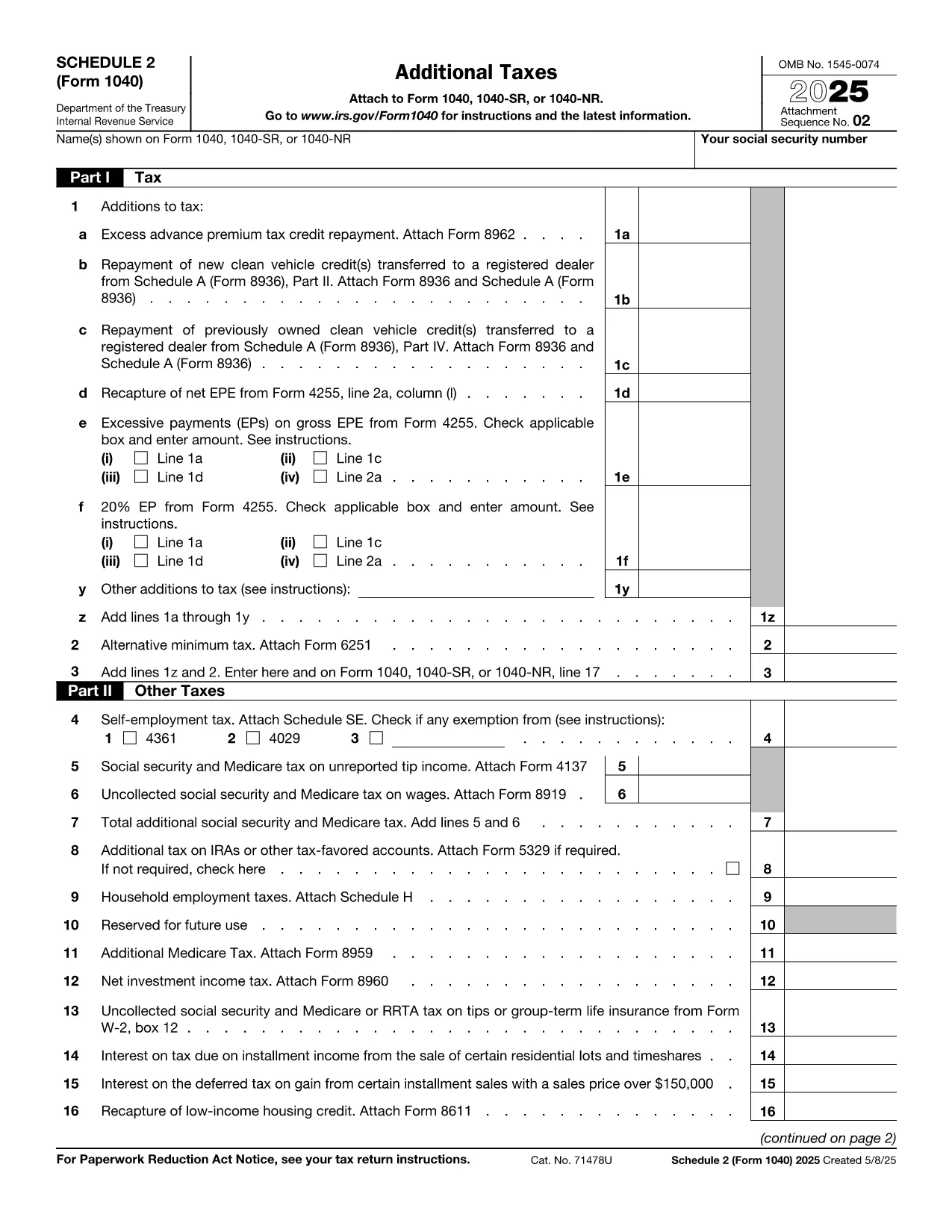
Schedule 2 (Form 1040) is the IRS supplemental form used to report additional taxes such as the **Alternative Minimum Tax**, excess advance premium tax credit repayment, and other taxes that don’t fit on the main 1040 page. If you’re filing a U.S. individual tax return for 2023 or later and owe any of these amounts, you’ll need to complete Schedule 2.

Our fillable PDF version lets you enter data directly in the browser, eliminates the need for a PDF editor, and automatically saves your entries. When you’re ready, you can download the completed form or print it for attachment to your tax return.

Below you’ll find everything you need to know about this form, step‑by‑step instructions for using the Formize PDF Filler, and tips to avoid common errors.

  • Secure, browser‑based filling – no software download required.
  • Auto‑save feature protects your data while you work.
  • Direct download of the IRS‑approved PDF after completion.
คำถามที่พบบ่อย
  • Do I need Schedule 2 if I have no additional taxes?

    No. If none of the additional taxes listed on Schedule 2 apply to you, you can leave the form blank or omit it entirely.

  • Can I edit the form after I download it?

    Yes, the downloaded PDF remains fillable, but it’s easier to make changes directly in the Formize PDF Filler before you download.

  • Is the fillable PDF accepted by the IRS?

    Absolutely. The PDF is the official IRS version (f1040s2.pdf). As long as you print or electronically attach the completed form, the IRS will accept it.

  • What if I make a mistake while filling out Schedule 2?

    Simply click the field again and correct the entry. The form auto‑saves, so you won’t lose any data.

  • Do I need to sign Schedule 2?

    Schedule 2 itself does not require a signature, but the signature on your main Form 1040 covers it.

  • Is there a fee to use the Formize PDF Filler?

    No. The fillable PDF and the online filler are completely free for all users.

ทำอย่างไร

วิธีกรอก IRS Schedule 2 ฟรีทางออนไลน์ใน 5 ขั้นตอนง่ายๆ:

  1. 1
    Click the Fillable Form Button
    On this page, click the bright “Fill out this form” button. The Formize PDF Filler app will open in a new tab.
  2. 2
    Wait for the Filler to Load
    The app loads the IRS Schedule 2 PDF automatically. This usually takes a few seconds.
  3. 3
    Enter Your Information
    Click any field and type the required numbers or text. The form supports keyboard navigation and auto‑calculates totals where applicable.
  4. 4
    Save or Download
    When all sections are complete, press the “Download Completed PDF” button to save a copy to your computer or click “Print” to attach it to your paper return.
  5. 5
    Submit with Your Tax Return
    Include the completed Schedule 2 with your Form 1040 when filing electronically or by mail.
สร้างแอป PDF Filler
เกี่ยวกับ

แบบฟอร์มภาษี

IRS Schedule 2 เป็นหนึ่งในแบบฟอร์มภาษีที่เป็นเอกสารที่ใช้ในการรายงานข้อมูลที่เกี่ยวข้องกับภาษีไปยังหน่วยงานด้านภาษีที่เกี่ยวข้อง มีแบบฟอร์มภาษีหลายประเภท รวมถึงแบบฟอร์มภาษีของรัฐบาลกลาง รัฐ และท้องถิ่น ซึ่งอาจแตกต่างกันไปขึ้นอยู่กับสถานการณ์และสถานที่ของผู้เสียภาษี

คุณสมบัติ

PDF ฟิลเลอร์

วิธีที่ง่ายที่สุดในการกรอกแบบฟอร์ม PDF ทางออนไลน์

  • กรอก IRS Schedule 2 อย่างรวดเร็ว
    กำลังมองหาวิธีเติม IRS Schedule 2 ทางออนไลน์อย่างรวดเร็วอยู่ใช่ไหม ด้วยตัวกรอกแบบฟอร์ม PDF ออนไลน์ฟรีของเรา คุณจะรู้วิธีแก้ไขและกรอกเอกสาร PDF นี้ในเวลาไม่ถึงนาที
  • โปรแกรมแก้ไข PDF ออนไลน์ที่ใช้งานง่าย
    เบื่อกับการพิมพ์ไฟล์ PDF เพื่อให้คุณสามารถแก้ไขได้ก่อนที่จะสแกนซ้ำและส่งกลับหรือไม่? แก้ไขเอกสาร PDF ออนไลน์ฟรี ใช้โปรแกรมแก้ไข PDF ออนไลน์ของเราเพื่อประหยัดเวลาและกระดาษ
  • เครื่องมือที่ยอดเยี่ยมสำหรับทุกแพลตฟอร์ม
    สงสัยวิธีเติม IRS Schedule 2 บน Mac หรืออาจใช้ตัวเติม PDF ฟรีได้อย่างไร เครื่องมือ PDF ออนไลน์ของเราทำงานได้บนทุกแพลตฟอร์ม
  • การจัดเก็บไฟล์ที่ปลอดภัย
    ไฟล์ "IRS Schedule 2" ที่เสร็จสมบูรณ์จะถูกจัดเก็บไว้ในฐานข้อมูลที่ปลอดภัยซึ่งจัดการโดย Amazon Cloud hosting คุณสามารถลบไฟล์ของคุณออกจากระบบของเราได้ตลอดเวลา ไม่ว่าในกรณีใด ไฟล์เหล่านี้จะถูกลบโดยอัตโนมัติหลังจากผ่านไป 24 ชั่วโมง
  • สนทนากับ IRS Schedule 2
    แชทกับ "IRS Schedule 2" บน Chatize ที่เป็นผู้ช่วยอ่าน PDF ฟรี ถามคำถามและรับคำตอบจาก "IRS Schedule 2" เพียงคลิกที่ปุ่ม แชทด้วยเอกสาร ด้านบน

ลบเซสชันการบรรจุ

ลบเซสชันการกรอกข้อมูลที่เลือกหรือไม่?ในกรณีนี้ความคืบหน้าในการกรอกแบบฟอร์มจะหายไป

ลบเซสชันการแก้ไข

ลบเซสชันการแก้ไขที่เลือกหรือไม่ ในกรณีนี้ ความคืบหน้าในการสร้างและแก้ไขแบบฟอร์มจะหายไป