
hamburger-menu icon
เลือกภาษา

Fillable IRS Schedule E (Tax Form E) – Free Online PDF

  1. ประเทศ สหรัฐอเมริกา
  2. ภาษา ภาษาอังกฤษ
  3. กิจกรรม ภาษี
  4. แผนก IRS
Fillable IRS Schedule E (Tax Form E) – Free Online PDF

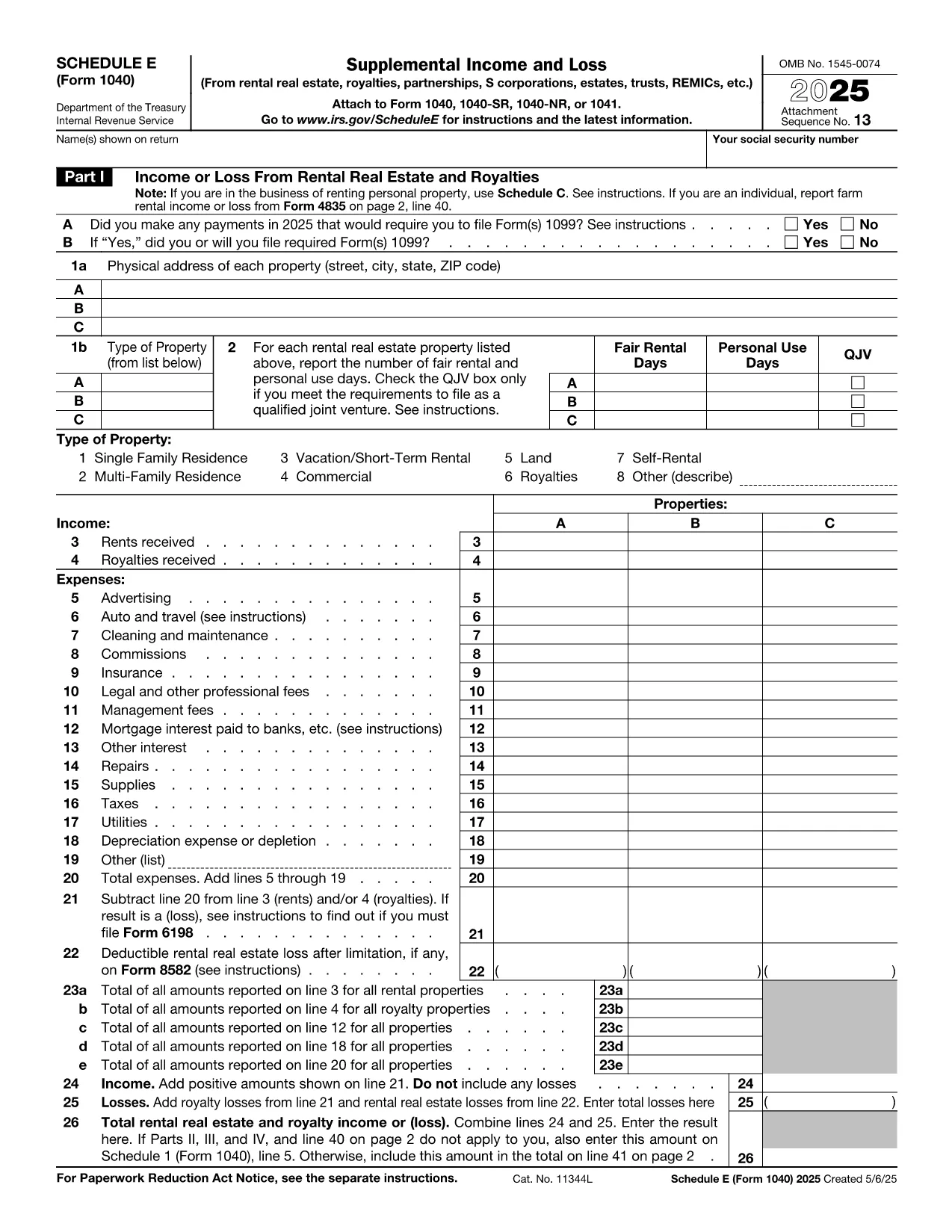
Schedule E (Form 1040‑SE) is the IRS tax form used to report supplemental income and loss from rentals, royalties, partnerships, S‑corporations, estates, trusts, and more. Filling it out correctly can affect your tax liability, so having a reliable, fillable PDF makes the process faster and error‑free.

What is IRS Schedule E?

Schedule E is part of the individual income tax return (Form 1040). It captures income or loss from:

  • Rental real estate and royalties
  • Partnerships and S‑corporations (K‑1 information)
  • Trusts and estates
  • Other sources of supplemental income

The form is required for any taxpayer who received a Schedule K‑1 or earned rental income during the tax year.

How to fill out Schedule E online with Formize

Instead of downloading the PDF and opening a separate editor, simply click the “Fill out this form” button on this page. The Formize PDF Filler app loads in your browser, letting you enter data directly into the fillable fields.

Common mistakes to avoid

  • Entering the wrong tax year in the header – always verify the year at the top.
  • Mixing up Part I (Rental) and Part II (Partnerships) sections – keep each source separate.
  • Leaving required fields blank – the Formize validator highlights missing entries before you save.
  • Incorrectly reporting depreciation – use IRS Publication 946 for guidance.

Where to submit Schedule E

Schedule E is attached to your Form 1040 when you e‑file or mail a paper return. The completed PDF can be saved, printed, and included with your other tax documents.

Need help with Schedule E?

For detailed instructions, see the IRS’s official Schedule E instructions. If you have specific questions about your K‑1 or rental calculations, consult a qualified tax professional.

คำถามที่พบบ่อย
  • Do I need to download any software to use the fillable Schedule E?

    No. The Formize PDF Filler runs entirely in your web browser, so there’s nothing to install.

  • Can I edit the form after I’ve saved it?

    Yes. Open the saved PDF again with Formize or any standard PDF editor to make changes.

  • Is the fillable Schedule E accepted by the IRS?

    Yes. The PDF follows the exact IRS layout, so the printed version is identical to the official paper form.

  • What if I make a mistake while filling the form?

    Use the “Undo” button or simply click into the field and correct the entry. The validator will flag any remaining errors before you save.

  • Do I need a tax professional to complete Schedule E?

    Many taxpayers can complete it themselves, but complex partnership, royalty, or depreciation calculations may benefit from professional advice.

  • Is my data stored on Formize’s servers?

    No. Formize processes the PDF locally in your browser; nothing is uploaded or stored on external servers.

ทำอย่างไร

วิธีกรอก tax form e ฟรีทางออนไลน์ใน 5 ขั้นตอนง่ายๆ:

  1. 1
    Open the fillable form
    Click the “Fill out this form” button below. The Formize PDF Filler app will open in a new browser tab.
  2. 2
    Enter your information
    Type directly into each field. Use the navigation pane to jump to Part I, Part II, etc.
  3. 3
    Validate and save
    When you finish, click “Validate” to let Formize check for missing required fields, then press “Save” to download the completed PDF.
  4. 4
    Print or attach
    Print the saved PDF to attach to a paper return, or keep the file for electronic filing with your tax software.
  5. 5
    Secure your data
    All data stays in your browser; Formize does not store personal information on its servers.
สร้างแอป PDF Filler
เกี่ยวกับ

แบบฟอร์มภาษี

tax form e เป็นหนึ่งในแบบฟอร์มภาษีที่เป็นเอกสารที่ใช้ในการรายงานข้อมูลที่เกี่ยวข้องกับภาษีไปยังหน่วยงานด้านภาษีที่เกี่ยวข้อง มีแบบฟอร์มภาษีหลายประเภท รวมถึงแบบฟอร์มภาษีของรัฐบาลกลาง รัฐ และท้องถิ่น ซึ่งอาจแตกต่างกันไปขึ้นอยู่กับสถานการณ์และสถานที่ของผู้เสียภาษี

คุณสมบัติ

PDF ฟิลเลอร์

วิธีที่ง่ายที่สุดในการกรอกแบบฟอร์ม PDF ทางออนไลน์

  • กรอก tax form e อย่างรวดเร็ว
    กำลังมองหาวิธีเติม tax form e ทางออนไลน์อย่างรวดเร็วอยู่ใช่ไหม ด้วยตัวกรอกแบบฟอร์ม PDF ออนไลน์ฟรีของเรา คุณจะรู้วิธีแก้ไขและกรอกเอกสาร PDF นี้ในเวลาไม่ถึงนาที
  • โปรแกรมแก้ไข PDF ออนไลน์ที่ใช้งานง่าย
    เบื่อกับการพิมพ์ไฟล์ PDF เพื่อให้คุณสามารถแก้ไขได้ก่อนที่จะสแกนซ้ำและส่งกลับหรือไม่? แก้ไขเอกสาร PDF ออนไลน์ฟรี ใช้โปรแกรมแก้ไข PDF ออนไลน์ของเราเพื่อประหยัดเวลาและกระดาษ
  • เครื่องมือที่ยอดเยี่ยมสำหรับทุกแพลตฟอร์ม
    สงสัยวิธีเติม tax form e บน Mac หรืออาจใช้ตัวเติม PDF ฟรีได้อย่างไร เครื่องมือ PDF ออนไลน์ของเราทำงานได้บนทุกแพลตฟอร์ม
  • การจัดเก็บไฟล์ที่ปลอดภัย
    ไฟล์ "tax form e" ที่เสร็จสมบูรณ์จะถูกจัดเก็บไว้ในฐานข้อมูลที่ปลอดภัยซึ่งจัดการโดย Amazon Cloud hosting คุณสามารถลบไฟล์ของคุณออกจากระบบของเราได้ตลอดเวลา ไม่ว่าในกรณีใด ไฟล์เหล่านี้จะถูกลบโดยอัตโนมัติหลังจากผ่านไป 24 ชั่วโมง
  • สนทนากับ tax form e
    แชทกับ "tax form e" บน Chatize ที่เป็นผู้ช่วยอ่าน PDF ฟรี ถามคำถามและรับคำตอบจาก "tax form e" เพียงคลิกที่ปุ่ม แชทด้วยเอกสาร ด้านบน

ลบเซสชันการบรรจุ

ลบเซสชันการกรอกข้อมูลที่เลือกหรือไม่?ในกรณีนี้ความคืบหน้าในการกรอกแบบฟอร์มจะหายไป

ลบเซสชันการแก้ไข

ลบเซสชันการแก้ไขที่เลือกหรือไม่ ในกรณีนี้ ความคืบหน้าในการสร้างและแก้ไขแบบฟอร์มจะหายไป